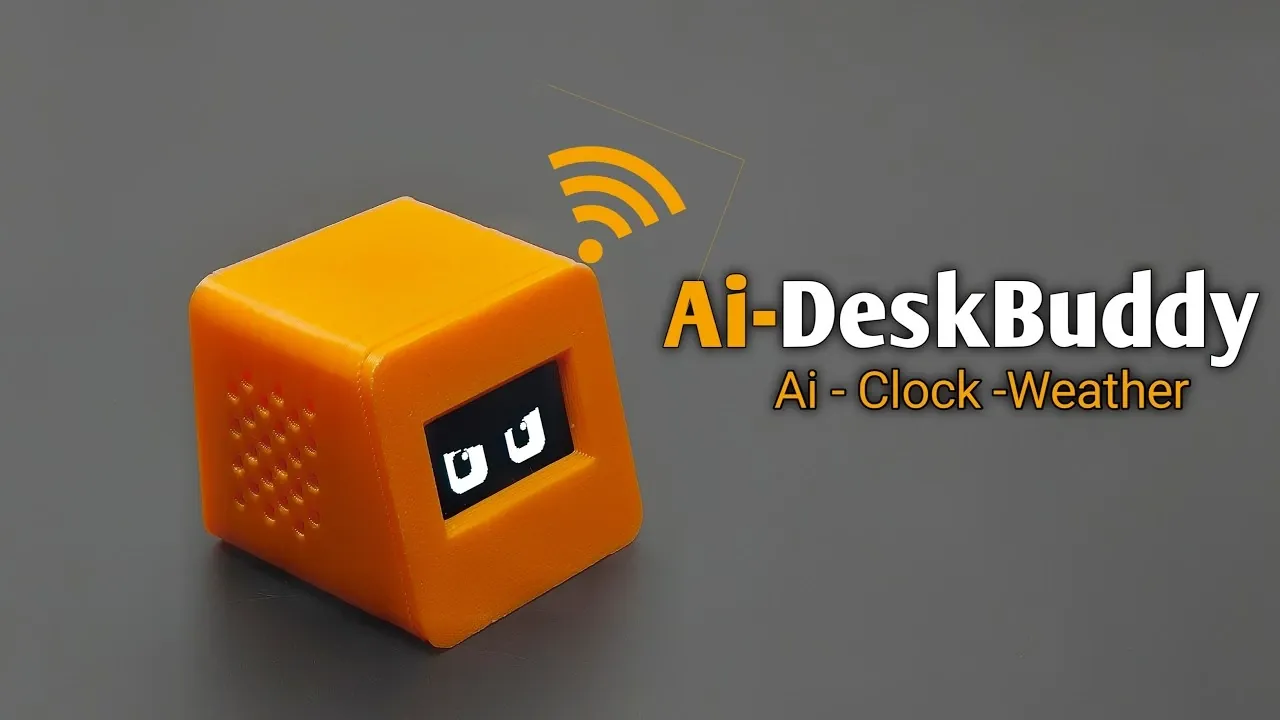
Turning a $4 ESP32S3 0 microcontroller into an AI-enabled desk companion highlights how accessible technology can simplify everyday tasks. This compact device features a 1.3-inch OLED display for improved visibility and supports functions like setting timers, checking weather updates, and displaying social media statuses. Assembly involves soldering components like a charging module and battery, followed by flashing firmware via USB, as demonstrated by EDISON SCIENCE CORNER.
Explore how to configure features such as wake words, language settings, and weather updates using an OpenWeatherMap API key. You’ll also learn how to connect the device to Wi-Fi and finalize the build with a custom 3D-printed case. This guide offers a step-by-step breakdown to help you create a functional, customizable desk assistant tailored to your needs.
TL;DR Key Takeaways :
- The AI-enabled desk buddy is built using the $4 ESP32S3 0 microcontroller, which is described as more powerful and resolves Wi-Fi connectivity issues reportedly caused by design flaws in the earlier ESP32C3 mini.
- The device features a 1.3-inch OLED display, which is a significant improvement over smaller screens used in previous versions, enhancing visibility and interaction.
- Assembly involves connecting components like the ESP32S3 0, OLED display, DC 4056 charging module, and battery, with firmware installation made simple via USB and files provided on the creator’s website.
- Customizable features include language, voice tone, weather updates (via OpenWeatherMap API), and social media status, with setup requiring Wi-Fi credentials and a six-digit code for configuration.
- Testing demonstrated that the desk buddy performs well for tasks like timers, weather updates, and social media displays, with its improved hardware and connectivity enhancing its practicality as a compact AI assistant.
Building an AI-Enabled Desk Buddy with the ESP32S3 0
A recent project demonstrates how the $4 ESP32S3 0 microcontroller can be turned into a functional AI-enabled desk companion. Designed to address earlier connectivity issues and improve usability, this device serves as a customizable assistant for tasks like timers, weather updates, and social media status.
Improved Hardware and Connectivity
The desk buddy is powered by the ESP32S3 0 microcontroller, which replaces the earlier ESP32C3 mini. The ESP32S3 0 is described as more powerful and resolves the Wi-Fi connectivity issues reportedly caused by board design flaws in its predecessor.
The hardware upgrade also includes a 1.3-inch OLED display, a significant improvement over smaller screens used previously. This larger display enhances visibility and interaction with the device.

Explore further guides and articles from our vast library that you may find relevant to your interests in ESP32.
- $5 ESP32-S3 Super Mini Packs Wi-Fi and Bluetooth
- The $4 ESP32 S3 Super Mini Packs a 240 MHz Dual-Core Chip
- How an $8 ESP32 S3 Microcontroller Runs a 28.9M Parameter Local LLM
- 5 ESP32 Projects Worth Building in 2026: Such as an Apple HomeKit Controller
- $4 ESP32 Module Brings Wi-Fi and Bluetooth to IoT Projects
- Replacing Security Cameras with Three $10 ESP32S3 Wi-Fi Boards
- ESP32-S3 Super Mini Costs $5 and Packs Wi-Fi and Bluetooth
- Gemini 4 Argon Writes ESP Mosaico Firmware to Control RGB LEDs
- ESP32-S3 Super Mini Brings 240 MHz Dual-Core Power For $4
- ESP32 S31 Devkit Hands-on: 320 MHz RISC-V Chip Adds Wi-Fi 6
Components and Assembly
The desk buddy’s components are sold as a kit on the creator’s website. Key parts include:
- ESP32S3 0 microcontroller
- 1.3-inch OLED display
- DC 4056 charging module with a switch
- Battery
The circuit was initially tested on a breadboard, but users can skip this step since functionality has already been verified. Assembly involves connecting the modules with small wires, soldering them to the ESP32S3 0, and attaching the battery to the charging module. Firmware installation is simple: connect the ESP32S3 0 to a computer via USB, press the boot button, and flash the software using files provided on the creator’s website.
Customizable Features and Configuration
The desk buddy offers various customizable features. Users can configure settings like language, voice tone, and weather preferences through the device’s IP address. For weather updates, an OpenWeatherMap API key is required, along with city and country details. Social media status updates can also be set up and displayed on the screen.
To connect to Wi-Fi, users first join the “Deskr Buddy” network and input their home Wi-Fi credentials via the IP address shown on the device. A six-digit code then appears on the screen, which must be entered on show.she.me to complete the setup. The device responds to the default wake word, “Hi ESP,” once configured.
Design and Final Assembly
The desk buddy’s case was designed in Tinkercad and 3D printed in orange and black. The enclosure consists of two parts: a front panel and a back housing. After soldering and assembling the components, they are secured inside the 3D-printed case to finalize the build.
Performance and Applications
Testing showed that the AI desk buddy performs well as a customizable assistant. It can handle tasks like setting timers, providing weather updates, and displaying social media statuses. These functions are accessible via voice commands or the device’s touch button. Proper configuration and assembly are emphasized as essential for users to fully benefit from the device.
The ESP32S3 0-based desk buddy represents a clear improvement over its predecessor, particularly for users who experienced Wi-Fi issues with the ESP32C3 mini. Its larger display and better connectivity enhance its practicality as a compact, AI-enabled assistant. However, its success depends on careful assembly and configuration.
Media Credit: EDISON SCIENCE CORNER
Disclosure: Some of our articles include affiliate links. If you buy something through one of these links, Geeky Gadgets may earn an affiliate commission. Learn about our Disclosure Policy.
