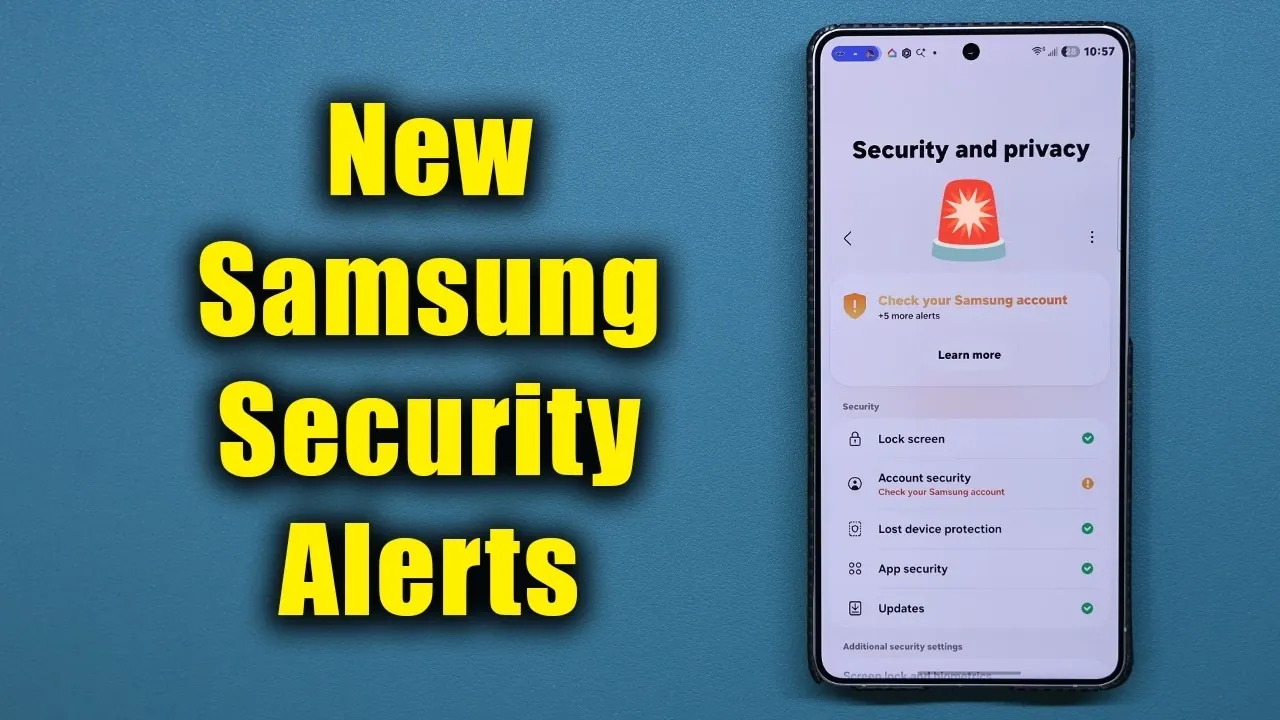
Samsung has released its latest security update for Galaxy smartphones, introducing a range of enhancements to its “Now Brief” feature. This update, version 1.0.02.4, focuses on improving security and privacy management by offering daily alerts, actionable notifications, and customizable options. Now available on the Samsung Galaxy Store, the update is designed to simplify how you monitor and protect your device while making sure a seamless user experience.
TL;DR Key Takeaways :
- Now Brief Overhaul: Version 1.0.02.4 integrates centralized daily security and privacy alerts directly into the Now Brief interface.
- Actionable Alerts: Instantly resolve vulnerabilities—like unauthorized USB connections or auto-blocker warnings—straight from the notification prompt.
- Tailored Customization: Easily enable, disable, or filter specific privacy alerts to match your personal security preferences.
- Lightweight Download: A quick 7 MB install available right now through the Samsung Galaxy Store.
Key Features of the Update
The update brings several notable improvements aimed at safeguarding your device while enhancing usability. Here are the standout features:
- Daily Security Alerts: Receive real-time notifications to stay informed about potential vulnerabilities or risks.
- Customizable Notifications: Adjust the alerts to prioritize the information that matters most to you.
- Actionable Prompts: Address security issues directly from notifications without navigating through complex menus.
These features work together to provide a streamlined and user-friendly approach to managing your device’s security, making sure that you stay informed and protected with minimal effort.
Revamped “Now Brief” Functionality
The centerpiece of this update is the enhanced “Now Brief” interface, which now integrates daily security and privacy alerts. This feature delivers real-time updates on potential risks, such as unauthorized USB connections or vulnerabilities in the auto blocker. For example, if your device detects suspicious activity, you’ll receive an immediate notification, allowing you to act quickly.
This centralized system eliminates the need to search through multiple settings, making sure that critical information is always at your fingertips. By consolidating security tools into a single, accessible interface, Samsung has made it easier than ever to monitor and address potential threats.
Customizable Alerts for Tailored Security
Understanding that every user has unique security needs, Samsung has introduced customization options within the “Now Brief” feature. These options allow you to enable or disable specific notifications based on your preferences, making sure that you only receive alerts that are relevant to you.
For instance:
- If privacy is your top priority, you can configure “Now Brief” to focus on privacy-related updates, such as app permissions or data usage warnings.
- If certain alerts are less relevant to your needs, you can minimize their frequency to reduce distractions.
This level of personalization ensures that your security management experience is both efficient and tailored to your individual requirements, giving you greater control over your device.
Actionable Notifications for Immediate Solutions
One of the most practical additions in this update is the inclusion of actionable notifications. These alerts not only inform you of potential issues but also provide direct solutions. For example, if a vulnerability is detected, the notification will include a prompt to resolve it immediately, such as updating an app or adjusting a setting.

This feature eliminates the need to navigate through multiple menus, saving you time and effort. By allowing you to address issues directly from the alert, Samsung has made it easier to maintain your device’s security without interrupting your workflow.
Update Details and Installation Process
The update, version 1.0.02.4, is lightweight at just 7 MB, making sure a quick and hassle-free installation process. To download the update, simply visit the Samsung Galaxy Store and check the “Updates” section. Once installed, the update seamlessly integrates with your device, enhancing the “Now Brief” feature and other security tools without requiring additional setup.
Samsung has designed this update to work smoothly with existing Galaxy devices, making sure compatibility and ease of use. By keeping the installation process straightforward, the company has prioritized convenience for its users.
Enhanced User Experience
Beyond its technical improvements, this update is designed to enhance the overall user experience by centralizing security and privacy management within the “Now Brief” interface. Whether you’re managing USB security permissions, configuring the auto blocker, or monitoring app activity, the updated interface ensures that all essential tools are easily accessible.
This focus on usability reflects Samsung’s commitment to providing a secure and intuitive experience for Galaxy users. By simplifying complex security processes, the update enables you to take control of your device’s protection with minimal effort, making sure that you can focus on what matters most.
Why This Update Matters
Samsung’s latest security update represents a significant improvement in how users can manage their device’s security and privacy. By enhancing the “Now Brief” feature with daily alerts, customizable settings, and actionable notifications, the update offers a more efficient and user-friendly approach to device protection. Available now on the Samsung Galaxy Store, version 1.0.02.4 is an essential download for Galaxy users who value both convenience and security.
Gain further expertise in Samsung Galaxy by checking out these recommendations.
- Why the Galaxy S27 Ultra Camera Upgrade Changes the Game
- Samsung’s TriFold 2 Fixes the Biggest Complaint About the First Gen
- The Samsung Galaxy S27 Ultra Leak That Completely Changes What We Expected
- Galaxy Z TriFold 2: Samsung Just Mastered the Ultimate Foldable Design
- Samsung Galaxy S27 Ultra Details Leak Ahead of Early 2027 Launch
- Samsung’s Foldable Masterpiece: Galaxy Z Fold 8 Ultra Leaks
Source & Image Credit: Sakitech
Disclosure: Some of our articles include affiliate links. If you buy something through one of these links, Geeky Gadgets may earn an affiliate commission. Learn about our Disclosure Policy.
