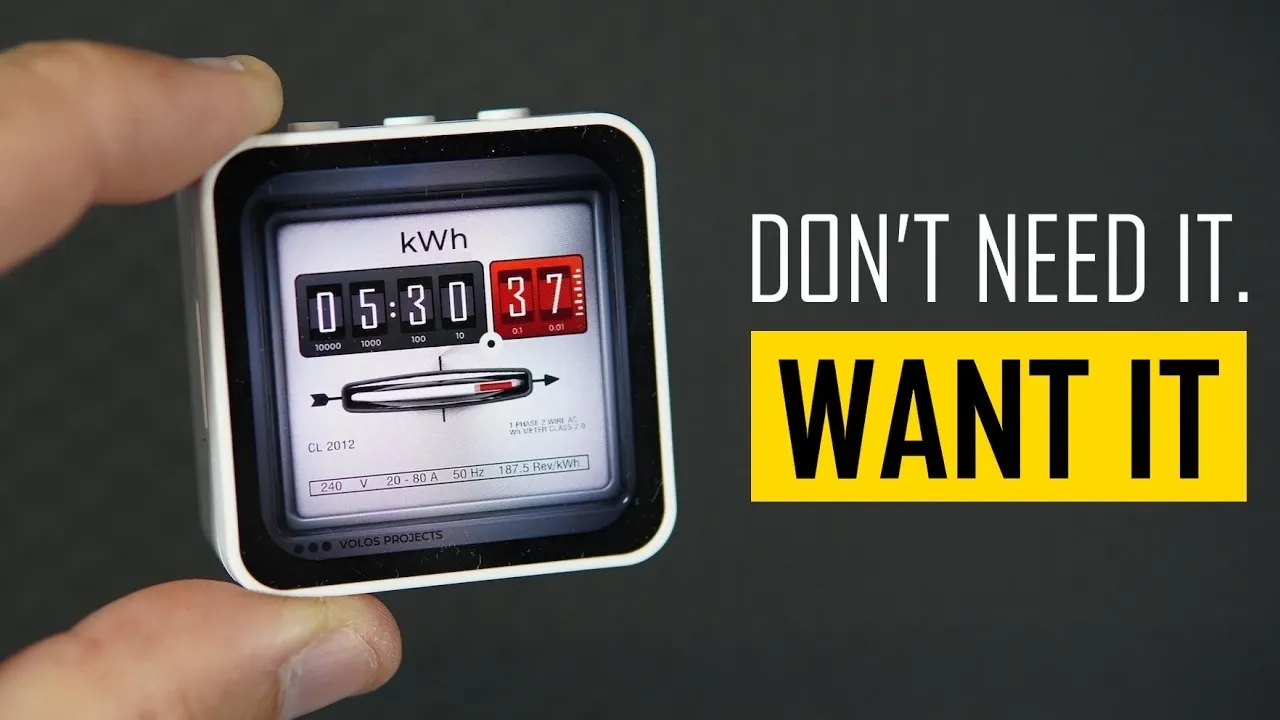
Volos Projects demonstrates how the Wave Share ESP32C6 Touch AMOLED 2.16 development board was used to create a functional clock with a sleek design. By combining the ESP32C6’s Wi-Fi and Bluetooth capabilities with an AMOLED touchscreen and the LVGL graphics library, the project achieves a responsive interface. Practical features like push-button adjustable brightness and toggling between 12-hour and 24-hour formats enhance usability while maintaining energy efficiency.
Explore how Paint.NET was employed to design custom graphics and how SquareLine Studio streamlined the interface creation process. Learn about programming the ESP32C6 with the Arduino IDE, including modifications to example code for this specific application. Additionally, gain insight into the role of spot welding in battery assembly, focusing on precision and safety considerations.
ESP32 Functionality Meets Simplicity
TL;DR Key Takeaways :
- The desk clock is powered by the Wave Share ESP32C6 Touch AMOLED 2.16 development board, featuring built-in Wi-Fi, Bluetooth and a vibrant AMOLED touchscreen for intuitive interaction.
- Key features include adjustable brightness, seamless switching between 12-hour and 24-hour time formats and optimized performance for energy efficiency and adaptability.
- Development tools like Paint.NET, SquareLine Studio and Arduino IDE were used to design the interface, customize functionality and refine the clock’s code, making it accessible for both beginners and experts.
- Spot welding technology played a crucial role in assembling components, offering precision, safety and reliability for battery-powered devices.
- The project emphasizes experimentation and learning, encouraging users to use open source resources and modern microcontrollers to create functional and educational DIY projects.
At the heart of this desk clock lies the Wave Share ESP32C6 Touch AMOLED 2.16, a microcontroller that integrates built-in Wi-Fi and Bluetooth capabilities. Its vibrant AMOLED display ensures excellent visibility while maintaining energy efficiency. The touchscreen interface, powered by the LVGL graphics library, offers an intuitive and user-friendly way to interact with the clock.
What makes this clock stand out includes:
- Adjustable Brightness: A push-button control allows you to fine-tune the brightness for optimal visibility during both daytime and nighttime.
- Time Format Options: The touchscreen interface enables seamless switching between 12-hour and 24-hour time formats, catering to user preferences.
- Optimized Performance: Operating at 80 MHz, the clock conserves battery life while offering the flexibility to adjust clock speed for specific needs.
These features make the clock not only practical but also adaptable, making sure it meets the demands of various environments and user preferences.
Development Process: Tools and Techniques
The creation of this clock involved a combination of accessible tools and deliberate design decisions. The following tools were instrumental in the development process:
- Paint.NET: A free and versatile image editing tool used to design custom graphics and layouts for the clock interface.
- SquareLine Studio: A user interface design platform that ensured the touchscreen interface was both intuitive and visually appealing.
- Arduino IDE: A widely-used programming environment for microcontroller projects, allowing the customization and refinement of the clock’s code.
The Wave Share ESP32C6 development board came with example code, which served as a foundation for rapid development. By using these resources, users can easily modify the clock’s functionality or design to suit their specific needs. Additionally, the project files and source code have been shared, encouraging others to experiment, learn and build upon this project.
Deep dive into the latest in ESP32 projects and devices by exploring our other resources and articles.
- $5 ESP32-S3 Super Mini Packs Wi-Fi and Bluetooth
- How an $8 ESP32 S3 Microcontroller Runs a 28.9M Parameter Local LLM
- $4 ESP32 Module Brings Wi-Fi and Bluetooth to IoT Projects
- ESP32-S3 Super Mini Brings 240 MHz Dual-Core Power For $4
- ESP32 S31 Devkit Hands-on: 320 MHz RISC-V Chip Adds Wi-Fi 6
- $4 ESP32-S3 Super Mini Packs a 0.96-Inch IPS TFT Screen
- Build a DIY Open-Source Flipper Zero Using a ESP32-DIV
- $9 CYD ESP32 Module Includes a 2.88-Inch LCD Screen
- WaveShare ESP32-C5 Offers 32MB Flash and Sensors For $20
- ESP32-S3 Automation System Packs 16 Relays for Smart Homes
Spot Welding: A Supporting Technology
While the desk clock is the centerpiece of this project, spot welding technology played a critical role in assembling its components. A compact, battery-powered smart spot welder with dual-pulse welding functionality was employed for tasks such as battery assembly. This tool provided several advantages:
- Adjustable Settings: A user-friendly interface allowed precise control over welding strength and pulse duration.
- Battery Monitoring: Voltage monitoring ensured consistent performance during the assembly process.
- Safety Features: Built-in temperature monitoring prevented overheating, making sure safe and reliable operation.
The precision and reliability of the spot welder were essential for creating secure electrical connections, particularly in battery-powered devices. This technology highlights the importance of using the right tools to achieve professional-grade results in DIY projects.
Encouraging Experimentation and Learning
This project demonstrates the potential of combining accessible tools, open source resources and innovative hardware to create something both functional and educational. By using free tools like Paint.NET and SquareLine Studio, users can design custom interfaces and graphics without incurring additional costs. Meanwhile, the Arduino IDE simplifies programming, making it approachable for beginners while remaining efficient for experienced developers.
Whether you aim to replicate this clock or explore other applications of the ESP32C6, this project serves as a testament to the versatility of modern microcontrollers and development tools. Through hands-on experimentation and learning, you can bring your ideas to life while gaining a deeper understanding of these powerful technologies. The possibilities are vast, limited only by your creativity and willingness to explore.
Media Credit: Volos Projects
Disclosure: Some of our articles include affiliate links. If you buy something through one of these links, Geeky Gadgets may earn an affiliate commission. Learn about our Disclosure Policy.
