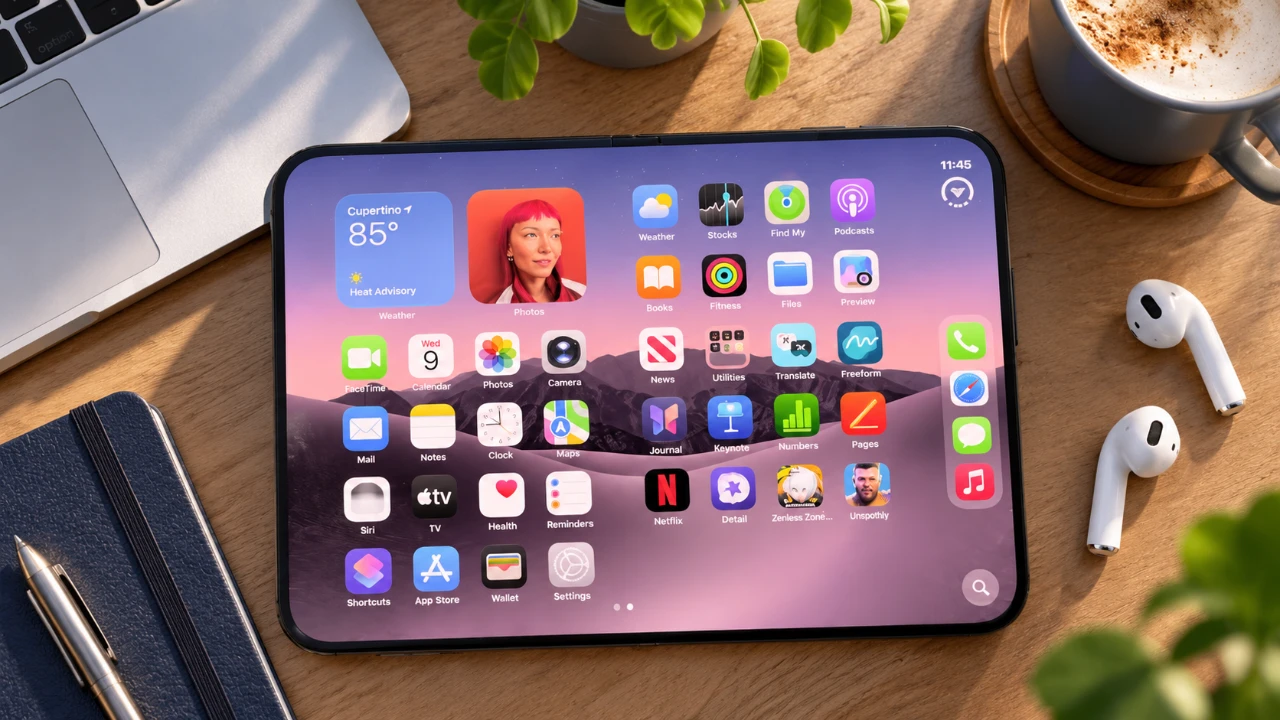
The iPhone Duo represents a significant leap in smartphone design, combining innovation and practicality to enhance your daily interactions. With its unique folding display, advanced multitasking capabilities, and a host of customizable features, this device is tailored to meet the needs of both casual users and tech enthusiasts. By exploring its standout features and hidden functionalities, you can maximize productivity, creativity, and convenience. The video below from Hayls World gives us a look at a range of tips and tricks you can use on your iPhone Duo.
TL;DR Key Takeaways :
- Dual-Screen Versatility: Master seamless transitions between the compact outer cover display and the expansive inner foldable canvas.
- Advanced Multitasking: Utilize split-screen workflows, app pairing combos, and picture-in-picture modes tailored for foldable productivity.
- Creative Camera Controls: Leverage Duo Preview live framing on the outer screen alongside hands-free Smart Take gesture triggers.
- Apple Pencil & Security Tricks: Unlock stylus precision for notes and sketches while fine-tuning multi-finger Touch ID biometric preferences.
Folding Display: Redefining Versatility
The folding display is the hallmark of the iPhone Duo, offering a seamless blend of portability and functionality. Its dual-screen design adapts to your needs, whether you’re handling quick tasks or diving into immersive activities:
- Use the compact outer screen for checking notifications, replying to messages, or making quick calls on the go.
- Unfold the inner display for a larger, tablet-like workspace, perfect for gaming, video editing, or reading eBooks.
This flexibility ensures the device transitions effortlessly between different modes, making it an ideal companion for both work and leisure.
Multitasking Made Simple
The iPhone Duo improves multitasking with intuitive tools designed to streamline your workflow and enhance efficiency:
- Split-Screen Mode: Run two apps simultaneously, such as watching a tutorial while taking notes or comparing documents side by side.
- Picture-in-Picture: Keep a video playing in a floating window while navigating other apps, making sure uninterrupted viewing.
- App Pairing: Save frequently used app combinations to launch them together with a single tap.
These features empower you to manage multiple tasks effortlessly, making the iPhone Duo a productivity powerhouse.
Advanced Camera Features for Creativity
The iPhone Duo’s 48-megapixel camera is engineered to deliver exceptional image quality, but its advanced features take photography to new heights:
- Duo Preview: The outer screen acts as a live viewfinder, allowing subjects to see themselves during photo sessions for better framing.
- Smart Take Mode: Capture group photos or selfies hands-free using voice commands or intuitive gestures.
These tools encourage creative experimentation, making it easier to capture stunning visuals and memorable moments.

Apple Pencil Integration: Precision at Your Fingertips
The iPhone Duo’s compatibility with the USB-C Apple Pencil transforms it into a versatile tool for creative and professional tasks:
- Navigate the interface, take handwritten notes, or create detailed sketches with features like scribble-to-text and shape correction.
- Securely attach the pencil magnetically to the chassis for easy access and storage.
Whether you’re brainstorming ideas or working on intricate designs, the Apple Pencil enhances precision and creativity, making the iPhone Duo a valuable asset for artists and professionals alike.
Touch ID Customization: Security Your Way
The iPhone Duo offers advanced biometric options, allowing you to tailor security settings to your preferences:
- Register up to five fingerprints for personalized access, allowing multiple users to unlock the device or specific apps.
- Adjust settings like disabling the “Rest Finger to Open” feature for faster and more direct unlocking control.
These customizable options provide a balance of convenience and security, making sure your device remains accessible yet fully protected.
Personalized Display Customization
The iPhone Duo allows you to personalize its display to reflect your style and enhance usability:
- Choose dynamic 3D tilt-sensitive wallpapers for visually engaging backgrounds on both screens.
- Use full-screen widgets to access essential information like weather, calendar events, or fitness stats at a glance.
- Enable standby mode to display customizable clock faces and widgets when the device is idle on a desk stand.
These features make the iPhone Duo uniquely yours while improving daily functionality.
Shortcuts and Automation: Simplify Your Routine
Automation tools on the iPhone Duo are designed to save time and effort by streamlining repetitive tasks:
- Create shortcuts to perform actions like launching specific apps, sending pre-written messages, or triggering sound effects when opening or closing the phone.
- Set the device to lock automatically when folded, adding an extra layer of physical security.
These tools ensure your device works smarter, adapting to your daily routine with minimal input.
Optimized Apps for a Unique Experience
The iPhone Duo’s design is complemented by apps optimized to take full advantage of its dual-screen capabilities:
- Deckman: Enjoy a retro cassette-inspired interface for music playback, blending nostalgia with modern functionality.
- TypeDraw: Experience a notebook-like interface for writing, sketching and organizing ideas.
- Enhanced versions of popular apps like Instagram and Netflix ensure seamless performance on the dual-screen setup.
These optimizations enhance your experience, making everyday tasks more engaging and enjoyable.
Enhanced Typing and Call Management
The iPhone Duo improves both typing and call management to suit your preferences and needs:
- Switch between a split keyboard on the inner display for easier thumb typing or a mini-laptop mode for extended writing sessions.
- Screen unknown callers by prompting them to state their purpose, helping you prioritize important calls while avoiding interruptions.
These enhancements ensure smoother communication and a more comfortable user experience.
Accessibility Features for Everyone
The iPhone Duo includes thoughtful accessibility options to accommodate a diverse range of users:
- Reachability: Simplify navigation by bringing hard-to-reach areas of the screen closer to your thumb.
- Content Shifting: Adjust the display layout for better visibility, especially when using a protective case.
These features make the device more inclusive and user-friendly, making sure it meets the needs of all users.
3D Printing Accessories and Status Bar Enhancements
Expand the functionality of your iPhone Duo with customizable accessories and improved status bar features:
- Create 3D-printed stands, docks, or mounts for personalized storage and charging solutions.
- View essential information like Wi-Fi, battery, and network signal strength simultaneously on the enhanced status bar.
- Enable silent mode indicators for added convenience during meetings or quiet environments.
These additions enhance both the practicality and usability of your device, making sure it adapts effortlessly to your lifestyle.
By exploring these features and tools, you can unlock the full potential of the iPhone Duo, transforming it into a device that seamlessly integrates into your daily life.
Deep dive into the latest in folding displays by exploring our other resources and articles.
- iPhone Duo Durability Test: Will It Survive This?
- Samsung Galaxy Z Roll 5G: New Leaks Reveal 10-Inch Display and Possible 2028 Launch
- Apple’s iPhone 13 to feature always on display (Video)
Source & Image Credit: Hayls World
Disclosure: Some of our articles include affiliate links. If you buy something through one of these links, Geeky Gadgets may earn an affiliate commission. Learn about our Disclosure Policy.
