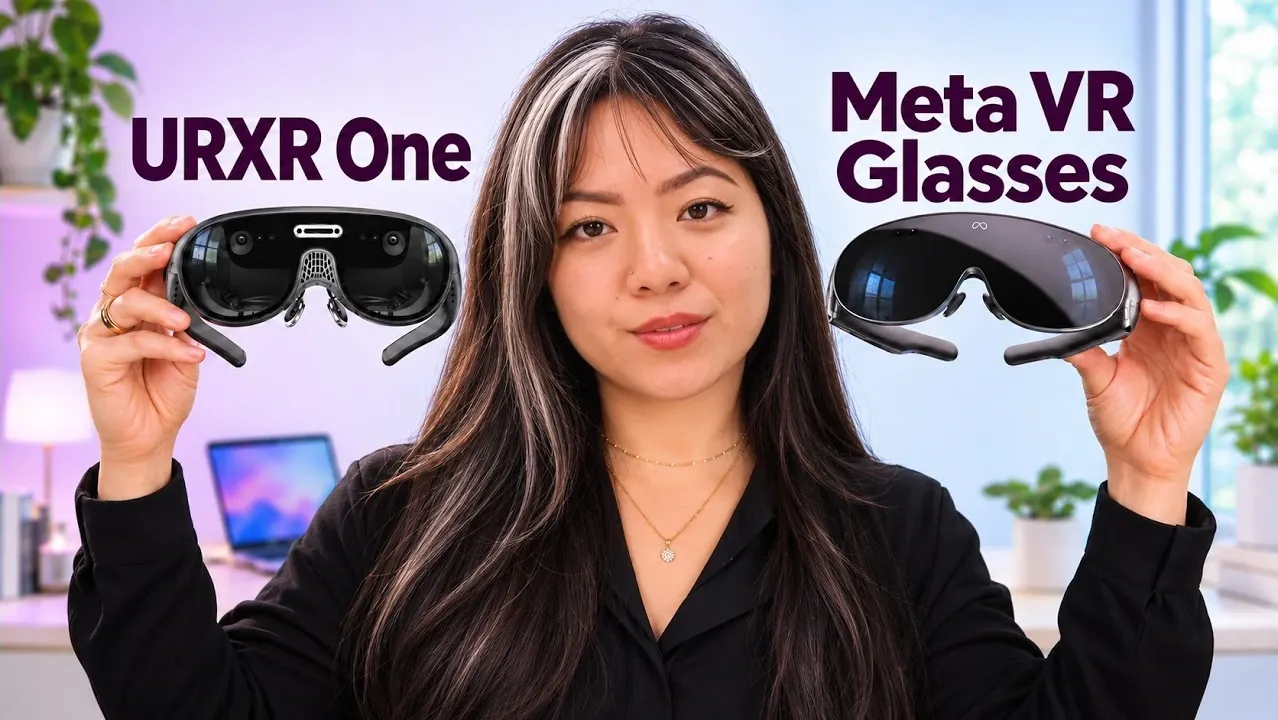
Two months of regular use with an URXR One prototype showed how these glasses can turn an existing computer into a wearable workspace. They plug straight into a laptop and leave the world visible around the display, making them the better choice for productivity, particularly at work. Meta’s VR glasses offer remote computer access and more immersive entertainment instead. Find out how the two differ in comfort, displays and everyday use, as well as what Jasmine Uniza found after trying both.
URXR One vs Meta VR
TL;DR Key Takeaways :
- URXR One has a transparent lens around its central display, while cloth surrounds Meta’s display. Listed fields of view suggest URXR One may be wider, but a reliable comparison was not possible without viewing them side by side.
- URXR One connects directly to a computer as one virtual monitor without software. Its downloadable software adds multiple displays and customization; the glasses have no built-in speakers.
- Meta VR glasses use a puck with its own operating system and a virtual keyboard. They support up to three virtual displays and can remotely access a computer with software installed on it.
- Meta offers Quest apps, games and immersive entertainment; Meta says more than 75 games and apps will be available directly through hand tracking. Access to the entire library requires separately purchased controllers. URXR One’s entertainment depends on its connected device.
- After about two months of home use, the URXR One prototype felt light and comfortable, though it became a little warm and its fan was audible. Jasmine Uniza recommends URXR One for productivity and Meta for remote access and VR entertainment; limited demos did not allow an assessment of Meta’s heat and other comfort features.
URXR One Keeps More of the World in View
What surrounds each display is probably the biggest visual difference. Both glasses use camera pass-through, but URXR One has a completely transparent lens around its central display. Its digital image blends into the real-world view, making the boundary hard to discern.
Meta VR glasses have an open periphery, so you can see nearby objects such as a table and its contents. Unlike URXR One, though, cloth surrounds Meta’s display. URXR One pairs a full display like Meta’s with a transparent view around it, rather than using the waveguide or birdbath displays found in other glasses.
URXR One displayed text clearly as a monitor. During a demo, Meta’s glasses placed a movie screen inside an immersive theater.
The listed fields of view suggest URXR One may be wider, though it was not possible to reliably recall which looked wider or taller without a side-by-side comparison. Meta lists 70° by 66°; URXR lists 90° diagonal, or roughly 80 by 56.
URXR One Works Directly as a Monitor
URXR One suits work with an existing computer and its keyboard and mouse. You can plug the glasses directly into a laptop or computer and adjust the screen without installing software.
- Screen distances: Farther away, mid-range or close up.
- Orientation: Landscape or vertical.
- Direct connection: One virtual monitor without the URXR One software.
URXR One has no built-in speakers. A button on the glasses brings the screen closer and makes text larger, or recenters the screen and activates space lock. You can use those controls during a work session without changing computer settings.
URXR’s downloadable computer software adds work-screen customization and more than one display. It also offers immersive environments and apps, including an exploded 3D view of an engine.
Direct monitor use can matter at work: many workplaces allow an external monitor but not an external computer connected to a work computer. URXR One can also connect to a phone with a power hub.

Browse through more resources below from our in-depth content covering more areas on URXR and Meta VR glasses.
- $1299 Meta VR Glasses Offer a Portable Laptop Alternative: Hand Tracking, Lightweight
- Can URXR One Smart Glasses Replace Monitors in 2026
- XREAL vs URXR vs VITURE Compared as Best AR Monitor Replacements
- URXR One Challenges the Apple Vision Pro at a $799 Price
- Unseen Reality URXR1 Hands-on: a 93g XR Headset For $799
Meta Adds Virtual Displays and Remote Access
Meta VR glasses offer a more independent workspace, with a virtual keyboard and a puck that runs its own operating system. The keyboard worked well during the demo. With remote-access software downloaded onto a computer, you can reach that computer through the glasses without bringing it along.
For a directly connected workspace, you plug a computer into the puck. The glasses support up to three virtual displays, which you can resize and position around you. Meta says it plans to increase that number.
URXR One, by contrast, plugs straight into a computer, although its software-free connection supplies only one monitor.
Meta Offers More Immersive Entertainment
Meta VR glasses have access to the Quest ecosystem, including free and paid apps and games. Meta says more than 75 games and apps will be available directly through hand tracking. Accessing the entire library requires controllers bought separately.
Meta also offers immersive movies, concerts and basketball viewing from close to the floor. URXR One can show movies and other content from apps including Netflix and YouTube, but its entertainment depends on the connected device.
Both pairs can connect to a Steam Deck or Nintendo Switch for flat games. URXR One draws power from a device such as a laptop or Steam Deck; Meta’s included puck supplies power to its glasses.
URXR One Was Light but Warmed Up in Use
The URXR One prototype felt light and comfortable during regular home use over about two months. It became a little warm. Its fan was audible, but the review found neither a major problem.
Meta VR glasses also felt comfortable during press demos, although their heat and other comfort features could not be assessed from that limited use. For private audio with URXR One, you must connect headphones or Bluetooth earphones to the computer.
Jasmine Uniza’s advice is to choose URXR One when productivity, particularly at work, is the priority. For remote access and VR entertainment, Uniza recommends Meta VR glasses, though accessing the entire Quest library requires separately purchased controllers. Uniza also could not assess how hot Meta’s glasses get or their other comfort features during the limited demos.
Media Credit: Jasmine Uniza ☕️
Disclosure: Some of our articles include affiliate links. If you buy something through one of these links, Geeky Gadgets may earn an affiliate commission. Learn about our Disclosure Policy.
