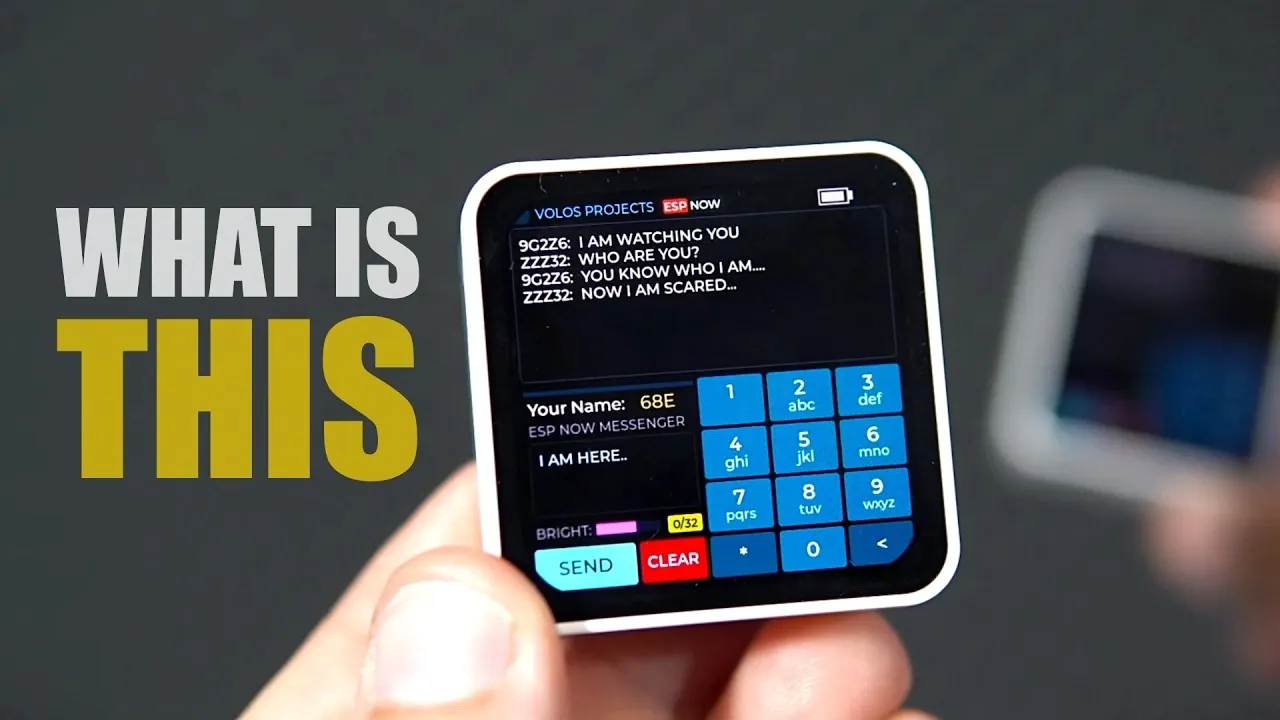
Wireless communication and microcontroller programming come to life in the DIY ESP32 Messaging System, a project shared by Volos Projects. Built around the Waveshare ESP32C6 board, this system uses the ESP-Now protocol to enable two devices to exchange messages without relying on Wi-Fi or SIM cards. Designed with a retro SMS-style interface, it offers a hands-on way to explore concepts like wireless data transfer and user interface design. The inclusion of features like a 2.6-inch AMOLED touchscreen and a 1000mAh rechargeable battery makes it both practical and engaging, whether for classroom use or personal experimentation.
Dive into this breakdown to uncover how to assemble and customize your own messaging system. You’ll explore the role of the ESP-Now protocol in simplifying communication, learn how to use the board’s additional components, such as the real-time clock and accelerometer, for expanded functionality and gain insight into creating an intuitive interface using Square Line Studio. Whether you’re an educator seeking interactive STEM projects or a hobbyist looking to deepen your understanding of microcontrollers, this guide offers practical steps and creative possibilities.
Why Build This System?
TL;DR Key Takeaways :
- The DIY ESP32 Messaging System combines modern microcontroller technology with a retro SMS-style interface, making it an engaging tool for STEM education and hands-on learning.
- Built using Waveshare ESP32C6 boards, it uses the ESP-Now protocol for wireless communication, eliminating the need for SIM cards or Wi-Fi networks.
- Key hardware features include a 2.6-inch AMOLED touchscreen, 1000mAh rechargeable battery, real-time clock, microphone, accelerometer, speaker and external antenna connector for extended range.
- The system is highly adaptable, suitable for classroom activities, creative projects and hands-on learning, fostering creativity, collaboration and problem-solving skills.
- Designed with user-friendly features like a touchscreen interface and retro SMS display, it bridges theoretical concepts with practical applications, making it ideal for educators, students and hobbyists.
The DIY ESP32 Messaging System is designed to provide an interactive and educational experience for students, educators and hobbyists. It is particularly well-suited for robotics and technology classes, where practical, hands-on projects enhance the learning process. By integrating retro-style messaging with modern hardware, this system encourages creativity, collaboration and problem-solving. It serves as a bridge between theoretical concepts and real-world applications, helping learners grasp the basics of microcontrollers and wireless communication in an engaging way.
This project is not only educational but also highly adaptable, making it suitable for a wide range of learning objectives. Whether you are introducing students to the basics of programming or exploring advanced concepts in wireless communication, the system provides a versatile platform for experimentation and discovery.
Key Hardware Features
The DIY ESP32 Messaging System is built around the Waveshare ESP32C6 board, which offers a variety of advanced features that enhance its usability and functionality. These features make the system both practical and versatile, making sure it meets the needs of diverse educational and creative projects.
- AMOLED Touchscreen: The 2.6-inch display with 480×480 resolution provides a responsive and visually appealing interface for typing and viewing messages. Its high resolution ensures clarity, while its touch functionality makes it intuitive for users of all skill levels.
- Long Battery Life: Equipped with a 1000mAh rechargeable battery, the system offers extended operation, reducing downtime and the need for frequent recharging. This feature is particularly useful in classroom settings or during extended projects.
- Additional Components: The board includes a real-time clock, microphone, accelerometer, speaker, push buttons and an SD card slot. These components enable diverse applications such as timekeeping, motion detection, audio playback and data storage, expanding the system’s potential uses.
- External Antenna Connector: The inclusion of an external antenna connector allows for an extended wireless communication range, making the system suitable for larger spaces or outdoor environments.
These hardware features ensure the system is not only functional but also adaptable, providing a robust platform for a variety of educational and creative applications.

Here are additional guides from our expansive article library that you may find useful on ESP32.
- $5 ESP32-S3 Super Mini Packs Wi-Fi and Bluetooth
- How an $8 ESP32 S3 Microcontroller Runs a 28.9M Parameter Local LLM
- $4 ESP32 Module Brings Wi-Fi and Bluetooth to IoT Projects
- ESP32 S31 Devkit Hands-on: 320 MHz RISC-V Chip Adds Wi-Fi 6
- $4 ESP32-S3 Super Mini Packs a 0.96-Inch IPS TFT Screen
- Build a DIY Open-Source Flipper Zero Using a ESP32-DIV
- $9 CYD ESP32 Module Includes a 2.88-Inch LCD Screen
- ESP32-S3 Automation System Packs 16 Relays for Smart Homes
- Wokwi vs Circuit Designer: Top Free ESP32 Simulators
- $5 ESP32 S3 Board Packs a 240 MHz Dual-Core Chip
How Communication Works
The system uses the ESP-Now protocol for wireless communication, offering a cost-effective and straightforward alternative to traditional messaging systems. Unlike systems that rely on SIM cards or Wi-Fi networks, ESP-Now operates independently, making it both economical and easy to set up. Its range is comparable to that of a home Wi-Fi network and can be further extended using an external antenna or by minimizing physical obstructions.
Each device in the system is assigned a unique, randomly generated name, making sure secure and distinct communication channels. This feature is particularly beneficial in classroom settings, where multiple devices may be in use simultaneously. By eliminating the need for complex network configurations, the system simplifies the learning process while maintaining reliable communication.
Interactive Functionality
The DIY ESP32 Messaging System is designed with user-friendly features that enhance its functionality and engagement. These features make the system accessible to users of all skill levels while providing a rich and interactive experience.
- Touchscreen Interface: The AMOLED touchscreen serves as the primary interface for typing and sending messages. Its high resolution and responsiveness ensure a smooth user experience, even for beginners.
- Push Buttons: Physical buttons allow users to adjust screen brightness and control power, adding a tactile element to the system. This feature enhances usability and provides an alternative method of interaction.
- Retro SMS Display: Messages are displayed in a style reminiscent of early SMS systems, adding a nostalgic and fun touch to the project. This design choice not only engages users but also introduces them to the evolution of communication technology.
These interactive features make the system both practical and enjoyable, making sure it serves as an effective tool for teaching and learning.
Potential Applications
The versatility of the DIY ESP32 Messaging System makes it suitable for a wide range of educational and creative applications. Its adaptability allows educators and hobbyists to tailor the system to their specific needs, fostering innovation and exploration.
- Classroom Activities: The system can be used for team-based challenges, escape room games, or collaborative problem-solving tasks, encouraging teamwork and critical thinking.
- Creative Projects: Users can develop retro-style messaging systems, educational games, or other interactive applications that align with specific learning objectives.
- Hands-On Learning: By introducing students to modern technology in a nostalgic context, the system keeps learners engaged while teaching practical skills in programming and wireless communication.
These applications demonstrate the system’s ability to inspire creativity and innovation, making it a valuable resource for educators and hobbyists alike.
Development Tools
The user interface for the DIY ESP32 Messaging System is created using Square Line Studio, a powerful tool for designing intuitive and visually appealing interfaces. By making the code and interface publicly available, the project encourages collaboration and customization. This openness allows educators and hobbyists to adapt the system to their unique needs, fostering a community of innovation and shared learning.
Educational Benefits
The DIY ESP32 Messaging System is more than just a communication tool, it is a gateway to learning and exploration. By introducing students to wireless communication and retro SMS-style typing, it bridges the gap between modern technology and nostalgic design. The project promotes hands-on learning, helping students develop practical skills while fostering creativity and critical thinking. Its engaging design and practical applications make it an invaluable resource for STEM education, inspiring the next generation of innovators and problem-solvers.
Media Credit: Volos Projects
Disclosure: Some of our articles include affiliate links. If you buy something through one of these links, Geeky Gadgets may earn an affiliate commission. Learn about our Disclosure Policy.
