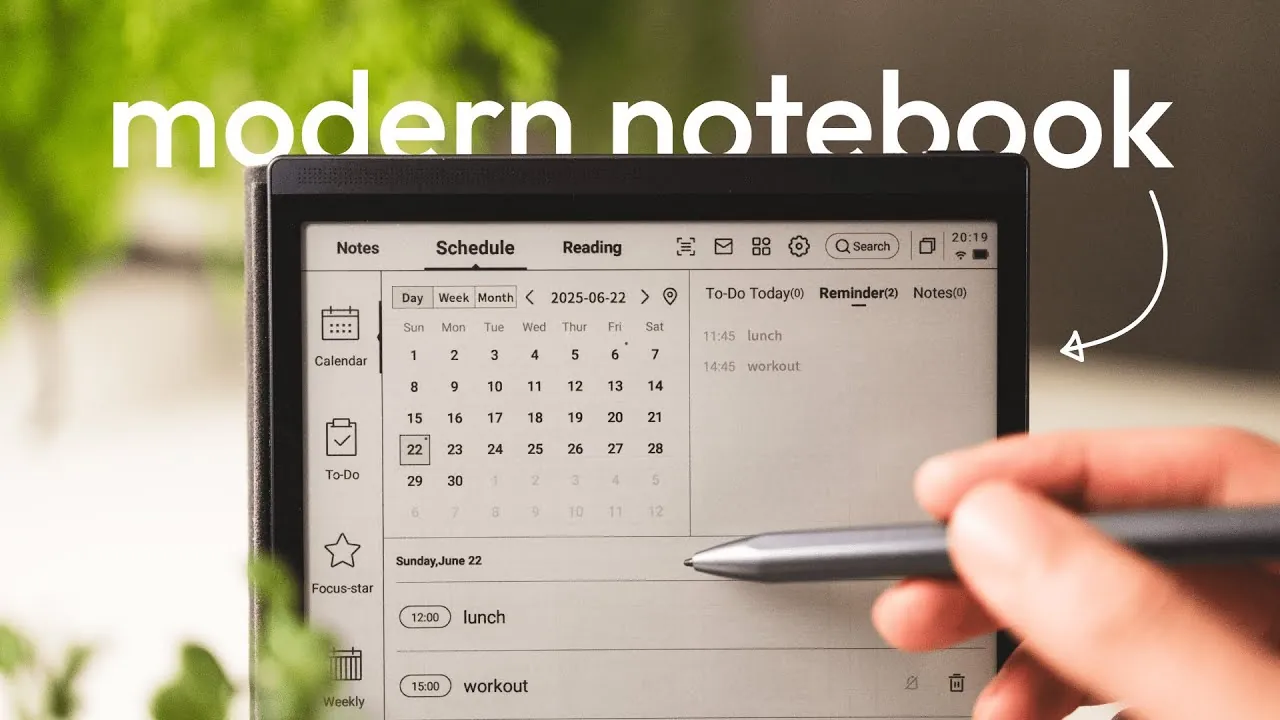
Have you ever wished for a notebook that could do more than just hold your thoughts—a device that could think alongside you, organize your chaos, and streamline your day? The iFLYTEK AINOTE Air 2 promises to be just that: a modern digital notebook designed to redefine how we approach productivity and creativity. With its sleek 8.2-inch e-ink display and a suite of AI-powered tools, this hybrid device aims to bridge the gap between traditional pen-and-paper simplicity and innovative technology. But does it truly deliver on its bold claims, or is it just another gadget vying for your attention in an already crowded market? In this assessment, Kai Notebook explores whether the AINOTE Air 2 is a fantastic option or simply a niche tool with limited appeal.
From its paper-like writing experience to its advanced transcription and document management features, the AINOTE Air 2 offers a lot to unpack. Whether you’re a student looking for a smarter way to take notes, a professional juggling deadlines and documents, or an avid reader seeking an eye-friendly e-reader, this device promises to cater to your needs. But how well does it balance its roles as a notebook, planner, and e-reader? And are its AI-driven features, like voice-to-text conversion and content generation, truly fantastic or just nice-to-have extras? By the end of this review, you’ll have a clearer picture of whether this digital notebook deserves a spot in your workflow—or if it’s better left on the shelf.
iFLYTEK AINOTE Air 2 Overview
TL;DR Key Takeaways :
- The iFLYTEK AINOTE Air 2 combines a digital notebook, e-reader, and productivity planner, offering tools for note-taking, document management, and reading in a single 8.2-inch e-ink device.
- It provides a paper-like writing experience with a matte e-ink screen and a pressure-sensitive stylus, supporting structured note-taking with built-in templates.
- Advanced transcription and AI tools, including voice-to-text conversion and ChatGPT integration, streamline workflows for tasks like capturing lectures, brainstorming, and content creation.
- Document management features include scanning, annotation, and converting handwritten notes into actionable to-do lists, enhancing organization and productivity.
- Its eye-friendly e-ink display supports multiple file formats and offers tools for highlighting and annotating, making it ideal for focused reading and research tasks.
Key Features at a Glance
- Paper-like writing experience with a matte e-ink screen and pressure-sensitive stylus for precise input.
- Advanced transcription and AI tools for voice-to-text conversion and content generation.
- Document scanning and annotation capabilities for efficient organization and editing.
- Productivity tools such as scheduling, to-do lists, and split-screen functionality.
- Eye-friendly e-reader with support for multiple file formats and research tools.
Writing Experience: A Pen-on-Paper Feel
The iFLYTEK AINOTE Air 2 offers a writing experience that closely mimics traditional pen and paper. Its matte e-ink screen reduces glare and provides a textured surface, making sure a comfortable and natural feel during extended use. The included pressure-sensitive stylus enhances precision, making it ideal for creating detailed notes, sketches, or diagrams. Built-in templates, such as Cornell notes and grid layouts, further support structured note-taking, helping you organize ideas effectively. Whether you’re brainstorming, drafting, or studying, the device ensures a seamless and intuitive writing process.
iFLYTEK AINOTE Air 2 Digital Notebook Features

Advance your skills in E-ink tablet by reading more of our detailed content.
- Lenovo Smart Paper E Ink tablet
- ReMarkable E Ink tablet Type Folio keyboard
- Hanvon N10 E Ink tablet and stylus
- Viwoods AiPaper Carta 1300 E Ink Tablet
- Janus E Ink dual screen tablet from $399
- Bigme Android 11 color E-ink tablet
- Raspberry Pi Wireless AI Color E-Ink Display Project
- MobiScribe 6.8 E Ink notebook slate from $199
- BOOX Note Air2 Plus E Ink tablets
- OKPad dual-screen Android tablet with LCD and E Ink displays
Transcription and AI Tools: Streamlining Your Workflow
One of the most notable features of the AINOTE Air 2 is its transcription capability. The voice-to-text function accurately converts spoken words into editable text, with options to customize font sizes and styles for better readability. This feature is particularly useful for capturing lectures, meetings, or brainstorming sessions. Additionally, the integration of AI tools, such as ChatGPT, allows you to generate summaries, brainstorm ideas, or seek explanations directly on the device. These tools are invaluable for research, content creation, or collaborative projects, significantly reducing the time and effort required for complex tasks.
Document Management: Simplify and Organize
The AINOTE Air 2 excels in document management, offering a range of features to simplify organization. Its built-in camera allows you to scan physical documents and annotate them directly on the device. The stylus includes a button that can convert handwritten notes into actionable to-do lists, making it easier to track tasks and deadlines. These features are particularly beneficial for professionals managing multiple documents or students handling extensive study materials. By centralizing your document handling needs, the device helps streamline workflows and improve productivity.
Productivity Features: Multitasking Made Easy
Designed with productivity in mind, the AINOTE Air 2 includes tools that enhance multitasking and organization. Its integrated scheduling system enables you to manage appointments, deadlines, and tasks efficiently. The split-screen functionality allows you to view two applications simultaneously, such as reading a document while taking notes. This feature eliminates the need to switch between devices or applications, making sure a smoother workflow. Whether you’re preparing for an exam, reviewing a report, or planning a project, the device supports efficient multitasking to help you stay on track.
E-Reader Functionality: Comfortable and Versatile Reading
As an e-reader, the AINOTE Air 2 provides a comfortable and versatile reading experience. Its eye-friendly e-ink display minimizes strain during prolonged reading sessions, making it suitable for academic texts, novels, or manga. The device supports a variety of digital formats, including PDFs and ePub, and offers tools for highlighting, annotating, and summarizing content. These features are particularly useful for research-intensive tasks, allowing you to engage with materials more effectively. Whether you’re reading for leisure or study, the AINOTE Air 2 ensures a distraction-free and enjoyable experience.
Use Cases and Limitations
The iFLYTEK AINOTE Air 2 is best suited as a secondary device for individuals who prioritize productivity, organization, and focused reading. Its ability to integrate note-taking, document management, and e-reading into a single platform makes it an excellent choice for students, professionals, and readers seeking a streamlined workflow. However, it may not fully replace traditional tablets for users who require advanced multimedia capabilities, such as video editing or gaming, or access to a broader app ecosystem. Understanding your specific needs will help determine whether this device aligns with your expectations.
A Hybrid Device for Productivity and Learning
The iFLYTEK AINOTE Air 2 stands out as a versatile digital notebook that bridges the gap between productivity and reading. Its features cater to those who value efficient note-taking, document management, and comfortable reading experiences. While it may not meet the demands of users requiring high-end multimedia functionality, it excels as a reliable tool for individuals focused on learning, organization, and productivity. By combining practical tools with an intuitive interface, the AINOTE Air 2 offers a compelling solution for modern-day challenges in education and professional environments.
Media Credit: Kai Notebook
Disclosure: Some of our articles include affiliate links. If you buy something through one of these links, Geeky Gadgets may earn an affiliate commission. Learn about our Disclosure Policy.
