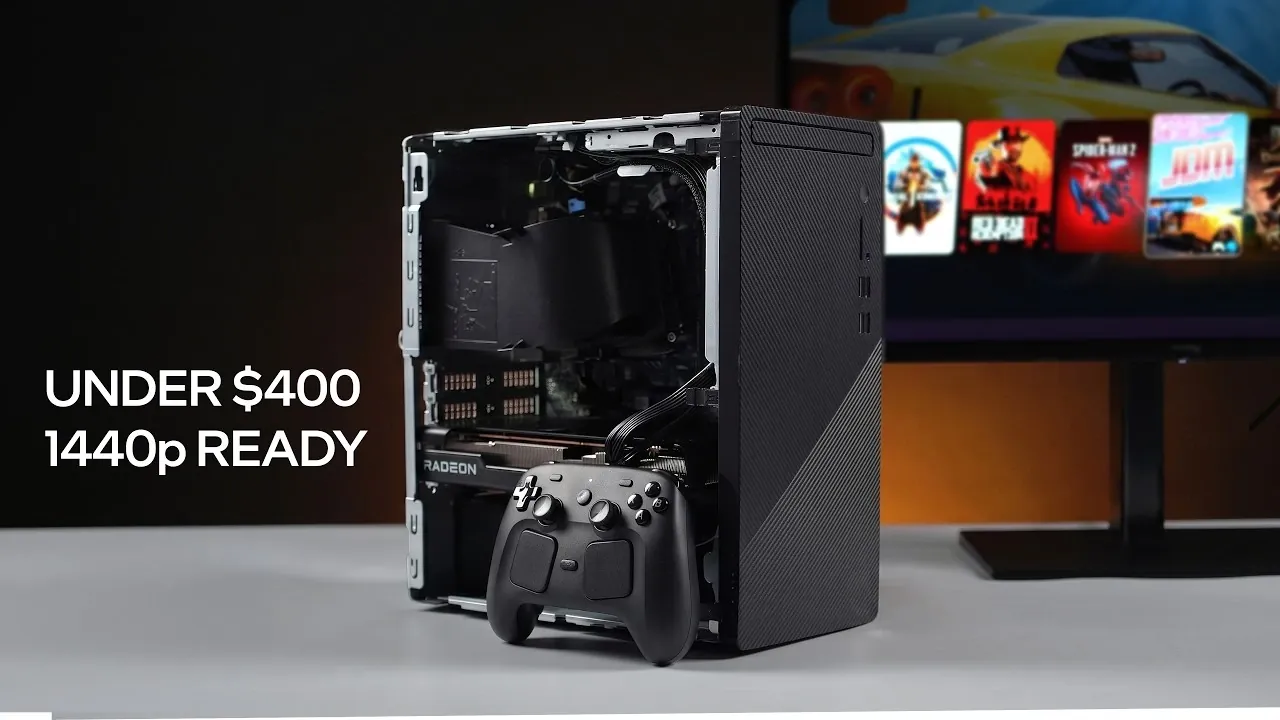
ETA Prime demonstrates how to assemble a cost-effective gaming PC using a refurbished Dell Inspiron 3880 as the starting point. This prebuilt system, priced at $143, includes an Intel Core i7-10700 processor, an 8-core, 16-thread CPU capable of handling both gaming and multitasking. By upgrading key components such as the power supply and graphics card, this build achieves 1440p gaming performance while staying within a $400 budget, offering a practical solution for budget-conscious gamers.
Explore how to enhance this setup with specific upgrades like the AMD Radeon RX 7600 graphics card and a 500W Aiva TFX power supply. Learn essential maintenance steps, including replacing thermal paste to improve cooling efficiency. Additionally, gain insight into optimizing performance with gaming-focused operating systems such as Steam OS or Bazi Linux.
Build a $400 Gaming PC
TL;DR Key Takeaways :
- Start with a refurbished Dell Inspiron 3880 ($143), featuring an Intel Core i7-10700 processor, 12 GB DDR4 RAM and a 256 GB M.2 SSD, as the base system for the build.
- Upgrade the stock 200W power supply to a 500W Aiva TFX power supply ($50) for stable power delivery, making sure compatibility with upgraded components.
- Install an AMD Radeon RX 7600 graphics card ($180 used) to achieve excellent 1440p gaming performance, with alternatives like the RX 6600 or Nvidia RTX 3060 as optional upgrades.
- Enhance cooling by cleaning the CPU cooler, replacing thermal paste and performing maintenance to prevent overheating and ensure consistent performance during gaming.
- Tested with Steam OS and Bazi Linux, the build delivers smooth 1440p gaming performance across popular titles like Cyberpunk 2077, Red Dead Redemption 2 and Spider-Man 2, all while keeping the total cost under $400.
1: Begin with the Dell Inspiron 3880
The foundation of this build is the refurbished Dell Inspiron 3880, available for just $143. Despite its budget-friendly price, this system is equipped with an Intel Core i7-10700 processor, boasting 8 cores, 16 threads and a turbo boost clock of up to 4.8 GHz. This CPU provides ample power for modern gaming and multitasking.
Key specifications of the base system include:
- RAM: 12 GB of DDR4 memory, which can be upgraded to 16 GB for improved performance.
- Storage: A 256 GB M.2 SSD, offering fast boot times and quick game loading.
- Expandability: Additional storage options via external drives or internal upgrades.
While the Dell Inspiron 3880 offers a solid starting point, a few essential upgrades are necessary to transform it into a capable gaming machine.
2: Upgrade the Power Supply
The stock 200W proprietary power supply in the Inspiron 3880 is insufficient for gaming purposes. Replacing it with a 500W Aiva TFX power supply ensures stable power delivery to support the upgraded components. This upgrade is critical for maintaining system reliability during demanding gaming sessions.
An adapter is required to connect the new power supply to the motherboard. While this adds a small step to the process, it is essential for unlocking the full potential of the system.
Unlock more potential in budget gaming PC by reading previous articles we have written.
- $350 Perfect Budget Gaming PC : Easily Handles Modern 1080P Gaming
- Building a Budget PC in 2026 : RX 6600 & 6700 XT Options, 1440p Results
- New Minisforum UM870 Slim : Budget Mini PC for Gamers and Professionals
- How to Build a Cheap Gaming Rig That Plays at 80 FPS 1440p in 2026
- Budget 2026 PC Build for 1440p AAA Gaming
- How to Build a Compact Gaming PC For Under $300
- Budget Gaming PC Build Using Second-Hand Parts Hits Smooth 1440p
3: Install a Dedicated Graphics Card
A dedicated graphics card is the cornerstone of any gaming PC. For this build, the AMD Radeon RX 7600 is the ideal choice. With 8 GB of VRAM, it delivers exceptional 1440p gaming performance and is available for approximately $180 on the used market.
If you have some flexibility in your budget, you might also consider alternatives like the RX 6600 or Nvidia RTX 3060. However, the RX 7600 strikes the best balance between cost and performance, making it the standout option for this build.
4: Improve Cooling and Perform Maintenance
To ensure optimal performance, it’s important to address the system’s cooling. Clean the CPU cooler and replace the thermal paste to improve heat dissipation. These simple maintenance steps help reduce thermal throttling, enhance system stability and extend the lifespan of your components.
Proper cooling is especially critical when running demanding games at higher settings, as it prevents overheating and ensures consistent performance.
5: Select an Operating System
This build has been tested with both Steam OS and the Bazi Linux distribution, both of which are excellent choices for gaming. Steam OS, in particular, is optimized for gaming and integrates seamlessly with the Steam platform, offering a console-like experience.
Additional features of these operating systems include:
- Built-in Wi-Fi and Bluetooth support for wireless connectivity.
- Compatibility with Steam controllers and other peripherals.
If you prefer a different Linux distribution, there are numerous options available to suit your specific needs and preferences.
Performance at 1440p
This budget-friendly Steam Machine delivers impressive gaming performance at 1440p resolution. Below are the results from testing several popular titles:
- Cyberpunk 2077: Mid-70s FPS with FSR 2.1 enabled.
- Japanese Drift Master: Around 60 FPS with FSR adjustments.
- Spider-Man 2: Smooth gameplay using FSR in balanced mode.
- Red Dead Redemption 2: Over 80 FPS with a mix of high and ultra settings.
- Mortal Kombat 1: 60 FPS at high settings.
- Crimson Desert: Approximately 85 FPS with FSR Frame Generation.
These benchmarks demonstrate that this build is capable of delivering a smooth and immersive gaming experience, even at high settings.
Cost Breakdown
The total cost of this build remains under $400, broken down as follows:
- Refurbished Dell Inspiron 3880: $143
- AMD Radeon RX 7600: $180 (used market).
- 500W Aiva TFX Power Supply: $50
- Miscellaneous Upgrades: $20 (thermal paste, adapter, etc.).
By sourcing refurbished and used components, you can achieve significant savings without compromising on performance. This approach also leaves room for future upgrades as your gaming needs evolve.
Customizing Your Build
To further enhance your gaming experience, consider these additional customizations:
- Upgrade to 16 GB of RAM for smoother multitasking and improved gaming performance.
- Add more storage, such as a larger SSD or HDD, to accommodate a growing library of games.
- Experiment with different Linux distributions to find the one that best suits your preferences and requirements.
These adjustments allow you to tailor the system to your specific gaming or software needs, making sure maximum satisfaction.
Building a Budget Gaming PC
Creating a high-performance gaming PC for under $400 is entirely achievable with careful planning and strategic upgrades. By using refurbished components and focusing on cost-effective improvements, you can build a system capable of delivering strong 1440p performance and compatibility with modern games. Whether you’re a casual gamer or new to PC gaming, this build offers an affordable and practical solution to meet your needs.
Media Credit: ETA PRIME
Disclosure: Some of our articles include affiliate links. If you buy something through one of these links, Geeky Gadgets may earn an affiliate commission. Learn about our Disclosure Policy.
