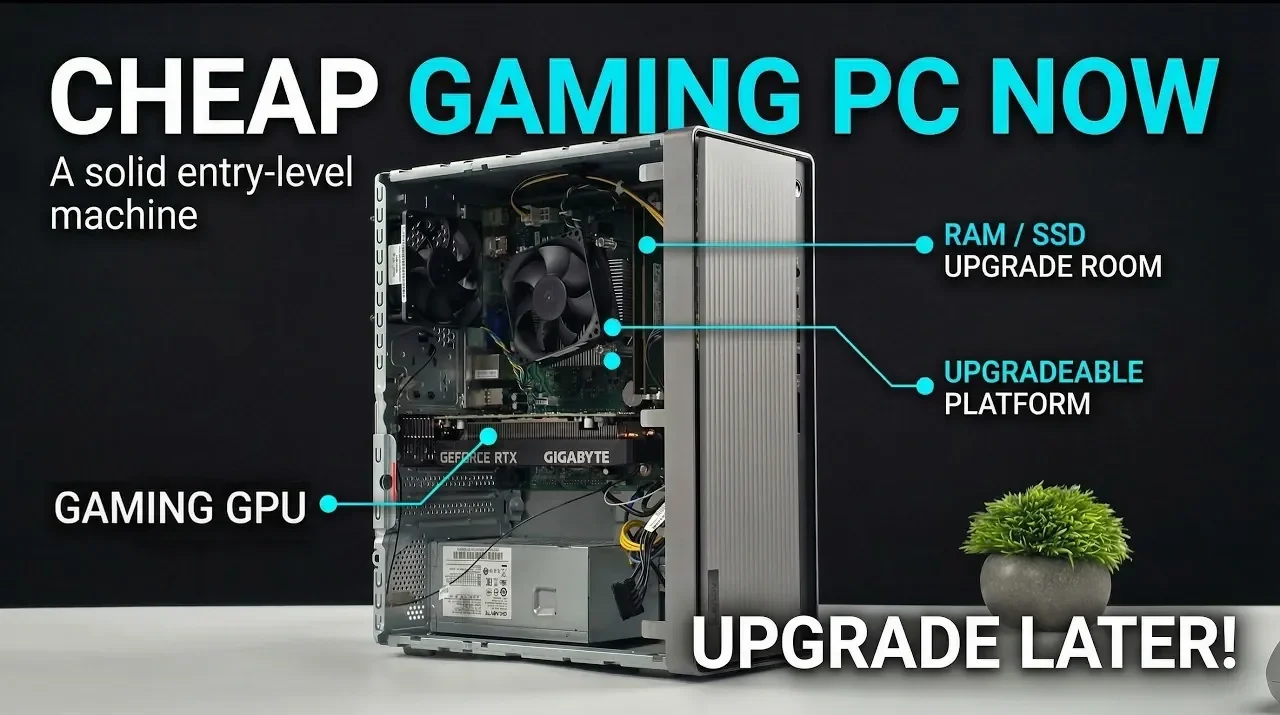
Building a gaming PC on a budget doesn’t have to mean compromising on performance. In a detailed explainer by ETA Prime, the Lenovo IdeaCentre 5 is highlighted as a practical starting point for assembling a capable system for around $350. Equipped with an Intel Core i5-10400 CPU, 8GB of DDR4 RAM and a 512GB M.2 SSD, this compact desktop offers a solid foundation for smooth 1080p gaming. By pairing it with an efficient GPU like the Nvidia GeForce RTX 3050, which works seamlessly with the system’s 260W power supply, you can achieve reliable gaming performance without overspending or requiring immediate upgrades.
Explore how to enhance this setup further with strategic upgrades and optimizations. Learn how adding 16GB of RAM improves multitasking and gaming responsiveness and discover performance tweaks using software like Nvidia Control Panel and MSI Afterburner. This guide also outlines future upgrade paths, such as increasing storage capacity or upgrading the power supply for more demanding components. Whether you’re building your first gaming PC or looking for a cost-effective way to enter the world of PC gaming, this approach balances affordability with flexibility for long-term growth.
Budget Gaming PC Guide
TL;DR Key Takeaways :
- Start with the Lenovo IdeaCentre 5 as a budget-friendly base system, featuring an Intel Core i5-10400 CPU, 8GB DDR4 RAM and a 512GB M.2 SSD, offering a solid foundation for gaming and multitasking.
- Add the Nvidia GeForce RTX 3050 GPU for smooth 1080p gaming at medium to high settings, using its low power consumption and compact design to avoid immediate power supply upgrades.
- Upgrade to 16GB of DDR4 RAM to enhance gaming performance, multitasking and system responsiveness, making sure compatibility with modern gaming demands.
- Optimize performance using software tools like Nvidia Control Panel, ThrottleStop and MSI Afterburner to fine-tune GPU and CPU settings for better frame rates and overall gaming experience.
- Plan for future upgrades, such as a higher-wattage PSU, more powerful GPU, additional storage and improved cooling, to scale the system for higher resolutions and evolving gaming needs.
1: Start with the Lenovo IdeaCentre 5
The Lenovo IdeaCentre 5 (141 MB05) serves as an excellent starting point for a budget gaming PC. This compact desktop offers a solid foundation with the following specifications:
– Processor: Intel Core i5-10400 CPU, providing six cores and twelve threads for reliable multitasking and gaming performance.
– Memory: 8GB of DDR4 RAM, sufficient for basic gaming and everyday tasks.
– Storage: 512GB M.2 SSD, offering fast boot times and quick access to your games and files.
Its compact design is ideal for limited desk space and it includes convenient features like USB Type-C connectivity and an optical drive. While the 260W power supply limits initial upgrade options, the system’s design supports gradual improvements, making it a practical choice for budget-conscious gamers.
2: Add a GPU – Nvidia GeForce RTX 3050
The Nvidia GeForce RTX 3050 is the centerpiece of this build, chosen for its affordability, performance and compatibility with the Lenovo IdeaCentre’s limited power supply. This GPU offers several advantages:
– Low Power Consumption: Operates efficiently with the 260W PSU, eliminating the need for additional power connectors.
– Compact Design: Fits seamlessly into the small case without requiring modifications.
– Performance: Equipped with 6GB of VRAM, it delivers smooth 1080p gaming at medium to high settings across a wide range of modern titles.
By adding the RTX 3050, you can achieve impressive gaming performance without the need for immediate power supply upgrades, making it a cost-effective solution for budget gaming.
Check out more relevant guides from our extensive collection on budget gaming PC that you might find useful.
- Best Budget Gaming PC 2026 : Ryzen 5 5600 & DDR4 Value
- UM870 Slim Review: AMD Mini PC with Ryzen 7 Performance
- Budget Gaming PC Build for 1440p microATX SFF Gameplay
- Quiet Budget Gaming PC Build for 1440p AAA Gaming
- How to Build a Budget Gaming PC for Under $300
- Best Value 1440p Gaming PC With Used Components in 2026
- DIY Budget Gaming PC for Under $350 : Ryzen 7 5700G & RX 7600 for 1440p
- Build a Budget Steam Machine That Easily Hits 1440p
- Budget Gaming PC Guide : Low-Cost PC Hits 80+ FPS in Big Titles
3: Upgrade RAM for Better Multitasking
Upgrading the system memory to 16GB of DDR4 RAM is a crucial step for modern gaming. Many contemporary games demand more than 8GB of RAM to run efficiently. This upgrade provides several benefits:
– Improved Gaming Performance: Handles demanding titles and reduces stuttering during gameplay.
– Enhanced Multitasking: Allows smooth operation when running multiple applications, such as streaming or browsing while gaming.
– Faster System Responsiveness: Everyday tasks, such as loading applications or switching between programs, become quicker and more seamless.
This simple yet impactful upgrade ensures your system is well-equipped to handle current and future gaming requirements.
4: Optimize Performance
To maximize the potential of your hardware, fine-tune your system using software tools and settings. These adjustments can significantly enhance your gaming experience without additional hardware costs:
- Nvidia Control Panel: Configure GPU settings to prioritize performance over visual quality, boosting frame rates in games.
- ThrottleStop: Adjust the CPU’s thermal design power (TDP) to maintain higher clock speeds during extended gaming sessions, improving overall performance.
- MSI Afterburner: Overclock the GPU’s core and memory frequencies for an extra performance boost in demanding games.
These optimizations are straightforward to implement and can make a noticeable difference in your system’s gaming capabilities.
5: Enjoy 1080p Gaming Performance
With this build, you can expect solid 1080p gaming performance across a variety of popular titles. Games like Red Dead Redemption 2, Cyberpunk 2077, and Forza Horizon 5 run smoothly at medium to high settings. Additionally, upscaling technologies such as DLSS (Deep Learning Super Sampling) and FSR (FidelityFX Super Resolution) enhance frame rates without compromising visual quality.
For example:
– Spider-Man 2 and Mortal Kombat 1 achieve consistent frame rates above 60 FPS, delivering a fluid and enjoyable gaming experience.
This setup demonstrates that even a budget-friendly system can handle modern games effectively, providing excellent value for the investment.
6: Plan for Future Upgrades
One of the key advantages of this build is its flexibility for future upgrades. While the current configuration is optimized for 1080p gaming, you can enhance its capabilities over time to meet evolving needs:
– Power Supply and GPU: Upgrade to a higher-wattage PSU and install a more powerful GPU to support higher resolutions like 1440p or 4K gaming.
– Storage Expansion: Add a secondary M.2 SSD or a traditional hard drive to accommodate a growing game library and other files.
– Cooling Solutions: Consider upgrading the cooling system to maintain optimal temperatures during extended gaming sessions.
These upgrades ensure your gaming PC remains relevant and capable as your preferences and requirements change.
Step 7: Save with Used Components
Building a gaming PC on a tight budget often requires creative solutions. Purchasing used components can significantly reduce costs while maintaining performance. For instance:
– A pre-owned RTX 3050 or additional DDR4 RAM can provide reliable performance at a fraction of the cost of new parts.
When buying used components, take the following precautions:
– Verify Seller Ratings: Purchase from reputable sellers with positive reviews.
– Check Compatibility: Ensure the components are compatible with your system to avoid potential issues.
– Inspect Product Descriptions: Look for detailed descriptions and images to confirm the condition of the parts.
By carefully sourcing used components, you can build a capable gaming PC without exceeding your budget.
Achieve Affordable Gaming Excellence
This budget-friendly gaming PC build proves that you don’t need to spend a fortune to enjoy modern games. Starting with the Lenovo IdeaCentre 5 and upgrading key components like the GPU and RAM allows you to achieve excellent 1080p performance for around $350. With room for future enhancements, this system offers a cost-effective entry point into PC gaming while providing the flexibility to scale up as your needs and budget grow.
Whether you’re a first-time builder or an experienced gamer, this approach provides an accessible and rewarding path to high-quality gaming.
Media Credit: ETA PRIME
Disclosure: Some of our articles include affiliate links. If you buy something through one of these links, Geeky Gadgets may earn an affiliate commission. Learn about our Disclosure Policy.
