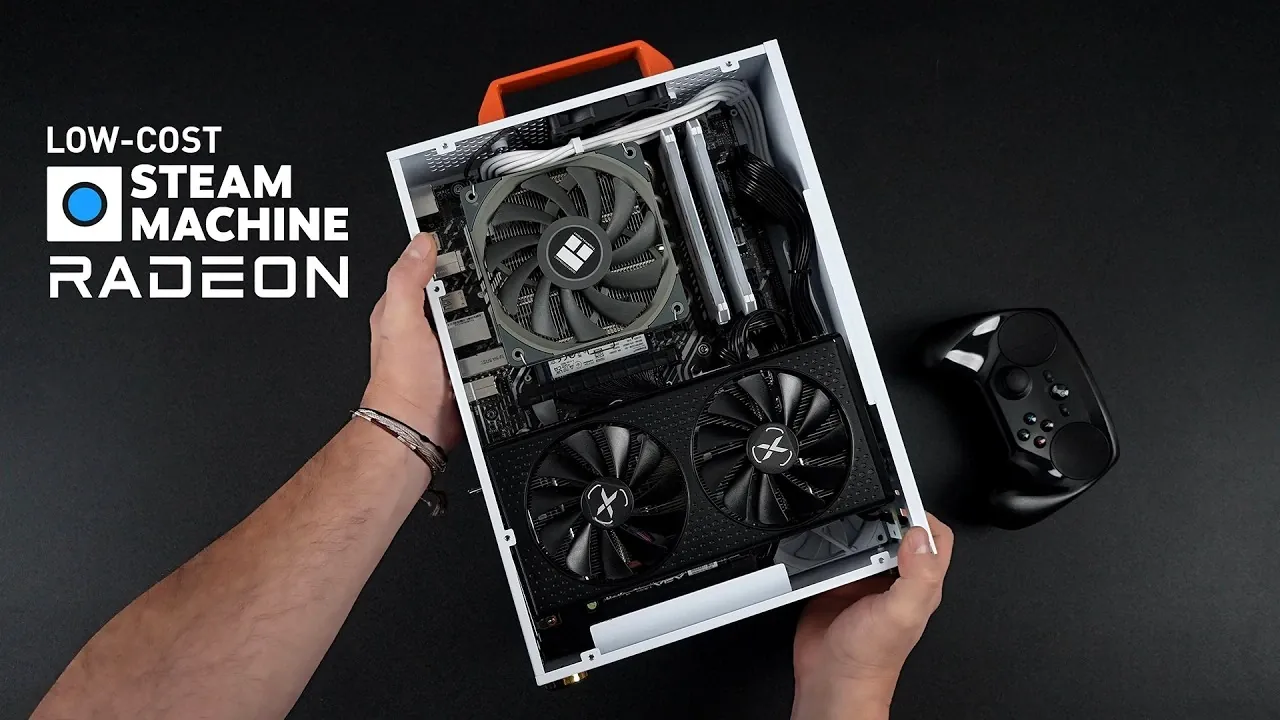
What if you could build a gaming PC capable of smooth 1440p performance without breaking the bank? It might sound too good to be true, but ETA Prime explains how you can assemble a compact, budget-friendly Steam Machine that delivers impressive results. By carefully selecting mid-range components and using cost-saving strategies, this guide makes high-quality gaming accessible to anyone willing to roll up their sleeves. Whether you’re a seasoned builder or a first-time enthusiast, this project proves that you don’t need a fortune to enjoy modern gaming at its best.
In this breakdown, you’ll discover how to strike the perfect balance between affordability and performance. From selecting the right CPU and GPU to optimizing Steam OS for gaming, every step is designed to help you get the most out of your build. You’ll also learn how to overcome potential challenges, like managing heat in compact cases or troubleshooting occasional compatibility issues. If you’ve ever dreamed of creating a powerful yet cost-effective gaming rig, this guide offers the inspiration and practical advice you need to make it happen. The possibilities are as exciting as they are attainable.
Build a Budget Steam Machine Now!
TL;DR Key Takeaways :
- Build a budget-friendly gaming PC optimized for Steam OS using mid-range components like the Intel Core i5-11600K CPU, Radeon RX 7600 GPU, 16GB DDR4 RAM, and a 1TB M.2 SSD for smooth 1440p gaming performance.
- Steam OS 3.9 is recommended for a streamlined gaming experience, with dual-boot options for added flexibility, though installation may require troubleshooting driver and compatibility issues.
- Thermal management is crucial for small form factor builds; ensure proper airflow, cable management, and consider aftermarket cooling solutions to maintain safe operating temperatures.
- Cost-saving strategies include using older but capable components like DDR4 RAM and 11th Gen Intel CPUs, or purchasing tested pre-owned parts from reputable sources.
- Plan for future upgrades, such as transitioning to newer CPUs, DDR5 RAM, or more powerful GPUs, to extend the system’s lifespan and handle evolving gaming demands.
Core Hardware Configuration
To achieve a balance between performance and affordability, this build focuses on mid-range components that provide solid gaming capabilities without overspending. Below is a breakdown of the key hardware:
- CPU: The Intel Core i5-11600K, a 6-core, 12-thread processor, offers excellent gaming performance at a reasonable price. Its strong single-core performance ensures smooth gameplay in modern titles.
- GPU: The Radeon RX 7600 is the recommended graphics card, featuring 8GB of VRAM and delivering strong 1440p performance. For tighter budgets, the Radeon RX 6600 is a viable alternative, though it may require lowering graphics settings in more demanding games.
- Memory: A 16GB DDR4 RAM kit running at 3200 MT/s ensures smooth multitasking and consistent gaming performance. This capacity is sufficient for most modern games and background applications.
- Storage: A 1TB M.2 SSD provides fast load times and ample space for game libraries. Its compact form factor also helps maintain a clean and organized build.
- Motherboard: Select a motherboard with onboard Wi-Fi and Bluetooth for added convenience. However, some users have overviewed occasional Bluetooth connectivity issues, so be prepared to troubleshoot if necessary.
This configuration prioritizes value without compromising the ability to handle modern games at 1440p resolution. It also provides a solid foundation for future upgrades.
Installing and Optimizing Steam OS
Steam OS 3.9 is the ideal operating system for this build, offering a streamlined and gaming-focused experience tailored to PC gamers. While installation is generally straightforward, certain challenges may arise, particularly with GPU or system compatibility. To minimize potential issues:
- Ensure all system drivers are up-to-date before beginning the installation process.
- Adjust BIOS and system settings as needed to optimize performance and compatibility.
For users seeking additional flexibility, consider setting up a dual-boot system with Windows. This approach allows you to switch between Steam OS for gaming and Windows for productivity tasks. However, configuring a dual-boot system requires careful partitioning of your SSD and familiarity with bootloaders, so proceed with caution if you’re new to this process.
A Cheap Steam Machine You Can Build Right Now!

Here are additional guides from our expansive article library that you may find useful on Steam Machines.
- New Steam Machine Accessories : Plus GeForce Now App for Linux
- Steam Machine : Early 2026 Release Date, Prices, Specs & OS
- Steam Machine Pricing Outlook, Early 2026 Release Window
- Steam Machine Emulation Guide: 4K Upscaling and Older Consoles
- Steam Machine Price : Why Valve Set the Tag at $1,000 in 2026
- Valve Steam Machine Returns in 2026, Specs, Price Outlook
- Early 2026 Slips for Valve’s Steam Hardware Lineup
- Steam Machine vs Consoles : Valve’s Path to Casual Players
- New Valve 4K Steam Machine : Early 2026 Can’t Come Soon Enough
- Is Building a Steam Machine in 2026 Worth It? Costs & Specs Guide
Performance at 1440p Resolution
This build is designed to deliver smooth gameplay at 1440p resolution with medium to high settings in most modern titles. Here’s how it performs in popular games:
- Excellent Performance: Titles like Doom Eternal, Spider-Man 2, and Mortal Kombat 1 run smoothly with minimal stuttering, offering an immersive gaming experience.
- Adjustments Needed: More demanding games such as Starfield and Black Myth: Wukong may require allowing features like FidelityFX Super Resolution (FSR) or frame generation to maintain acceptable frame rates.
One limitation to note is the CPU’s performance during shader compilation in certain games, which can cause brief slowdowns. Additionally, GPU performance under Steam OS may be slightly lower compared to Windows, potentially impacting frame rates in some scenarios. Despite these minor drawbacks, the system remains highly capable for 1440p gaming.
Managing Heat and Overcoming Build Challenges
Thermal management is a critical aspect of any gaming PC, particularly in small form factor builds. Proper cooling ensures consistent performance and prevents hardware from overheating. Here’s how this system performs under load:
- CPU Temperature: Averages 75°C during gaming, staying well within safe operating limits.
- GPU Temperature: Maintains a cooler 63°C during extended gaming sessions, making sure stable performance.
To prevent overheating, select a case with adequate airflow and ensure proper cable management. Compact cases with limited ventilation can exacerbate heat buildup, so investing in quality cooling solutions, such as additional case fans or an aftermarket CPU cooler, is essential.
Other potential challenges include cases with missing components, such as PCIe risers or front USB ports, which can complicate assembly. Research case reviews thoroughly before purchasing to avoid these issues and ensure a smooth building experience.
Saving Money Without Sacrificing Performance
Building a budget-friendly gaming PC often involves using older but capable components. Here are some cost-saving strategies to consider:
- Opt for DDR4 RAM and 11th Gen Intel CPUs, which offer excellent value for their performance. These components are widely available and provide a solid foundation for gaming.
- Consider purchasing used parts from reputable platforms like eBay or local marketplaces. Pre-owned GPUs, motherboards, or power supplies can significantly reduce costs, but ensure they’ve been tested and are in good condition before purchasing.
By implementing these strategies, you can maximize performance while staying within your budget, making high-quality gaming more accessible.
Planning for Future Upgrades
While this build is optimized for current gaming needs, planning for future upgrades can extend its lifespan and improve performance as gaming technology evolves. Here are some upgrade paths to consider:
- Transition to a 12th Gen Intel CPU or newer for improved gaming and multitasking capabilities.
- Upgrade to DDR5 RAM and a more powerful GPU to handle upcoming game titles and higher resolutions.
- Implement a dual-boot setup with Windows to access Windows-exclusive features and expand your system’s versatility.
These upgrades ensure your system remains relevant and capable of handling the demands of future games and applications.
Final Recommendations
To build a successful Steam Machine, keep the following tips in mind:
- Avoid cases with poor ventilation or missing features, as they can lead to thermal issues and assembly challenges.
- If your budget allows, invest in newer CPUs and GPUs for better performance and future-proofing.
- Take the time to optimize your system’s settings and address any compatibility issues to get the most out of your build.
By following these guidelines, you can create a cost-effective gaming PC that delivers impressive 1440p performance. Whether you’re a seasoned builder or a first-time enthusiast, this project offers an excellent opportunity to explore the potential of Steam OS and modern gaming hardware.
Media Credit: ETA PRIME
Disclosure: Some of our articles include affiliate links. If you buy something through one of these links, Geeky Gadgets may earn an affiliate commission. Learn about our Disclosure Policy.
