Why does it feel like PC gaming is becoming a luxury hobby? With the cost of GPUs skyrocketing, CPUs demanding a bigger slice of your wallet, and RAM prices refusing to budge, building a gaming rig that doesn’t break the bank seems almost impossible. But here’s the thing: it doesn’t have to be. What if you could assemble a system that delivers smooth 1440p gaming without spending more than $350? Sounds too good to be true, right? By combining a sharp eye for second-hand deals with smart upgrades, I built a budget-friendly sleeper PC that punches well above its weight class, and I’m here to show you how.
In this guide ETA Prime takes you through how to transform a modest prebuilt system into a gaming powerhouse capable of handling modern titles like Cyberpunk 2077 and Red Dead Redemption 2 at high settings. I’ll walk you through the components, the costs, and the clever tweaks, like using FidelityFX Super Resolution (FSR)—that made this build possible. Along the way, you’ll see how strategic choices, like opting for a Ryzen 7 5700G CPU and a Radeon RX7600 GPU, can unlock surprising performance without overspending. If you’ve ever wondered whether PC gaming on a budget is still achievable, this project might just change your perspective.
Building a $350 Gaming PC
TL;DR Key Takeaways :
- Building a budget gaming PC is challenging due to rising hardware costs, but combining second-hand and new components can achieve solid 1440p performance for $350.
- The build is based on a second-hand HP Pavilion TG01 with a Ryzen 7 5700G CPU, 16GB DDR4 RAM, and a 256GB SSD, upgraded with a Radeon RX7600 GPU for enhanced gaming performance.
- Performance optimization techniques like minor overclocking and FidelityFX Super Resolution (FSR) enable smooth gameplay in modern titles at high settings.
- Gaming benchmarks include impressive results, such as 90 FPS in “Red Dead Redemption 2” and 100+ FPS in “Forza Horizon 5” at 1440p with FSR enabled.
- Key tips for budget PC building include focusing on newer Ryzen CPUs, exploring alternative GPUs, planning for additional storage, and using second-hand prebuilt systems for cost savings.
The Challenges of Budget PC Building
Building a gaming PC on a budget requires navigating several challenges, particularly the rising costs of essential components. Over the past few years, hardware prices have surged, with RAM and GPUs seeing some of the steepest increases. For budget-conscious builders, this often means exploring second-hand markets or repurposing prebuilt systems as a foundation for their build. While this approach demands compromises and careful planning, it can yield surprisingly powerful results when executed thoughtfully.
Second-hand systems, such as prebuilt desktops, often provide a cost-effective starting point. These systems typically include essential components like a CPU, RAM, and storage, which can be upgraded or supplemented with additional parts. However, compatibility and power supply limitations must be carefully considered to ensure the final build meets performance expectations.
Build Overview: Affordable Yet Capable
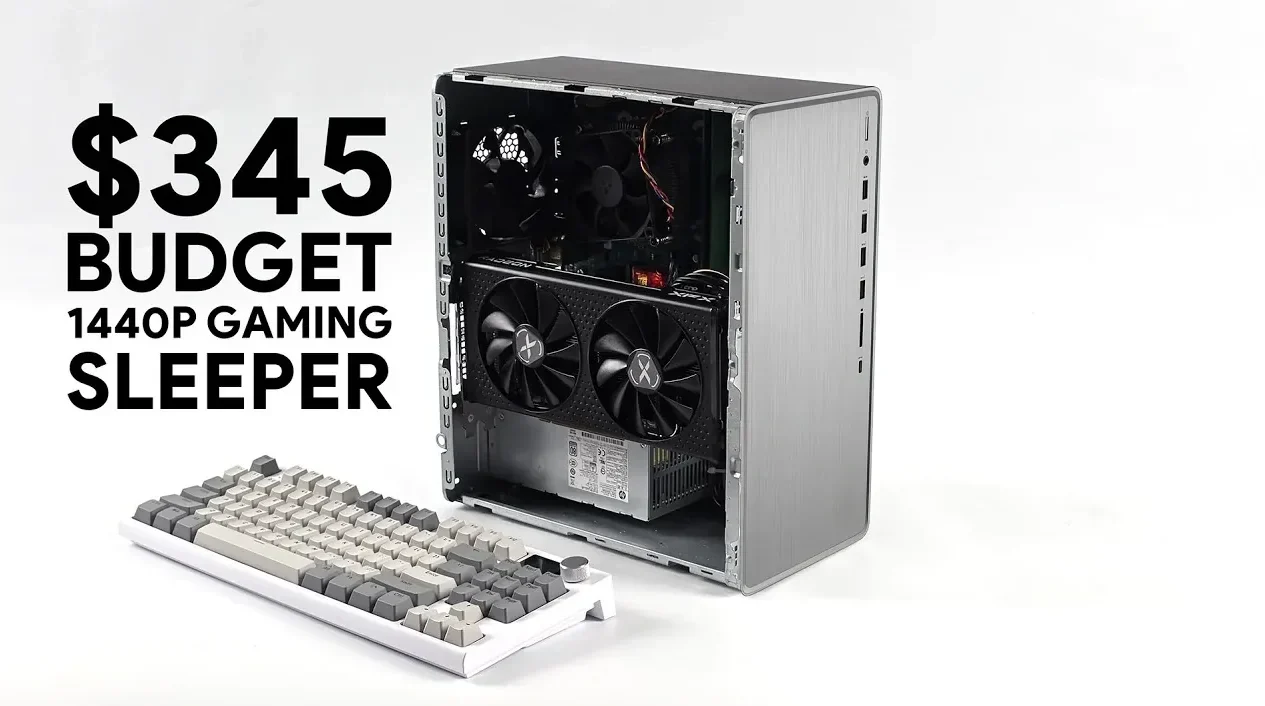
The foundation of this $350 build was an HP Pavilion TG01, a second-hand prebuilt system purchased for $165. This system included a Ryzen 7 5700G processor, an 8-core, 16-thread CPU that handles modern games and multitasking with ease. It also featured 16GB of DDR4 RAM running at 3200 MHz, a 256GB M.2 SSD for fast storage, and a 400W power supply with an 8-pin PCIe connector.
To enhance gaming performance, an XFX Swift Radeon RX7600 GPU with 8GB of VRAM was added for $180. While not a top-tier graphics card, it offers excellent value for 1440p gaming. The total cost of the build came to $345, making it a practical choice for gamers on a budget.
This combination of components strikes a balance between affordability and performance, making sure smooth gameplay in modern titles without overspending. The Ryzen 7 5700G, part of AMD’s Ryzen 5000 series, is particularly noteworthy for its strong performance in both gaming and productivity tasks.
Budget Gaming PC Build Guide
Uncover more insights about Budget Gaming PC in previous articles we have written.
- How to Build a Budget Gaming PC for 1440p Performance in 2025
- How to Build a Budget Gaming PC with SteamOS in 2025
- How to Build a Budget Gaming PC for Under $300
- $240 Budget Gaming PC Build : Play Cyberpunk 2077 for Less
- How to Build a Budget 4K Gaming PC for Smooth Gameplay
- How to Build a Budget SFF Gaming PC for 1440p Gaming in 2025
- Dual GPU Budget Gaming PC Setup Using Lossless Scaling in
- How to Build a Budget Gaming PC with Steam Deck OS for $250
- How to Build a $230 Gaming PC with SteamOS for 1080p Gaming
- DIY Gaming PC Build: Achieve PS5 Pro Performance on a Budget
Key Components and Costs
Achieving a cost-effective build requires prioritizing value and compatibility. Below is a breakdown of the components used in this build:
- Base System: HP Pavilion TG01 (Ryzen 7 5700G, 16GB RAM, 256GB SSD) – $165
- GPU: Radeon RX7600 (XFX Swift model) – $180
- Total Cost: $345
The Radeon RX7600 operates on a PCIe 3.0 x8 interface in this setup, which may seem like a limitation compared to PCIe 4.0. However, the reduced bandwidth has minimal impact on gaming performance, making it a solid choice for this budget build. Additionally, the included 256GB M.2 SSD provides fast storage for the operating system and a few games, though users with larger game libraries may need to consider additional storage options.
Performance Optimization
To maximize the performance of this build, minor overclocking was applied to both the CPU and GPU. These adjustments provided a modest boost in frame rates while maintaining system stability. Overclocking, when done carefully, can unlock additional performance without requiring further investment in hardware.
FidelityFX Super Resolution (FSR) was another key feature used in supported games. This technology upscales lower-resolution images to 1440p, enhancing visual quality and performance simultaneously. By allowing FSR, the system was able to achieve higher frame rates without compromising image clarity.
Storage considerations were also addressed. While the included 256GB SSD is sufficient for the operating system and a few games, it may not accommodate a larger game library. Adding an external SSD or a mechanical hard drive is a cost-effective way to expand storage capacity, making sure the system remains versatile for future needs.
Gaming Performance: Tested and Proven
This build was tested with several modern games to evaluate its 1440p gaming capabilities. The results demonstrate that this budget system delivers smooth gameplay at high settings, making it a viable option for gamers seeking performance without overspending. Here are the performance metrics:
- Red Dead Redemption 2: High settings, 90 FPS with FSR
- Cyberpunk 2077: Medium-high settings, 75-85 FPS with FSR
- Forza Horizon 5: High settings, 100+ FPS
- Spider-Man 2: High settings, 110 FPS with FSR
- Borderlands 4: High settings, 141 FPS
These results highlight the capability of the Radeon RX7600 GPU and Ryzen 7 5700G CPU to handle demanding titles at 1440p. The use of FSR further enhances performance, allowing the system to maintain high frame rates even in graphically intensive games.
Tips for Building Your Own Budget PC
If you’re considering building a similar system, here are some recommendations to help you maximize value and performance:
- Focus on newer Ryzen CPUs, such as the Ryzen 4000 or 5000 series, for better performance per dollar compared to older Ryzen 3000 models.
- Explore alternative GPUs like the RX6600, RTX 3060, RTX 4060, or the upcoming RTX 5050 for comparable performance at different price points.
- Plan for additional storage, such as an external SSD or a larger internal drive, to accommodate a growing game library.
- If you’d rather skip the hunting process altogether, a gaming PC prebuilt from a dedicated builder gives you a performance-ready system with full compatibility guaranteed from day one.
- Take advantage of technologies like FSR or DLSS to enhance performance in supported games.
By following these tips, you can build a gaming PC that balances cost and performance effectively, making sure a satisfying gaming experience without exceeding your budget.
Media Credit: ETA PRIME
Disclosure: Some of our articles include affiliate links. If you buy something through one of these links, Geeky Gadgets may earn an affiliate commission. Learn about our Disclosure Policy.
