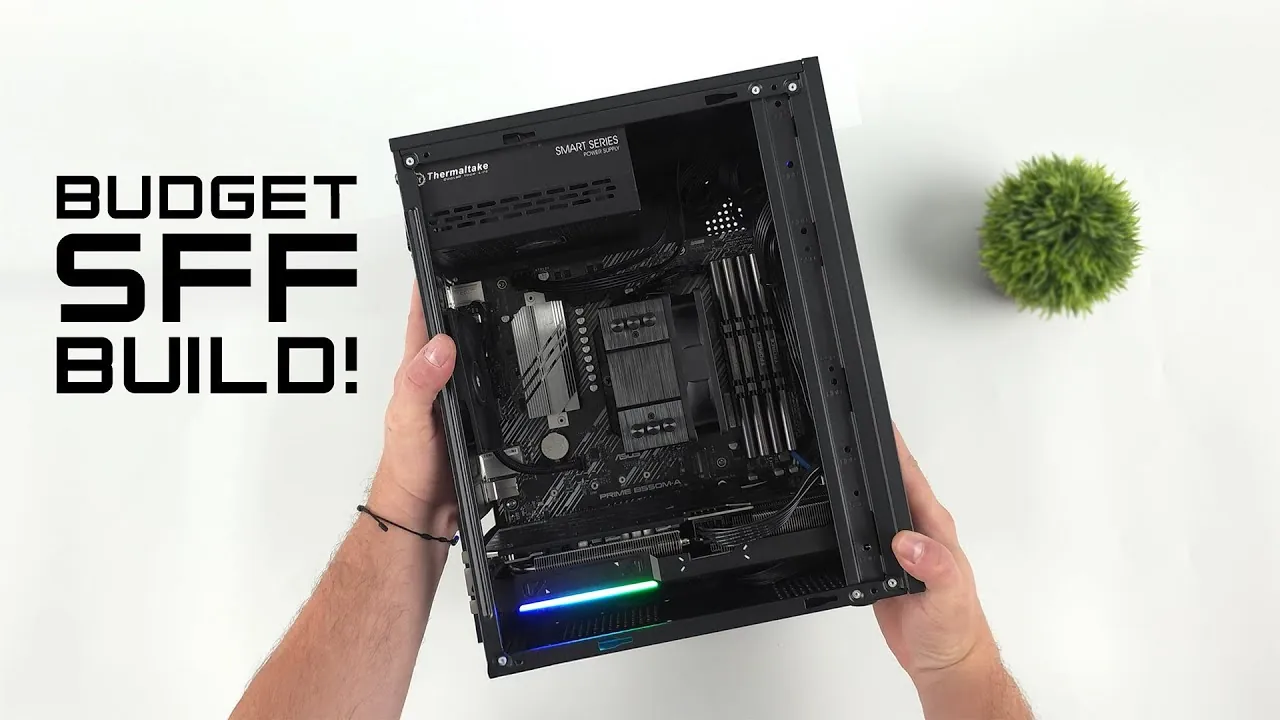
Imagine playing your favorite AAA games in stunning 1440p resolution on a sleek, compact gaming rig that doesn’t dominate your desk, or your wallet. Building a small form factor (SFF) gaming PC on a budget might sound like a daunting task, but it’s more achievable than you think. With the right mix of new and used components, you can craft a system that delivers impressive performance without breaking the bank. Whether you’re a seasoned builder or a first-timer, the challenge of balancing power, size, and cost in a compact design is as rewarding as it is exciting. And here’s the kicker: an affordable SFF gaming PC doesn’t mean compromising on quality or future-proofing. It’s all about making smart, informed choices.
In the video below ETA Prime explains how to assemble a high-performance, budget-friendly SFF gaming PC that’s capable of handling modern titles with ease. From selecting the perfect microATX motherboard to optimizing BIOS settings for maximum efficiency, each step is designed to help you get the most out of your build. You’ll discover how to use components like the AMD Ryzen 7 5700G and Intel Arc A570 GPU to strike the perfect balance between cost and capability. Along the way, we’ll also tackle challenges unique to compact builds, such as cooling and cable management, making sure your system runs smoothly and looks clean. By the end, you’ll not only have the knowledge to build your own SFF gaming powerhouse but also the confidence to do it without overspending. After all, who says great gaming has to come in a giant, expensive package?
Budget SFF Gaming PC Guide
TL;DR Key Takeaways :
- Building a small form factor (SFF) gaming PC on a budget is achievable by combining compact design, performance, and cost-efficiency, using both new and used components.
- Key components include the ASUS Prime B550M motherboard, AMD Ryzen 7 5700G CPU, 16GB DDR4 RAM, 2TB Viper M.2 SSD, and Intel Arc A570 GPU for smooth 1440p gaming performance.
- Efficient cooling and case selection are crucial for SFF builds, with compact cases requiring proper airflow and thermal management to maintain safe operating temperatures.
- Optimizing BIOS settings, such as allowing Resizable BAR and adjusting RAM clock speed, can significantly enhance gaming performance and system responsiveness.
- This build delivers strong performance benchmarks, including smooth 1440p gameplay in modern AAA titles, making it a cost-effective solution for budget-conscious gamers.
Essential Components for Your Build
Choosing the right components is critical to the success of your SFF gaming PC. Each part plays a vital role in determining the system’s performance, cooling efficiency, and ease of assembly. Below is a breakdown of the key components to consider:
- Motherboard: The ASUS Prime B550M is a reliable microATX motherboard featuring an AM4 socket, making it compatible with AMD Ryzen processors. It supports PCIe 4.0, making sure future-proofing for upcoming hardware. Purchasing a used motherboard from reputable platforms like eBay can significantly reduce costs while maintaining quality.
- CPU: The AMD Ryzen 7 5700G is an excellent choice, offering 8 cores and 16 threads for seamless multitasking and gaming. Its integrated graphics provide a temporary solution if you delay purchasing a discrete GPU. Pair it with the ID Cooling 903 XT cooler to maintain optimal thermal performance.
- RAM: A 16GB DDR4 kit running at 3200 MHz strikes a balance between speed and capacity. Configuring the RAM in the BIOS ensures it operates at its full potential. For future-proofing, you can upgrade to 32GB if needed.
- Storage: The 2TB Viper M.2 SSD offers ample storage for your operating system, games, and applications. Its high-speed performance ensures quick load times, and additional SATA or external storage can be added later if required.
- GPU: The Intel Arc A570, equipped with 10GB of GDDR6 memory, is a cost-effective solution for 1440p gaming. It supports advanced features like XESS and frame generation, enhancing both performance and visual quality in modern games.
Choosing the Right Case and Cooling
Selecting the right case is essential for an SFF build, as it must accommodate microATX or miniITX motherboards while making sure efficient airflow. Compact cases often face challenges with heat buildup, so prioritize designs with adequate ventilation. Look for cases with mesh panels or strategically placed vents to enhance airflow.
A basic cooling setup, such as a single rear 90mm fan, can effectively maintain safe operating temperatures if airflow is optimized. Thermal management is crucial for both performance and hardware longevity. The Ryzen 7 5700G operates at an average temperature of 68°C under load, peaking at 79°C, while the Intel Arc A570 remains cooler, averaging 61°C with a maximum of 76°C. These temperatures are well within safe operating ranges, making sure reliable performance during extended gaming sessions.
Affordable SFF Gaming PC Build for Stunning 1440p Performance

Explore further guides and articles from our vast library that you may find relevant to your interests in SFF gaming PC build.
- How to Build a Low Cost SFF 1440p Gaming PC
- How to Build a Budget 4K Gaming PC for Smooth Gameplay
- How to Build a $400 SFF Gaming PC for 1440p Gaming
- How to Build a Budget Gaming PC with SteamOS in 2025
- How to Build a Powerful Mini-ITX Gaming PC for 4K Performance
- How to Build a Budget Gaming PC for Under $300
- How to build a small form factor gaming PC
- How to Build a Budget-Friendly Small Form Factor Gaming PC
- How to Build a Budget Gaming PC with Steam Deck OS for $250
- Building a 5L mini gaming PC capable of playing anything
Power Supply and Cable Management
The Thermaltake Smart BX1 550W non-modular power supply is a budget-friendly option that provides sufficient power for this build. However, non-modular PSUs can complicate cable management in compact cases due to the fixed cables. If your budget allows, consider investing in a modular PSU. Modular power supplies simplify assembly by allowing you to use only the cables you need, reducing clutter and improving airflow within the case.
Effective cable management is not just about aesthetics; it also plays a role in maintaining efficient airflow and preventing overheating. Use cable ties or Velcro straps to secure excess cables and keep the interior of the case organized.
Optimizing BIOS Settings
Fine-tuning your BIOS settings can unlock additional performance from your hardware. These adjustments are straightforward and can significantly enhance your gaming experience:
- Resizable BAR: Enable this feature to allow the GPU to access more memory, which can improve frame rates in supported games.
- RAM Clock Speed: Adjust the RAM to run at its rated speed of 3200 MHz. This ensures you are using the full potential of your memory modules.
These optimizations are easy to implement and can make a noticeable difference in both gaming performance and overall system responsiveness.
Performance Benchmarks
This SFF gaming PC delivers impressive performance across a variety of benchmarks, demonstrating its capability to handle demanding games and applications. Here are some key performance metrics:
- Geekbench 6: Achieves a single-core score of 1,926 and a multi-core score of 9,723, showcasing strong CPU performance.
- 3DMark Time Spy: Scores 12,524, highlighting the GPU’s ability to handle high-resolution gaming.
- Gaming: Provides smooth 1440p gameplay in popular titles such as Cyberpunk 2077, God of War Ragnarok, and Forza Horizon 5.
These results confirm that this build is more than capable of delivering a high-quality gaming experience at 1440p resolution, making it an excellent choice for budget-conscious gamers.
Final Thoughts on Building an SFF Gaming PC
Building an affordable SFF gaming PC is a practical way to enjoy modern gaming without overspending. By carefully selecting components and optimizing settings, you can achieve smooth gameplay at both 1080p and 1440p resolutions. The compact design of an SFF build is ideal for gamers who value portability and space efficiency without compromising on performance. This guide demonstrates that with thoughtful planning and smart choices, you can create a powerful gaming system that meets your needs and stays within budget.
Media Credit: ETA PRIME
Disclosure: Some of our articles include affiliate links. If you buy something through one of these links, Geeky Gadgets may earn an affiliate commission. Learn about our Disclosure Policy.
