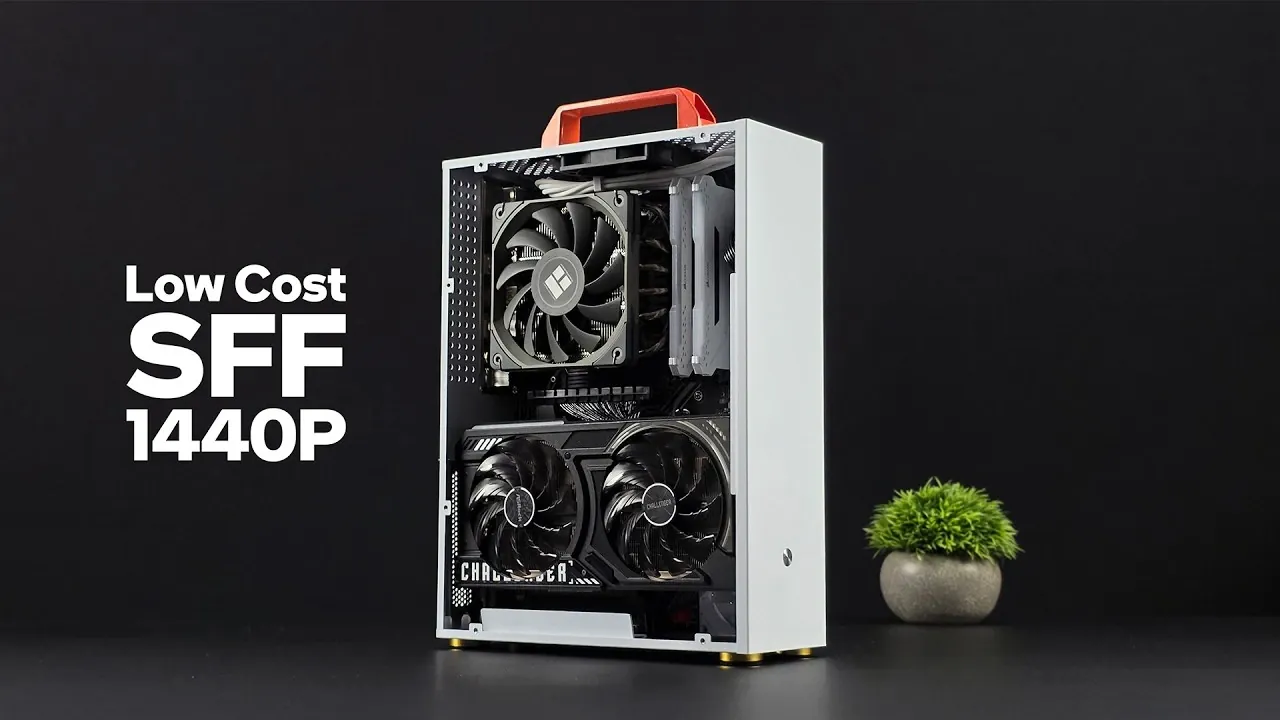
Is it really possible to build a high-performance 1440p gaming PC in 2026 without emptying your wallet? The answer might surprise you. In this breakdown, ETA PRIME walks through how to assemble a powerful yet budget-friendly gaming rig by blending affordable new components with carefully chosen used parts. With hardware prices stabilizing and innovative options like the Intel Arc A570 GPU entering the market, achieving smooth 1440p gameplay is no longer reserved for those with deep pockets. Whether you’re a seasoned builder or a first-timer, this guide proves that innovative performance doesn’t have to come with a premium price tag.
Throughout the overview, you’ll uncover practical strategies for selecting components that maximize performance while minimizing costs. From the budget-friendly Intel Core i5-11600 processor to cooling solutions tailored for compact builds, every detail is designed to help you make informed choices. Curious about how this setup handles demanding titles like Cyberpunk 2077 or Spider-Man 2? Or how to navigate the challenges of small form factor cases? This guide doesn’t just provide answers, it equips you with insights to create a system that’s efficient, powerful, and uniquely yours. The possibilities might just change the way you think about gaming on a budget.
Building a Budget 1440p PC
TL;DR Key Takeaways :
- Building a 1440p gaming PC in 2026 is cost-effective by combining affordable new components with reliable used parts, focusing on performance and budget balance.
- Key components include the Intel Core i5-11600 CPU, Intel Arc A570 GPU, 16GB DDR4 RAM, a 1TB M.2 SSD, and the Thermalright AXP120 cooler for efficient performance and cooling.
- Compact cases with adequate ventilation and a fully modular 500W power supply are recommended for small form factor builds to ensure proper airflow and cable management.
- Performance benchmarks show smooth 1440p gaming in modern titles, with highlights like 120 FPS in Forza Horizon 5 (ultra settings) and 78 FPS in Cyberpunk 2077 (high settings).
- Cost-saving strategies include using DDR4 platforms, purchasing used components, and avoiding unnecessary features like vertical GPU mounting to optimize the budget without sacrificing performance.
Key Components for Optimal Performance
Selecting the right components is the foundation of any successful gaming PC build. Each part plays a critical role in making sure your system delivers the performance you need without exceeding your budget. Below is a breakdown of the essential components:
- CPU and Motherboard: The Intel Core i5-11600, a 6-core, 12-thread processor, offers excellent gaming performance at a budget-friendly price point. Pair it with a used Asus B560 Prime microATX motherboard to save money while maintaining compatibility with DDR4 memory and essential features.
- Memory: A 16GB DDR4 RAM kit (dual-channel, 3200 MT/s) strikes the perfect balance between cost and performance. While DDR5 is the latest standard, DDR4 remains a reliable and affordable choice for gaming in 2026.
- GPU: The Intel Arc A570, featuring 10GB of VRAM, is a standout option for 1440p gaming. It delivers competitive performance at a fraction of the cost of high-end GPUs, making it ideal for budget-conscious gamers.
- Storage: A 1TB M.2 SSD provides ample storage for games and ensures fast load times. This practical and affordable solution enhances overall system responsiveness.
- Cooling: The Thermalright AXP120 low-profile cooler efficiently manages CPU temperatures in compact builds, offering reliable cooling without unnecessary expense.
Case and Power Supply Selection
Choosing the right case and power supply is crucial, especially for small form factor (SFF) builds. These components directly impact your system’s airflow, cable management, and overall usability.
- Case Selection: Compact cases with vertical GPU mounting are popular for their space-saving design. However, they often come with trade-offs, such as limited airflow and fewer front-panel features like USB ports. Consider cases with adequate ventilation to avoid thermal issues.
- Power Supply: A fully modular 500W flex power supply with dual PCIe connectors is recommended. Modular designs simplify cable management, which is particularly important in tight spaces, making sure a clean and organized build.
Build A Fast Low-Cost 1440p in 2026

Check out more relevant guides from our extensive collection on 1440p gaming PC that you might find useful.
- Build a Budget 1440p Gaming PC for under $350
- Compact Steam Machine Alternative : Built for 1440p Gaming
- How to Build a Budget SFF Gaming PC for 1440p Gaming in 2025
- Budget Intel Arc Gaming PC Rig Crushes 1440p
- DIY Budget Steam Machine Gaming PC : 1440p Ryzen 5700G & RX
- Build a 1440p Gaming PC on a Budget That Crushes Consoles
- ROG Flow Z13 Tablet Loaded with SteamOS 3.9, 1440p Gaming
- Is eGPU Gaming Worth It in 2026? Real FPS at 1080p, 1440p & 4K
- 1440p Gaming on Overclocked Radeon 890M iGPU
- SFF Gaming PC Build on a Budget with Arc A380 or RTX 5060
Cooling and Airflow Optimization
Cooling is a critical consideration in small form factor builds, where restricted airflow can lead to higher component temperatures. Proper planning and adjustments can help mitigate these challenges and ensure stable performance.
- Install additional fans to improve ventilation and maintain consistent temperatures for both the CPU and GPU.
- Be cautious with vertical GPU mounting, as it can restrict airflow and increase GPU temperatures. While visually appealing, this setup may require a riser cable, adding cost and complexity.
During testing, the CPU and GPU maintained acceptable temperatures, although the GPU ran slightly hotter due to airflow limitations. Addressing these challenges with thoughtful cooling solutions can significantly enhance system stability and longevity.
Performance Benchmarks and Gaming Capabilities
This build delivers impressive gaming performance at 1440p resolution, even in demanding modern titles. Below are some benchmark results that highlight the system’s capabilities:
- Cyberpunk 2077: 1440p high settings, ~78 FPS; with frame generation enabled, 1440p ultra settings, ~120 FPS.
- Forza Horizon 5: 1440p ultra settings, ~120 FPS.
- Spider-Man 2: 1440p high settings, ~60 FPS.
- Mortal Kombat 1: 1440p high settings, 60 FPS.
- Red Dead Redemption 2: 1440p high/ultra mix, ~100 FPS.
These results demonstrate the capability of the Intel Arc A570 GPU and i5-11600 CPU to handle modern games smoothly at 1440p, providing an excellent gaming experience without breaking the bank.
Addressing Potential Challenges
While this build is both cost-effective and powerful, there are some challenges to consider. Understanding these potential issues and their solutions can help you make better decisions during the building process.
- Case Limitations: Small form factor cases often lack adequate venting and front-panel features. Consider alternative cases with better airflow and usability to avoid thermal bottlenecks.
- Vertical GPU Mounting: While aesthetically pleasing, this setup can restrict airflow and increase costs due to the need for a riser cable. Evaluate whether the visual appeal is worth the trade-offs in performance and cost.
- CPU Bottlenecking: The i5-11600 may limit performance in certain scenarios, particularly in CPU-intensive games. Upgrading to a faster processor, such as a Ryzen 5800 or a newer Intel 12th Gen CPU, can provide a noticeable performance boost if your budget allows.
Strategies for Cost Savings
Building a budget-friendly gaming PC doesn’t mean compromising on performance. Here are some strategies to help you save money while still achieving excellent results:
- Opt for older platforms, such as DDR4-compatible motherboards, to save money while maintaining solid performance.
- Purchase used components, such as the CPU and motherboard, from reputable sellers to reduce costs without sacrificing reliability.
- Avoid unnecessary features, like vertical GPU mounting, to minimize additional expenses and simplify the build process.
By implementing these cost-saving measures, you can allocate your budget more effectively and focus on components that truly enhance your gaming experience.
Media Credit: ETA PRIME
Disclosure: Some of our articles include affiliate links. If you buy something through one of these links, Geeky Gadgets may earn an affiliate commission. Learn about our Disclosure Policy.
