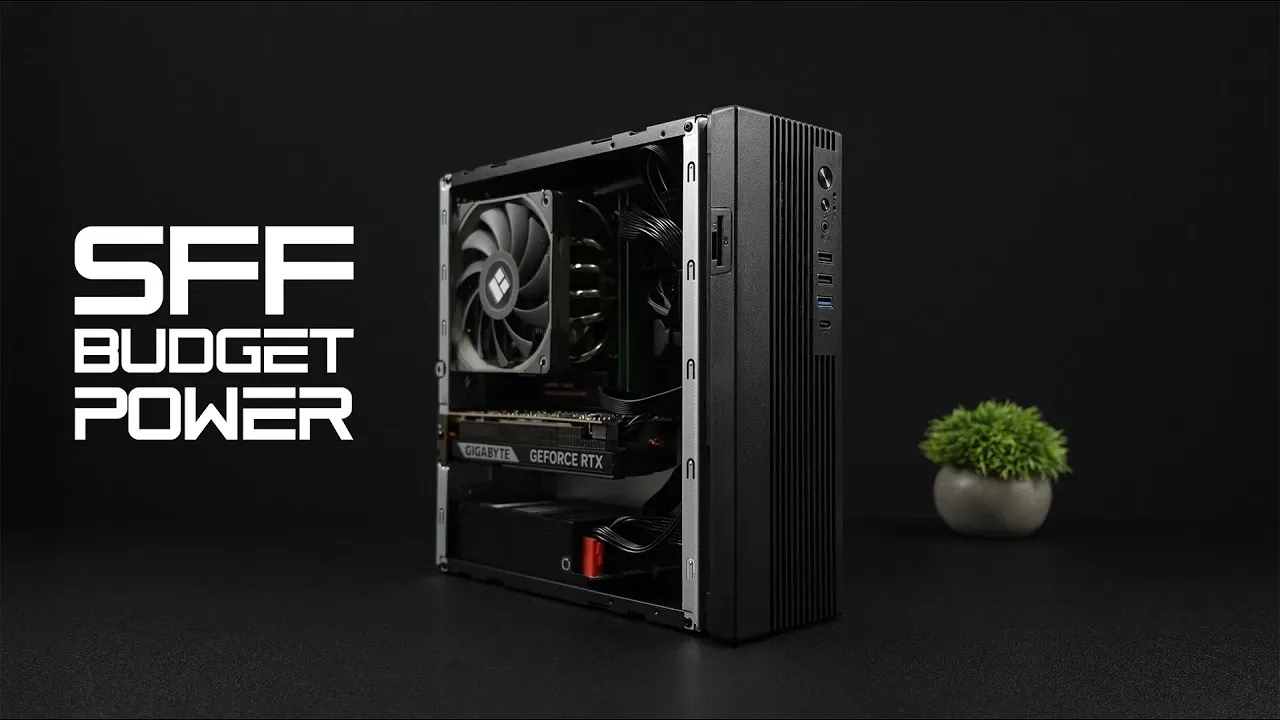
What if we told you that building a powerful gaming PC doesn’t have to break the bank, or take up half your desk? Imagine playing your favorite games at 1080p or even 1440p, all while keeping your setup sleek and compact. In the video, ETA PRIME breaks down how to assemble a budget-friendly small form factor (SFF) gaming PC that punches well above its price point. With a mix of smart component choices and a few clever tricks, this build delivers performance that rivals much pricier setups, proving that size and cost don’t have to limit your gaming ambitions.
In this deep dive, we’ll explore how to balance affordability and performance without cutting corners. From choosing the right CPU and GPU to optimizing thermal management in tight spaces, this guide covers every detail you need to know. Whether you’re a first-time builder or a seasoned enthusiast, you’ll discover practical tips for sourcing components, maximizing airflow, and achieving smooth gameplay. If you’ve ever wondered how to get the most out of a compact gaming rig, this build offers some surprising answers, and a few lessons in creative problem-solving along the way.
Budget SFF Gaming PC Guide
TL;DR Key Takeaways :
- Building a small form factor (SFF) gaming PC is now more accessible, offering a balance of performance and affordability for 1080p and 1440p gaming.
- The ASRock Mini-ITX B550 motherboard paired with the AMD Ryzen 7 5700G CPU provides a strong foundation, with integrated graphics as a fallback for budget-conscious builders.
- Key components include a 1TB M.2 SSD for fast storage, 16GB of dual-channel DDR4 RAM for optimal performance, and optional GPU choices like the Intel Arc A380 or Nvidia GeForce RTX 5060 for tailored gaming needs.
- Efficient thermal management is achieved with the Thermaltake AXP120 low-profile cooler, additional case fans, and a compact Mini-ITX case, making sure stable performance in tight spaces.
- Cost-saving strategies, such as sourcing used components, allow for a budget-friendly build without sacrificing quality, making this SFF PC a versatile and high-value option for modern gaming.
Core Components: Motherboard and CPU
The motherboard and CPU form the backbone of any gaming PC. For this build, the ASRock Mini-ITX B550 motherboard is an excellent choice. Designed for AMD’s AM4 platform, it offers a compact size ideal for SFF cases while supporting advanced features like PCIe 4.0 for faster data transfer. This ensures compatibility with modern GPUs and storage devices.
Pairing this motherboard with the AMD Ryzen 7 5700G processor provides a strong foundation. The Ryzen 7 5700G features 8 cores, 16 threads, and a boost clock of up to 4.6 GHz, delivering excellent multitasking and gaming performance. Additionally, its integrated Radeon graphics serve as a reliable fallback if a discrete GPU isn’t immediately available, making it a versatile option for budget-conscious builders.
Storage and Memory: Optimizing Speed and Capacity
For storage, a 1TB M.2 SSD is recommended. While this particular SSD is a used component and lacks a heatsink, it offers fast read and write speeds, making sure quick game load times and smooth application performance. The compact M.2 form factor also helps reduce cable clutter, which is especially important in SFF builds.
Complementing the storage is 16GB of DDR4 RAM, configured as two 8GB sticks running at 3200 MT/s. This dual-channel setup strikes an ideal balance between cost and performance, providing sufficient memory bandwidth for gaming, multitasking, and even light content creation. For those looking to future-proof their system, upgrading to 32GB of RAM is a viable option, though not strictly necessary for most gaming scenarios.
Powerful DIY SFF Budget Gaming PC

Below are more guides on budget gaming PC from our extensive range of articles.
- DIY Budget Gaming PC for Under $350 : Ryzen 7 5700G & RX 7600
- How to Build a Budget Gaming PC for 1440p Performance in 2025
- Build a Budget Gaming PC with SteamOS in 2025
- How to Build a Budget Gaming PC for Under $300
- $240 Budget Gaming PC Build : Play Cyberpunk 2077 for Less
- Dual GPU Budget Gaming PC Setup Using Lossless Scaling in
- How to Build a Budget 4K Gaming PC for Smooth Gameplay
- Build a Budget SFF Gaming PC for 1440p Gaming in 2025
- DIY Budget Gaming PC for Stunning 1440p Performance
- How to Build a Budget Gaming PC with Steam Deck OS for $250
Cooling and Case: Efficient Thermal Management
Thermal management is a critical consideration in compact builds, where space constraints can lead to higher temperatures. The Thermaltake AXP120 low-profile CPU cooler is a standout choice for this build. Featuring six heat pipes and a 120mm fan, it effectively dissipates heat from the Ryzen 7 5700G, making sure stable performance even during extended gaming sessions.
The components are housed in a no-name Mini-ITX case. Despite its generic branding, this case offers surprising versatility. It supports dual-slot low-profile GPUs with minor modifications and can be positioned vertically or horizontally to fit your workspace. While the case lacks premium features like tempered glass panels or advanced cable management, its compact design and affordability make it a practical choice for budget-conscious builders.
Power Supply and Airflow: Making sure Stability
A reliable power supply is essential for stable and efficient performance. The Aiva 500W fully modular power supply is a practical choice for this build. Its modular design minimizes cable clutter, which is crucial in tight SFF cases, and its 500W capacity is sufficient to power the selected components.
To further enhance airflow, additional 80mm Thermaltake fans are installed. These fans help maintain consistent cooling by expelling hot air and drawing in fresh air, reducing the risk of thermal throttling. For those seeking even better airflow, upgrading to higher-quality fans or experimenting with fan placement can yield noticeable improvements.
Graphics Card Options: Performance Tailored to Your Budget
The choice of GPU significantly impacts gaming performance. This build offers two options to cater to different budgets and performance needs:
- Intel Arc A380: A budget-friendly option capable of 1080p gaming. It supports modern features like ray tracing and provides solid performance for less demanding titles.
- Nvidia GeForce RTX 5060 (low-profile): A more powerful choice for 1440p gaming. It excels in DLSS-enhanced titles and offers superior ray tracing performance, making it ideal for gamers seeking higher frame rates and visual fidelity.
Both GPUs deliver excellent value, with the RTX 5060 offering a noticeable edge in demanding games. Choosing between these options depends on your budget and gaming preferences.
Performance Benchmarks: Real-World Results
This SFF gaming PC delivers impressive performance across synthetic benchmarks and real-world gaming tests. Below are some key results:
- Geekbench 6: Single-core score of 2020 and multi-core score of 7567, highlighting the CPU’s strong performance.
- 3DMark Steel Nomad: Total score of 3128, showcasing the system’s gaming capabilities.
In gaming scenarios, the system achieves the following frame rates:
- Red Dead Redemption 2: 60-90 FPS at Ultra settings with DLSS Balanced.
- Borderlands 4: 150+ FPS at High settings with DLSS Frame Generation.
- Cyberpunk 2077: 70+ FPS at Ultra settings with DLSS Quality.
- Spider-Man 2: 60+ FPS at High settings with DLSS Balanced.
These results demonstrate the system’s ability to handle modern games at high settings, making it a versatile choice for gamers.
Thermal Performance: Maintaining Safe Temperatures
Thermal performance is a critical aspect of SFF builds. During gaming, the CPU averages 67°C, peaking at 82°C, while the GPU maintains an average of 71°C, with a maximum of 84°C. These temperatures are well within safe operating limits, making sure reliable performance over time. For those seeking even better thermal efficiency, applying high-quality thermal paste or upgrading case fans can further reduce temperatures.
Cost-Saving Strategies: Using Used Components
Building a budget-friendly gaming PC often involves sourcing used components. Platforms like eBay and local marketplaces can offer significant savings on items such as the M.2 SSD, DDR4 RAM, and even GPUs. When purchasing used parts, it’s essential to:
- Verify compatibility with your build to avoid compatibility issues.
- Inspect the condition of components, making sure they are free from physical damage.
- Check seller reviews and ratings to ensure reliability.
By carefully selecting used components, you can reduce costs without compromising performance.
Compact, Affordable, and Capable
This SFF gaming PC demonstrates that you don’t need to compromise on performance or quality to stay within budget. By carefully selecting components and optimizing thermal management, you can build a compact system capable of handling modern games at high settings and resolutions. Whether you’re gaming at 1080p or exploring 1440p, this build offers exceptional value and versatility, making it an excellent choice for gamers seeking a balance between performance and affordability.
Media Credit: ETA PRIME
Disclosure: Some of our articles include affiliate links. If you buy something through one of these links, Geeky Gadgets may earn an affiliate commission. Learn about our Disclosure Policy.
