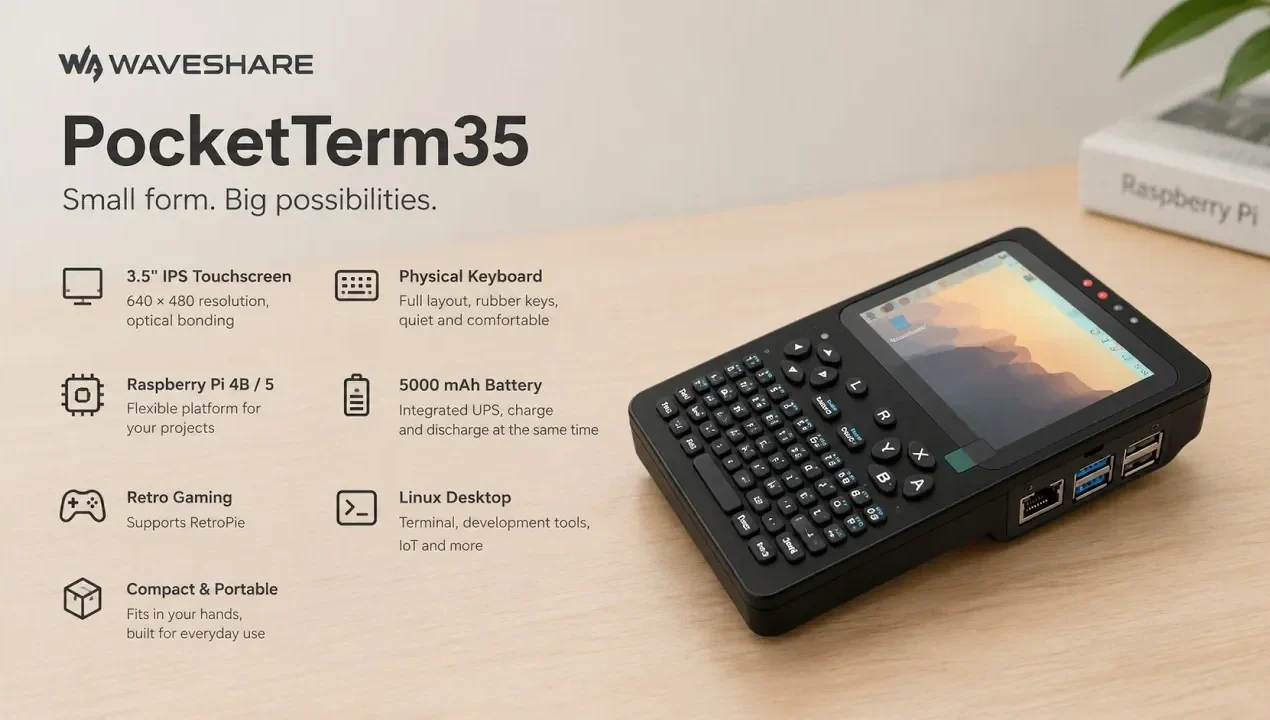
The Waveshare PocketTerm35 offers a compact and portable computing experience built around the Raspberry Pi 4 or 5, making it a versatile choice for various applications. With a 3.5-inch IPS touchscreen at 640×480 resolution and a built-in rubber-key keyboard, it balances portability and usability for tasks like programming, IoT management and retro gaming. DevelopAKR explores the straightforward assembly process, which includes aligning components, managing cables and integrating a 5,000 mAh battery with UPS functionality. This hands-on approach not only ensures a functional device but also helps users familiarize themselves with its internal design.
Dive into this breakdown to understand how the PocketTerm35 supports diverse workflows, from coding in a Linux environment to configuring IoT devices and playing classic games with RetroPie. You’ll gain insights into its performance with Raspberry Pi hardware, practical assembly tips and potential areas for improvement, such as keyboard feedback and screen resolution. Whether you’re a hobbyist or a developer, this guide provides a clear look at what the PocketTerm35 can offer for portable computing.
Compact Design with Enhanced Usability
TL;DR Key Takeaways :
- The Waveshare PocketTerm35 is a portable computing device built around the Raspberry Pi 4 Model B or Raspberry Pi 5, offering a full Linux environment for programming, IoT projects, retro gaming and general computing tasks.
- It features a 3.5-inch IPS touchscreen with 640×480 resolution, a built-in rubber-key keyboard and a durable, ergonomic design for portability and functionality.
- The device supports a wide range of applications, including software development, terminal-based tasks, retro gaming with RetroPie and everyday computing, powered by the Raspberry Pi’s performance.
- The assembly kit includes a 5,000 mAh lithium battery with UPS functionality, cables, connectors, mounting hardware and a detailed user manual, making it accessible for users of all skill levels.
- Potential improvements include upgrading the keyboard to harder plastic keys for better tactile feedback and offering a higher-resolution touchscreen for enhanced visuals.
The PocketTerm35 is engineered for portability while maintaining a high level of functionality. Its durable and ergonomic case houses a 3.5-inch IPS touchscreen with a resolution of 640×480, delivering sharp visuals and responsive touch input. This screen size strikes a balance between portability and usability, making it suitable for both detailed tasks and casual use. Complementing the touchscreen is a built-in rubber-key keyboard, which, while functional, could benefit from firmer feedback to improve typing comfort during extended use.
The device’s design emphasizes practicality, making it an excellent choice for on-the-go tasks. Whether you are coding, managing IoT devices, or enjoying retro games, the PocketTerm35 ensures a seamless and efficient experience in a compact form factor. Its lightweight construction further enhances its portability, allowing users to carry it effortlessly for work or leisure.

Hardware Compatibility and Performance
The PocketTerm35 supports both the Raspberry Pi 4 Model B and Raspberry Pi 5, providing users with the flexibility to choose the hardware that best suits their performance needs. This compatibility ensures that the device can handle a variety of tasks within a full Linux environment, including but not limited to:
- Software development and programming, offering a portable workstation for coders.
- Terminal-based operations such as server management and IoT device configuration.
- Retro gaming with full compatibility for RetroPie, allowing access to a vast library of classic games.
- Everyday computing tasks like web browsing, document editing and multimedia playback.
The PocketTerm35’s ability to integrate seamlessly with Raspberry Pi hardware makes it a versatile tool for both professional and recreational applications. Its performance is further enhanced by the Raspberry Pi’s processing power, making sure smooth operation across various use cases.

Advance your skills in Raspberry Pi 5 by reading more of our detailed content.
- Raspberry Pi 5 tablet using Raspad 3
- WiFi 7 on Raspberry Pi 5: Unlock Blazing Speeds and Next-Gen Features
- 7+ Raspberry Pi 5 operating systems compared and explored
- Zima Board 2 Review : Has the Future of Compact Computing Arrived?
- How to build a Raspberry Pi 5 NAS
- Raspberry Pi CM5 Development Kit Unboxing
- Transform Your Raspberry Pi 5 Into a Desktop Powerhouse with Alpine Linux
- RK3588 ARM PC vs N100 Intel PC Ubuntu 24.04 performance comparison
- Passive cooling a Raspberry Pi 5 for performance
- Best 7 Raspberry Pi Desktop OS Reveiwed for 2026
Comprehensive Assembly Kit
The PocketTerm35 comes as an assembly kit, thoughtfully designed to provide everything needed to build a functional portable computer. The kit includes:
- A 5,000 mAh lithium battery with integrated UPS functionality, making sure uninterrupted power during use and protecting against unexpected shutdowns.
- Cables and connectors for seamless integration of the Raspberry Pi and other components, making sure a hassle-free setup.
- Mounting hardware, including screws and brackets, to securely assemble the device within its case.
- A screwdriver and a detailed user manual with clear, step-by-step instructions to guide users through the assembly process.
The inclusion of these components ensures that even users with limited technical expertise can assemble the PocketTerm35 with ease. The user manual provides detailed guidance, making the process straightforward and accessible to beginners while still engaging for experienced users.
Step-by-Step Assembly Process
Assembling the PocketTerm35 is a straightforward process that involves installing the Raspberry Pi, battery and connectors into the provided case. The detailed user manual walks you through each step, making sure that the assembly is both efficient and error-free. Key considerations during assembly include:
- Proper alignment of components to ensure a secure fit within the case.
- Attention to cable management to prevent damage and maintain optimal performance.
- Careful handling of the touchscreen and keyboard to avoid scratches or misalignment.
With careful adherence to the instructions, users can have their PocketTerm35 fully operational in a short amount of time. The assembly process not only provides a sense of accomplishment but also familiarizes users with the device’s internal components, enhancing their understanding of its functionality.
Functionality and Versatile Applications
The PocketTerm35 combines a responsive touchscreen and a physical keyboard to offer flexible input options, making it suitable for a wide range of tasks. Its applications include:
- Programming and software development in a portable Linux environment, ideal for developers on the move.
- Terminal-based tasks such as server management, IoT device configuration and network diagnostics.
- Retro gaming with support for RetroPie, providing access to a diverse library of classic games from various platforms.
- Everyday computing tasks, including web browsing, document editing and multimedia consumption.
The integrated UPS functionality ensures that the device remains operational even during power interruptions, making it a reliable choice for critical applications. This feature is particularly valuable for users working in environments where consistent power supply cannot be guaranteed.
Potential Areas for Improvement
While the PocketTerm35 offers impressive functionality and design, there are areas where it could be refined to enhance user experience. One notable improvement would be replacing the rubber keyboard keys with harder plastic ones. This change would provide better tactile feedback and improve typing comfort, especially during prolonged use. Additionally, offering an optional upgrade for a higher-resolution touchscreen could further enhance the device’s appeal for users requiring more detailed visuals.
A Portable Solution for Diverse Needs
The Waveshare PocketTerm35 stands out as a versatile and portable computing solution that combines the power of the Raspberry Pi with a compact, user-friendly design. Its compatibility with Linux and RetroPie, coupled with features like a touchscreen, keyboard and integrated UPS, makes it suitable for a wide range of applications. Whether you are a developer, IoT enthusiast, or retro gaming fan, the PocketTerm35 provides a reliable and portable platform to meet your needs. With its straightforward assembly process and thoughtfully designed components, it is a valuable addition to any tech enthusiast’s toolkit.
Media Credit: ETA Prime & DevelopAKR
Disclosure: Some of our articles include affiliate links. If you buy something through one of these links, Geeky Gadgets may earn an affiliate commission. Learn about our Disclosure Policy.
