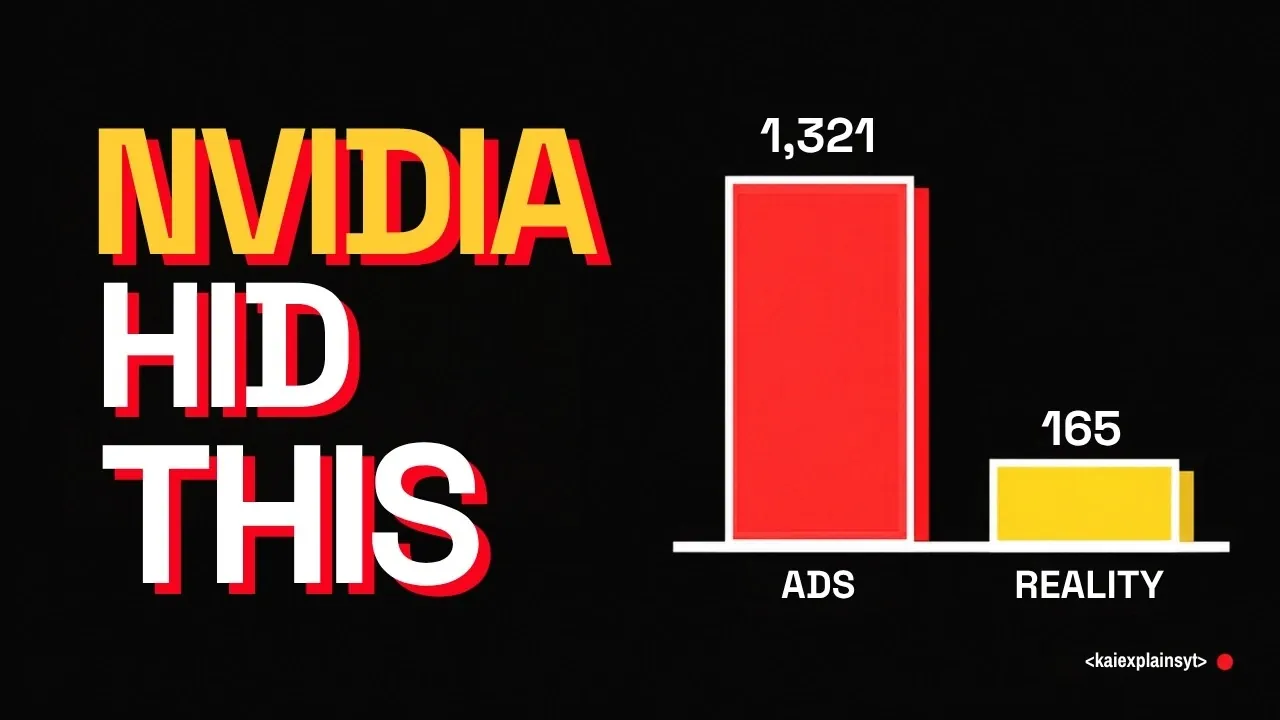
Nvidia’s consumer GPUs, including high-end models like the RTX 4090, are often touted as ideal for AI workloads. However, as Kai explains, these GPUs come with hidden firmware-level restrictions that can significantly limit their performance in real-world scenarios. For instance, tasks requiring full-precision (FP32) computations, such as long-context language model inference or high-resolution image generation, are particularly affected by features like register throttling. While an open source Linux kernel module has been developed to bypass these constraints and unlock the GPU’s full potential, implementing it involves technical challenges and potential risks.
Explore how these limitations impact different workloads and what options are available to mitigate them. You’ll gain insight into the benefits and trade-offs of using the unlock module, including its potential to boost performance by up to 39% for specific tasks. Additionally, learn about alternative strategies, such as adjusting GPU power limits, which can offer meaningful improvements without modifying firmware. This feature provides a balanced look at the considerations users must weigh when optimizing Nvidia GPUs for AI applications.
Understanding Why Your GPU May Underperform
TL;DR Key Takeaways :
- Nvidia’s consumer GPUs, like the RTX 4090, face firmware-imposed limitations that hinder real-world AI performance, particularly for full-precision workloads.
- An open source Linux kernel module can bypass these restrictions, unlocking up to 33-39% performance gains for tasks requiring high computational accuracy, but it involves security risks and technical expertise.
- High-impact use cases for the unlock include full-precision AI workloads like vision-language models and long-context language models, while gaming and quantized models see minimal benefits.
- Adjusting GPU power limits offers a simpler, safer alternative to improve performance without modifying firmware, especially for energy-intensive tasks.
- Nvidia’s upcoming RTX 50 series GPUs are expected to have similar constraints, emphasizing the need for users to evaluate hardware capabilities against their specific workload requirements.
Despite Nvidia’s claims of exceptional AI performance, such as the RTX 4090’s advertised 1,321 AI TOPS (Tera Operations Per Second), users often encounter a noticeable gap between theoretical and actual performance. This discrepancy arises from several key factors:
- Sparsity Assumptions: Nvidia’s performance metrics are based on sparse AI models, which are not always representative of real-world workloads.
- Precision Prioritization: The hardware is optimized for lower-precision operations like INT8, while full-precision (FP32) calculations, critical for certain tasks, are deprioritized.
- Register Throttling: Firmware-level restrictions limit the speed of 32-bit accumulation, reducing computational power for workloads requiring high precision.
These limitations are particularly evident in resource-intensive tasks such as high-resolution image generation, video rendering and long-context language model inference. For users relying on full-precision computations, these constraints can significantly hinder productivity and efficiency.
Unlocking GPU Potential with a Linux Kernel Module
A recently developed open source Linux kernel module offers a workaround to Nvidia’s imposed restrictions. By exploiting a firmware vulnerability, this module unlocks the GPU’s full potential, allowing substantial performance improvements. Users have reported gains of 33-39% in tasks that rely on full-precision models.
For instance, workloads such as generating detailed images, processing long-context language models and fine-tuning AI models benefit significantly from the unlock. Additionally, energy efficiency improves as the GPU operates closer to its advertised capabilities, reducing wasted computational power.
However, implementing this solution requires technical expertise and a clear understanding of its implications. The module is not officially supported and its use involves certain risks that must be carefully evaluated.

Browse through more resources below from our in-depth content covering more areas on NVIDIA.
- Mac Studio M5 Ultra vs Nvidia DGX Spark: Compared for Local AI
- Valve Adds Initial NVIDIA GPU Driver Support to SteamOS
- Dynamic Routing in NVIDIA Switchboard Boosts Speed By 50%
- Alibaba Panjiu AL128 Replaces NVIDIA with 128 Linked Chips
- NVIDIA NVFP4 Boosts Prompt Processing by 46% on Blackwell
- NVIDIA DGX Spark Price Hits $4,699 Amid Memory Shortages
- Thermaltake Element V NVIDIA Edition Unveiled
- NVIDIA RTX Spark N1X Beats the RTX 5070 Laptop GPU By 4.3%
- Mac Studio Beats DGX Spark in local AI Tests with 1.2 TB/s Bandwidth
- NVIDIA RTX 4060 Runs Cyberpunk 2077 on Snapdragon X2 Elite
Who Stands to Benefit Most?
The effectiveness of the unlock module varies depending on the type of workload. Some users will see fantastic improvements, while others may experience negligible benefits. Key scenarios include:
- High-Impact Use Cases: Linux users working with full-precision models, such as vision-language models (VLMs) or long-context language models, will experience the most significant performance boosts. These workloads demand high computational accuracy and benefit greatly from the removal of artificial constraints.
- Low-Impact Scenarios: Tasks involving quantized models (e.g., GGUF formats in Llama CPP) or memory-bound operations like token generation see minimal improvement. Similarly, gaming and cryptocurrency mining remain largely unaffected by the unlock.
Understanding the specific demands of your workload is crucial before deciding whether to implement the unlock module.
Risks and Limitations to Consider
While the unlock module offers clear advantages for certain workloads, it also comes with notable risks and limitations that users must weigh carefully:
- Security Concerns: Using the module requires disabling secure boot, which increases your system’s vulnerability to malicious attacks.
- Firmware Updates: Nvidia may address the exploit in future firmware updates, potentially rendering the unlock ineffective.
- Workload Dependency: The performance gains are highly specific to certain workloads, meaning casual users or those with less demanding tasks may not find the unlock worthwhile.
These factors highlight the importance of assessing your system’s security and workload requirements before proceeding with the unlock.
Power Limit Adjustments: A Simpler Alternative
For users seeking a less complex solution, adjusting GPU power limits can provide meaningful performance improvements without the risks associated with the unlock module. Many GPUs, including the RTX 4090, are often run at reduced power settings, which can throttle performance. For example, operating an RTX 4090 at 200W instead of its maximum capacity can significantly impact speed and efficiency.
By increasing the power limit to 250W or higher, users can unlock additional performance for energy-intensive tasks. This adjustment is straightforward and does not require any modifications to firmware or software, making it an attractive option for those looking to optimize their GPU’s capabilities with minimal risk.
Future Implications for Nvidia GPUs
The limitations observed in the RTX 4090 are unlikely to be isolated. Nvidia’s upcoming RTX 50 series GPUs are expected to exhibit similar constraints, though no unlock solution currently exists for these newer models. This trend reflects a growing divergence between Nvidia’s marketing claims and the real-world performance of its hardware.
For AI professionals and enthusiasts, understanding these limitations is critical for making informed purchasing decisions. As hardware becomes increasingly specialized, users must carefully evaluate whether a GPU’s advertised capabilities align with their specific needs.
Making the Right Choice for Your Workload
The Linux kernel module offers a powerful option for users seeking to maximize GPU performance in specific AI workloads, particularly those requiring full-precision computations. However, its implementation involves risks that may not be acceptable for all users. Before proceeding, it is essential to evaluate your workload requirements, consider adjusting power limits and weigh the potential benefits against the associated risks.
For many users, optimizing GPU performance can be achieved through simpler methods, such as power limit adjustments, without compromising system security. By understanding the capabilities and limitations of your hardware, you can make informed decisions that align with your goals and ensure the best possible performance for your specific use case.
Media Credit: Kai
Disclosure: Some of our articles include affiliate links. If you buy something through one of these links, Geeky Gadgets may earn an affiliate commission. Learn about our Disclosure Policy.
