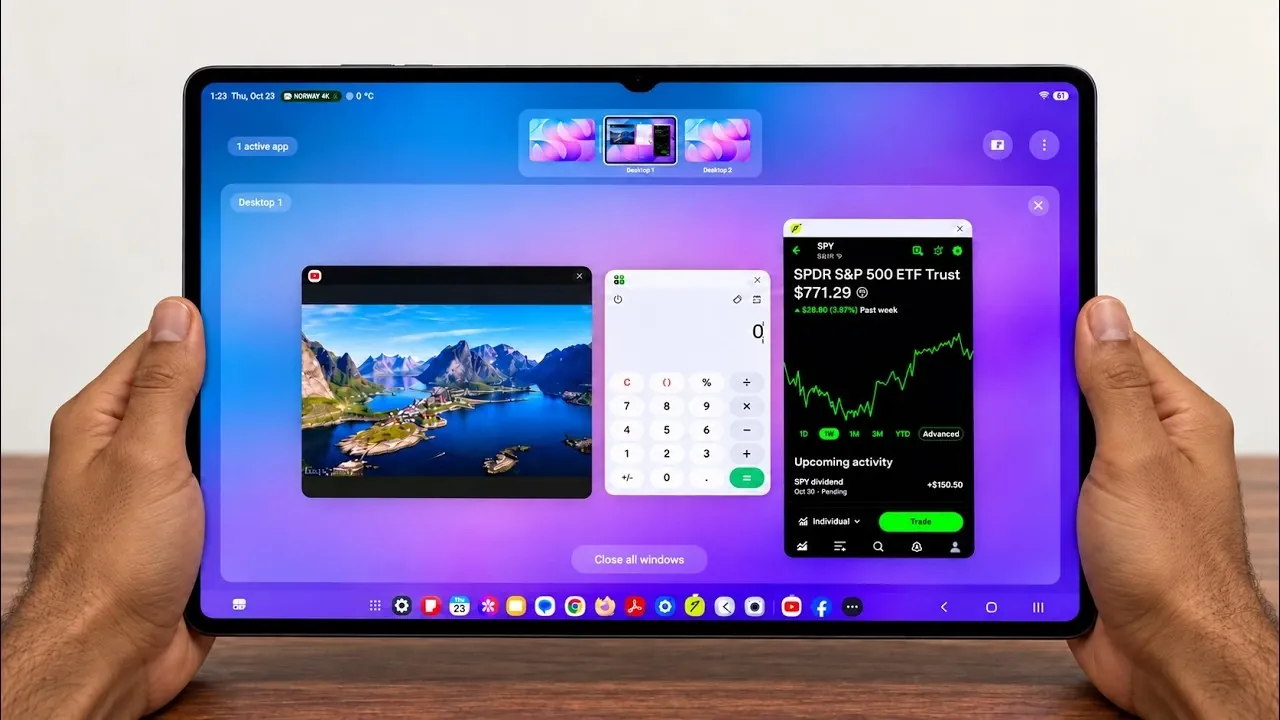
The Samsung Galaxy Tab S12 Ultra, when paired with Samsung DeX, redefines the potential of a tablet by offering a robust platform for productivity. This combination transforms the device into a versatile workstation, delivering a desktop-like experience that supports multitasking, customizable workflows, and seamless transitions between Android and desktop modes. Powered by the latest One UI 9 and complemented by accessories like the Samsung Keyboard Pro case, the Galaxy Tab S12 Ultra caters to the needs of professionals, creatives, and tech enthusiasts seeking a portable yet powerful solution. The video below from Sakitech gives us more details.

What Sets Samsung DeX Apart?
At the core of the Galaxy Tab S12 Ultra’s productivity capabilities lies Samsung DeX, a platform designed to emulate the functionality of a traditional PC. DeX offers a desktop-like interface that allows you to work with multiple resizable windows, making multitasking intuitive and efficient. For example, you can:
- Edit a document in one window while participating in a video call in another.
- Browse the web or manage emails without switching between apps.
- Use split-screen multitasking to divide your screen for different tasks simultaneously.
DeX also introduces customizable workspaces, supporting up to four distinct setups tailored to your specific needs. Whether you’re managing professional tasks, personal projects, or creative endeavors, you can switch between these workspaces effortlessly. The seamless transition between Android and DeX modes ensures that you can adapt the device to your workflow without interruptions, making it a practical tool for both casual and professional use.
Enhanced Productivity with One UI 9
The Galaxy Tab S12 Ultra benefits significantly from One UI 9, which brings a range of enhancements designed to optimize productivity. These updates include:
- An auto-hiding taskbar in DeX mode, maximizing screen space for your applications.
- Customizable settings for peripherals such as the mouse, touchpad, and keyboard, allowing for a personalized experience.
- Adjustable pointer size and color when using the Samsung Keyboard Pro case, making sure comfort and precision during extended use.
These features make the tablet more adaptable to various workflows, whether you’re managing complex projects, conducting research, or handling everyday tasks. The intuitive design of One UI 9 ensures that the Galaxy Tab S12 Ultra remains user-friendly while offering advanced tools for productivity.
Wireless Projection: Expanding Your Workspace
One of the standout features of Samsung DeX is its wireless projection capability, which allows you to extend your workspace to larger displays via Wi-Fi. This functionality is particularly beneficial for:
- Delivering professional presentations without the need for additional hardware.
- Collaborating on projects in real-time with colleagues or clients.
- Enjoying a more expansive view for multitasking or entertainment purposes.
The wireless connection is designed to be stable and responsive, making sure a smooth experience whether you’re working on critical tasks or streaming high-definition content. This feature enhances the versatility of the Galaxy Tab S12 Ultra, making it an excellent choice for users who require flexibility in their work environments.
Samsung Keyboard Pro Case: A Productivity Essential
The Samsung Keyboard Pro case is a key accessory that improves the DeX experience by combining a physical keyboard with a built-in trackpad. This accessory transforms the Galaxy Tab S12 Ultra into a capable laptop replacement, offering several advantages:
- Precise navigation through the integrated trackpad, which supports intuitive interaction with the DeX interface.
- Keyboard shortcuts that streamline common tasks, improving efficiency.
- A lightweight and portable design that complements the tablet’s mobility, making it ideal for on-the-go productivity.
The tactile feedback of the keyboard and the convenience of the trackpad ensure that you can work comfortably and efficiently, whether you’re drafting documents, editing spreadsheets, or navigating complex workflows. This accessory underscores the Galaxy Tab S12 Ultra’s potential as a multifunctional device for professionals and students alike.
Seamless Navigation and Workflow Integration
Navigating DeX mode is designed to be straightforward, allowing you to focus on your tasks without unnecessary distractions. One of the most practical features is the ability of DeX windows to retain their state even when switching back to Android mode. This ensures that your progress is never lost, allowing you to transition between work and leisure activities seamlessly.
The thoughtful integration of DeX with the Galaxy Tab S12 Ultra’s hardware and software ensures that the device adapts to your needs, whether you’re working on a detailed project, creating digital art, or simply relaxing with your favorite content. This level of flexibility makes the tablet a reliable companion for a wide range of activities.
A New Standard for Productivity and Versatility
The Samsung Galaxy Tab S12 Ultra, combined with Samsung DeX, establishes itself as a benchmark for productivity and versatility in the tablet market. With its desktop-like interface, advanced multitasking capabilities, customizable workspaces and wireless projection, the device is well-suited for both professional and personal use. Enhanced by the intuitive features of One UI 9 and the functionality of accessories like the Samsung Keyboard Pro case, the Galaxy Tab S12 Ultra delivers a seamless and efficient user experience.
Whether you’re tackling complex projects, collaborating with colleagues, or enjoying entertainment, this tablet offers a balanced blend of power, convenience, and adaptability. The Galaxy Tab S12 Ultra, with its innovative features and thoughtful design, enables users to maximize their efficiency and creativity, setting a new standard for what a tablet can achieve.
Here are more guides from our previous articles and guides related to the Samsung Galaxy Tab S12 Ultra that you may find helpful.
- The Problem With Samsung’s Upcoming Galaxy Tab S12 Ultra
- Samsung Galaxy Tab S12 Ultra: the Biggest Upgrades Leaked So Far
- Leaked: First Look at the Samsung Galaxy Tab S12 Ultra Design
- Same Design May Hide Huge Samsung Galaxy Tab S12 Ultra IUpgrades
- Samsung Galaxy Tab S12 Ultra vs M5 iPad Pro: What to Expect
Source & Image Credit: Sakitech
Disclosure: Some of our articles include affiliate links. If you buy something through one of these links, Geeky Gadgets may earn an affiliate commission. Learn about our Disclosure Policy.
