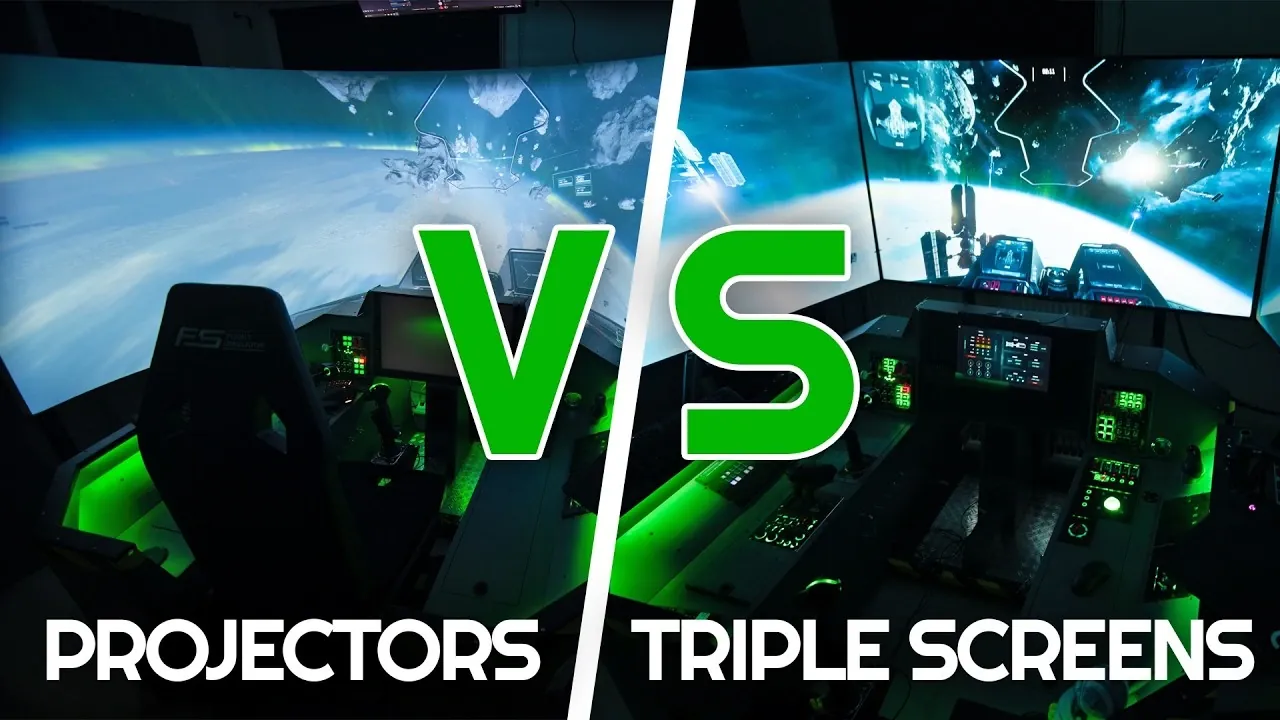
What’s the ultimate way to bring your simulator setup to life—projectors or triple screens? Below, UndeadParrot breaks down how each option transforms your experience, from the sweeping immersion of curved projector displays to the crisp, vibrant visuals of high-resolution monitors. Choosing between these two setups isn’t just about aesthetics; it’s about how deeply you want to feel connected to your virtual cockpit or racetrack. While projectors promise a wraparound realism that can make you forget you’re in your living room, triple screens deliver unmatched clarity and simplicity, making them a favorite for many enthusiasts. But which one truly reigns supreme for your needs? The answer might surprise you.
In this guide, we’ll explore the key factors that set projectors and triple screens apart, from immersion and image quality to the practicality of setup and long-term upkeep. Whether you’re building a racing rig or a flight simulator, understanding the trade-offs, like the complexity of projector calibration versus the plug-and-play ease of monitors, can save you time, money, and frustration. If you’ve ever wondered whether the allure of a projector’s cinematic visuals is worth the effort or if triple screens are the smarter, more reliable choice, this breakdown will help you decide. After all, the right setup isn’t just about performance, it’s about creating an experience that keeps you coming back for more.
Projectors vs Triple Screens
TL;DR Key Takeaways :
- Immersion: Projectors provide a wraparound field of view for enhanced realism, especially in flight and racing simulators, while triple screens offer a cockpit-like experience with high clarity.
- Image Quality: Triple screens deliver sharper visuals, better contrast, and accurate colors, whereas projectors may suffer from resolution loss, distortion, and sensitivity to ambient light.
- Ease of Setup: Triple screens are plug-and-play and require minimal maintenance, while projectors demand complex calibration, alignment, and ongoing adjustments.
- Cost Considerations: Projectors may seem cheaper initially but require additional investments in hardware and maintenance, whereas triple screens offer better long-term value and durability.
- Practicality: Triple screens are more user-friendly and reliable, making them a practical choice for frequent use, while projectors are better suited for users prioritizing immersive visuals and willing to manage the complexity.
Immersion: The Depth of Realism
For those prioritizing immersion, projectors often provide a more compelling experience. A properly configured projector system, especially when paired with a curved screen, can create a wraparound field of view that closely mimics real-world environments. This is particularly beneficial for flight simulators and racing simulators, where peripheral vision plays a crucial role in enhancing realism. However, achieving this level of immersion requires precise calibration and, in many cases, multiple projectors to ensure seamless image coverage.
On the other hand, triple screens offer a different kind of immersive experience. While they lack the wraparound effect of projectors, their large, high-resolution displays effectively simulate a cockpit or dashboard environment. This setup provides sufficient visual coverage to maintain focus and engagement. For users who value clarity and simplicity over the expansive visuals of projectors, triple screens remain a practical and immersive choice.
Image Quality: Clarity and Precision
When it comes to image quality, triple screens have a clear advantage. Modern monitors deliver sharper visuals, superior contrast, and accurate color reproduction, all of which are essential for simulators like Flight Simulator 2020 or Flight Simulator 2024. The high resolution of monitors ensures that intricate details, such as cockpit instruments or distant landscapes, are rendered with precision, enhancing the overall experience.
In contrast, projectors face challenges in maintaining image quality, particularly on curved surfaces. The use of warping and blending software to align multiple projectors can result in resolution loss and image distortion. Additionally, projectors are more susceptible to ambient light, which can wash out colors and reduce contrast, making them less ideal for brightly lit environments. For users who prioritize visual clarity, triple screens are the better option.
Projectors vs Triple Screens for Simulator Setups
Here are more guides from our previous articles and guides related to projectors that you may find helpful.
- Benq HDR-PRO and Android TV projectors 2023
- Researchers Create 3D Display Using Fog And Multiple Projectors
- Nebra AnyBeam pocket projector from £189
- Raspberry Pi projector HAT
- VisionMaster Valerion Max and Pro 2 4K UHD Projectors
- Yaber Pico T1 slimline portable projector
- Monolith Projector iPhone Case (video)
- 3M Reveals the World\’s Smallest Micro Projector
- Sweam Pocket Touchscreen Smart Projector
- DIY Raspberry Pi Pocket Projector Project
Compatibility : Plug-and-Play vs Customization
Triple screens excel in compatibility, offering a straightforward, plug-and-play experience. Most modern simulators are optimized for multi-screen setups, making configuration simple and intuitive. Whether you’re using gaming monitors or large TVs, the process is typically hassle-free, allowing you to focus on enjoying your simulator rather than troubleshooting technical issues.
Projectors, while compatible with many simulators, often require additional setup and customization. Tools like projection mapping and warping software are necessary to align images across curved or irregular surfaces. This added complexity can be a deterrent for users who prefer a simpler, more intuitive setup. However, for those willing to invest the time and effort, projectors can deliver a uniquely immersive experience.
Ease of Setup and Maintenance
Triple screens are significantly easier to set up and maintain compared to projectors. Once installed, they require minimal adjustments, making them a reliable option for long-term use. Maintenance is straightforward, typically involving tasks like cleaning the screens and managing cables. This simplicity makes triple screens an attractive choice for users who value convenience.
In contrast, projectors demand more effort in both setup and maintenance. Calibration, alignment, and stability are ongoing concerns, particularly in environments prone to movement or temperature changes. Even slight shifts in projector placement can disrupt the image, requiring time-consuming recalibration. For users with limited time or technical expertise, this complexity can be a significant drawback.
Cost : Initial Investment vs Long-Term Value
At first glance, projectors may appear to be a more affordable option. However, a complete projector setup, including multiple units, a curved screen, and specialized software—can quickly become expensive. Additionally, ongoing maintenance costs, such as replacing bulbs or cleaning filters, add to the overall expense.
Triple screens, particularly large TVs, often provide a more cost-effective solution. While high-quality monitors may require a higher initial investment, their durability and low maintenance needs make them a better long-term choice. For budget-conscious users, triple screens offer excellent value without compromising performance.
Practicality : Balancing Performance and Usability
Practicality is a key consideration when deciding between projectors and triple screens. A complex projector system, while impressive, may discourage frequent use due to the time and effort required for calibration and maintenance. In contrast, triple screens are more user-friendly and reliable, allowing you to focus on enjoying your simulator rather than troubleshooting technical issues.
For most users, the convenience and consistency of triple screens make them the more practical option. They strike a balance between performance and ease of use, making sure that your setup remains functional and enjoyable over time.
Making the Right Choice
The decision between projectors and triple screens ultimately depends on your specific priorities and preferences. Projectors excel in delivering immersive, wraparound visuals, especially when paired with curved screens, but they require significant effort and a stable environment. Triple screens, while less immersive, offer superior image quality, compatibility, and practicality, making them a versatile and reliable choice.
By carefully weighing factors like immersion, image quality, ease of setup, and cost, you can select the option that best aligns with your needs. Whether you prioritize realism or convenience, the right setup will enhance your simulator experience and ensure long-term satisfaction.
Media Credit: UndeadParrot
Disclosure: Some of our articles include affiliate links. If you buy something through one of these links, Geeky Gadgets may earn an affiliate commission. Learn about our Disclosure Policy.
