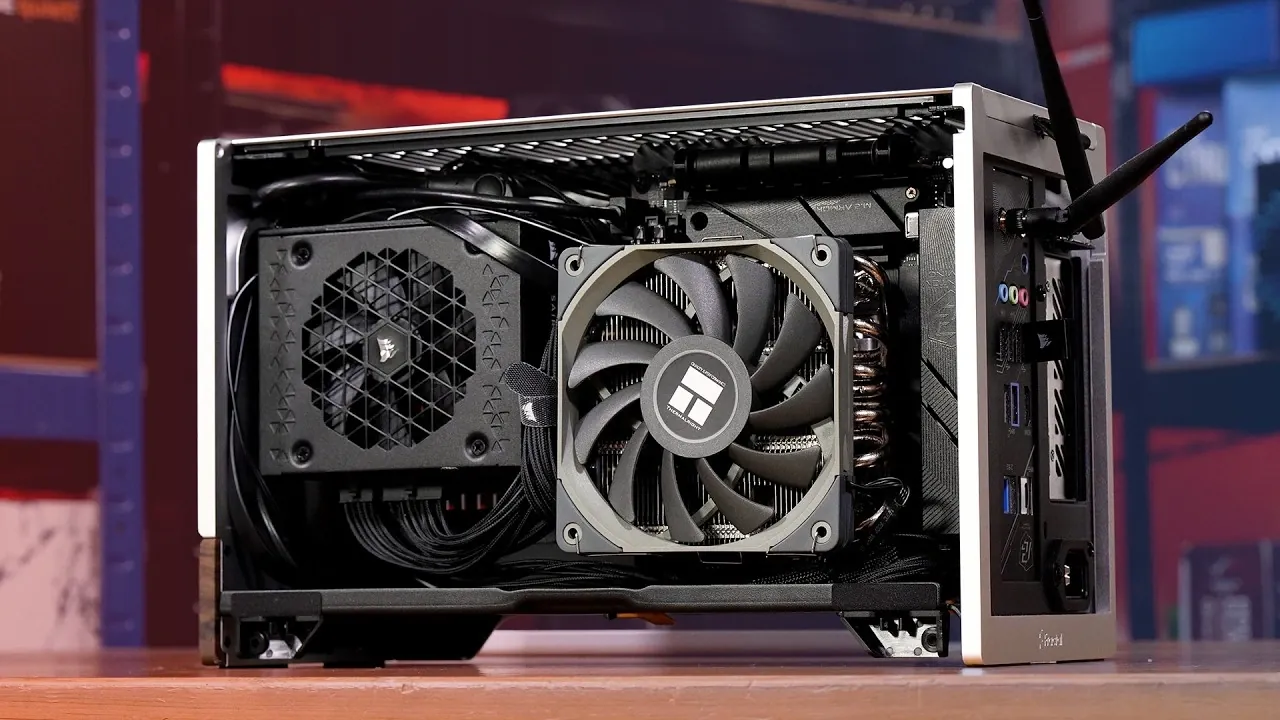
Upgrading a DIY Steam Machine can significantly improve its performance, especially when addressing thermal challenges posed by high-performance CPUs like the 7600X. TechteamGB demonstrates how replacing the Noctua L9A cooler with the Thermaltake AXP120-X67 can help manage excessive heat buildup and reduce noise levels in compact setups. For example, the original cooler struggled to keep temperatures below 96°C during demanding tasks, leading to thermal throttling and reduced CPU efficiency. This guide highlights the importance of selecting a cooling solution that balances thermal performance with the constraints of small form factor cases like the Fractal Terra.
Dive into this guide to explore the step-by-step process of upgrading your Steam Machine’s cooling system. You’ll gain insight into how to safely remove the existing cooler, properly install the Thermaltake AXP120-X67 and optimize airflow without compromising the case’s compact design. Additionally, discover the tangible benefits of this upgrade, including lower operating temperatures, quieter performance and improved system stability during intensive workloads. By following these steps, you can ensure your DIY Steam Machine is better equipped to handle modern gaming and multitasking demands.
Identifying the Problem: Initial Setup and Challenges
TL;DR Key Takeaways :
- Upgrading the Noctua L9A cooler to the Thermaltake AXP120-X67 significantly improves thermal performance, reducing CPU temperatures and eliminating thermal throttling during intensive tasks.
- The Thermaltake AXP120-X67 allows the 7600X CPU to maintain higher clock speeds, enhancing overall system performance and efficiency.
- Noise levels are reduced with the new cooler, creating a quieter and more comfortable environment, especially in living room setups.
- The upgrade process involves careful removal of the old cooler, proper installation of the new one and optimizing airflow without requiring additional fans.
- Post-upgrade benefits include improved system stability, smoother performance during demanding workloads and enhanced usability for gaming, rendering and multitasking.
The 7600X CPU powering your DIY Steam Machine is a high-performance processor capable of handling modern gaming and multitasking demands. However, when paired with the compact Noctua L9A cooler, the system may encounter significant thermal challenges during CPU-intensive tasks. These challenges can hinder the machine’s performance and disrupt its usability in a living room environment.
Key issues include:
- Excessive heat buildup: Temperatures can spike up to 96°C during heavy workloads, leading to thermal throttling and reduced performance.
- Performance limitations: Overheating forces the CPU to lower its clock speeds, preventing it from reaching its full potential.
- Increased noise levels: The Noctua L9A’s fan may ramp up significantly, creating an audible distraction in quiet settings.
These limitations highlight the need for a more efficient cooling solution to maintain consistent performance and ensure a quieter, more enjoyable user experience.
The Upgrade Process: Replacing the CPU Cooler
Replacing the Noctua L9A with the Thermaltake AXP120-X67 is a practical solution to the thermal challenges of the 7600X CPU. The Thermaltake AXP120-X67 is designed to handle higher thermal loads while maintaining a compact form factor, making it an ideal choice for small cases like the Fractal Terra. However, the upgrade process requires careful planning and precision to ensure compatibility and optimal performance.
Steps to complete the upgrade:
- Remove the existing cooler: Begin by carefully detaching the Noctua L9A cooler. Ensure the thermal paste is thoroughly cleaned from the CPU surface using isopropyl alcohol and a lint-free cloth.
- Install the Thermaltake AXP120-X67: Position the new cooler over the CPU, aligning it with the mounting brackets. Secure it in place, making sure even pressure for proper thermal contact.
- Optimize airflow: While the addition of an extra slim fan was considered, it was deemed unnecessary due to the Fractal Terra case’s efficient airflow design. This decision helps maintain a balance between cooling performance and noise levels.
By following these steps, you can ensure the new cooler is installed correctly, maximizing its effectiveness without compromising the compact design of your Steam Machine.

Here are more guides from our previous articles and guides related to Steam Machines that you may find helpful.
- High End Emulation on the Steam Machine Tested
- Compact Steam Machine Alternative : Built for 1440p Gaming
- Steam Machine Guide: How to Get Maximum Performance Out of the 6-Inch Cube
- Valve Hits 760,000 Yearly Steam Machine Sales Amid RAM Shortage
- Steam Machine Makes Couch Co-Op Feel Fresh Again : Proton, Lepton & FEX Support
- Upgrading Valve’s Steam Machine to 64GB RAM and 4TB Storage
- Steam Machine Exceeds Expectations: SteamOS, Solid Gaming Performance, Compact Design
- Steam Machine Hands on : New Console Struggles with Native 4K Gaming
- How to Upgrade Steam Machine SSD Storage with a 1TB Samsung 9100 Pro
- Valve Revamps the Steam Machine UI with New Verification Metrics
Performance Gains: Post-Upgrade Results
The Thermaltake AXP120-X67 delivers tangible improvements in both thermal management and overall system performance. After the upgrade, the 7600X CPU operates at significantly lower temperatures, even during demanding tasks. This enhanced cooling capability allows the processor to maintain higher clock speeds and operate more efficiently.
Key benefits include:
- Elimination of thermal throttling: The CPU consistently achieves clock speeds closer to its maximum 5.2 GHz, making sure smoother performance during intensive workloads.
- Reduced noise levels: The quieter operation of the Thermaltake AXP120-X67 creates a more comfortable environment, especially in living room setups where noise can be distracting.
- Improved system stability: Lower temperatures contribute to greater reliability during extended gaming sessions or rendering tasks.
While rendering benchmarks may show only modest performance gains, the overall improvements in thermal efficiency and noise reduction significantly enhance the usability and longevity of your system.
Maximizing Your Steam Machine’s Potential
Upgrading to the Thermaltake AXP120-X67 is a cost-effective and practical way to address the thermal and noise limitations of the Noctua L9A cooler. By improving temperature control and making sure quieter operation, this upgrade transforms your DIY Steam Machine into a more versatile and reliable system. Whether you’re gaming, rendering, or tackling other CPU-intensive tasks, this thoughtful hardware improvement enhances both performance and user experience, making your system better equipped to handle the demands of modern computing.
Media Credit: TechteamGB
Disclosure: Some of our articles include affiliate links. If you buy something through one of these links, Geeky Gadgets may earn an affiliate commission. Learn about our Disclosure Policy.
