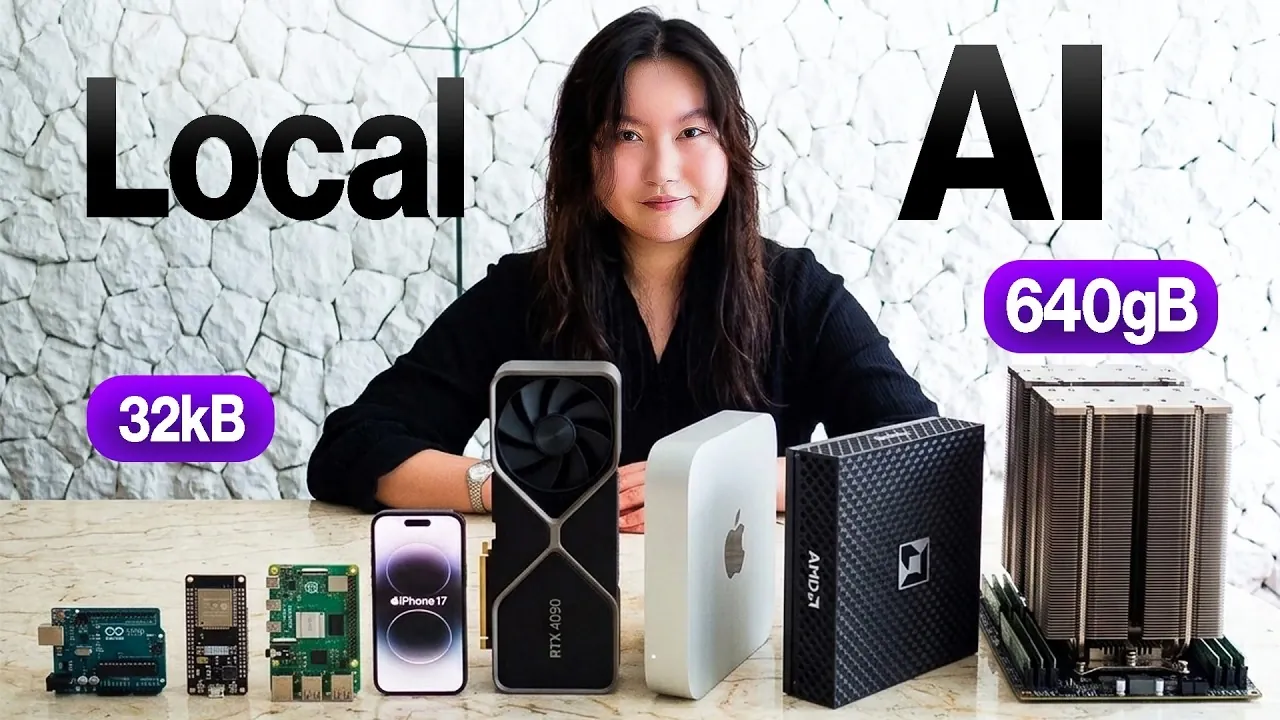
Running AI models locally has become more feasible than ever, with hardware options ranging from microcontrollers to high-performance GPUs. Tina Huang explores this diverse landscape, breaking down how devices like the Arduino R4 Uno or RTX 4090 cater to vastly different AI needs. For instance, while microcontrollers excel at lightweight tasks like object detection in IoT setups, GPUs handle demanding applications such as real-time video synthesis. By examining the trade-offs between processing power, memory and bandwidth, this deep dive offers a clear framework for understanding which hardware best suits specific AI workloads.
Discover how to align your AI ambitions with the right hardware by exploring the capabilities and constraints of various devices. Learn how mini computers like the Raspberry Pi 5 balance portability and functionality, why personal computers are ideal for medium-sized models and what makes home servers indispensable for intensive tasks. Gain insights into optimizing performance by matching model sizes to available resources and weighing capacity against bandwidth. This guide equips you with practical knowledge to navigate the complexities of local AI development effectively.
Local AI Hardware Explained
TL;DR Key Takeaways :
- AI models can now run locally on a wide range of hardware, from microcontrollers to high-performance GPUs, each suited for specific tasks based on processing power, memory and bandwidth.
- Microcontrollers like Arduino R4 Uno and ESP32S3 are ideal for lightweight AI tasks in IoT devices due to their low power consumption and affordability, but they are limited to simpler applications.
- Mini computers (e.g., Raspberry Pi 5, iPhone 16) and personal computers (e.g., MacBook Pro) offer more versatility, handling small to medium-sized AI models for tasks like language translation, coding and multimodal systems.
- Home servers (e.g., Mac Studio, AMD Ryzen AI Halo) and GPUs (e.g., RTX 4090, 8x H100 setups) are designed for demanding workloads, such as large-scale AI models, video generation and real-time processing, with GPUs excelling in speed and efficiency.
- Choosing the right hardware requires balancing capacity (model size) and bandwidth (data processing speed) while optimizing performance through practical strategies like matching model size to hardware capabilities and using cloud services when needed.
Chips: Small but Mighty
At the smallest end of the hardware spectrum are microcontrollers like the Arduino R4 Uno and ESP32S3. These devices are compact, energy-efficient and cost-effective, making them ideal for lightweight AI tasks. However, their limited memory and processing power restrict them to simpler applications. For example, an ESP32S3 can run basic models like Tiny Stories for text generation or perform object detection in constrained environments. While unsuitable for complex tasks, these chips excel when integrated into larger systems, such as IoT devices that rely on more powerful hardware for advanced processing. Their low power consumption and affordability make them a practical choice for small-scale, embedded AI solutions.
Mini Computers: Portable Versatility
Mini computers, such as the Raspberry Pi 5 and iPhone 16, offer a significant step up in capability. The Raspberry Pi 5, equipped with modest processing power and RAM, can handle small language models, speech-to-text conversions and basic visual recognition tasks. However, it struggles with larger models and lacks the GPU support necessary for advanced image or video generation. On the other hand, the iPhone 16 provides additional flexibility for running small AI models, such as those used for image generation or object detection. Despite its versatility, the iPhone 16 is constrained by iOS limitations and hardware resources, which may limit its use for more demanding applications. These devices are well-suited for portable AI solutions, offering a balance between functionality and convenience.

Here is a selection of other guides from our extensive library of content you may find of interest on local AI.
- Ollama Runs 32B Local AI Models on a $599 Mac via Quantization for Free
- How DeepSeek Fits a 284B Parameter AI Model on a Single Laptop
- Awesome DIY Raspberry Pi 5 Offline AI Companion Inspired by BMO from Adventure Time
- Beelink GTR9 Pro : The AMD Ryzen AI Max Plus 395 Mini PC Outperforming the Big Guys
- $40K Apple Mac Studio RDMA Setup: 1 TFLOP per Node, 3.7 TFLOPS Across Four
- New DeepSeek Harness Runs AI Workflows on Local Systems
- Apple Silicon AI Performance: Local Al on Apple Silicon Uses 7X Less RAM
- Intel Arc B580 Brings Local AI to the Desktop for Just $250
- 128GB Ryzen AI Halo Replaces Cloud Servers for Local AI
- AMD’s $3,500 Strix Halo Mini PC Excels in Mixture-of-Experts
Personal Computers: Balanced and Reliable
Personal computers, such as the MacBook Pro, strike a balance between portability and performance. With configurations offering up to 32GB of RAM, these machines can handle a wide range of AI models, including medium-sized language models, coding assistants and multimodal systems. For instance, a MacBook Pro can fine-tune a medium-sized AI model or run systems that integrate text, image and speech processing. The key to optimizing performance lies in aligning the model size with the available RAM to avoid overloading the system. Personal computers are ideal for users seeking a versatile platform capable of supporting diverse AI applications without the need for specialized hardware.
Home Servers: Power for Heavy Workloads
Home servers, such as the Mac Studio or AMD Ryzen AI Halo, are designed to handle demanding AI tasks. These machines feature higher RAM capacities and processing power, making them suitable for running large AI models or multiple models simultaneously. For example, a Mac Studio can manage complex image or video generation tasks while supporting other AI applications. However, trade-offs exist. Devices with high capacity but limited bandwidth may encounter challenges with tasks requiring rapid data transfer, such as real-time video processing. Home servers are best suited for users who need robust performance for intensive workloads, offering a reliable solution for advanced AI development and deployment.
GPUs: Specialists in Speed
GPUs, such as the RTX 4090 and 8x H100 GPU setups, are the preferred choice for high-speed AI processing. The RTX 4090 excels at tasks like image, video and music generation, thanks to its high bandwidth. However, its capacity limits the size of models it can handle. In contrast, an 8x H100 GPU configuration combines massive capacity and bandwidth, allowing the deployment of ultra-large models and multimodal AI systems. These setups are ideal for professionals working on innovative applications, such as real-time video synthesis or advanced generative models. GPUs are indispensable for users requiring exceptional speed and efficiency in AI processing.
Understanding AI Hardware Through a Kitchen Metaphor
To simplify the complexities of AI hardware, consider a restaurant kitchen as an analogy. The CPU, GPU and NPU are like chefs, each specializing in different tasks. RAM serves as the kitchen counter, where ingredients (data) are prepared, while memory bandwidth represents the speed at which ingredients are delivered to the counter. A small kitchen with limited counter space and slow delivery will struggle to prepare complex meals, just as a device with low RAM and bandwidth will struggle with large AI models. This metaphor highlights the importance of balancing hardware components to achieve optimal performance.
Applications Across Hardware Types
Each type of hardware unlocks unique possibilities for AI applications:
- Chips: Develop a storytelling device using Tiny Stories or create a smart sensor for IoT projects.
- Mini Computers: Build a portable language translator or a basic object detection system for robotics.
- Personal Computers: Fine-tune medium-sized AI models for coding or run multimodal AI systems for creative projects.
- Home Servers: Host a local AI-powered assistant or manage complex image and video generation tasks.
- GPUs: Train large-scale generative models for research or create high-resolution video content.
Balancing Capacity and Bandwidth
When selecting hardware, it is crucial to weigh the trade-offs between capacity and bandwidth. Devices with high capacity can store larger models but may lack the bandwidth for rapid data processing. Conversely, high-bandwidth devices excel at speed but may be limited in the size of models they can handle. Understanding these trade-offs will help you choose the right hardware for your specific use case, making sure efficient and effective AI performance.
Practical Tips for Optimizing Hardware
To maximize the potential of your hardware, consider these practical tips:
- Match the model size to your device’s RAM and processing capabilities to avoid performance bottlenecks.
- Use serverless tools to fine-tune and deploy AI models without the need to manage hardware directly.
- Use cloud-based services for tasks that exceed your local hardware’s capabilities.
By understanding the strengths and limitations of each hardware type, you can make informed decisions that align with your AI project requirements. Whether you’re building a simple IoT device or training a innovative multimodal AI system, balancing capacity, bandwidth and processing power is essential for achieving optimal results.
Media Credit: Tina Huang
Disclosure: Some of our articles include affiliate links. If you buy something through one of these links, Geeky Gadgets may earn an affiliate commission. Learn about our Disclosure Policy.
