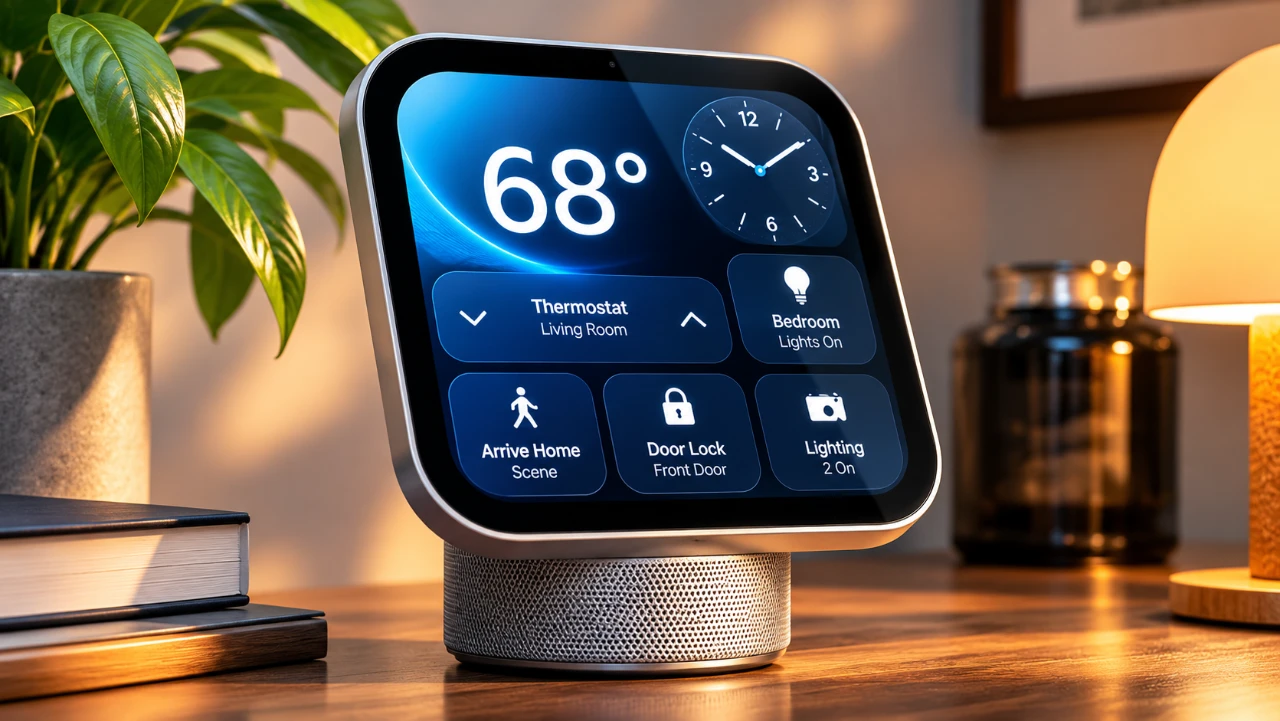
Apple’s HomeView represents the company’s latest foray into the smart home market, aiming to centralize control over connected devices, media, and personal tasks. With its sleek design, impressive audio capabilities, and seamless integration into the Apple ecosystem, the HomeView is tailored for users already invested in Apple’s suite of products. However, its compact size and limited app options may leave some users wanting more. The video below from MacRumors gives us a look at Apple’s latest home device.
TL;DR Key Takeaways :
- Compact Square Canvas: Features a distinctive 7-inch Liquid Retina square touch display (1088 × 1088 resolution) mounted on an articulating metal arm.
- Advanced Siri & Recognition: Powered by an A18 chip with facial and voice recognition to seamlessly swap personalized user profiles and deliver context-aware AI responses.
- Ecosystem Locked: Designed specifically for iPhone-centric households, acting as a central dashboard for HomeKit accessories, FaceTime calls, and AirPlay audio.
- Accessible Pricing: Available in both standalone countertop and wall-mounted versions starting at $299 / £299.

Design and Build: Compact Yet Premium
The Apple HomeView features a premium design that reflects Apple’s meticulous attention to detail. Its aluminum frame and stainless steel hinge allow for adjustable display angles, ensuring both durability and flexibility. The 7-inch square Liquid Retina display, equipped with True Tone and adaptive brightness, provides clear visibility in various lighting conditions, capable of dimming down to an ultra-low 0.3 nits for comfortable bedside placement. Available in multiple cohesive color options like Space Gray, Silver, Starlight, and Rose Pink, it fits seamlessly onto crowded kitchen counters or hallway walls.
While the compact size enhances versatility and makes it easy to position in tight spaces, it may feel restrictive compared to larger standalone smart displays. For users accustomed to expansive screens, the HomeView’s dimensions require some scrolling, particularly for web browsing or recipe reading.
Audio Performance: Immersive and Versatile
The HomeView’s audio performance is one of its standout hardware achievements. Driven by a weighted acoustic base on the countertop model and downward-firing beam-forming drivers, it delivers rich, distortion-free sound comparable to a HomePod mini. Whether you’re streaming music, watching videos, or engaging in FaceTime calls, the sound quality remains crisp and dynamic.
The device also supports multi-room audio, allowing you to pair it with HomePods or other AirPlay-compatible speakers for synchronized playback throughout your home. This feature creates a cohesive audio environment for casual listening or hosting gatherings.
Core Features: Siri at the Center
At the heart of the HomeView is an upgraded Siri AI assistant, powered internally by an A18 processor and 8GB of memory. This setup manages smart home commands, contextual assistance, and personal queries with minimal lag. The device supports face and voice recognition for up to six users, automatically pulling up personalized calendars, reminders, and photos based on who is standing in front of the screen.
The HomeView requires an initial setup via a nearby iPhone or iPad. Once connected, native apps like FaceTime, Messages, and the Apple Home app run smoothly, creating a frictionless extension of the iOS environment. However, users outside the Apple ecosystem will find compatibility heavily restricted.
Smart Home Integration: A Centralized Hub
As a smart home hub, the HomeView offers robust control over connected devices and automations. Users can monitor live HomeKit-enabled security camera feeds, receive acoustic alerts for smoke and carbon monoxide alarms, and manage accessories from partner brands.
Because it operates natively within the Apple Home framework, accessory setup requires virtually zero manual configuration if your network is already populated with compatible smart locks, thermostats, and lighting.
Additional Features: Thoughtful Touches
Apple has incorporated several thoughtful software touches to enhance usability. For instance, the Cooking mode in Safari streamlines recipe navigation, formatting web pages into clean, easy-to-read steps while managing multitasking timers hands-free.
Additionally, users can choose between a countertop model with an adjustable articulating arm or a dedicated wall-mounted version (with optional power mounting accessories like USB-C, hardwired AC, or Power over Ethernet solutions coming soon).
Limitations: Room for Improvement
Despite its strengths, the HomeView faces a few limitations. The App Store is conspicuously missing from the device; instead, third-party services like YouTube, Gmail, or streaming sites must be accessed via Safari web shortcuts. Furthermore, the lack of physical volume buttons means all adjustments must be handled via touch inputs or voice commands.
Pricing and Availability
The Apple HomeView is priced at $299 / £299 for both the standalone countertop and wall-mounted editions. Pre-orders are open now, with general in-store availability launching on November 13, 2026. Power mounting accessories and hardwired kits are sold separately.
Overall Impression: A Premium Hub for Apple Enthusiasts
The Apple HomeView stands out for its premium hardware craftsmanship, exceptional audio performance, and deep ecosystem synchronization. It is an ideal addition for households deeply embedded in Apple’s services, offering a private, ad-free smart home dashboard. While its app ecosystem is currently restricted, its potential makes it a compelling centerpiece for iOS-centric homes.
Here are more guides from our previous articles and guides related to Apple HomeView that you may find helpful.
- Apple HomeView Buyer’s Guide: Features, Pricing and What to Know
- Apple HomeView: Things You Need to Know Before Spending $299
- Apple TV and HomeView Release Dates Leaked Ahead of Today’s Event
- Is Apple HomeView the Smart Display We’ve All Been Waiting For?
- Apple HomeView Price and Features: Is Apple’s New $299 Smart Display Worth Buying?
Source: MacRumors
Disclosure: Some of our articles include affiliate links. If you buy something through one of these links, Geeky Gadgets may earn an affiliate commission. Learn about our Disclosure Policy.
