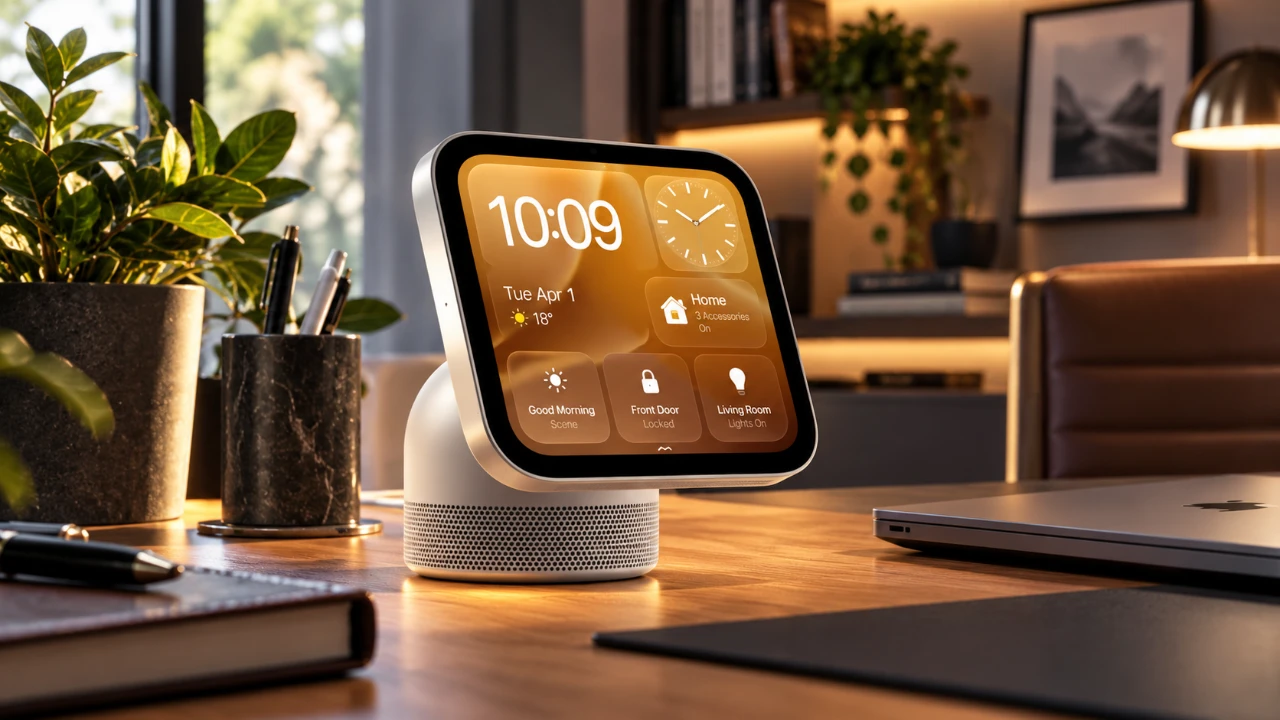
Apple has unveiled the HomeView, a $299 smart home hub designed to seamlessly integrate into its ecosystem. With a focus on advanced hardware, personalized software, and compatibility with the Apple Home Collection accessories, the HomeView aims to redefine smart home interactions. However, its reliance on Apple devices and the absence of an app store may limit its appeal for users outside the Apple ecosystem. The video below from MacRumors gives us more information about the new HomeView and its range of features.

Key Features of the HomeView
The HomeView combines innovative technology with thoughtful design to deliver a tailored smart home experience. Here are the standout features:
- Display and Performance: The device features a 7-inch square Liquid Retina LCD with True Tone technology, offering vibrant and adaptive visuals. Powered by the A18 chip, the same processor found in the iPhone 16, the HomeView ensures fast and efficient performance for all its functions.
- Camera and Sensors: Equipped with a Center Stage front camera for FaceTime calls, the HomeView also includes an ambient light sensor, an accelerometer and temperature/humidity sensors, making it versatile for various smart home applications.
- Two Models:
- Tabletop version: This model features a domed aluminum speaker base with advanced audio capabilities, including a woofer, passive radiators and spatial audio technology. It is available in four colors, offering both functionality and aesthetic appeal.
- Wall-mounted version: A slimmer option designed for space-saving, this version lacks the speaker base but includes two drivers for audio output. It requires additional mounting accessories and is available in two colors.
Software and User Experience
The HomeView runs on HomeView software version 27.2, offering a dynamic and intuitive interface designed to simplify smart home management. Key features include:
- Multi-User Support: The device recognizes up to six users by face and voice, allowing personalized home screens and tailored interactions for each individual.
- Customizable Modes: Users can switch between modes such as a photo frame, interactive art display, or smart home control center, adapting the device to their preferences and needs.
- Kitchen Assistant: The HomeView serves as a helpful kitchen companion, offering recipe guidance, ingredient tracking and timers to streamline cooking tasks.
Despite its user-friendly interface, the software is limited to pre-installed apps like Apple Music and FaceTime, along with select third-party integrations similar to CarPlay. The lack of an app store restricts the ability to expand functionality, which may be a drawback for users seeking more customization.
Siri AI: The Core of HomeView
At the heart of the HomeView is Siri AI, which powers voice commands and personalized interactions. Siri provides contextual responses based on user preferences and activities, enhancing the overall experience. However, full functionality requires pairing the HomeView with a compatible iPhone or iPad, which may limit its appeal to non-Apple users. While Siri’s capabilities are robust, customization options for its voice settings remain minimal, leaving some users wanting more flexibility.
Privacy and Security
Apple places a strong emphasis on privacy and security with the HomeView. Key measures include:
- Facial Recognition: This feature ensures that sensitive data, such as messages and calendar events, is accessible only to the intended user, adding a layer of personalized security.
- Proximity-Based Features: Certain functions require a paired and unlocked iPhone or iPad, providing an additional safeguard against unauthorized access.
However, shared content such as music playlists and photo albums is accessible to all users, which may raise privacy concerns in households with multiple users.
Apple Home Collection Accessories
The HomeView is designed to work seamlessly with Apple’s new Home Collection accessories, developed in collaboration with LG and Schneider Electric. These accessories include:
- Video doorbells
- Cameras
- Smart deadbolts
- Thermostats
- Room sensors
While some of these accessories will be available starting in December, others are delayed until 2027. This staggered release may limit immediate options for users looking to expand their smart home setups.
Pricing and Availability
The HomeView is priced at $299 and is currently available for pre-order, with shipping set to begin on November 13. The wall-mounted version requires additional mounting accessories, which could increase the total cost to over $360. For repairs, AppleCare+ offers coverage at $40, while out-of-warranty repairs cost $279.
Limitations to Consider
While the HomeView offers a range of advanced features, there are several limitations to keep in mind:
- No App Store: The device is restricted to pre-installed and integrated apps, which limits customization and functionality for users seeking a more versatile smart home hub.
- Dependence on Apple Devices: Many of the HomeView’s features, including Siri AI and personalized interactions, require a compatible iPhone or iPad, reducing its appeal for non-Apple users.
- Regional Restrictions: The HomeView is currently unavailable in the European Union due to regulatory concerns surrounding Siri AI, which may limit its global reach.
The Apple HomeView is a compelling option for those deeply invested in the Apple ecosystem. Its advanced hardware, personalized software and seamless integration with smart home accessories make it an attractive choice for enhancing your smart home experience. However, its high cost, reliance on Apple devices and limited app flexibility may deter users seeking a more open and customizable solution. For Apple enthusiasts, the HomeView represents a secure and intuitive way to elevate smart home interactions.
Unlock more potential in Apple HomeView by reading previous articles we have written.
- Apple TV and HomeView Release Dates Leaked Ahead of Today’s Event
- New $299 Apple HomeView Packs a 7-Inch Liquid Retina Display
- Bypass Apple CarPlay Restrictions: How to Stream YouTube in Your Car
Source & Image Credit: MacRumors
Disclosure: Some of our articles include affiliate links. If you buy something through one of these links, Geeky Gadgets may earn an affiliate commission. Learn about our Disclosure Policy.
