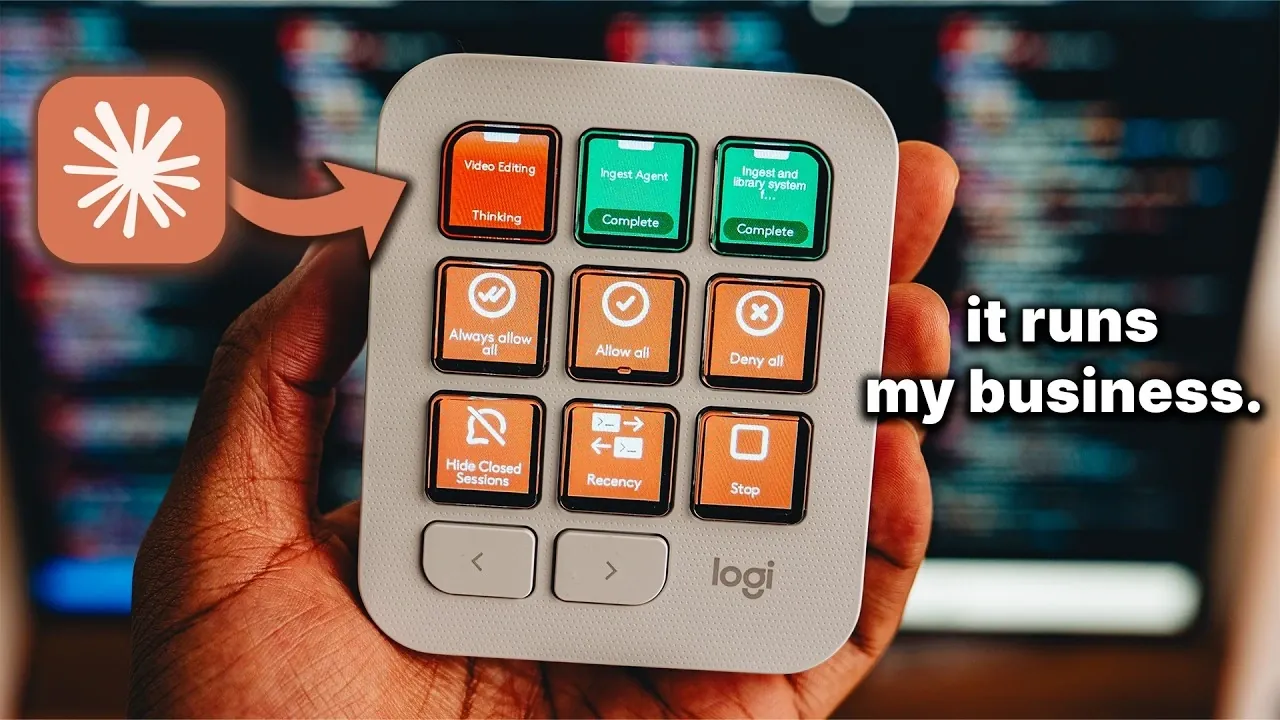
Terren Rule demonstrates how the Logitech MX Keypad, combined with AI like Claude Code, can streamline business operations through automation. Featuring nine programmable buttons with customizable labels, the keypad enables users to perform tasks such as generating invoices, managing passwords and launching complex workflows. By using the Logi Options Plus software, Terren shows how this device can be adapted for various professional scenarios, including video editing and software development, while minimizing repetitive actions.
Explore how to configure the Logitech MX Keypad to suit your specific workflows. Learn to implement AI-driven automation, set up shortcuts for faster application access and integrate coding assistants like GitHub Copilot. This guide provides clear steps and examples to help you optimize both routine and creative tasks.
Logitech MX Keypad AI Automations
TL;DR Key Takeaways :
- The Logitech MX Keypad features nine customizable buttons with small screens for visual cues, allowing users to streamline workflows and automate tasks efficiently.
- It integrates with AI tools and APIs like Gmail and YouTube Analytics, allowing users to automate complex tasks such as generating invoices, analyzing metrics and creating media kits.
- Customization is managed through the Logi Options Plus software, making it adaptable for developers, content creators and business professionals to optimize their workflows.
- The keypad supports advanced features like native integration with tools such as VS Code and GitHub Copilot, along with a developer kit for creating custom plugins.
- Priced at approximately $100 USD, its compact design, versatility and ability to enhance productivity make it a cost-effective and practical tool for professionals across industries.
The Logitech MX Keypad stands out due to its unique combination of functionality and adaptability. Its nine programmable buttons are equipped with small screens that display custom icons or labels, providing a visual cue for each assigned task. These buttons can be configured to perform a wide array of actions, ranging from launching applications to executing intricate AI-driven workflows.
Customization is handled through the intuitive Logi Options Plus software, which allows users to tailor the keypad to their specific needs. Whether you are a developer, content creator, or business professional, the keypad seamlessly integrates into your workflow, helping you save time and focus on high-priority tasks. Its compact design ensures it fits comfortably into any workspace, making it a practical choice for professionals across industries.
Enhancing Productivity Through AI Integration
One of the most compelling features of the Logitech MX Keypad is its ability to integrate with AI tools and automate time-consuming tasks. By using APIs such as Gmail or YouTube Analytics, users can create workflows that significantly reduce manual effort. For example, you can configure the keypad to:
- Generate invoices automatically with a single button press.
- Create comprehensive media kits in seconds.
- Analyze YouTube performance metrics effortlessly.
These capabilities not only save time but also reduce the likelihood of human error, making sure smoother and more reliable operations. The keypad’s ability to handle such tasks makes it an invaluable tool for professionals managing complex workflows, allowing them to focus on strategic decision-making rather than routine processes.

Unlock more potential in AI automations by reading previous articles we have written.
- How to Easily Build AI Automations Using n8n Agents – Beginners Guide (No Code)
- Automate Your Gmail Like a Pro: Create an AI Agent Today in Under 30 Minutes
- How Claude Code Can Automate Your Life and Save You Hours Every Day
- Inside Hermes Agent V2.0: the Hidden Features You Missed
- 3 Essential Tips for Using Gemini in Google Workspace
- Microsoft’s New AI Agent Magentic-One Tested
- 7 Best AI Automation Platforms for Businesses and Individuals in 2025
- Google Workspace Gemini Flows : Makes Creating AI Agents Easy Using a Single Prompt
- Automate boring tasks using the Lindy AI automation platform
- Building AI-First Automations with Trigger.dev, Modal, and Supabase
Customizing Workflows for Maximum Efficiency
The Logitech MX Keypad is designed to simplify task management by offering a high degree of customization. The middle-row buttons, for instance, are ideal for quick access to essential applications. Users can configure these buttons to:
- Open Notion for project management and team collaboration.
- Launch Claude Code for AI-driven development tasks.
- Access Da Vinci Resolve for video editing projects.
Each application can have its own unique keypad layout, allowing seamless transitions between tasks. This level of personalization ensures that users can maintain focus and efficiency without being bogged down by repetitive actions or complex navigation. The keypad adapts to your workflow, making it a versatile tool for professionals in any field.
Streamlining Daily Operations
The bottom-row buttons of the Logitech MX Keypad are particularly useful for managing everyday tasks. These buttons can be programmed to handle essential functions such as:
- Secure password management for quick and safe account access.
- Terminal access for executing command-line operations efficiently.
- AI-powered dictation for transcribing notes or drafting documents.
By consolidating these routine actions into a single device, the keypad enhances productivity and reduces the cognitive load associated with multitasking. For professionals juggling multiple responsibilities, this device offers a practical solution to staying organized and efficient.
Who Can Benefit the Most?
The Logitech MX Keypad is designed for individuals who rely on AI and automation in their workflows. Its versatility makes it an excellent choice for a wide range of professionals, including:
- Developers: Simplify coding tasks with tools like VS Code and GitHub Copilot.
- Content creators: Optimize workflows for video editing, graphic design, or writing.
- Data analysts and project managers: Streamline tasks such as data visualization and team coordination.
By reducing the time spent on repetitive tasks, the keypad allows users to focus on creative and strategic aspects of their work, ultimately improving overall productivity.
Advanced Features for Tech-Savvy Users
For power users, the Logitech MX Keypad offers advanced features that extend its functionality even further. Native integration with popular tools like VS Code and GitHub Copilot makes it particularly appealing to developers. Additionally, a developer kit is available for creating custom plugins, allowing users to tailor the device to their unique requirements. This flexibility ensures that the keypad evolves alongside your needs, making it a future-proof investment for professionals who demand more from their tools.
Affordability and Practicality
Priced at approximately $100 USD, the Logitech MX Keypad offers exceptional value for its robust feature set. Its compact design ensures it fits seamlessly into any workspace, while its ability to handle a wide range of tasks makes it a cost-effective solution for optimizing workflows. By simplifying repetitive or complex actions, the keypad not only saves time but also enhances overall productivity, making it a worthwhile addition to any professional toolkit.
A Smarter Approach to Work
The Logitech MX Keypad is more than just a peripheral, it’s a tool designed to transform how you work. By integrating AI tools like Claude Code and offering extensive customization options, it enables professionals to take control of their workflows and focus on what truly matters. Whether you’re managing a YouTube channel, developing software, or coordinating large-scale projects, this device provides the flexibility and efficiency needed to excel in today’s fast-paced professional environment.
Media Credit: Terren Rule
Disclosure: Some of our articles include affiliate links. If you buy something through one of these links, Geeky Gadgets may earn an affiliate commission. Learn about our Disclosure Policy.
