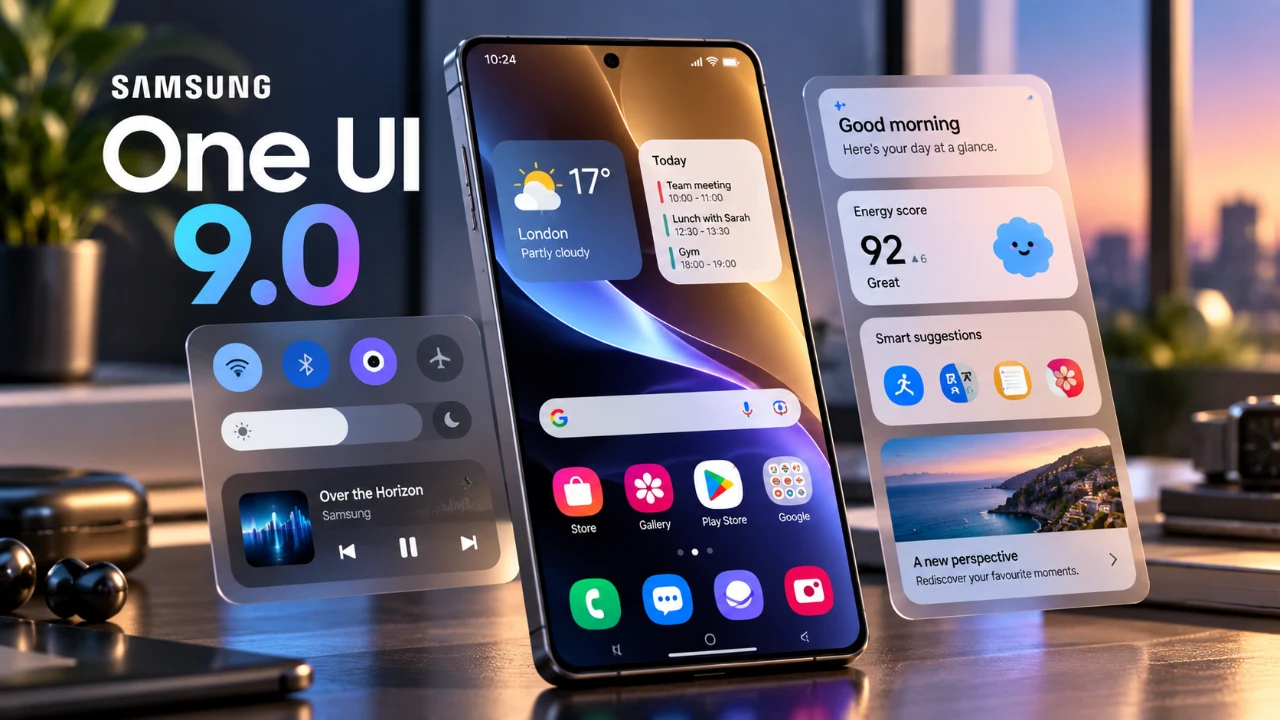
Samsung has officially rolled out its highly anticipated One UI 9 update, starting with the Galaxy S24 series. This update, initially available to beta users, introduces a range of new features and refinements aimed at enhancing usability, customization, and overall performance. While the update is gradually expanding to mid-range Galaxy devices in select regions, some advanced features remain exclusive to the upcoming Galaxy S25 and S26 series. However, the absence of the October security patch for the S24 and S25 series has raised concerns among users awaiting critical security updates. The video below from AppX gives us more details.

Device Compatibility and Rollout
The One UI 9 update is currently available for Galaxy S24 series devices, with priority given to users who participated in the beta testing program. Samsung has also extended the update to select mid-range Galaxy models in specific regions, broadening its reach to a wider audience. Despite this, the lack of the October security patch for the S24 and S25 series has left some users questioning the completeness of the rollout. This gap in security updates highlights an area where Samsung may need to address user concerns promptly.
Key Features and Enhancements
One UI 9 brings a host of updates designed to improve the user experience. These enhancements focus on customization, functionality and visual appeal, making the interface more intuitive and engaging.
- Enhanced Customization: The quick panel now includes adjustable brightness and volume sliders, a resizable music widget and a motion assist toggle for added convenience. Users can also customize quick panel backgrounds and button styles through updated Good Lock modules.
- Refined User Interface: The settings menu has been streamlined for easier navigation, while the “About Phone” page has been redesigned for clarity. Widgets now feature frosted glass effects and a dynamic waveform visualizer enhances the audio playback experience. Additionally, dual search widgets for Google and Finder are now available directly on the home screen.
- Gallery and Camera Upgrades: The new “My Fan Cam” feature allows you to track and crop specific individuals in videos, offering a more personalized and interactive media experience.
- Improved Call Features: The “Call Brief” feature provides context-aware information during calls, making communication more efficient and informative.
- Samsung Notes Enhancements: A new tape tool for hiding text and additional pen styles have been introduced, enhancing the note-taking experience for users who rely on this app for productivity.
- Samsung Dex Improvements: Multitasking has been made more seamless with enhanced window management tools and desktop previews, allowing users to work more efficiently across multiple applications.
Privacy and Security Upgrades
Samsung has placed a strong emphasis on privacy and security in One UI 9, introducing several features to give users greater control over their personal data.
- Location Access Indicator: A visible indicator alerts you whenever an app is accessing your location, making sure transparency and control.
- On-Device AI: Advanced AI tools identify potential privacy risks, helping you make informed decisions about app permissions and data sharing.
- Security Alerts: Notifications warn you about malware or apps requesting unnecessary permissions, enhancing overall device security.
These updates aim to create a safer and more secure environment for users, addressing growing concerns about data privacy in the digital age.
Accessibility Enhancements
One UI 9 introduces several accessibility improvements, making sure the interface is inclusive and user-friendly for a diverse range of users.
- Text Spotlight: This feature enlarges text on the screen, improving readability for users with visual impairments or those who prefer larger text.
- Mouse Keys: Designed for precise desktop control, this feature caters to users with specific accessibility needs, enhancing their overall experience.
These enhancements reflect Samsung’s commitment to making its devices more accessible to all users, regardless of their individual requirements.
Performance and User Feedback
The One UI 9 update delivers smoother animations and reduces stuttering, particularly on the Galaxy S24 series. These improvements contribute to a more fluid and responsive user experience. However, some users have reported occasional lags, prompting Samsung to actively seek feedback to address these issues. Battery performance remains a key area of focus, with the company encouraging users to share their experiences to help optimize future updates.
Limitations on the Galaxy S24 Series
Despite the numerous improvements, certain features remain unavailable on the Galaxy S24 series. These limitations include:
- Notification highlights for better alert visibility.
- Scam detection capabilities to identify fraudulent calls or messages.
- AI-driven functionalities reserved for the Galaxy S25 and S26 series.
These omissions may leave some users feeling that their devices are not fully using the potential of the One UI 9 update.
Good Lock Module Updates
Samsung’s Good Lock modules have received significant updates, offering users even more tools for personalizing their devices.
- Support for multi-finger gestures to perform custom actions.
- Dock background customization for a more tailored interface.
- A network speed indicator for real-time monitoring.
- Ongoing activity chips displayed on the status bar for quick access.
- New unlock animations and lock screen text customization options.
These updates enhance the overall user experience, allowing for deeper customization and functionality.
File Management Redesign
The My Files app has been revamped with a cleaner layout and improved storage monitoring tools. These changes make file management more intuitive, helping users stay organized and efficiently manage their device storage.
Future Updates and Expectations
The inclusion of nearby device scanning hints at preparations for the upcoming One UI 9.5 update, which is expected to bring further refinements and features. Additionally, Google Play system updates for October are still pending, suggesting that more enhancements are on the horizon. Samsung’s commitment to continuous improvement ensures that users can look forward to a steadily evolving experience.
Exploring the Potential of One UI 9
Samsung’s One UI 9 update offers a comprehensive set of improvements, from refined user interfaces to advanced customization options and enhanced privacy features. While the Galaxy S24 series benefits significantly from these updates, some features remain exclusive to newer models like the Galaxy S25 and S26. As the update expands to mid-range devices, users are encouraged to explore the new functionalities and provide feedback, particularly on performance and battery life. This collaborative approach ensures that Samsung can continue to refine and optimize its software for a better user experience.
Advance your skills in One UI 9 by reading more of our detailed content.
- Every New Feature in the Samsung One UI 9 WATCH Update
- Samsung’s One UI 9 Update Is Finally Here: And It’s a Total Game-Changer
- The Best One UI 9 Hidden Features Samsung Kept Quiet
- Samsung’s One UI 9.0 Update Lands on the Galaxy S26 Ultra: What’s New
- First Look at One UI 9.5: Samsung’s Sleekest Interface Redesign in Years
- Samsung Rolls Out One UI 9: is Your Galaxy Phone Eligible?
Source & Image Credit: AppX
Disclosure: Some of our articles include affiliate links. If you buy something through one of these links, Geeky Gadgets may earn an affiliate commission. Learn about our Disclosure Policy.
