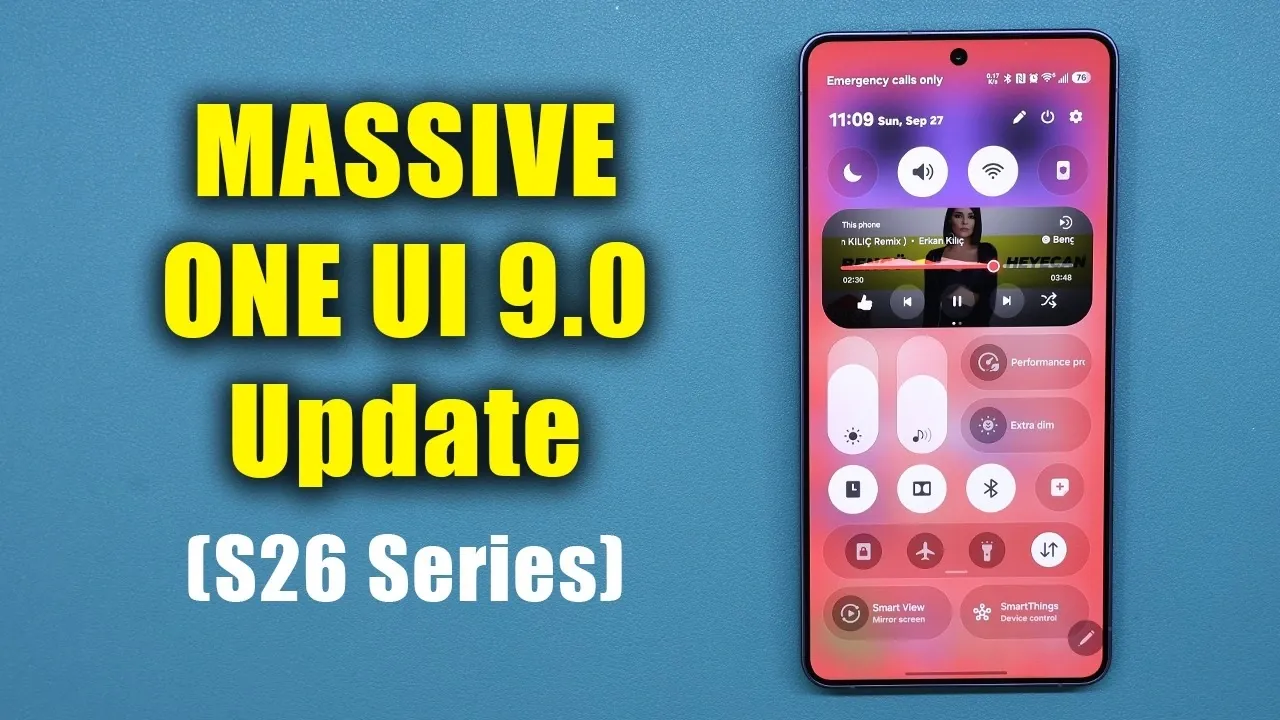
Samsung has officially released One UI 9.0 for the Galaxy S26 Ultra, introducing a comprehensive suite of updates designed to enhance usability, customization, and security. This latest version integrates AI-powered tools, refined interface designs, and advanced functionality, creating a more intuitive and efficient smartphone experience. Below is an in-depth exploration video from Sakitech of the most significant features and improvements.

Home Screen: Smarter, Cleaner and More Accessible
The home screen in One UI 9.0 has been thoughtfully redesigned to prioritize usability and accessibility. A new Google search bar and Finder bar are now conveniently positioned at the bottom of the screen, making them easier to reach and interact with. These elements are fully customizable, allowing you to adjust their placement, size, and appearance through the settings menu.
Samsung has also streamlined the overall layout by replacing older widget-based search bars, resulting in a cleaner and more efficient interface. This change not only improves navigation but also ensures that frequently used tools are always within easy reach.
Quick Panel: Enhanced Control and Customization
The Quick Panel has undergone significant updates to provide greater control and flexibility. Key improvements include the separation of the dark mode and sound mute buttons, allowing you to manage these settings independently. This separation enhances convenience, especially for users who frequently toggle between these modes.
Additionally, you can now adjust the size and layout of toggles, choosing between compact or expanded designs to suit your preferences. A new resizable music player widget has also been introduced, allowing you to optimize screen space without compromising usability. These updates make the Quick Panel a more versatile and user-friendly tool.
File Management: Simplified and Productive
Managing files on the Galaxy S26 Ultra is now more intuitive, thanks to updates in the My Files app. One UI 9.0 introduces the ability to preview PDFs directly within the app, eliminating the need for third-party software. This feature streamlines workflows, particularly for users who frequently handle documents.
Samsung Notes has also been integrated with this functionality, allowing you to edit PDFs seamlessly. Whether you’re annotating professional documents or organizing personal files, these enhancements significantly boost productivity and simplify file management.
Good Lock: Expanded Customization Options
Samsung’s Good Lock customization suite has been upgraded with new tools to personalize your device further. The Quick Star module now includes a network speed indicator, which displays real-time upload and download speeds directly in the Quick Panel. This feature is particularly useful for users who need to monitor their network performance, whether for work or leisure.
These updates to Good Lock empower you to tailor your device’s appearance and functionality to better align with your preferences, making the Galaxy S26 Ultra a truly personalized smartphone.
Security and Privacy: Greater Awareness and Control
One UI 9.0 places a strong emphasis on security and privacy, making sure you remain informed and in control of your data. Real-time notifications now alert you whenever an app accesses your microphone, camera, or location, providing greater transparency.
Enhanced permission management tools allow you to review detailed access logs and adjust app permissions with ease. These updates not only protect your privacy but also give you the confidence to use your device without concerns about unauthorized data access.
Camera: Innovative Features for Creativity
The camera app in One UI 9.0 introduces advanced features designed to enhance your photography and videography. A new dual-camera recording mode allows you to use the front and rear cameras simultaneously, displayed in a vertical split-screen format. This feature is ideal for creating dynamic content, such as vlogs or interviews.
Additionally, the AI-powered “My Fan Cam” focuses on a specific person in videos, making sure they remain the center of attention. These tools provide greater creative flexibility, making it easier to capture professional-quality content directly from your smartphone.
AI-Powered Widgets: Personalized and Dynamic Insights
AI-driven tools are a standout feature of One UI 9.0, with the introduction of the Now Brief widget. This widget offers customizable cards for weather, health, and video updates, allowing you to tailor the information displayed to your specific needs.
By adapting to your preferences and usage patterns, these widgets create a dynamic and personalized user experience, making sure that the most relevant information is always at your fingertips.
Samsung Notes: Advanced Document Tools
Samsung Notes has been enhanced with new tools to improve document management. The app now includes a document redaction tool, which allows you to obscure sensitive information in PDFs. This feature, often referred to as the “tape” tool, offers customizable colors and patterns, combining functionality with visual appeal.
Whether you’re editing professional documents or personal files, this tool adds an extra layer of security, making sure your sensitive information remains protected.
Phone App: Smarter Call Management
The Phone app has been updated with the Call Brief feature, which alerts you to potential calendar conflicts during calls. This feature is particularly useful for busy users, helping you stay organized and avoid scheduling mishaps. By integrating call management with your calendar, One UI 9.0 ensures a smoother and more efficient communication experience.
Driving Insights: Promoting Safer Driving Habits
For drivers, the new Driving Overview feature provides weekly insights into your driving patterns. Metrics such as speed, acceleration, and distance are tracked and analyzed, offering valuable feedback to help you understand and improve your driving habits.
This feature not only promotes safer driving but also encourages more efficient practices, making it a valuable tool for anyone who spends significant time on the road.
A Comprehensive Upgrade for the Galaxy S26 Ultra
One UI 9.0 delivers a wide array of updates that enhance the Galaxy S26 Ultra’s functionality, customization and security. From AI-powered tools and improved file management to advanced camera features and real-time privacy notifications, this update ensures your device is more intuitive, efficient and secure. Whether your priorities lie in productivity, personalization, or privacy, One UI 9.0 caters to a diverse range of needs, solidifying the Galaxy S26 Ultra as a powerful and versatile smartphone.
Uncover more insights about One UI 9.0 features in previous articles we have written.
- Why One UI 9’s Subtle Changes Make It Samsung’s Smartest Android 17 Update Yet
- The Hidden One UI 9 Features You Probably Missed
- Samsung Galaxy Phones Receive a 1GB+ Feature Drop Update
- These Hidden One UI 9 Features Will Transform Your Samsung Phone
- How Samsung’s New Software Update Quietly Boosts Galaxy Performance
Source & Image Credit: sakitech
Disclosure: Some of our articles include affiliate links. If you buy something through one of these links, Geeky Gadgets may earn an affiliate commission. Learn about our Disclosure Policy.
