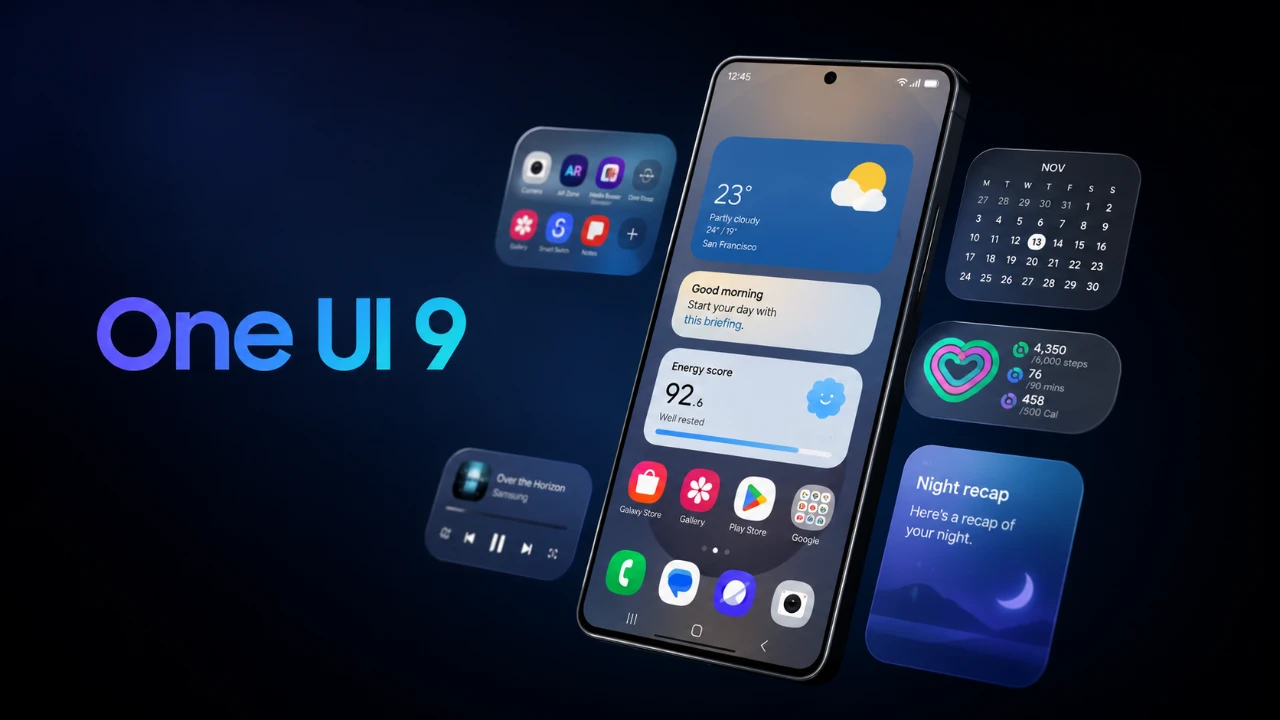
Samsung’s One UI 9, built on the foundation of Android 17, introduces a wide array of updates designed to enhance usability, customization, and security. This latest version refines the smartphone experience with a focus on interface improvements, advanced AI tools, and expanded functionality. In the video below, HowToMen delves into the most notable features and improvements, structured to prioritize the most impactful updates.

Key Highlights of One UI 9
One UI 9 emphasizes a user-friendly experience with several standout features:
- Enhanced interface design for improved navigation and modern aesthetics.
- Advanced AI tools that deliver smarter, more intuitive functionality.
- Improved security measures to safeguard your personal data.
- Customizable multitasking options for greater personalization and efficiency.
Driving Overview: Smarter Insights for Safer Driving
Samsung introduces the Driving Overview feature, using Bluetooth technology to monitor your driving habits. This tool provides detailed trip summaries and weekly reports, analyzing patterns to offer actionable suggestions for safer and more efficient driving. By integrating this feature, One UI 9 aims to promote responsible driving behavior while enhancing user awareness.
Camera Upgrades: Dual Recording for Creative Freedom
The camera system in One UI 9 now supports dual recording, allowing simultaneous video capture from both the front and rear cameras. Although limited to 1080p resolution, this feature is particularly appealing to content creators and casual users seeking innovative ways to document their experiences. It opens up new creative possibilities, making it easier to produce dynamic and engaging content.
Streamlined Interface Enhancements
One UI 9 introduces a cleaner, more organized interface that prioritizes usability and aesthetics. Key improvements include:
- Streamlined menus to reduce visual clutter and simplify navigation.
- Redesigned widgets and icons for a fresh, modern appearance.
- Floating pill-shaped bottom bars that enhance intuitive navigation and accessibility.
Quick Settings Panel: Tailored to Your Needs
The quick settings panel has been revamped to offer greater customization. Dedicated spaces for brightness and volume sliders make adjustments more convenient, while resizable elements, such as the music player, allow users to tailor the interface to their preferences. This update ensures that frequently used settings are always within easy reach.
Samsung Internet Browser: Smarter and More Efficient
AI integration improves the Samsung Internet browser, allowing smarter, context-aware queries for a more efficient browsing experience. Additionally, users can now open multiple browser windows as separate apps, significantly improving multitasking capabilities. This feature is particularly useful for users who need to manage multiple tasks or research topics simultaneously.
Security Enhancements: Greater Control and Protection
Security remains a top priority in One UI 9, with several updates designed to provide users with greater control over their devices:
- Immediate phone locking after exiting the power menu, requiring a password to restart or power off the device.
- A new menu that tracks apps installed from unknown sources, offering better oversight of app installations and potential risks.
Gaming Mode: Optimized for Performance
For gaming enthusiasts, One UI 9 introduces a dedicated Gaming Mode that allows users to customize resolution and performance settings. Whether you prioritize high-quality visuals or smoother gameplay, this feature ensures an optimized gaming experience tailored to your preferences.
Call Features: Smarter Communication
AI-powered scam detection enhances call security by alerting users to potential fraudulent calls. Additionally, calls from third-party apps are now integrated into the phone app’s recent call log, providing a unified view of all communication activities. This update simplifies call management and improves overall convenience.
Hidden Network Restrictions
A new hidden menu enables users to restrict specific apps from accessing the internet. This feature is particularly useful for managing data usage, enhancing privacy, or preventing certain apps from consuming bandwidth unnecessarily. It offers an additional layer of control over app behavior.
Samsung DeX: Improved Multitasking
Samsung DeX receives significant updates in One UI 9, making multitasking more seamless and efficient. Enhanced desktop previews and easier app window movement improve the experience of using your device as a productivity tool. These updates cater to professionals and users who rely on their devices for work-related tasks.
Location Permissions: Greater Transparency
One UI 9 introduces a new indicator that flags apps accessing your location, making sure greater transparency. The redesigned permission menu simplifies navigation and provides users with better control over location settings. This update enables users to make informed decisions about their privacy.
Accessibility Features: Inclusive Design
Accessibility tools in One UI 9 are designed to accommodate a diverse range of user needs:
- Text Spotlight: Enlarges text on the screen for improved visibility.
- Select-to-Speak: Reads text and images aloud, assisting users with visual impairments.
- Keyboard shortcuts for mouse control enhance usability for individuals with specific accessibility requirements.
App Updates: Enhanced Functionality
Several Samsung apps receive meaningful updates in One UI 9, enhancing their functionality and user experience:
- Modes and Routines: Now includes detailed descriptions for routines, simplifying the setup of automated tasks.
- My Files: Adds support for direct viewing of PDFs and text files, streamlining file management.
- Samsung Notes: Introduces a tape tool for precise note editing, particularly useful for S Pen users.
- Weather App: Features redesigned visuals and condensed health cards, offering a more informative and user-friendly experience.
Performance and Stability: A Smoother Experience
One UI 9 delivers significant improvements in performance and stability, making sure a smoother experience across supported devices. For those eager to explore the new features, Samsung offers a beta program accessible through the Samsung Members app, allowing users to test the update before its official release.
Samsung’s One UI 9, powered by Android 17, represents a thoughtful evolution of its user interface. By focusing on usability, security and customization, this update caters to a wide range of user needs, from productivity and creativity to gaming and accessibility. Whether you’re a multitasker, a content creator, or someone who values a seamless smartphone experience, One UI 9 offers a comprehensive and refined solution.
Discover other guides from our vast content that could be of interest on One UI 9.
- One UI 9 Leaks: New Features Coming to Your Samsung Phone
- One UI 9: Game-Changing Features Every Samsung User Needs to Find
- What Samsung’s One UI 9 Beta Brings to the Galaxy S26
- One UI 8.5 vs One UI 9: the Biggest Upgrades You Might Miss
- Samsung One UI 9 First Build Leaked: Android 17 Arrives Early for Galaxy Users
- Why One UI 9’s Subtle Changes Make It Samsung’s Smartest Android 17 Update Yet
Source: HowToMen
Disclosure: Some of our articles include affiliate links. If you buy something through one of these links, Geeky Gadgets may earn an affiliate commission. Learn about our Disclosure Policy.
