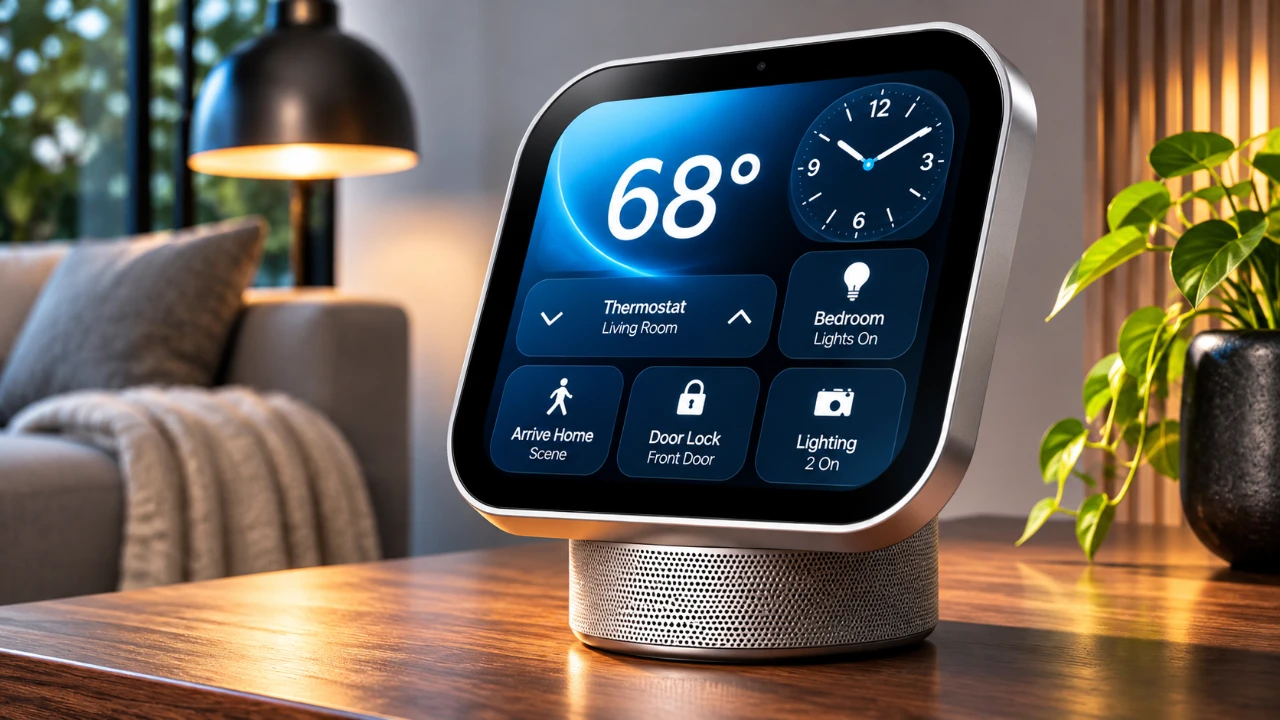
The Apple HomeView is a sleek and compact smart home hub designed to integrate seamlessly into the Apple ecosystem. Featuring a 7-inch screen, it combines smart home control, multimedia playback, and personal assistant capabilities in one device. While it excels in areas such as responsive controls and AirPlay integration, it falls short in app functionality and customization, leaving room for improvement. The video below from Stephen Robles explores its design, features, and limitations to help you determine if it’s the right addition to your home.
TL;DR Key Takeaways :
- Compact Square Display: Features a 7-inch Liquid Retina square touch canvas (1088×1088 resolution) engineered with ultra-low 0.3-nit nightstand dimming.
- A18-Powered Intelligence: Driven by the A18 chip supporting multi-user face and voice recognition for up to six household members.
- Ecosystem Integration: Functions as an intuitive HomeKit and Matter smart display hub with AirPlay multi-room audio and FaceTime capabilities.
- App Ecosystem Limits: Operates without a standalone App Store, relying instead on native system apps and shared casting capabilities.
Design and Build: Elegance Meets Simplicity
The Apple HomeView embodies Apple’s signature minimalist design philosophy. Its compact form factor, featuring a 7-inch square Liquid Retina display (1088×1088 resolution) perched on a domed speaker base via a flexible stainless steel hinge, makes it a versatile addition to any space—whether on a desk, kitchen countertop, or nightstand. The adjustable tilt mechanism ensures an optimal viewing angle whether you’re managing smart home routines or using it as a digital photo frame.
Powered via a USB-C port, the countertop model packs robust audio hardware including two custom full-range drivers and a down-firing woofer with passive radiators, offering sound quality well above its diminutive footprint. Wall-mounted versions are also available, though dedicated mounting brackets and power kits are sold separately.
Seamless Setup and Ecosystem Integration
Setting up the HomeView is a straightforward process executed directly through a nearby iPhone or iPad, cementing its place within Apple’s hardware ecosystem. Once configured, the device uses facial and voice recognition backed by the A18 chip’s secure enclave to deliver private, personalized content for up to six distinct users. This ensures individual access to personal calendars, reminders, and media playlists without exposing private data to other household members.

However, this tight integration comes with a natural trade-off: for non-Apple users or households running mixed operating systems, the HomeView’s core personalization features remain inaccessible, making it heavily tailored for the Apple faithful.
Smart Home Control: A Centralized Hub
The HomeView excels as a smart home hub, offering responsive touch controls for managing HomeKit and Matter-compatible accessories such as smart lights, door locks, and thermostats. Its modular interface allows you to customize dashboards to suit your room layouts and preferences.
With native Thread networking support, the HomeView ensures fast, reliable communication across connected smart devices. Features like live HomeKit camera feeds, environmental sensors (temperature and humidity), and intercom functionality establish it as a robust command center for home monitoring.
Multimedia Features and AirPlay Integration
As a multimedia display, the HomeView supports music, podcasts, and video streaming, leveraging AirPlay for seamless content handoff from your iPhone, iPad, or Mac. Its whole-home audio control feature allows you to sync playback across multiple AirPlay-compatible speakers, creating a unified listening environment.
For video communication, the HomeView features a built-in 12-megapixel camera with Center Stage tracking, keeping you perfectly framed during hands-free FaceTime calls while cooking or moving around the room.
User Interface: Intuitive but Limited
The HomeView’s user interface is built for clarity and speed. Customizable clock faces and widgets provide quick glances at weather updates, calendar schedules, and interactive art. The inclusion of dynamic notification management helps keep tasks organized without cluttering the screen. Despite its responsive nature, the lack of deep theme or third-party widget customization options means power users have less room to tinker.
App Functionality: A Narrow Ecosystem
The HomeView runs native core apps such as Music, Podcasts, Safari, Calendar, and FaceTime, but its third-party software architecture is notably restricted. Operating without a dedicated App Store, third-party software availability depends heavily on what companion apps share via casting and system extensions, omitting native standalone applications like a dedicated YouTube client.
Recipe Integration: A Clever Kitchen Companion
For cooking enthusiasts, the HomeView includes a thoughtfully implemented Safari Recipe mode. When pulling up recipes via web browsing, the interface formats cooking steps cleanly onto the screen, enabling hands-free timer management and readable step navigation while handling ingredients in the kitchen.
Multi-User Support: Convenient but Imperfect
The HomeView’s automated facial and voice recognition system handles multi-user profile switching efficiently when an authorized iPhone is nearby and recently unlocked. While generally fast, occasional low-light conditions can require brief authentication adjustments.
Limitations: Where the HomeView Falls Short
Despite its strengths, the HomeView carries a few notable limitations:
- No dedicated App Store, restricting third-party app expansion.
- Absence of native third-party video apps like YouTube.
- Platform locked strictly to the Apple ecosystem, requiring an iPhone or iPad for setup.
- Wall-mount hardware variations require separate accessory purchases.
Who Should Consider the Apple HomeView?
The Apple HomeView is best suited for Apple enthusiasts who are already deeply invested in the iOS ecosystem. Its responsive touch controls, robust privacy-focused multi-user profiles, and fluid smart home integration make it an exceptional bedside or kitchen companion. However, users seeking an open, platform-agnostic smart display with extensive third-party app stores will find its walled garden too restrictive.
Final Verdict
The Apple HomeView is a beautifully crafted smart home hub that delivers exceptional audio performance, secure profile switching, and streamlined HomeKit controls. While its closed software ecosystem limits broad versatility, it stands as an Editors’ Choice-level centerpiece for Apple-centric households looking to unify their living spaces.
Advance your skills in Apple HomeView by reading more of our detailed content.
- Apple HomeView Buyer’s Guide: Features, Pricing and What to Know
- Apple HomeView: Things You Need to Know Before Spending $299
- Apple TV and HomeView Release Dates Leaked Ahead of Today’s Event
- Is Apple HomeView the Smart Display We’ve All Been Waiting For?
- Apple HomeView Price and Features: Is Apple’s New $299 Smart Display Worth Buying?
Source: Stephen Robles
Disclosure: Some of our articles include affiliate links. If you buy something through one of these links, Geeky Gadgets may earn an affiliate commission. Learn about our Disclosure Policy.
