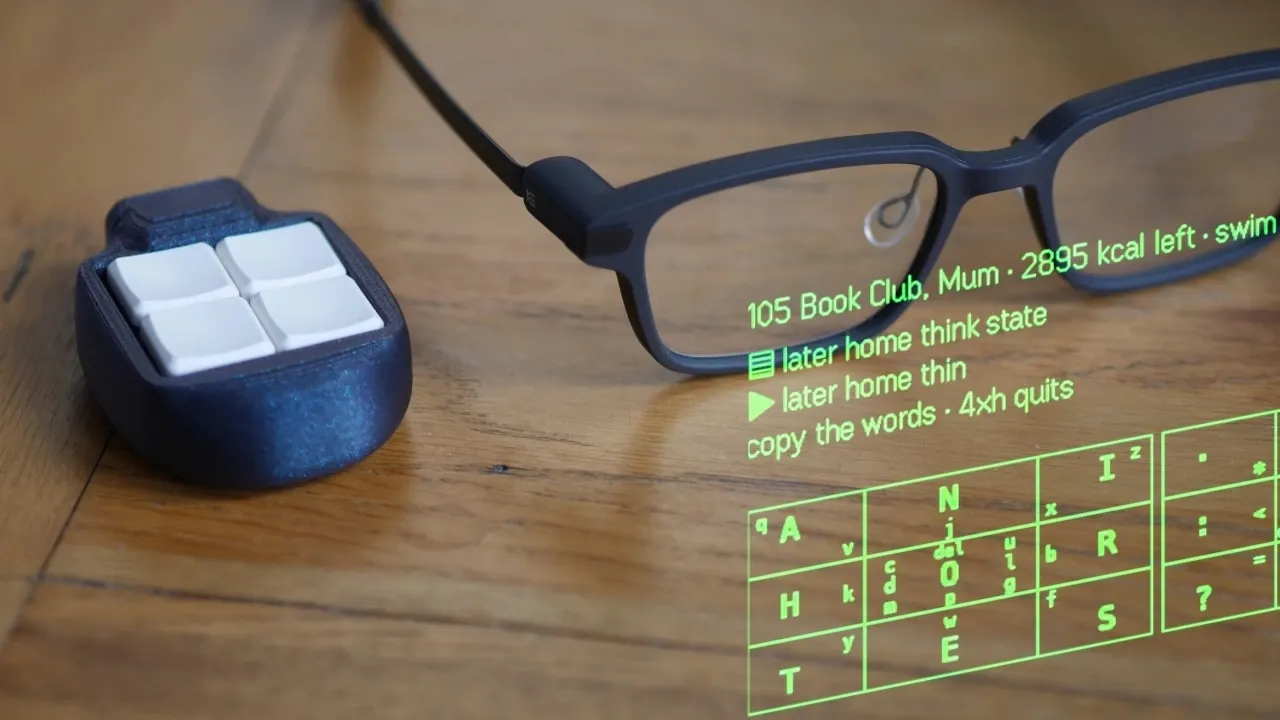
The keyboard, once a staple of digital interaction, is now being reevaluated for its limitations in promoting health and productivity. Ben Vallack examines how prolonged use can lead to repetitive strain injuries and restrict natural movement, prompting a search for alternatives. For example, modular setups and voice-based input systems offer more adaptable solutions that emphasize mobility and comfort, challenging the dominance of traditional designs.
Explore how wearable technologies like smart glasses and voice-to-text systems are changing workflows by reducing physical strain and allowing more dynamic environments. Gain insight into the practical use of compact macro pads and custom software to improve usability, alongside the challenges these systems face in specialized applications. This deep dive provides a structured look at emerging approaches to human-computer interaction.
Why Traditional Workspaces Fall Short
TL;DR Key Takeaways :
- Traditional keyboards, while efficient, contribute to ergonomic issues like repetitive strain injuries and chronic discomfort due to static postures.
- Wearable devices, such as smart glasses and voice-based input systems, are emerging as alternatives, offering greater mobility, comfort and efficiency in workspaces.
- Smart glasses, like the Even Realities G2, provide immersive and ergonomic experiences by projecting information directly into the user’s field of vision, reducing reliance on traditional monitors.
- Voice-to-text systems, such as Whisper, enhance productivity by allowing real-time, private transcription and eliminating the need for keyboards in text-based workflows.
- While wearable systems excel in dynamic and text-focused tasks, they face limitations in high-resolution visual work, but advancements in AI and software are expected to address these gaps over time.
The modern workspace, centered around the keyboard and monitor, often forces the human body into unnatural positions. If you’ve experienced wrist pain, neck stiffness, or back strain after hours at your desk, you’re not alone. These physical issues stem from the static posture required for keyboard use, which limits movement and reinforces sedentary habits.
While ergonomic solutions like standing desks, treadmill workstations and specialized chairs have gained popularity, they primarily address the symptoms rather than the root cause. The keyboard remains a central issue, restricting natural movement and contributing to long-term health problems. As work environments continue to evolve, it’s clear that traditional setups no longer meet the demands of a more dynamic and health-conscious workforce.
Reimagining How We Work
Imagine a workspace where you’re no longer tethered to a desk. Wearable devices, such as lightweight smart glasses paired with voice-based input systems, are paving the way for this future. These tools allow you to interact with your computer while maintaining mobility and reducing physical strain. By replacing the traditional keyboard and monitor with a wearable interface, you can work dynamically, whether standing, walking, or even reclining.
This shift not only enhances physical comfort but also fosters greater adaptability. For example, smart glasses can project information directly into your field of vision, allowing you to stay engaged with your tasks while moving freely. Voice-to-text systems further streamline workflows, allowing you to dictate emails, manage tasks, or even code without the need for a keyboard. This reimagined workspace prioritizes flexibility and efficiency, offering a glimpse into the future of work.

Deep dive into the latest in AI voice by exploring our other resources and articles.
- Create Stunning AI Voices with Hume AI : Move Over ElevenLabs
- Wispr Flow AI Tool Offers Effortless Voice Dictation in Every App
- Create AI Voices for Any Application With Eleven Labs’ New AI Voice Design Tool
- ChatTTS a new open source AI voice text-to-speech AI model
- Build Your Own AI Voice Character App in Under 40 Minutes
- Easily Create Realistic AI Voices in Minutes With ElevenLabs New Update
- Watch Gemini 3 Spin up Client-Ready Voice AI Sites, Secure on Google Cloud
- Ultra realistic AI voice generator – Murf AI
- Building a Smart RAG AI Voice Assistant Agent with ElevenLabs and n8n
- How to Upgrade BMO Local Al Agent’s Voice & Brain
Smart Glasses and Supporting Tools
Smart glasses, such as the Even Realities G2, exemplify the potential of wearable technology. Weighing just 40 grams, these glasses are designed for all-day comfort. Using advanced waveguide display technology, they project information directly into your field of vision, reducing eye strain and allowing for natural head movement. This eliminates the need for a traditional monitor, allowing a more immersive and ergonomic experience.
Voice-to-text transcription systems, like Whisper, further enhance the usability of smart glasses. Unlike older voice recognition tools, Whisper processes data locally, making sure both privacy and real-time responsiveness. Whether you’re drafting documents, coding, or managing projects, this system adapts to your needs, eliminating the reliance on a keyboard.
To complement smart glasses, a compact five-key macro pad has been developed. This tactile device allows you to perform essential actions, such as switching applications or confirming commands, with minimal effort. Additionally, custom software solutions expand the system’s capabilities. Apps for email, messaging and task management are optimized for seamless integration with the glasses, making sure a smooth transition from traditional setups.
The system also supports integration with external devices like smartphones and TVs. For instance, you can mirror your smart glasses display onto a larger screen for collaborative tasks or presentations. This modular approach mirrors the Unix philosophy: each tool is designed to excel at a specific function, creating a cohesive and efficient ecosystem.
Strengths, Limitations and the Path Forward
Wearable systems like smart glasses excel in workflows that prioritize text-based tasks, such as software development, project management and communication. They encourage movement, reduce physical strain and foster adaptability, making them ideal for professionals seeking a healthier and more dynamic work environment.
However, these systems are not without limitations. Tasks requiring high-resolution visuals, such as video editing or graphic design, still benefit from traditional monitors and input devices. Additionally, while AI-assisted workflows are advancing rapidly, they are not yet sophisticated enough to fully replace manual control in certain specialized areas.
Despite these challenges, the potential of wearable technology is undeniable. As AI and custom software continue to evolve, these tools will become increasingly intuitive and capable, further transforming how we work. By embracing these innovations, you can create a workspace that prioritizes comfort, mobility, and efficiency, unlocking new levels of productivity and well-being.
The decline of the keyboard marks more than just a technological shift, it represents a fundamental rethinking of how we interact with computers. While the keyboard may not disappear entirely, its role as the primary input device is undoubtedly fading. The future of work is here and it’s more dynamic, adaptable and human-centered than ever before.
Media Credit: Ben Vallack
Disclosure: Some of our articles include affiliate links. If you buy something through one of these links, Geeky Gadgets may earn an affiliate commission. Learn about our Disclosure Policy.
