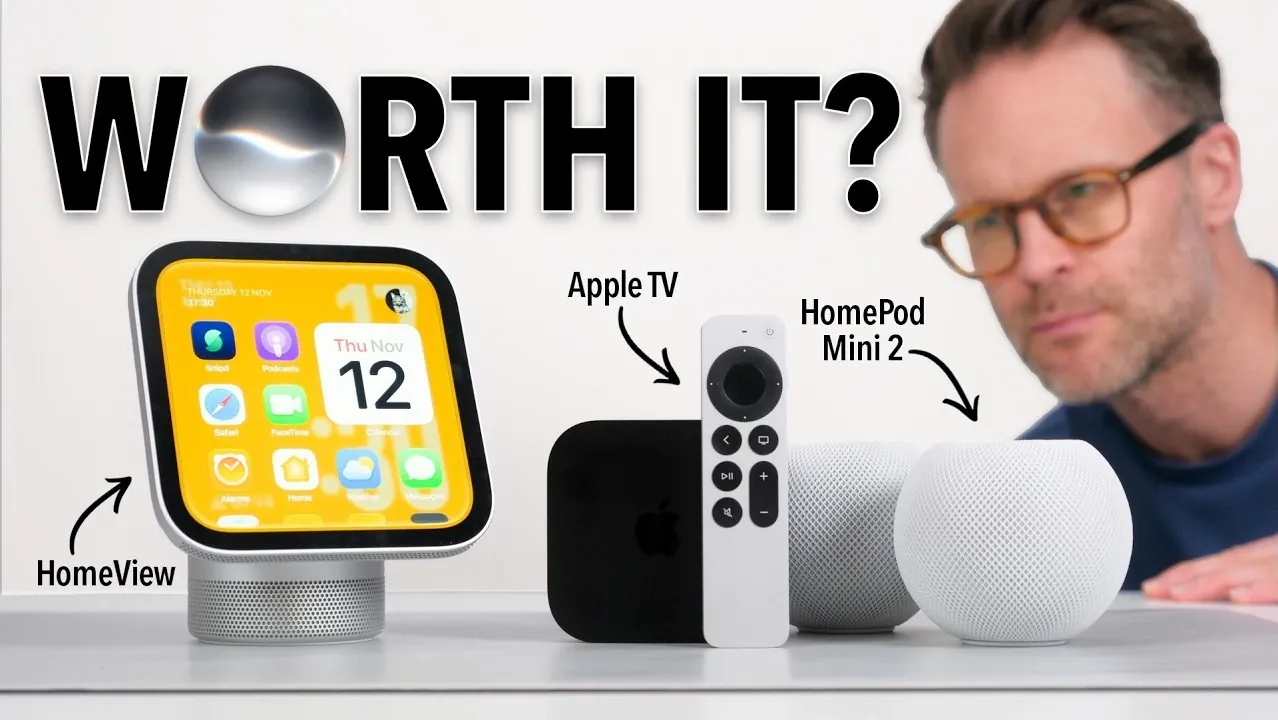
Apple’s latest lineup of smart home devices, Home View, Apple TV 4K, and HomePod 2, offers a mix of sleek design, advanced features, and ecosystem integration. The Home View, for example, boasts a 7-inch liquid retina display and adaptive interface but lacks third-party app support, limiting its functionality. Similarly, the HomePod 2 delivers impressive sound quality and stereo pairing options, while the Apple TV 4K introduces hands-free Siri and A19 chip-powered AI, as explored by Better Creating.
Dive into this breakdown to understand how these devices perform in real-world scenarios. Discover the Home View’s multi-user customization and Siri’s whisper-responsive commands, the Apple TV 4K’s surround sound setup with HomePods, and the HomePod 2’s role in multi-room audio systems. This explainer highlights key strengths and limitations, helping you assess whether Apple’s smart home ecosystem fits your needs.
TL;DR Key Takeaways :
- The Apple Home View features a 7-inch liquid retina display and integrates well with Apple’s ecosystem, but its lack of third-party app support and an app store limits functionality, with unsupported widgets proving frustrating in testing.
- Siri on the Home View can respond to whispered commands from up to 2 meters away and assist with tasks like cooking using on-device intelligence, but the interface is described as unintuitive, and the bezel design feels outdated.
- The Apple TV 4K, powered by the A19 chip, introduces hands-free Siri activation, a Siri AI beta with natural conversation capabilities, and seamless integration with other Apple devices, making it a standout upgrade for $299.
- The HomePod 2 delivers “super loud” and “super clean” sound with “lovely bass,” supports stereo pairing, and integrates with the Apple TV and Home View for multi-room audio setups, automatically adjusting timing and levels for optimal performance.
- While the Apple Home View, Apple TV 4K, and HomePod 2 offer a cohesive smart home experience for Apple users, the high cost and certain limitations, such as the Home View’s restricted functionality, may deter those outside the Apple ecosystem.
Apple Home View: A Beautifully Designed but Limited Smart Display
The Apple Home View is a new addition to Apple’s smart home lineup, featuring a 7-inch liquid retina display with an adaptive design inspired by the Apple Watch interface. Users can link their Apple accounts to access features like podcasts, Spotify, and Find My. However, the absence of an app store and third-party app support, such as Claude or ChatGPT (available in CarPlay), restricts its functionality.
Widgets for unsupported apps appear but cannot be used, which proved frustrating in testing. For example, selecting the Claude widget results in an “unavailable” message.
The Home View supports up to six users, each able to customize widgets and views. Security settings allow access to be limited to the user, anyone using the device, or recognized individuals. However, Siri’s access to personal data like messages or calendars requires each user to have an Apple Intelligence-enabled iPhone or iPad signed into the same Apple account linked to the Home View.
Conversations started on the Home View hub also appear on the connected iPhone. While the device integrates well with Apple’s ecosystem, its compatibility with external devices is limited. For instance, it can detect a UG Green NAS but only offers a music menu, with no option to check or send files.
Voice control is a standout feature. Siri responds to whispered commands from up to 2 meters away, performing tasks like providing weather updates, managing calendars, playing music, and finding recipes. The updated Siri AI uses on-device intelligence to assist with cooking, recognizing recipes and guiding users through the process.
However, the lack of a dedicated Siri app on the Home View and an unintuitive interface, featuring a secondary menu described as “almost looks wrong”, detract from the experience. Additionally, the bezel design feels outdated compared to other Apple products.
The Home View comes in two versions: a tabletop model with a woofer and passive radiators for enhanced bass and higher output, and a wall-mounted version with two full-range drivers in the display. Both versions are priced the same, which raised questions during testing given their differing sound capabilities. Apple recommends the tabletop version for users prioritizing bass performance.
Accessibility features include live captions for FaceTime calls, voice-over settings, intercom alarms, and a ring light system for face recognition, similar to a feature introduced on the MacBook. Apple has also partnered with third-party home tech providers, including LG, to expand its ecosystem with devices like doorbells, security cameras, and intercoms.

Take a look at other insightful guides from our broad collection that might capture your interest in Apple HomeView and HomePod.
- Apple HomeView Price and Features: Is Apple’s New $299 Smart Display Worth Buying?
- Apple HomeView Buyer’s Guide: Features, Pricing, and What to Know
- Apple HomeView: Things You Need to Know Before Spending $299
- Is Apple HomeView the Smart Display We’ve All Been Waiting For?
- Apple HomeView Is Here: 10 Things Every Buyer Needs to Know First
Apple TV 4K: A Brilliant Upgrade for Voice Control and AI
The Apple TV 4K introduces several upgrades, including the A19 chip for on-device AI and built-in microphones for hands-free Siri activation. Users can now say “Hey Siri” to control the device without pressing a button.
The Siri AI beta, accessible through the settings menu, supports natural conversation, full-screen search results, and additional content details. Activating this feature requires an iPhone or iPad running version 27.2. To enable the Siri AI beta, users navigate to General > Siri in the Apple TV settings.
While the Apple TV 4K retains the same physical dimensions as its predecessor, the status light has been relocated to the center to accommodate the new microphones. The remote now features precise Find My functionality, making it easier to locate. Priced at $299, the device also offers a software update that allows older Apple TV models to access the new Siri AI, though without voice control or the processing power of the A19 chip.
The Apple TV 4K integrates seamlessly with other Apple devices, such as the HomePod 2, and supports advanced audio configurations. Users can create surround sound systems with up to four HomePod Mini 2s or second-generation HomePods, with matching front and rear speaker pairs required. To set up surround sound with an existing stereo pair, users must first unpair the speakers.
The system automatically calibrates timing and levels for the room, delivering impressive sound quality. Beyond home cinema setups, the Apple TV can also function in a desk configuration, connecting to a monitor via HDMI and using Ethernet for network connectivity.
HomePod 2: Excellent Sound and Seamless Integration
The HomePod 2 introduces new color options and supports stereo pairing, allowing users to create immersive audio setups. The speakers integrate with the Apple TV and Home View, enabling audio playback across different rooms or systems via the “play to” feature. Sound quality is described as “super loud,” “super clean,” and featuring “lovely bass.” The new speakers are compatible with other Apple devices, allowing users to gradually build a comprehensive sound system.
In a home cinema configuration, larger HomePods can be paired at the front with Mini 2s at the rear. The speakers automatically adjust their timing and levels to suit the room, ensuring a balanced audio experience. For optimal performance, the front and rear speaker pairs must match.
The intercom feature on the Home View adds further functionality, allowing users to send messages to specific rooms or throughout the house. Additionally, the Home View includes sound settings for intercom alarms, enhancing its usability in multi-room setups.
Is Apple’s Home Tech Worth It?
The Home View, Apple TV 4K, and HomePod 2 represent a significant investment, especially when purchased together. While the Home View offers sleek design and strong integration with the Apple ecosystem, its limited functionality and outdated bezel design may deter some users. The host suggested waiting for Apple to expand its features before committing to the Home View.
The Apple TV 4K, however, is described as “absolutely brilliant” and a worthwhile upgrade for those without a recent model. Its voice control, AI capabilities, and seamless integration with other Apple devices make it a compelling addition to an Apple-centric home setup. Similarly, the HomePod 2 earns praise for its excellent sound quality and versatility, making it an appealing choice for users seeking to enhance their audio experience.
For those already invested in the Apple ecosystem, these devices offer a cohesive and well-executed smart home experience. However, for users less entrenched in Apple’s ecosystem, the high cost and certain limitations may make these products less justifiable.
Media Credit: Better Creating
Disclosure: Some of our articles include affiliate links. If you buy something through one of these links, Geeky Gadgets may earn an affiliate commission. Learn about our Disclosure Policy.
