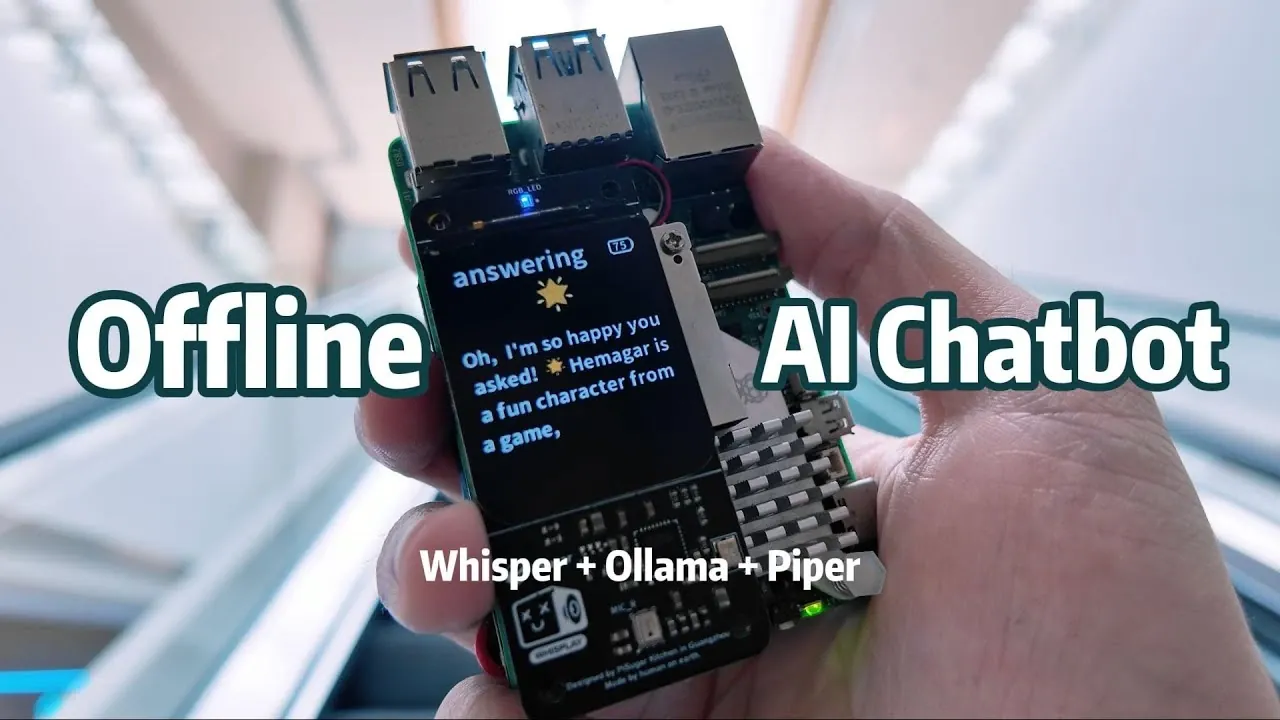
What if your AI assistant could think, speak, and respond intelligently, all without ever needing an internet connection? Imagine asking it for advice, having it narrate text, or even engaging in a casual conversation, all while knowing your data stays entirely private. With the power-packed Raspberry Pi 5 at its core, this isn’t just a futuristic dream, it’s a reality you can build yourself. By combining innovative tools like Whisper for speech recognition, Olama for local language processing, and Piper for natural voice output, you’ll create a device that’s not only portable but also completely independent of the cloud. In a world where privacy concerns are growing and connectivity isn’t always guaranteed, this project offers a refreshing alternative: an AI assistant that works for you, not for a server.
In this hands-on exploration, Jdaie Lin takes you through how to transform a Raspberry Pi 5 into a fully functional offline AI assistant. From assembling essential hardware components like the Pi Sugar 3 Plus battery for portability to configuring software that enables seamless AI interactions, every step is designed to empower you with knowledge and practical skills. You’ll learn how to optimize performance for smooth operation, integrate advanced AI tools, and unlock features like complete offline operation and customizable responses. Whether you’re a tech enthusiast eager to push the limits of DIY innovation or someone seeking a privacy-first solution, this guide will show you what’s possible when innovative AI meets local control. After all, who says intelligence has to rely on the cloud?
Build a Pi 5 Offline AI Assistant
TL;DR Key Takeaways :
- The guide explains how to build a fully offline AI voice assistant using the Raspberry Pi 5, making sure privacy and independence from Wi-Fi or cloud services.
- Key hardware components include the Raspberry Pi 5B, Whisplay Hat for display, Pi Sugar 3 Plus battery for portability, and an active cooling system for optimal performance.
- Essential AI tools like Whisper (speech-to-text), Ollama (local language model), and Piper (text-to-speech) are integrated for seamless offline functionality.
- Performance optimizations include efficient file management, automated startup scripts, and resource allocation to ensure smooth operation during intensive tasks.
- The offline assistant offers features like complete privacy, portability, customizable responses, and interactive abilities, making it versatile for various applications.
Essential Hardware Components
To build a reliable and portable offline AI assistant, you will need the following components:
- Raspberry Pi 5B (8GB RAM recommended): The core processing unit that handles all AI operations.
- Whisplay Hat: A display interface for visual feedback and user interaction.
- Pi Sugar 3 Plus Battery Pack: A portable power source to ensure mobility.
- Active Cooling System: Prevents overheating during intensive AI tasks.
- GPIO Header Adjustments: Ensures secure and stable connections between components.
Begin by assembling the hardware. Attach the Whisplay Hat to the Raspberry Pi’s GPIO pins, making sure all connections are secure and properly aligned. Next, connect the Pi Sugar 3 Plus battery pack to provide portability, and install the active cooling system to maintain optimal temperatures during prolonged use. These steps ensure your device is ready for the next phase of development.
Software Setup and Configuration
Once the hardware is assembled, the next step is to prepare the software environment. Start by flashing the latest Raspberry Pi OS onto a microSD card using the Raspberry Pi Imager. After booting up your Raspberry Pi, follow these steps to configure the software:
- Install Drivers: Set up the Whisplay Hat by installing its required drivers to enable the display interface.
- Enable SSH Access: Configure SSH for remote management, simplifying the setup process.
- Transfer Large Files: Use FTP tools to move large AI model files from another device to the Raspberry Pi, avoiding performance bottlenecks during installation.
These steps ensure the Raspberry Pi is fully prepared to handle the AI components and provide a seamless user experience.
Raspberry Pi 5 Offline AI
Check out more guides from our extensive collection on Raspberry Pi 5 projects that you might find useful.
- Raspberry Pi 5 vs Raspberry Pi 4 mini PCs compared
- Raspberry Pi 5 Galactic aluminum case with integrated passive
- Build Your Own 10″ Raspberry Pi 5 Tablet Running KDE Mobile
- How to Build a Retro Gaming Console with a Raspberry Pi 5
- How to Install Alpine Linux on Raspberry Pi 5 : Lightweight Desktop
- How to Build a Raspberry Pi 5 Docker Swarm Cluster
- Add a Raspberry Pi 5 SSD NVMe storage with ease
- How to Solve Raspberry Pi 5 Power Issues for Maximum
- Raspberry Pi 5 M.2 SSD HAT+ PCIe Gen 3 board launches for $9
- AI Vision Devices Compared: Raspberry Pi 5 vs Jetson Orin Nano
Integrating AI Tools
The functionality of your offline AI assistant relies on three essential AI tools, each serving a specific purpose:
- Whisper: An offline speech-to-text engine that accurately converts spoken input into text.
- Olama: A local language model, such as Quinn 3 1.7B, that generates intelligent, context-aware responses.
- Piper: A text-to-speech engine that produces natural-sounding voice output for smooth interactions.
Install and configure these tools to work together seamlessly. Adjust their settings to balance performance and response times, making sure the assistant operates efficiently. For more complex queries, you can enable an optional “thinking mode,” which allows the assistant to process advanced tasks with greater accuracy.
Optimizing Performance for Daily Use
To ensure your offline AI assistant is always ready to perform, consider implementing these optimizations:
- Efficient File Management: Download large AI models on a separate device and transfer them to the Raspberry Pi via FTP. This approach saves time and prevents overloading the Raspberry Pi during installation.
- Automated Startup: Configure startup scripts to launch all necessary services automatically when the Raspberry Pi boots, eliminating the need for manual intervention.
- Resource Allocation: Fine-tune the AI tools to optimize memory and processing power, making sure smooth operation even during intensive tasks.
These optimizations streamline the workflow and enhance the overall user experience, making the assistant more practical for everyday use.
Features and Capabilities
Once fully assembled and configured, your offline AI assistant offers a range of features that make it both practical and versatile:
- Complete Offline Operation: The assistant functions without an internet connection, making sure privacy and data security.
- Interactive Abilities: It can answer questions, provide instructions, tell jokes, and perform other conversational tasks.
- Portability: Powered by the Pi Sugar 3 Plus battery pack, the device is portable and can be used anywhere.
- Customizable Responses: The local language model allows you to tailor the assistant’s responses to specific needs or preferences.
These features highlight the practicality and flexibility of an offline AI assistant, making it suitable for a variety of applications, from personal use to specialized tasks.
The Value of an Offline AI Assistant
Building an offline AI assistant with the Raspberry Pi 5 demonstrates the potential of localized AI solutions. By using advanced tools like Whisper, Olama, and Piper, you can create a self-contained device that prioritizes privacy, portability, and functionality. This project not only showcases the capabilities of modern AI but also emphasizes the importance of maintaining control over your data. Whether you are a hobbyist exploring new technologies or a professional seeking a specialized solution, this offline assistant offers a practical and innovative approach to AI development.
Media Credit: Jdaie Lin
Disclosure: Some of our articles include affiliate links. If you buy something through one of these links, Geeky Gadgets may earn an affiliate commission. Learn about our Disclosure Policy.
