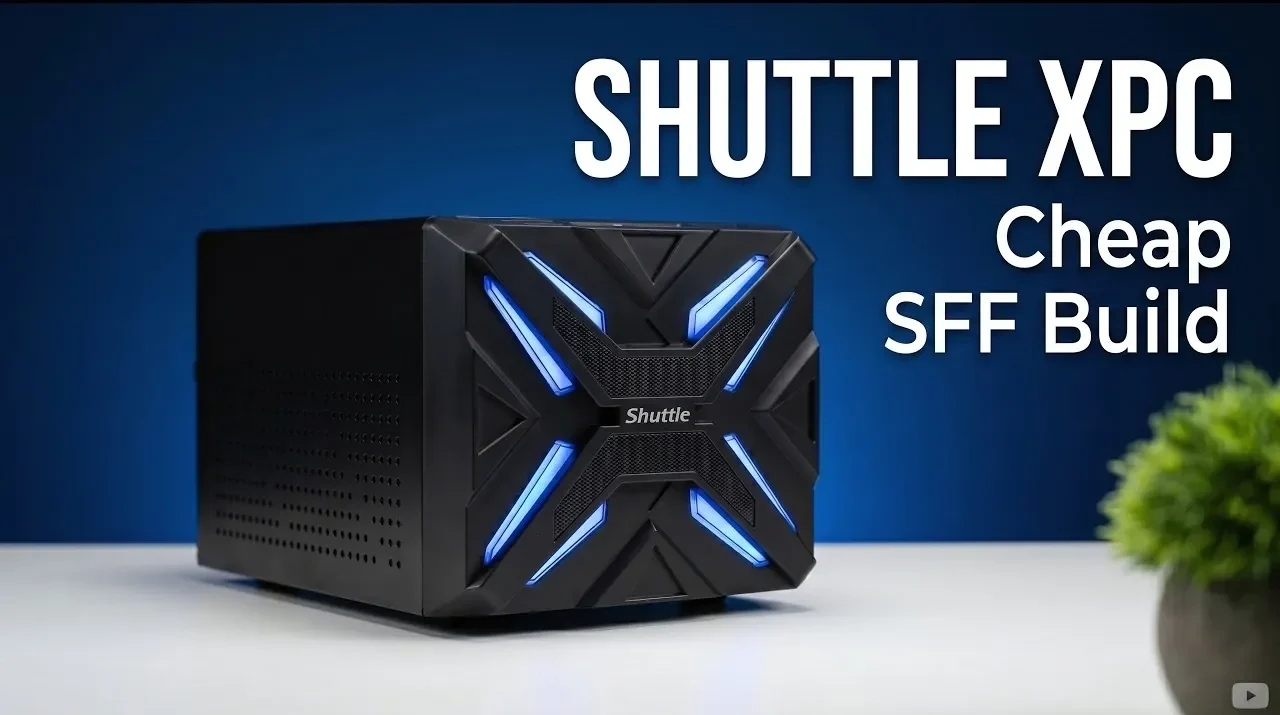
The Shuttle XPC Gaming Cube offers a compact and budget-friendly foundation for building a capable gaming PC. As highlighted by ETA Prime, this bare-bones kit includes a small form factor case, an Intel Z270 motherboard, a basic CPU cooler and a 500W power supply, all for just $99. Designed to support 6th and 7th generation Intel processors, the system is ideal for gamers looking to maximize performance while minimizing costs. However, its reliance on older hardware introduces trade-offs, such as limited compatibility with newer CPUs and the absence of features like USB Type-C ports, which may affect its long-term versatility.
In this explainer, you’ll gain insight into how to assemble a cost-effective gaming system using the Shuttle XPC Gaming Cube as a base. Discover recommended components, including the Intel Core i7-7700 and Radeon RX 5500 XT, to achieve smooth 1080p gaming performance. Explore the build’s strengths, such as its compact design and upgrade potential, alongside its limitations, like basic cooling and aging hardware. This guide provides a clear breakdown of what to expect from this budget SFF PC build and how to make the most of its unique features.
What Makes the Shuttle XPC Gaming Cube Unique?
TL;DR Key Takeaways :
- The Shuttle XPC Gaming Cube is a budget-friendly, small form factor (SFF) gaming PC kit priced at $99, including a case, motherboard, CPU cooler and 500W power supply.
- It supports 6th and 7th generation Intel processors (Skylake and Kaby Lake) and is optimized for 1080p gaming, though it relies on older hardware with limited compatibility for newer technologies.
- The compact design accommodates a dual-slot GPU, multiple storage drives and mid-range components, making it ideal for small spaces or portable setups.
- Recommended additional components include an Intel Core i7-7700 CPU, 16GB DDR4 RAM, a 512GB M.2 SSD and a Radeon RX 5500 XT GPU for cost-effective performance.
- While affordable and upgradeable, the system has trade-offs, such as basic cooling, lack of USB Type-C ports and limited future-proofing, but remains a practical choice for budget-conscious gamers.
The Shuttle XPC Gaming Cube is tailored for gamers who prioritize affordability and compactness without sacrificing functionality. The bare-bones kit includes:
- A compact case with a small form factor design
- An Intel Z270 chipset motherboard
- A basic CPU cooler
- A 500W power supply
The Intel Z270 chipset supports 6th and 7th generation Intel processors (Skylake and Kaby Lake), which helps keep costs low. While this limits compatibility with newer CPUs, it provides sufficient performance for most 1080p gaming scenarios.
The SFF design is a standout feature, ideal for users with limited desk space or those seeking a portable gaming setup. Despite its compact size, the case accommodates a dual-slot GPU, multiple storage drives and adequate cooling for mid-range components. However, the absence of modern features like USB Type-C ports and advanced cooling solutions reflects its budget-oriented nature, making it a better fit for gamers willing to work within these constraints.
Recommended Components for the Build
To complete the Shuttle XPC Gaming Cube, additional components must be sourced. Here are the recommended parts to maximize performance while staying within budget:
- CPU: The Intel Core i7-7700, a 4-core, 8-thread processor with a maximum clock speed of 4.2 GHz, is a cost-effective choice. Available for around $33 on the used market, it offers reliable performance for gaming and multitasking.
- RAM: A 16GB DDR4 kit (2x8GB) running at 3200 MT/s ensures smooth gameplay and efficient multitasking, even in demanding scenarios.
- Storage: A 512GB Western Digital M.2 SSD provides fast load times and system responsiveness. Additional SATA drives can be added for expanded storage capacity.
- GPU: The Radeon RX 5500 XT, equipped with 8GB of VRAM, delivers dependable 1080p gaming performance at an affordable price point.
These components strike a balance between affordability and capability, making sure the system remains cost-effective while meeting the demands of modern games.

Become an expert in mini PC with the help of our in-depth articles and helpful guides.
- Tiny Budget PC Runs Cyberpunk 2077 at 60 FPS
- Corsair’s New Mini PC Just Outperformed Apple’s M1 Ultra
- Why This Tiny Ryzen Mini PC Outperforms Intel’s N100 Options
- DIY Steam Machine : SteamOS Mini PC Build Targets $350 Budget
- Why the GMKtec EVO T2’s Intel Arc B390 iGPU Changes the Mini PC Game
- Turn a Broken Phone into a DeX-Powered 1440p Mini PC for Under $100
- $299 Mac mini Neo: Is This the End of the Budget Windows PC?
- PIX NII 4K Intel cube mini PC
- KhadasMind Pro Mini PC : Intel Panther Lake & ARC B390 Graphics Benchmarks Revealed
- How a Modded 2-Liter SFF Mini PC Runs Cyberpunk 2077 at 180 FPS
Strengths and Drawbacks
The Shuttle XPC Gaming Cube offers several advantages for budget-conscious builders:
- Compact Design: The SFF case is highly space-efficient, making it suitable for small desks or portable setups. It supports a dual-slot GPU and multiple storage drives, offering surprising versatility for its size.
- Included Power Supply: The 500W PSU comes with both 8-pin and 6-pin PCIe connectors, making sure compatibility with a wide range of GPUs.
- Upgrade Potential: The system allows for future upgrades, such as swapping out the GPU, adding more storage, or improving the cooling system.
However, there are notable limitations to consider:
- Cooling: The included CPU cooler is basic and designed for processors with a thermal design power (TDP) of up to 65W. It may struggle under sustained heavy loads, particularly in warmer environments.
- Connectivity: The motherboard lacks USB Type-C ports, though it compensates with 10 USB ports and dual gigabit Ethernet for robust networking options.
- Hardware Age: The reliance on older hardware limits compatibility with newer technologies and may impact performance in resource-intensive applications or games.
Gaming Performance and Real-World Use
This build is optimized for 1080p gaming, delivering playable performance in a variety of modern titles. Games such as Red Dead Redemption 2, Crimson Desert, Japanese Drift Master, Mortal Kombat 1, and Spider-Man 2 were tested at medium to high settings. FidelityFX Super Resolution (FSR) was frequently employed to boost frame rates without significantly compromising visual quality.
The combination of the Radeon RX 5500 XT and Intel Core i7-7700 ensures smooth gameplay in most scenarios. However, newer AAA titles with higher system requirements may necessitate reduced settings to maintain consistent frame rates. This trade-off is expected in budget builds using older hardware but remains acceptable for gamers prioritizing affordability.
Affordability and Alternatives
The Shuttle XPC Gaming Cube stands out for its affordability, particularly when paired with second-hand components. This approach makes it an attractive option for gamers on a tight budget. However, it’s worth exploring alternative options that may better suit specific needs:
- Refurbished Office PCs: These systems can be upgraded with a dedicated GPU to achieve similar performance at a comparable cost.
- Newer Entry-Level Builds: Spending slightly more on modern hardware may provide better long-term value, improved compatibility with future upgrades and access to newer technologies.
For those looking to enhance performance, upgrading the GPU to a more powerful option, such as the RTX 3060, or investing in a higher-quality CPU cooler for improved thermal management are viable paths to consider.
Why the Shuttle XPC Gaming Cube is Worth Considering
The Shuttle XPC Gaming Cube is a practical and affordable solution for gamers seeking a compact 1080p gaming PC. While its reliance on older hardware imposes some limitations, the build strikes a commendable balance between cost and functionality. By using used components, you can assemble a capable gaming system without exceeding your budget.
With room for customization and upgrades, this SFF PC serves as a versatile entry point into the world of PC gaming. Its combination of affordability, space efficiency and upgrade potential makes it a solid choice for gamers who value practicality and cost-effectiveness.
Media Credit: ETA PRIME
Disclosure: Some of our articles include affiliate links. If you buy something through one of these links, Geeky Gadgets may earn an affiliate commission. Learn about our Disclosure Policy.
