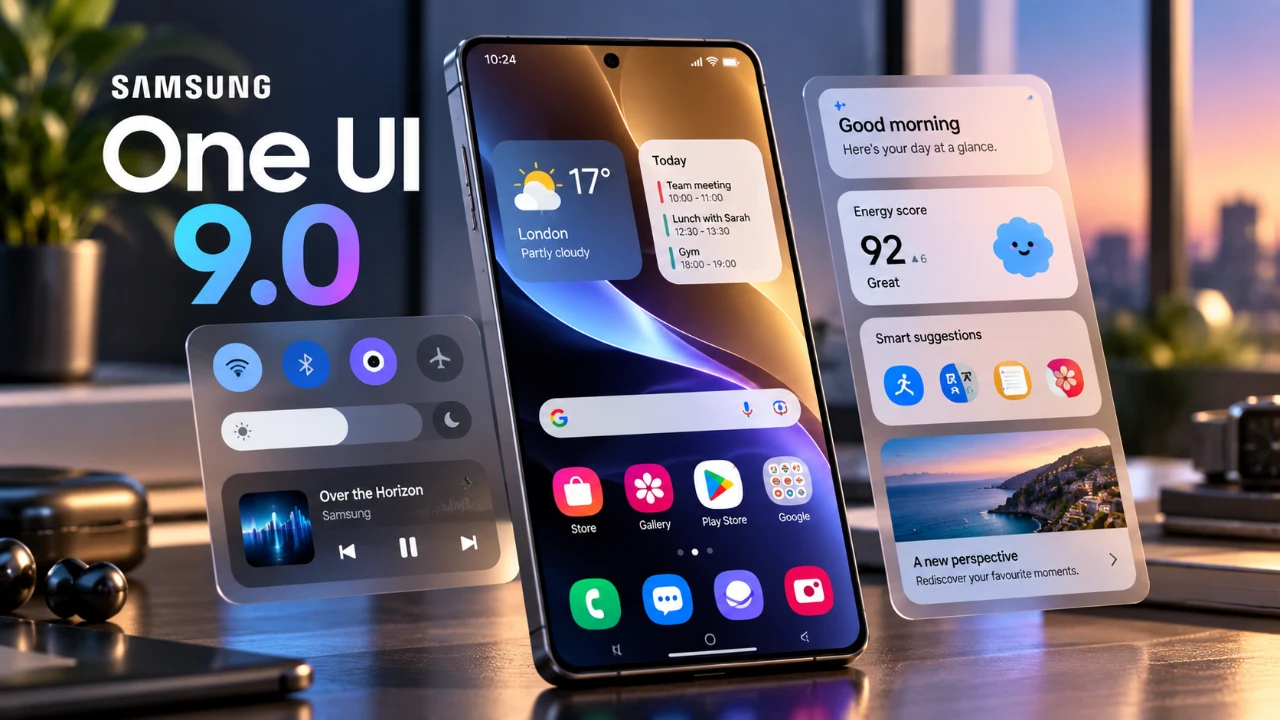
Samsung has officially launched its One UI 9 update, introducing a host of new features, design refinements, and performance upgrades to millions of Galaxy devices. The rollout begins with the Galaxy S25 series and will gradually expand to other compatible models. This update focuses on enhancing the overall user experience while delivering tools that improve productivity, privacy, and accessibility. By prioritizing user-centric innovations, Samsung continues to strengthen its reputation for seamless functionality and thoughtful design. The video below from AppX gives us more details about the update.

Top Features of One UI 9
The One UI 9 update brings a wide array of features designed to improve usability, customization and security. Whether you’re seeking smarter tools or a more personalized experience, this update offers something for everyone.
- AI-Powered Scam Detection: Automatically identifies and alerts users to potential scam calls, offering an added layer of protection for personal information.
- Motion Assist: Dynamically adjusts screen visuals based on device movement, reducing motion sickness and making sure a more comfortable viewing experience.
- Call Brief: Displays context-aware information, such as upcoming calendar events or recent messages, during calls to keep users informed without interruptions.
- Warranty and Care Hub: Centralizes warranty details, diagnostics and maintenance tools for connected devices, simplifying device management.
Refined User Interface and Visual Enhancements
Samsung has introduced significant visual and functional upgrades to the One UI 9 interface. The redesigned quick panel now includes customizable brightness and volume controls, allowing users to tailor their experience. Smoother animations and frosted glass effects contribute to a modern, polished aesthetic. Additionally, a dynamic waveform visualizer enhances the audio experience, while integrated Finder and Google search widgets streamline navigation directly from the home screen. These enhancements reflect Samsung’s commitment to creating an intuitive and visually appealing interface.
Good Lock Modules: New Customization Tools
For users who enjoy personalizing their devices, the updated Good Lock modules provide exciting new options to enhance functionality and aesthetics.
- Multi-Finger Gesture Controls: Assign specific gestures to actions such as taking screenshots, launching apps, or toggling settings, offering greater convenience.
- Network Speed Indicator: Displays real-time network performance directly in the status bar, helping users monitor connectivity at a glance.
- Lock Screen Customization: Introduces new animations, customizable text options, and enhanced layouts for a more personalized lock screen experience.
Camera and Photography Upgrades
Photography enthusiasts will appreciate the advanced features introduced in One UI 9. The Camera Assistant now includes a shutter speed adjustment option, allowing users to set it to 1/60th of a second for improved control over motion capture. Additionally, the ability to disable the camera timeout ensures uninterrupted use during extended photography sessions. For foldable devices, the new Mirror View toggle offers added flexibility, allowing users to frame shots more effectively. These updates cater to both casual users and professional photographers seeking greater precision and versatility.
Productivity Features to Boost Efficiency
One UI 9 introduces several tools aimed at enhancing productivity and multitasking, making it easier for users to stay organized and efficient.
- Samsung Notes: Features like a tape tool for hiding text, updated pen styles, and advanced drawing tools provide a more versatile note-taking experience.
- My Files App: A redesigned layout simplifies navigation, making it easier to locate and manage files across devices.
- Samsung DeX: Enhanced window management and virtual desktop previews improve multitasking capabilities for users working on desktop setups.
Privacy and Security Enhancements
Privacy and security remain a top priority in One UI 9, with new tools designed to safeguard user data and provide greater transparency.
- Location Access Indicator: Notifies users whenever an app accesses their location, making sure greater awareness and control.
- Security Brief: Alerts users to potential malware threats and unnecessary app permissions, enhancing device security.
- Privacy Alerts: Provides notifications about background access to sensitive data, empowering users to take action when necessary.
Accessibility and Additional Features
One UI 9 includes several accessibility improvements, making sure the platform is inclusive and user-friendly for individuals with diverse needs. These updates enhance usability and expand functionality across devices.
- Text Spotlight: Enlarges selected text in a floating window, making it easier to read for users with visual impairments.
- Mouse Keys: Offers precise cursor control for desktop setups, improving accessibility for users with mobility challenges.
- Now Brief Cards: Customizable cards provide quick updates on weather, health metrics, and video content, keeping users informed at a glance.
- Expanded Language Support: Broader language options ensure a seamless experience for a global audience.
- Accessory Upgrades: Enhanced compatibility and features for connected devices, such as wearables and smart home products, improve integration and usability.
Samsung’s One UI 9 update represents a comprehensive effort to balance functionality, customization, and security. By introducing features like AI-powered scam detection, advanced camera controls, and refined UI elements, Samsung continues to set a high standard for mobile operating systems. As the update becomes available across more Galaxy devices, it promises to deliver a more intuitive, secure, and personalized experience for users worldwide.
Here are additional guides from our expansive article library that you may find useful on the Samsung One UI 9 update.
- Samsung Galaxy Z Fold 8: 5 MASSIVE Leaks You Need to See!
- One UI 9 Changes Everything: The Best Features Coming to Your Galaxy
- Every New Feature in the Samsung One UI 9 WATCH Update
- Samsung’s One UI 9 Update Is Finally Here: And It’s a Total Fantastic option
- One UI 9 Beta Features Revealed: Here’s Every New Change
Source: AppX
Disclosure: Some of our articles include affiliate links. If you buy something through one of these links, Geeky Gadgets may earn an affiliate commission. Learn about our Disclosure Policy.
