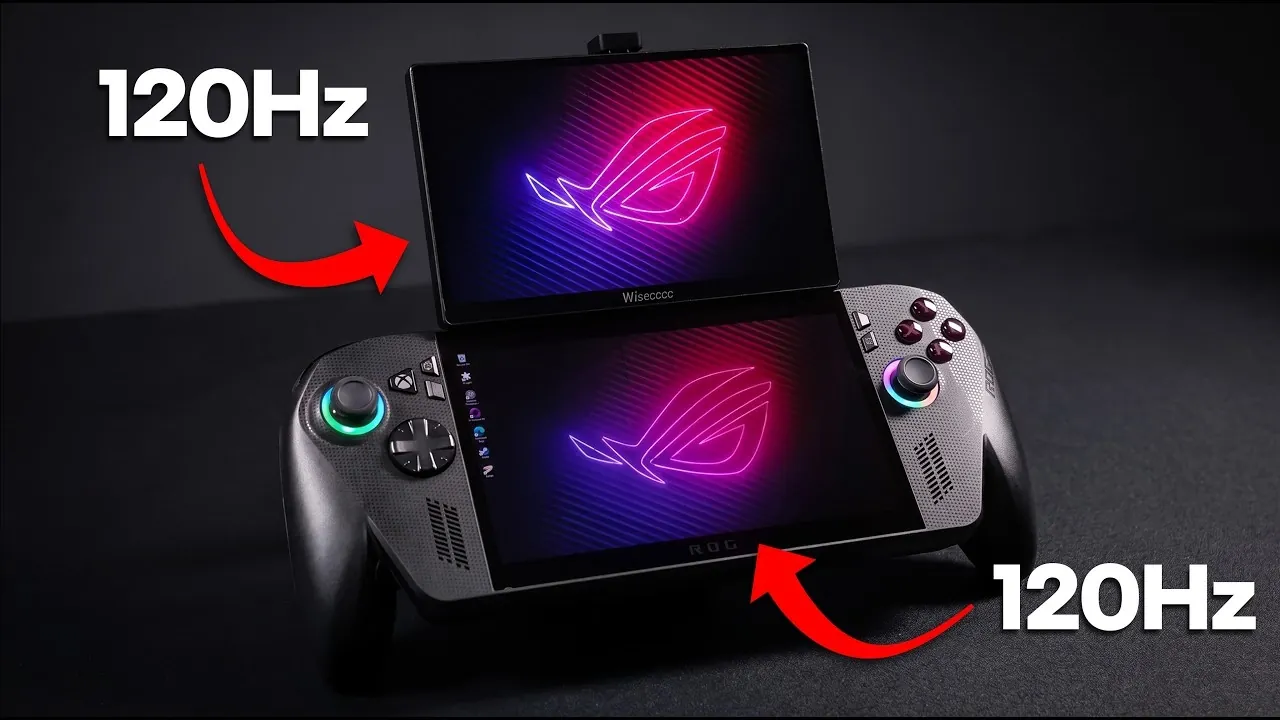
ETA Prime highlights a custom modification that pairs the ROG Ally X with a portable 120Hz dual-screen setup, offering a unique approach to multitasking and gaming. At the core of this setup is a 1080p IPS touchscreen monitor with HDR and FreeSync support, making sure smooth visuals and vibrant colors. Despite the monitor’s OSD lacking touch functionality, its USB-C and mini HDMI ports provide broad compatibility with various devices, making it a practical addition for users seeking flexibility in their gaming or productivity workflows.
Explore how features like MagSafe-compatible stands and an integrated kickstand contribute to the usability of this dual-screen configuration. Learn about the impact of the 120Hz refresh rate on fast-paced gaming experiences and gain insights into powering the setup with external power banks for added portability. This overview offers detailed guidance for those looking to expand their gaming or workstation capabilities with a dual-screen approach.
ROG Ally X Dual Screen Mod
TL;DR Key Takeaways :
- The monitor features a 120Hz refresh rate, 1080p IPS display, HDR support and FreeSync compatibility, making sure smooth visuals and vibrant colors for gaming and creative tasks.
- Touchscreen functionality adds interactivity, though the On-Screen Display (OSD) is not touch-enabled, limiting some usability aspects.
- Highly portable with a lightweight metal design, but it requires an external power source due to the lack of a built-in battery.
- Offers multiple connectivity options, including USB-C and mini HDMI ports, along with practical accessories like a kickstand and USB-C adapters for streamlined setup.
- Ideal for dual-screen gaming setups and creative workflows, supporting tasks like video editing, graphic design and coding, while also enhancing productivity on the go.
The defining feature of this monitor is its 120Hz refresh rate, which ensures smooth and fluid visuals, making it ideal for fast-paced gaming and intricate creative tasks. Its 1080p resolution, paired with IPS technology, delivers vibrant colors and wide viewing angles, while HDR support enhances brightness and contrast for a more immersive visual experience. Additionally, FreeSync compatibility eliminates screen tearing, making sure seamless gameplay for gamers.
The monitor also incorporates touchscreen functionality, adding an interactive element to its design. However, the On-Screen Display (OSD) is not touch-enabled, which may limit some users’ expectations. Other notable features include:
- Dual stereo speakers for basic audio output
- A 3.5mm audio jack for private listening
- Multiple connectivity options, including USB-C and mini HDMI ports
Constructed with lightweight metal, the monitor is highly portable, though it lacks a built-in battery, requiring an external power source for operation.
Streamlined Setup and Practical Accessories
Setting up this monitor is intuitive, thanks to its thoughtful design and included accessories. A kickstand allows users to position the screen at an optimal viewing angle, while USB-C cables and 90° USB-C adapters simplify cable management. For those seeking a dual-screen setup, MagSafe rings and stands enable secure attachment to devices like the ROG Ally X.
Although the monitor is ready to use straight out of the box, additional accessories may be necessary for specific configurations. For example:
- A portable power bank can enhance mobility by providing an external power source.
- External speakers or headphones can significantly improve the audio experience.
These accessories ensure that the monitor can adapt to a variety of use cases, whether stationary or on the go.

Here are more detailed guides and articles that you may find helpful on ROG Ally X.
- ASUS Finally Fixed the ROG Ally : Hands-on with the X20 OLED
- ASUS Releases Ally X Driver 26.6.1 for Forza Horizon 6
- ASUS ROG Ally dock mode transforms handheld into desktop PC
- Native 1080P Fails Halo Campaign Evolved on ROG Xbox Ally X
- What Happens When Handheld Consoles Rival Gaming Laptops In 2026
- Legion Go 2 vs ROG Ally X: The Benchmark Battle You Can’t Miss!
- ROG Xbox Ally Bazzite OS vs Steam Deck : Which Linux Handheld Wins the Battle?
- Windows 11 vs SteamOS : Which Wins on the Ally X?
- SteamOS ROG Xbox Ally X : Unlocking New Gaming Potential with SteamOS 3.8
- ROG Xbox Ally X vs. Legion Go 2: Is OLED Worth The Extra Cash?
Performance and Customization for Diverse Needs
This monitor is engineered for adaptability, offering a range of customization options through its OSD. Users can adjust brightness, contrast, and color profiles to suit their preferences, making sure an optimal viewing experience. The 120Hz refresh rate guarantees smooth motion, particularly in fast-action games, while HDR support enhances visual fidelity for compatible content.
While the built-in stereo speakers provide only basic sound quality, the 3.5mm audio jack or external speakers can be used to achieve a richer audio experience. Despite this minor limitation, the monitor excels in delivering high-quality visuals and a customizable interface, making it a versatile tool for both gaming and creative applications.
Applications in Gaming and Creativity
This monitor is particularly effective in dual-screen gaming setups, offering unique advantages for gamers. It is well-suited for PC games and emulators, allowing users to emulate dual-screen systems like the Nintendo DS, 3DS, or Wii U. For simulation games such as Microsoft Flight Simulator, the monitor can display gauge clusters, while in Fallout 4, it can serve as a dedicated screen for inventory systems or maps.
Beyond gaming, the monitor is a valuable asset for creative professionals. It functions as a secondary display for tasks such as video editing, graphic design, or coding, enhancing productivity and streamlining workflows. Its portability makes it ideal for on-the-go projects, whether you are working in a coffee shop, collaborating in a shared workspace, or presenting in a meeting.
Considerations and Limitations
While this monitor offers a robust set of features, there are a few limitations to consider:
- The OSD navigation is not touch-enabled, which may be a drawback for users accustomed to fully interactive touchscreen controls.
- The built-in stereo speakers provide limited sound quality, making external audio solutions a better choice for immersive experiences.
- The absence of a built-in battery necessitates reliance on external power sources, which can restrict mobility during extended use.
Despite these limitations, the monitor’s overall performance and adaptability make it a compelling option for gamers and creators alike.
A Versatile Companion for Gamers and Creators
This portable 120Hz dual-screen monitor is a versatile tool that enhances both gaming and creative workflows. Whether you are a gamer seeking to emulate classic systems or a creator in need of a reliable secondary display, this device offers a range of applications to improve your digital experience. Its lightweight design, robust feature set, and customization options make it a valuable addition to any tech setup.
While it is not without its shortcomings, the monitor’s strengths far outweigh its drawbacks. From delivering smooth visuals in fast-paced games to serving as a portable solution for creative projects, this device combines performance, flexibility and portability to meet the demands of modern users.
Media Credit: ETA PRIME
Disclosure: Some of our articles include affiliate links. If you buy something through one of these links, Geeky Gadgets may earn an affiliate commission. Learn about our Disclosure Policy.
