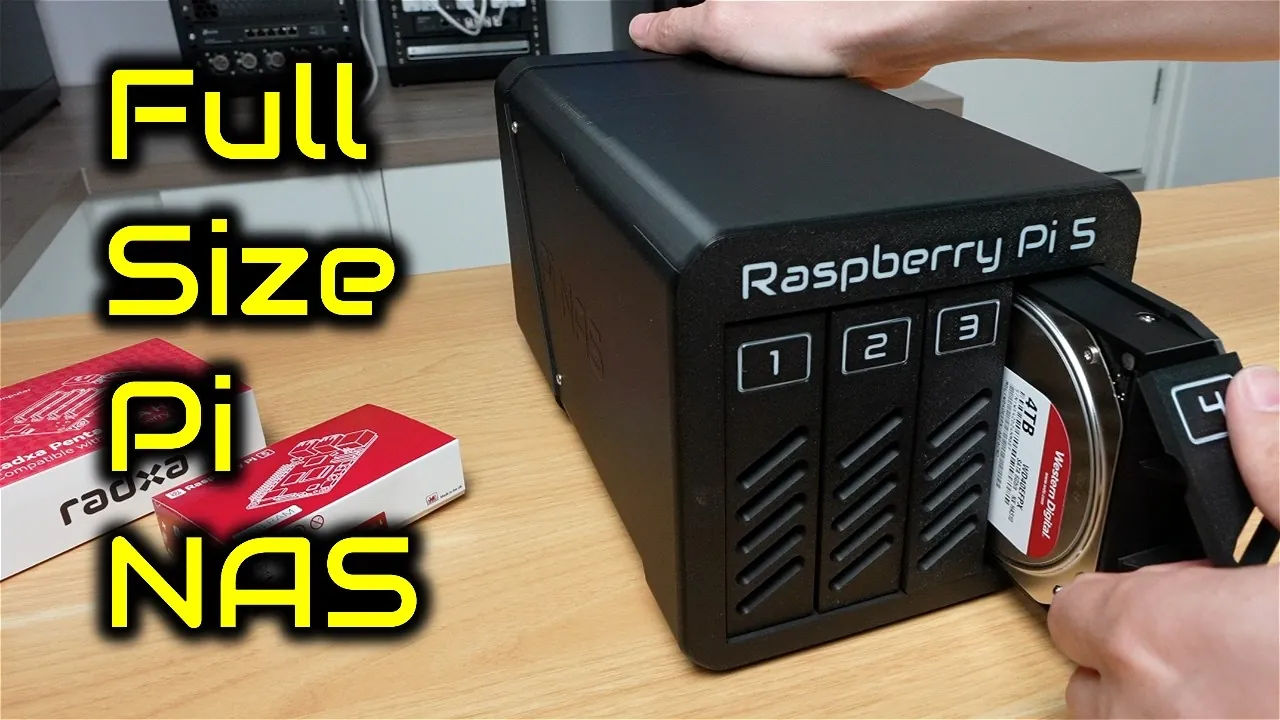
What if you could build your own high-performance, scalable data storage solution for a fraction of the cost of commercial options? Imagine a sleek, compact system with swappable drives, RAID 5 redundancy, and the power to handle your growing digital library—all powered by the versatile Raspberry Pi 5. This isn’t just a dream for tech enthusiasts; it’s a practical, cost-effective solution that combines innovative hardware with the flexibility of 3D-printed components. Whether you’re a data hoarder, a media streamer, or simply someone who values control over their storage, this exploration will show you how to create a custom NAS that’s as functional as it is future-proof.
In this guide, Michael Klements explains how to transform the Raspberry Pi 5 into a 4-bay NAS with modular hardware, a custom-designed enclosure, and OpenMediaVault software for seamless management. We’ll walk you through the essentials—from assembling the hardware and configuring RAID 5 for data redundancy to optimizing performance and addressing common challenges. Along the way, you’ll discover how to design a 3D-printed case with swappable drive trays, making sure easy upgrades and maintenance. By the end, you’ll not only have a powerful storage solution but also the satisfaction of having built it yourself. After all, why settle for off-the-shelf when you can create something uniquely yours?
Build a Raspberry Pi 5 NAS
TL;DR Key Takeaways :
- Building a 4-bay NAS with a Raspberry Pi 5 offers a cost-effective, scalable, and modular solution, featuring RAID 5 redundancy and enhanced network performance.
- The Raspberry Pi 5’s PCIe interface supports multiple drives and faster data transfer rates, making it ideal for demanding storage tasks.
- A custom 3D-printed enclosure with swappable drive trays, efficient airflow, and secure assembly enhances functionality and personalization.
- OpenMediaVault simplifies software setup, allowing easy management of storage configurations, RAID 5, and file-sharing protocols like SMB and NFS.
- Performance optimization includes Gigabit Ethernet speeds (upgradable to 2.5G), energy-efficient operation, and effective cooling for reliable performance under heavy workloads.
Why Use a Raspberry Pi 5 for Your NAS?
The Raspberry Pi 5 is a versatile and powerful platform, making it an excellent choice for building a NAS. Its compact size, energy efficiency, and advanced features such as the PCIe interface allow for robust storage configurations. The PCIe interface supports multiple drives and enables faster data transfer rates, making it suitable for demanding storage tasks. Additionally, the Raspberry Pi 5’s affordability and modularity make it accessible for both beginners and experienced tech enthusiasts.
By combining the Raspberry Pi 5 with 3D-printed components and reliable software, you can create a system that balances performance, cost, and customization. This approach ensures that your NAS is not only functional but also adaptable to future upgrades.
Key Hardware Components
To build your NAS, you will need the following essential components:
- Raspberry Pi 5: The core of your NAS, featuring a PCIe port for storage expansion and efficient processing capabilities.
- Radxa Penta SATA Hat: A critical component that allows you to connect up to four SATA drives to your Raspberry Pi.
- Storage Drives: Four 4TB WD RED NAS drives are recommended for their reliability, durability, and performance in RAID setups.
- Cooling System: An active cooler and an 80mm fan to maintain optimal operating temperatures and prevent overheating.
- Power Supply: A 12V power adapter capable of supporting both the Raspberry Pi and the connected drives.
This modular hardware setup ensures that your NAS is future-proof and easy to upgrade, allowing you to replace or add components as your storage needs evolve.
Raspberry Pi 5 4-Bay NAS Build
Find more information on Network Attached Storage (NAS) projects by browsing our extensive range of articles, guides and tutorials.
- 3 Mini NAS Devices Compared: Speed, Storage, and Performance
- PiNAS dual drive Raspberry Pi NAS
- Raspberry Pi 4 NAS Setup: Affordable Storage Made Easy
- Building a DIY ARM Network Attached Storage (NAS) solution
- UGREEN NASync DX480T Plus NAS network attached storage
- How to build a $100 NAS storage server in 2024
- How to build a NAS storage system using a mini PC
- The NAS a Must Have for Video Editors : Say Goodbye to Storage
- 3D Printed NAS storage system with HDD dampening
- How to build a NAS from scratch using UnRAID OS
Designing and Printing a Custom Enclosure
A custom 3D-printed enclosure is essential for protecting your hardware and enhancing the overall functionality of your NAS. Using design software such as Fusion 360, you can create a split-design enclosure tailored to your components. Printing the enclosure with a high-quality 3D printer, such as the Bambulab P1S, in durable black PLA ensures a professional and polished finish.
Key features of the enclosure include:
- Swappable Drive Trays: These allow for quick and easy drive replacements or upgrades without the need to dismantle the entire system.
- Efficient Airflow: Integrated vents and cable management spaces ensure proper cooling and prevent overheating.
- Secure Assembly: Brass inserts and screws provide a sturdy and reliable build, making sure the enclosure remains durable over time.
This custom enclosure not only enhances the usability of your NAS but also adds a layer of personalization and practicality to your build.
Software Setup with OpenMediaVault
Once the hardware is assembled, the next step is configuring the software. OpenMediaVault (OMV) is a powerful and user-friendly NAS management software that simplifies storage configuration and system monitoring. Follow these steps to set up your NAS:
- Install Raspberry Pi OS Lite: Flash the operating system onto a microSD card to serve as the foundation for your NAS.
- Install OpenMediaVault: Set up OMV to manage storage configurations, user access, and file-sharing protocols.
- Activate the PCIe Port: Ensure that the connected drives are recognized by the system for seamless operation.
- Configure RAID 5: Set up a RAID 5 array to balance storage capacity and data redundancy, protecting your files against potential drive failures.
OMV supports various file-sharing protocols, including SMB, NFS, and FTP, making sure compatibility with a wide range of devices on your network. Its intuitive interface makes it easy to monitor and manage your NAS.
Performance Optimization and Testing
Testing and optimizing your NAS is crucial to ensure it meets your performance expectations. Focus on the following key metrics:
- Network Speeds: The Raspberry Pi 5’s Gigabit Ethernet port delivers read and write speeds of approximately 110MBps. For faster performance, consider upgrading to a 2.5G Ethernet adapter, which can achieve speeds of 200-250MBps under optimal conditions.
- Power Consumption: The system is energy-efficient, consuming around 18W at idle and 30W under load, making it suitable for continuous operation.
- Cooling Efficiency: The active cooling system ensures that drive temperatures remain within safe limits, although the fan may produce noticeable noise levels (approximately 54 decibels) in quiet environments.
By addressing these performance factors, you can ensure that your NAS operates efficiently and reliably, even under heavy workloads.
Addressing Common Challenges
Building a NAS can present challenges, but these can be overcome with careful planning and attention to detail. Common issues include:
- Component Fitment: Ensure that the enclosure design provides adequate clearance for drive trays and secure mounting for the Raspberry Pi.
- Software Configuration: Fine-tune OpenMediaVault settings to optimize performance and compatibility with your network.
- CPU Limitations: Be aware that the Raspberry Pi’s CPU may limit RAID calculations during high-speed data transfers, which could affect performance under heavy workloads.
By addressing these challenges early in the build process, you can create a more reliable and efficient NAS.
Key Benefits of This NAS Build
A Raspberry Pi 5-based NAS offers several advantages, making it an excellent choice for home users and tech enthusiasts:
- Customizable 3D-printed enclosure for enhanced functionality and aesthetics.
- RAID 5 configuration for data redundancy and efficient storage utilization.
- Improved network performance with optional 2.5G Ethernet upgrades.
- Energy-efficient operation suitable for continuous use.
- Modular design for easy upgrades and maintenance.
These features make this NAS build a versatile and cost-effective solution for managing your storage needs. Whether you’re storing media, backing up files, or hosting a personal cloud, this system offers a reliable and scalable platform for your data.
Media Credit: Michael Klements
Disclosure: Some of our articles include affiliate links. If you buy something through one of these links, Geeky Gadgets may earn an affiliate commission. Learn about our Disclosure Policy.
