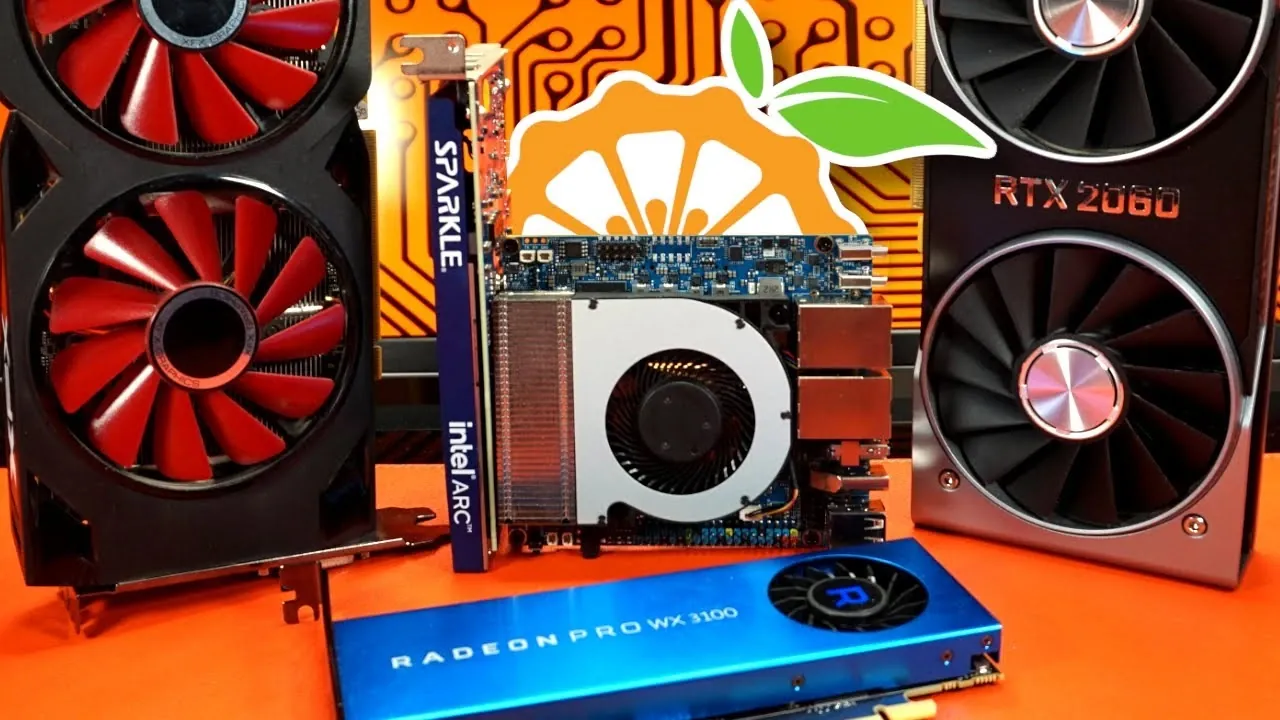
What if your compact single-board computer could handle modern gaming, 3D rendering, and video encoding, all on an ARM platform? Interfacing Linux explores how the Orange Pi 6 Plus, a seemingly modest ARM-based device, can achieve this by integrating external GPUs through its M.2 PCIe interface. But this isn’t just a plug-and-play solution. From power supply demands to BIOS quirks, the process reveals both the promise and the pitfalls of pushing ARM hardware beyond its limits.
In this breakdown, we’ll uncover how the Orange Pi 6 Plus transforms into a compact powerhouse for gaming and creative workflows, thanks to the ADT-Link adapter and the right GPU. You’ll learn about the challenges of hardware compatibility, the unexpected hurdles of PCIe configurations, and the surprising performance gains achieved with GPUs like the RTX 2060. Whether you’re an enthusiast intrigued by ARM’s possibilities or a tinkerer ready to embrace the chaos of custom setups, this analysis offers a compelling look at what’s possible, and what’s not, when you push the boundaries of small-scale computing.
Orange Pi 6 Plus GPU Upgrade
TL;DR Key Takeaways :
- The Orange Pi 6 Plus, an ARM-based single-board computer, can integrate external GPUs via an ADT-Link adapter, allowing advanced tasks like gaming, 3D rendering, and video encoding.
- GPU integration requires careful planning, including hardware compatibility checks, BIOS configuration adjustments, and making sure sufficient power supply for high-performance GPUs.
- Compatible GPUs like the RX 470, RTX 2060, and WX3100 enhance performance, while some GPUs, such as Intel Arc models, face compatibility challenges due to BIOS and PCIe limitations.
- With external GPUs, the Orange Pi 6 Plus supports modern gaming titles and retro games, offering playable frame rates and improved visuals, making ARM-based gaming viable.
- Beyond gaming, the system excels in creative workflows, with CUDA-enabled GPUs allowing faster 3D rendering and video encoding, positioning it as a compact, cost-effective tool for content creators.
- Read more about the complete project over on Interfacing Linux
The Orange Pi 6 Plus is a single-board computer designed to run ARM-based operating systems such as Debian 12 and Fedora. While it offers sufficient processing power for basic computing tasks, its onboard GPU lacks the performance necessary for gaming or demanding creative workflows. This limitation can be overcome by connecting an external GPU, unlocking advanced features like hardware acceleration, 3D rendering, and video encoding.
By integrating an external GPU, the Orange Pi 6 Plus becomes a more capable platform for users seeking to push the boundaries of ARM computing. This upgrade transforms the device into a compact yet powerful system, suitable for gaming enthusiasts and content creators alike.
How the ADT-Link Adapter Enables GPU Integration
The ADT-Link adapter plays a pivotal role in connecting external GPUs to the Orange Pi 6 Plus. It converts the board’s M.2 PCIe lanes into a standard PCIe slot, allowing the attachment of a GPU. However, the process involves more than just plugging in the adapter. Several factors must be considered to ensure a successful upgrade:
- External Power Supply: High-performance GPUs, such as the RX 470 or RTX 2060, require a dedicated external PSU to deliver sufficient power. Without this, the system may fail to operate correctly or experience instability.
- Bus-Powered GPUs: Some GPUs, like the WX3100, can function without an external PSU. While this simplifies the setup, these GPUs typically offer limited performance compared to more powerful models.
The ADT-Link adapter, combined with the right GPU and power supply, unlocks the Orange Pi 6 Plus’s potential for advanced computing tasks. However, users must carefully assess their hardware choices to avoid compatibility issues.
Learn more about eGPU’s with the help of our in-depth articles and helpful guides.
- Mind Portable Workstation now features Graphics eGPU Module
- Sparkle Studio G Ultra 850 eGPU : Thunderbolt 5 External GPU
- Is eGPU Gaming Worth It in 2026? Real FPS at 1080p, 1440p & 4K
- GPD G1 eGPU external graphics card expansion dock hands-on
- GMKTec AD-GP1 Review: Compact eGPU with OCuLink and USB4
- Miniforum new DEG1 Oculink eGPU graphics card docking station
- Sonnet Thunderbolt 3 eGPU card external graphics card expansion
- World’s first portable eGPU with SSD storage
- Portable eGPU on Batteries: 1080p with High Presets and FSR
- How to Set up Intel Arc eGPU on Raspberry Pi, Drivers Guide
GPU Compatibility and Performance Insights
Not all GPUs are compatible with the Orange Pi 6 Plus, and performance varies depending on the model. Testing has revealed both successes and challenges when integrating external GPUs with this ARM-based system:
- Stable Performance: GPUs such as the WX3100, RX 470, and RTX 2060 have demonstrated reliable performance when paired with the ADT-Link adapter. These GPUs enable hardware acceleration for gaming, 3D rendering, and video processing.
- Compatibility Challenges: Intel Arc GPUs, including the A310, encountered issues such as BIOS configuration limitations and difficulties with PCIe link speed adjustments. These challenges highlight the importance of selecting a GPU that aligns with the Orange Pi 6 Plus’s hardware and software capabilities.
Selecting the right GPU is critical to achieving optimal performance. Users may also need to tweak BIOS settings to ensure compatibility and stability, particularly when using high-performance GPUs.
Expanding Gaming Possibilities on ARM
With an external GPU, the Orange Pi 6 Plus can handle modern gaming titles, delivering playable frame rates and enhanced visuals. Technologies like DLSS (Deep Learning Super Sampling) further improve performance, making gaming on ARM systems a viable option. Here’s what users can expect:
- Modern Titles: Games such as The Witcher 3, Shadow of the Tomb Raider, and Cyberpunk 2077 ran at acceptable frame rates when paired with a compatible GPU and properly configured settings.
- Retro Gaming: Older titles like Half-Life 2 performed exceptionally well, showcasing the system’s potential for retro gaming enthusiasts.
These results demonstrate that, with the right hardware, the Orange Pi 6 Plus can deliver a satisfying gaming experience, even for modern titles. The integration of external GPUs opens up new possibilities for ARM-based gaming systems.
Creative Applications: Beyond Gaming
The Orange Pi 6 Plus with an external GPU isn’t limited to gaming. It also excels in creative workflows, making it a valuable tool for content creators. CUDA-enabled GPUs, such as the RTX 2060, unlock powerful capabilities for tasks like 3D rendering and video encoding:
- 3D Rendering: Applications like Blender benefit from significantly reduced rendering times, thanks to the GPU’s hardware acceleration. This makes the Orange Pi 6 Plus a viable option for 3D artists seeking a compact workstation.
- Video Encoding: Tools like OBS use GPU acceleration to process video more efficiently, allowing faster encoding and smoother workflows for video creators.
These enhancements position the Orange Pi 6 Plus as a versatile platform for creative professionals, offering a compact and cost-effective alternative to traditional workstations.
Addressing Technical Challenges
Integrating an external GPU with the Orange Pi 6 Plus is not without its challenges. Users must navigate several technical hurdles to achieve optimal performance:
- BIOS Configuration: Limited BIOS access can complicate adjustments to PCIe link speeds and other settings necessary for GPU compatibility. Users may need to experiment with configurations to achieve stability.
- Power Requirements: High-performance GPUs demand a reliable external PSU, which adds complexity to the setup. Making sure proper power delivery is essential to avoid system instability or hardware damage.
Despite these obstacles, the combination of the ADT-Link adapter and a compatible GPU unlocks the full potential of the Orange Pi 6 Plus. With careful planning and the right hardware, users can overcome these challenges and transform their system into a powerful ARM-based platform.
Unlocking the Future of ARM Computing
Upgrading the Orange Pi 6 Plus with an external GPU demonstrates the untapped potential of ARM-based systems. By allowing hardware acceleration, advanced gaming capabilities, and creative workflows, this compact single-board computer becomes a versatile tool for both enthusiasts and professionals. While challenges such as BIOS configuration and GPU compatibility require attention, the results are well worth the effort. The Orange Pi 6 Plus showcases what’s possible with ARM computing, paving the way for future innovations in compact, high-performance hardware.
Media Credit: Interfacing Linux
Disclosure: Some of our articles include affiliate links. If you buy something through one of these links, Geeky Gadgets may earn an affiliate commission. Learn about our Disclosure Policy.
