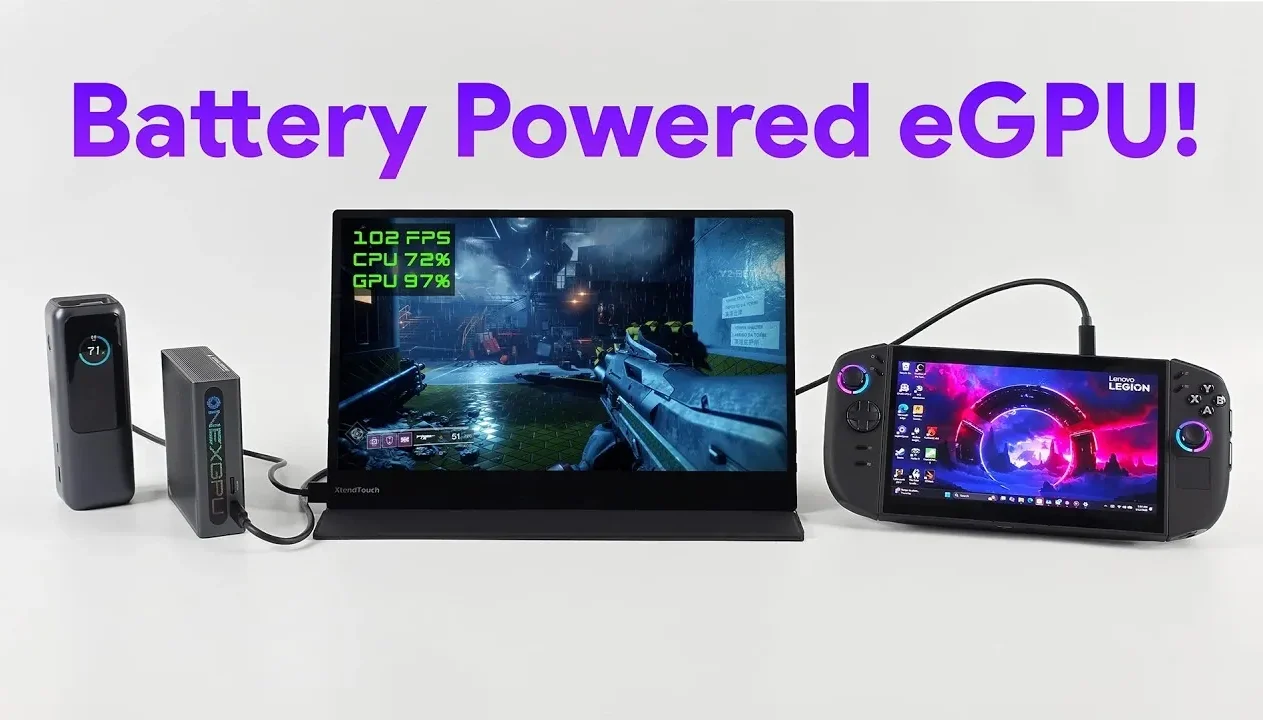
Have you ever wished for a high-performance gaming or productivity setup that doesn’t tie you down to a desk or a wall outlet? In this walkthrough, ETA Prime shows how a fully battery-powered eGPU setup can deliver impressive performance while remaining completely portable. Combining innovative components like a Legion Go 2 handheld device, an RX 7600 MXT GPU, and compact yet powerful battery packs, this guide explores the exciting potential of creating a truly mobile workstation or gaming rig. The result? A system that’s not just functional but also liberating, allowing you to game, edit, or work from virtually anywhere, all without being tethered to traditional power sources. It’s a bold step forward in portable computing, but it doesn’t come without its challenges.
In this guide, you’ll discover how to assemble a setup that balances mobility and performance, including the hardware essentials, power solutions, and key optimizations needed to make it work. From overcoming bandwidth bottlenecks to managing battery life during demanding tasks, this breakdown offers practical insights into building a system that’s as versatile as it is powerful. Whether you’re a digital nomad, a gamer on the move, or a professional tackling resource-intensive projects in remote locations, this setup opens the door to a new level of freedom. The possibilities are as exciting as they are innovative, what could you achieve with a system like this in your hands?
Battery-Powered eGPU Overview
TL;DR Key Takeaways :
- A battery-powered eGPU setup enables high-performance gaming and productivity on the go, offering mobility without reliance on traditional power outlets.
- The core components include an RX 7600 MXT GPU, a Legion Go 2 handheld device with AMD Ryzen Z2 Extreme processor, a portable AMOLED display, and two battery pack options for varying runtimes.
- Challenges include managing power efficiency, bandwidth limitations with USB 4, and making sure proper power delivery through adapters, requiring careful planning and component selection.
- Performance tests show playable frame rates at 1080p with high or ultra settings in modern games, though the GPU’s 100W power cap results in slightly lower performance compared to desktop setups.
- Battery life varies, with the smaller Anker pack offering 1.25 hours and the larger RavPower pack providing 3.5 hours, highlighting the need for efficient power management and potential alternative solutions for extended use.
Why Choose a Battery-Powered eGPU Setup?
A battery-powered eGPU setup is designed for users who prioritize mobility without compromising on performance. Whether you’re gaming, editing videos, or tackling demanding professional tasks, this system offers compatibility with advanced technologies such as USB 4, Thunderbolt 4/5, and Oculink. It’s an ideal solution for those seeking a portable workstation or gaming rig that operates independently of fixed power sources. This setup is particularly appealing for digital nomads, gamers on the move, or professionals who require high-performance computing in remote locations.
Essential Hardware Components
Building a fully battery-powered eGPU system requires carefully selected components to ensure optimal performance and portability. Below are the core elements that make up this innovative setup:
- eGPU: The centerpiece of the system is a 1X GPU Light enclosure equipped with an RX 7600 MXT GPU featuring 8GB of VRAM. This provides the graphical power necessary for demanding applications, from AAA gaming to video rendering.
- Handheld Device: The Legion Go 2 serves as the primary computing unit. Powered by an AMD Ryzen Z2 Extreme processor and 32GB of RAM (30GB usable), it delivers robust performance for multitasking and resource-intensive tasks.
- Monitor: A portable AMOLED display with 1080p resolution and a 60Hz refresh rate ensures vibrant visuals. Its built-in battery enhances portability, making it an excellent companion for this setup.
- Battery Packs: Two battery options provide power to the system:
- An Anker battery pack, offering up to 1 hour and 15 minutes of runtime, ideal for short gaming sessions or light productivity tasks.
- A larger RavPower battery pack, extending usage to approximately 3.5 hours, suitable for longer sessions or more demanding workloads.
Battery-Powered eGPU Set Up

Here is a selection of other guides from our extensive library of content you may find of interest on Battery-Powered eGPU.
- Battery-Powered Dual GPU Gaming: What You Need to Know
- RTX 5000 eGPU Review: Specs, Features & Performance Insights
- AG02 eGPU Dock with OCuLink external GPU hands on
- ONEXGPU Lite Review : Thunderbolt 5 eGPU for Gamers
- How to connect an external GPU to your laptop
- Sparkle Studio G Ultra 850 eGPU : Thunderbolt 5 External GPU
- AOKZoe A1X and RTX 4090 eGPU Gaming Setup Performance
- EliteMini UM780 XTX mini PC with OCulink
- How to Set up Intel Arc eGPU on Raspberry Pi, Drivers Guide
- MSI Claw 8 AI+ Review: Hybrid Gaming with 1440p Docked Power
Overcoming Challenges in Building the Setup
Creating a fully battery-powered eGPU system presents several challenges, primarily related to power efficiency and performance optimization. Battery capacity and wattage output are critical factors, as they directly influence the system’s ability to deliver consistent performance. The eGPU’s power draw is capped at 100W, which, while sufficient for most tasks, imposes limitations on its full potential.
Bandwidth constraints associated with USB 4 can also bottleneck performance during graphically intensive tasks. Additionally, making sure proper power delivery to all components requires adapters such as USB-C to barrel jack converters. These challenges necessitate careful planning and component selection to achieve a balanced and functional setup.
Performance Insights
Despite its limitations, the battery-powered eGPU system delivers impressive performance. Testing with modern games such as Cyberpunk 2077, Doom: The Dark Ages, God of War: Ragnarok, and Forza Horizon 5 demonstrated playable frame rates at 1080p resolution with high or ultra settings. Technologies like FidelityFX Super Resolution (FSR) and frame generation significantly enhance visual quality while maintaining smooth performance.
However, the GPU’s limited power output results in slightly lower frame rates compared to traditional desktop setups. While this trade-off may be noticeable in certain scenarios, the system still provides a highly capable and portable gaming experience.
Battery Life and Power Efficiency
Battery life is a crucial consideration for this setup. The smaller Anker battery pack is suitable for brief gaming sessions or light productivity tasks, offering just over an hour of runtime. For extended use, the larger RavPower battery pack provides approximately 3.5 hours of operation, making it a more practical choice for longer sessions. However, users planning extended gaming marathons or intensive workloads may need to explore additional power solutions, such as carrying multiple battery packs or using solar charging options.
Balancing power consumption with performance is essential to maximize the system’s efficiency. Adjusting settings such as resolution, frame rate, and graphical quality can help extend battery life without significantly compromising the user experience.
Exploring the Potential of Portable Computing
A fully battery-powered eGPU setup demonstrates that portable gaming and productivity are achievable without reliance on traditional power sources. While there are inherent limitations in power and performance, this system strikes a balance between mobility and functionality. By integrating compact hardware, advanced connectivity options, and efficient power solutions, you can enjoy a versatile and portable computing experience.
This setup highlights the growing potential of battery-powered technology in mobile computing. As advancements in battery efficiency, GPU performance, and connectivity standards continue, the future of portable high-performance systems looks increasingly promising. Whether you’re a gamer, a creative professional, or a tech enthusiast, this innovative approach to computing offers a glimpse into the possibilities of a more mobile and flexible digital lifestyle.
Media Credit: ETA PRIME
Disclosure: Some of our articles include affiliate links. If you buy something through one of these links, Geeky Gadgets may earn an affiliate commission. Learn about our Disclosure Policy.
