Imagine this: you’re in the middle of an intense gaming session, your adrenaline is pumping, and then—bam!—a dreaded “storage full” notification halts your momentum. With blockbuster titles in 2025 pushing storage limits to new extremes, this isn’t just an occasional inconvenience; it’s a recurring nightmare for gamers everywhere. Did you know that some of the latest games now require over 150GB of space each? For both PS5 and Xbox Series X|S users, the need for a reliable storage upgrade has never been more urgent. If you’re tired of juggling game installs or sacrificing performance, it’s time to rethink your console’s storage strategy.
In this comprehensive guide, we’ll explore the best storage solutions tailored for your console, whether you’re a PlayStation or Xbox enthusiast. From high-speed NVMe SSDs for PS5 to seamless plug-and-play options for Xbox, you’ll discover upgrades that not only expand your storage but also enhance your gaming experience with faster load times and smoother gameplay. But which option strikes the perfect balance between performance, compatibility, and cost? Stick around as we break down the pros, cons, and must-know tips for upgrading your console in 2025. Because in the world of modern gaming, running out of space isn’t just inconvenient—it’s a fantastic option.
Console Storage Upgrade Guide
TL;DR Key Takeaways :
- Modern gaming demands larger storage and faster load times, making storage upgrades essential for both PlayStation 5 and Xbox Series X|S users.
- Xbox Series X|S users can choose between the high-performance Seagate 1TB Expansion Card for Quick Resume support or more affordable external drives for backward-compatible games and media storage.
- PlayStation 5 users can expand storage with NVMe SSDs for next-gen games or external drives for PS4 games and media, with NVMe SSDs offering superior performance and compatibility.
- Xbox storage upgrades are plug-and-play, while PS5 NVMe SSD installation requires additional steps but is manageable with proper guidance.
- Performance considerations, such as Quick Resume for Xbox and high-speed NVMe SSDs for PS5, are critical in choosing the right storage solution based on gaming needs and budget.
Xbox Series X|S Storage Options
The Xbox Series X and Series S offer flexible storage upgrade solutions designed to cater to different gaming needs. Understanding these options will help you choose the right upgrade for your setup.
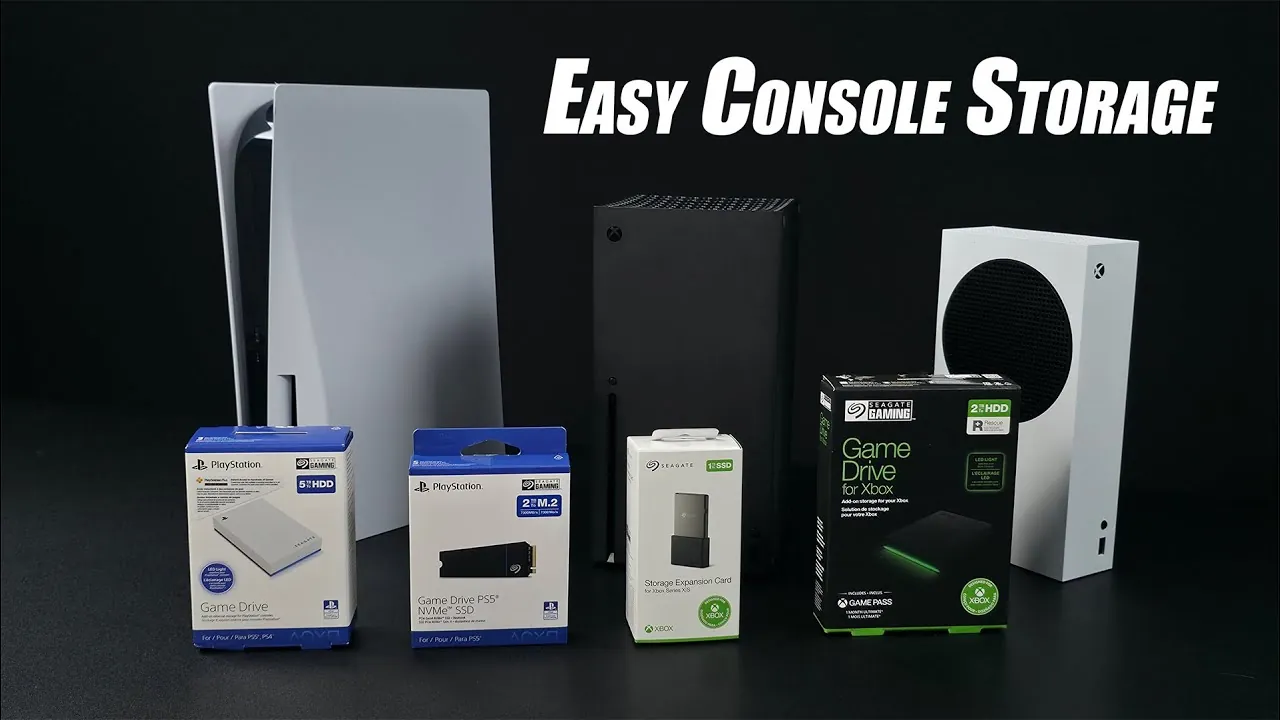
- Seagate 1TB Expansion Card: Specifically designed for Xbox consoles, this proprietary storage solution integrates seamlessly with the system. It supports the Quick Resume feature, allowing you to switch between games effortlessly, and delivers high-speed performance for next-gen titles. However, its premium price may make it less appealing to budget-conscious gamers.
- Seagate Game Drive (External): For those seeking a more affordable option, external drives like the Seagate Game Drive offer up to 2TB of storage. These drives are excellent for storing backward-compatible games and media files. However, they cannot support Quick Resume or run next-gen titles directly, limiting their functionality for newer games.
When deciding on an Xbox storage upgrade, consider your priorities. If performance and seamless integration are critical, the Seagate Expansion Card is the best choice. On the other hand, external drives are a cost-effective solution for gamers looking to expand storage for older games without overspending.
PlayStation 5 Storage Options
The PlayStation 5 offers two primary storage upgrade paths: external drives for backward-compatible games and internal NVMe SSDs for PS5 titles. Each option serves a specific purpose, allowing you to tailor your storage solution to your gaming needs.
- Seagate 5TB External Drive: This external drive is ideal for storing PS4 games and media files. While it cannot store or run PS5 games, it provides ample space for your legacy library, freeing up internal storage for next-gen titles. This makes it a practical choice for gamers with extensive PS4 collections.
- Seagate 2TB NVMe SSD: For PS5 games, upgrading your internal storage with a high-speed NVMe SSD is the most effective solution. These SSDs meet Sony’s performance requirements, making sure fast load times and smooth gameplay. Installation involves removing the PS5’s side panel, inserting the SSD into the designated slot, and formatting it through the system settings. While the process requires some effort, it is straightforward with proper guidance.
For PS5 users, an NVMe SSD is the optimal choice for expanding storage while maintaining compatibility with next-gen games. External drives, although limited in functionality, are a cost-efficient way to manage older titles and media files.
Best Storage Upgrades For Your PS5 & XBOX in 2025

Here are more guides from our previous articles and guides related to console storage that you may find helpful.
- PlayStation 4 Games Console Provides Around 400GB Of Actual
- RG35XX H mini handheld games console
- Valve Steam Deck games console specifications
- Pimax Portal portable VR game console
- PlayStation 5 SSD upgrade performance tested
- Couch Console charges and organizes your couch goodies
- Deals Reminder: Retro Arcade Game Console
- 2TB Steam Deck SSD storage upgrade
- PlayStation 5 update adds M.2 SSD storage support
- PlayStation 5 Slim vs Original PS5 teardown
Installation and Setup
The installation process for storage upgrades varies depending on the console and the type of storage solution. Here’s what you can expect:
- Xbox: Both the Seagate Expansion Card and external drives are plug-and-play solutions. Simply connect the device to your console, and it’s ready to use. You can even set default installation locations for new games, making the process seamless and user-friendly.
- PS5: Installing an NVMe SSD requires a few additional steps. You’ll need to remove the PS5’s side panel, insert the SSD into the designated slot, and format it through the system settings. While this process is slightly more involved compared to the Xbox, it is manageable with clear instructions and basic tools.
Overall, Xbox storage upgrades are simpler to set up, but PS5 users can still handle the process with minimal effort, especially with the availability of detailed installation guides.
Performance Considerations
Performance is a critical factor when selecting a storage upgrade, as it directly impacts your gaming experience. Each console has unique requirements and limitations that should be considered.
- Xbox: The Quick Resume feature, which allows you to switch between multiple games instantly, is exclusive to internal storage and the Seagate Expansion Card. External drives, while offering larger capacities, are limited to storing and playing backward-compatible games, making them less versatile for next-gen gaming.
- PS5: For PS5 games, only NVMe SSDs deliver the high-speed performance required for minimal load times and smooth gameplay. External drives are restricted to PS4 games and media storage, which limits their utility for next-gen titles. However, they remain a practical solution for managing older content.
Understanding these performance considerations will help you choose the right storage solution based on your gaming habits and priorities.
Recommendations
Choosing the best storage upgrade depends on your gaming preferences, priorities, and budget. Here are the top recommendations for each console:
- Xbox Users: If you prioritize performance and features like Quick Resume, the Seagate Expansion Card is the ideal choice. For gamers on a budget, external drives provide a cost-effective way to expand storage for backward-compatible games and media files.
- PS5 Users: An NVMe SSD is essential for expanding storage for PS5 games while maintaining high-speed performance. External drives are a practical and affordable option for managing PS4 titles and media files without compromising your budget.
By selecting the right storage upgrade, you can enhance your gaming experience with faster load times, smoother gameplay, and sufficient space to accommodate your growing game library. Whether you’re an Xbox or PlayStation user, investing in the right storage solution ensures that your console is ready to handle the demands of modern gaming in 2025.
Media Credit: ETA PRIME
Disclosure: Some of our articles include affiliate links. If you buy something through one of these links, Geeky Gadgets may earn an affiliate commission. Learn about our Disclosure Policy.
