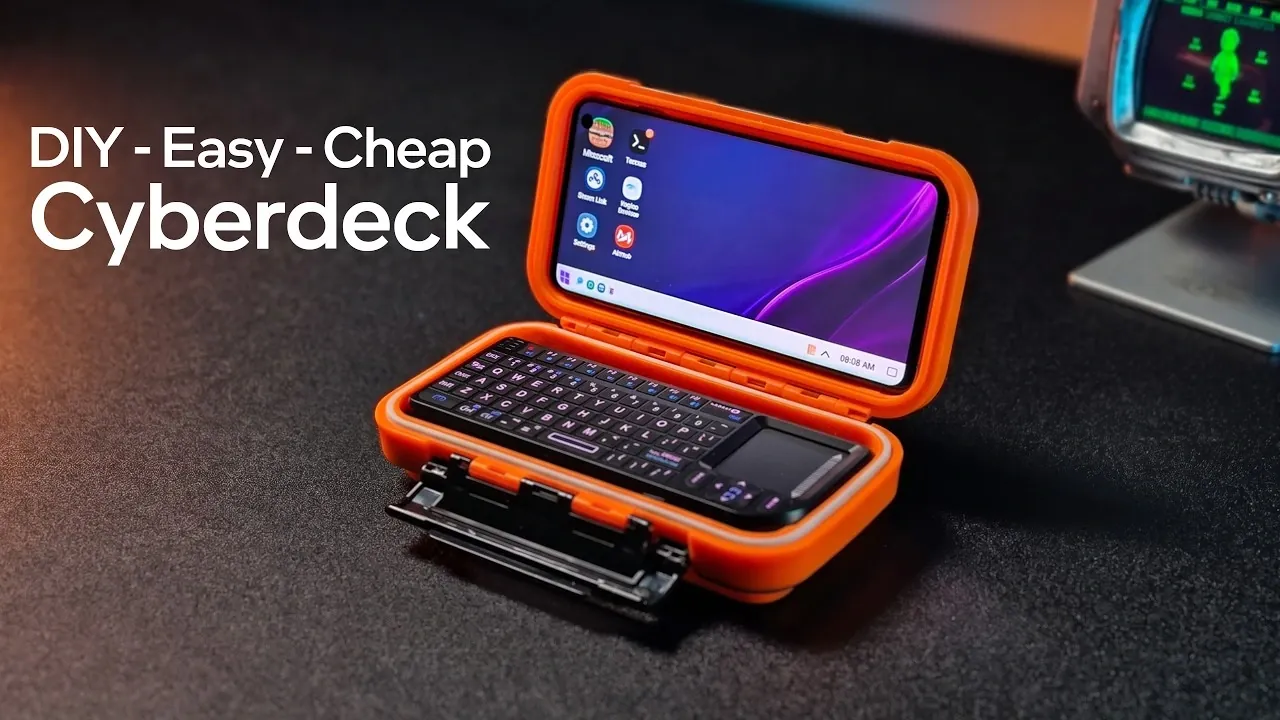
Building a cyberdeck is a creative way to combine functionality, portability and affordability into a single DIY project. In a detailed breakdown by ETA Prime, the process centers around repurposing a Galaxy S10 smartphone as the core computing device. The build incorporates a modified tackle box for a weatherproof enclosure and a Bluetooth keyboard with an integrated trackpad for input. With a total cost under $100 and minimal assembly requirements, this project is accessible to beginners while delivering a practical solution for mobile computing needs.
Dive into this guide to explore how to construct a cyberdeck tailored to your preferences. You’ll gain insight into selecting the right components, such as optimizing battery life or enhancing ergonomics with a kickstand. Discover customization options like integrating alternative devices, such as a Raspberry Pi, or personalizing the aesthetics of your build. Whether you’re interested in gaming, productivity, or media consumption, this analysis provides a clear roadmap for creating a compact and versatile computing setup.
Essential Components for Your Cyberdeck
TL;DR Key Takeaways :
- Create a portable, weatherproof cyberdeck for under $100 using a Galaxy S10 smartphone, a tackle box and a Bluetooth keyboard.
- The Galaxy S10 offers excellent performance with its Snapdragon 855 processor, 8GB RAM and AMOLED display, making it ideal for gaming, productivity and media consumption.
- The project is beginner-friendly, requiring only basic tools like a Dremel for modifications and features a durable, weatherproof design suitable for outdoor use.
- Customization options include extended battery life, ergonomic enhancements, alternative core devices like Raspberry Pi and personalized aesthetics.
- This cost-effective and sustainable project repurposes older devices, promoting affordability and environmental consciousness while delivering high functionality.
To construct your cyberdeck, you’ll need three primary components: a smartphone, a durable case and a keyboard. Here’s a detailed breakdown of each:
- Smartphone: The Galaxy S10 is an excellent choice, featuring a powerful Snapdragon 855 processor, 8GB of RAM and 128GB of expandable storage. Its AMOLED display ensures sharp and vibrant visuals, making it suitable for gaming, productivity and even emulation tasks.
- Case: A mini tackle box serves as the weatherproof enclosure. Lightweight yet durable, it protects your device from dust, moisture and other environmental factors, making sure reliability in various conditions.
- Keyboard: A Bluetooth keyboard with an integrated trackpad provides seamless input functionality. RGB backlighting adds a customizable aesthetic while maintaining practicality for low-light environments.
These components form the foundation of your cyberdeck, making sure a balance of performance, portability and protection.
Key Features and Benefits
This project stands out for its simplicity, accessibility and practicality. You don’t need advanced tools or technical expertise to bring your cyberdeck to life. Here are the standout features:
- Simple Assembly: The build requires only a Dremel tool for minor modifications to the tackle box, making it approachable for beginners with basic DIY skills.
- Weatherproof Design: The sealed case eliminates the need for external holes for charging or buttons, enhancing durability and making it ideal for outdoor use or rugged environments.
- Portability: The compact size and lightweight materials make the cyberdeck easy to carry, perfect for travel, commuting, or mobile computing needs.
This straightforward design ensures that anyone can create a functional and stylish cyberdeck without requiring specialized knowledge or expensive equipment.
Here are more guides from our previous articles and guides related to cyberdecks that you may find helpful.
- ClockworkPi uConsole Linux handheld PC from $139
- Awesome Backpack Cyberdeck powered by overclocked Raspberry Pi
- Build a $50 Dual-Screen Cyberdeck Using a Cardputer Advance
- DIY Handheld LattePanda Linux Cyberdeck Build Guide from Scratch
- Build a Modular Cyberdeck for Ultimate Portable Computing Power
- This Altoids Tin is Actually a Cyberdeck
- How to Build an Awesome LattePanda Mu Cyberdeck
- Awesome Framedeck transparent modular cyberdeck
- Raspberry Pi Reviiser Cyberdeck portable mini PC
- Flipper One Features Dual Gigabit Ethernet and Wi-Fi 6E
Customizing Your Cyberdeck
One of the most appealing aspects of this project is its flexibility. You can modify and enhance the build to suit your specific needs and preferences. Here are some customization ideas to consider:
- Extended Battery Life: Integrate an additional battery under the keyboard to significantly increase usage time, making it ideal for long trips or extended outdoor use.
- Improved Ergonomics: Attach a detachable kickstand to the case for a more comfortable viewing angle during extended use.
- Alternative Core Devices: Replace the Galaxy S10 with a Raspberry Pi or a small form factor PC for greater versatility, such as running Linux-based operating systems or specialized software.
- Personalized Aesthetics: Customize the RGB backlighting on the keyboard or decorate the tackle box to reflect your personal style.
These options allow you to enhance both the functionality and appearance of your cyberdeck, creating a device that is uniquely tailored to your needs.
Performance and Practical Applications
The Galaxy S10’s Snapdragon 855 processor delivers robust performance, surpassing alternatives like the Raspberry Pi 4 and 5 in both CPU and GPU benchmarks. This makes it an excellent choice for a variety of tasks, including:
- Gaming and Emulation: Run platforms such as Dreamcast and PSP smoothly, with vibrant visuals on the AMOLED display for an immersive experience.
- Productivity: Use Android apps or Linux-based tools for tasks like coding, writing, or managing spreadsheets, making sure efficiency on the go.
- Media Consumption: Enjoy sharp, colorful visuals for streaming videos, browsing the web, or reading e-books.
This combination of high performance and versatility ensures a seamless experience, whether you’re working, gaming, or exploring new applications.
Affordability and Sustainability
One of the most compelling aspects of this project is its cost-effectiveness. By repurposing a used Galaxy S10, which can often be purchased for under $70 and pairing it with a budget-friendly Bluetooth keyboard, you can keep the total cost under $100. Additional savings come from using inexpensive materials like a tackle box, making this project accessible to those on a tight budget.
This approach not only saves money but also promotes sustainability by giving new life to older devices. It demonstrates that innovative technology can be both affordable and environmentally conscious, offering a practical solution for those who value resourcefulness and creativity.
Media Credit: ETA PRIME
Disclosure: Some of our articles include affiliate links. If you buy something through one of these links, Geeky Gadgets may earn an affiliate commission. Learn about our Disclosure Policy.
