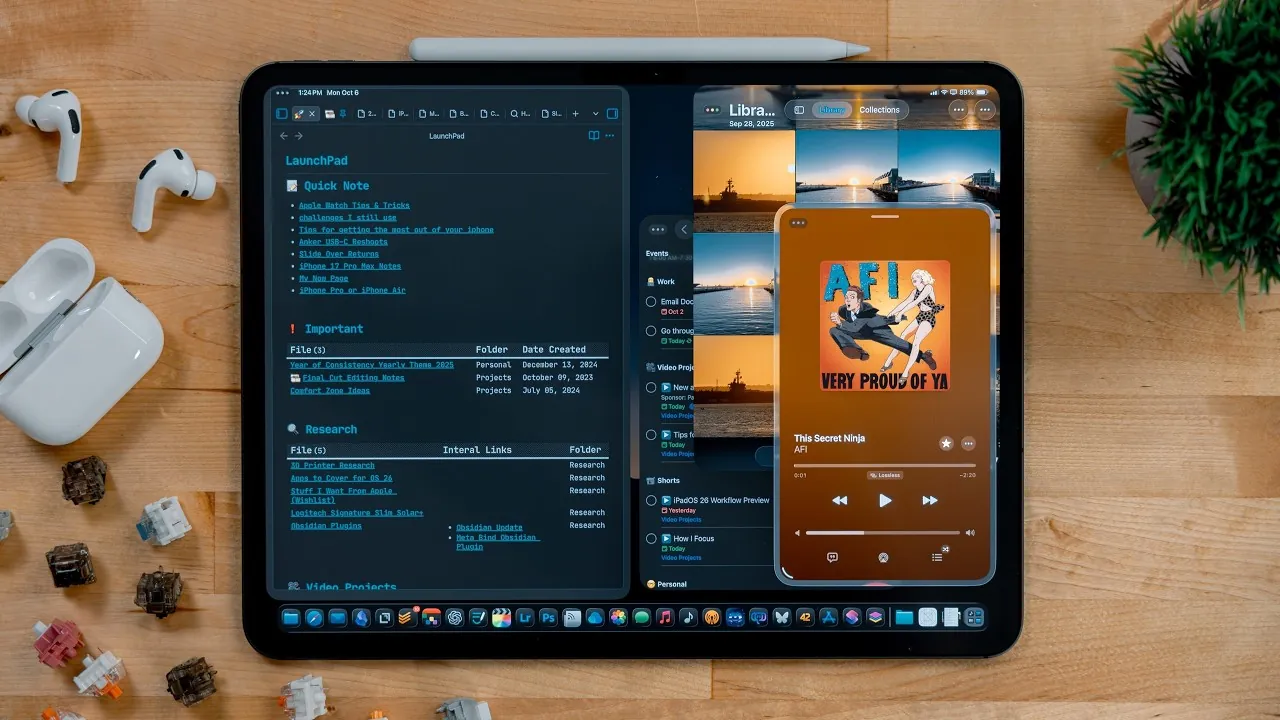
Apple has reintroduced the SlideOver feature in iPadOS 26.1, now available in developer beta 2. This update represents a significant step in enhancing multitasking capabilities on the iPad. By addressing user feedback from earlier iterations, Apple has refined SlideOver to work seamlessly with the new windowing mode. While the feature introduces several improvements, it also comes with functional changes that may impact how users interact with their devices. The video below from Christopher Lawley gives us a look at this feature in iPadOS 26.1 beta 2.

What Is SlideOver and How Does It Work?
SlideOver is a multitasking feature that allows you to overlay a single app on top of others in a floating window. This window can be moved across the screen, allowing you to interact with one app without disrupting your primary workflow. For example, you can reply to a message while reviewing a document or manage a chat while browsing the web.
In iPadOS 26.1, SlideOver has been enhanced to integrate with the new windowing mode, offering a more dynamic and flexible interface. Key updates include the ability to resize the floating app window, allowing you to adjust its dimensions to suit your needs. Additionally, a subtle glass border now highlights the active SlideOver app, providing a clear visual indicator to help you stay organized. These refinements make the feature more intuitive and adaptable for various use cases.
Key Enhancements to Multitasking
iPadOS 26.1 introduces several multitasking improvements, with SlideOver playing a central role. These updates are designed to streamline workflows and enhance usability for productivity-focused users:
- Keyboard Shortcuts: New shortcuts enable you to quickly position and toggle SlideOver apps, reducing reliance on touch gestures. This is particularly beneficial for users who pair their iPads with external keyboards, as it allows for faster navigation and app management.
- Seamless Integration: SlideOver now works cohesively with the windowing mode, allowing you to resize and reposition floating windows alongside apps in split view or full-screen mode. This flexibility ensures that your iPad adapts to your workflow, making multitasking more efficient and personalized.
- Improved Visual Feedback: The addition of a glass border around the active SlideOver app provides a clear visual cue, helping you stay focused and organized when managing multiple tasks.
These enhancements collectively make multitasking more intuitive and efficient, particularly for users who rely on their iPads for professional or creative work.
Limitations of the Updated SlideOver
Despite its improvements, the updated SlideOver feature comes with certain limitations that may affect some users. One notable change is that SlideOver in iPadOS 26.1 supports only one app at a time. This means you can no longer cycle through multiple SlideOver apps using the multitasking switcher, a feature that was available in earlier versions. While this change simplifies the interface, it may feel restrictive for users accustomed to managing several apps simultaneously in SlideOver.
Another limitation is the absence of a multitasking switcher for SlideOver apps. This could slow down workflows that depend on quick app switching, as users must now manually open and close apps to replace the active SlideOver window. Apple appears to be prioritizing a streamlined and focused multitasking experience, which may appeal to users who value simplicity but could frustrate those who rely on more complex multitasking setups.
Availability and User Feedback
The updated SlideOver feature is currently available in developer beta 2 of iPadOS 26.1, with a public beta and official release expected in the coming months. Apple’s decision to bring back SlideOver reflects its responsiveness to user feedback, particularly from those who missed the feature in earlier versions of iPadOS 26. By addressing these concerns, Apple demonstrates its commitment to refining the iPad’s multitasking capabilities and making sure that its devices meet the needs of a diverse user base.
Early feedback from developers and beta testers highlights both the strengths and limitations of the updated SlideOver. While many users appreciate the new resizing options and keyboard shortcuts, others have expressed concerns about the single-app limitation. This mixed reception underscores the challenge of balancing simplicity with functionality in a feature designed for a wide range of workflows.
The Future of Multitasking on iPad
The reintroduction of SlideOver in iPadOS 26.1 represents a significant step forward for the iPad’s multitasking tools. Features like app resizing, keyboard shortcuts, and integration with the new windowing mode make SlideOver more versatile and user-friendly. However, the decision to limit SlideOver to a single app may not suit every workflow, particularly for users who rely on managing multiple floating apps.
As iPadOS 26.1 moves closer to its public release, SlideOver’s return is likely to spark discussions among iPad users and developers. While the feature may not be perfect, its enhancements demonstrate Apple’s ongoing efforts to evolve the iPad as a productivity device. Whether you’re a casual user or a multitasking professional, SlideOver’s comeback offers new possibilities for improving your workflow and adapting the iPad to your unique needs.
Dive deeper into SlideOver feature with other articles and guides we have written below.
- How to Use Your iPad Like a Pro: Top Features Explained
- iPad Productivity: Top Tips to Turn Your Tablet Into a Powerhouse
- How to Master Multitasking on Your iPad
- iPadOS 26 Features: Multitasking, AI, and Design Upgrades
- How to use split screen on iPad
Source & Image Credit: Christopher Lawley
Disclosure: Some of our articles include affiliate links. If you buy something through one of these links, Geeky Gadgets may earn an affiliate commission. Learn about our Disclosure Policy.
