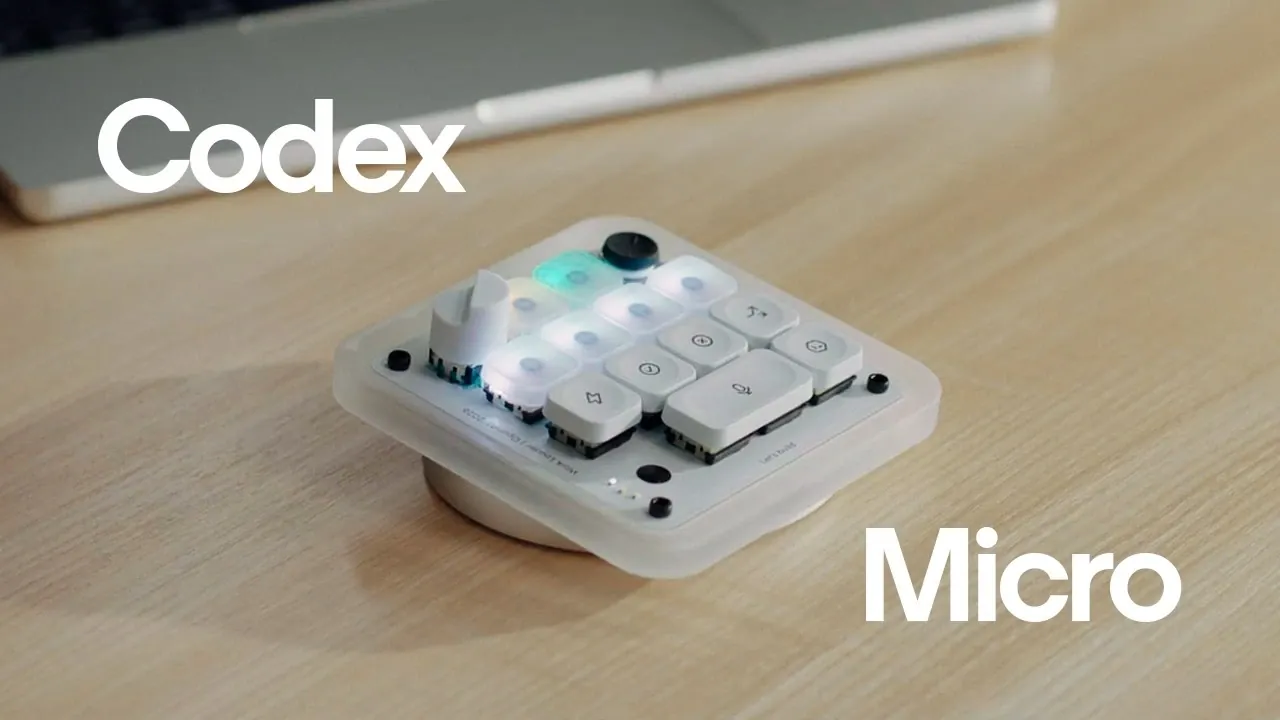
OpenAI introduces the Codex Micro, a compact keyboard designed to support productivity for Codex users. Developed in partnership with Work Louder, it features a customizable control system that allows users to assign specific actions, such as debugging or reviewing pull requests, to dedicated keys. This reduces repetitive navigation and simplifies task execution. Additional features, like a rotary dial for adjusting reasoning levels and a joystick for precise input, emphasize its focus on efficiency and adaptability in technical workflows.
Explore how the Codex Micro integrates real-time RGB feedback to monitor task progress, the functionality of voice dictation for hands-free operation and the flexibility of its wired and wireless connectivity options. This explainer will also cover practical examples of how these features can enhance coding tasks and team collaboration in professional settings.
OpenAI Codex Micro Keyboard
TL;DR Key Takeaways :
- The Codex Micro is a customizable keyboard designed by OpenAI and Work Louder to enhance productivity and efficiency, particularly for Codex users, with features tailored for coding, task management and hands-free interaction.
- Key features include a joystick for precise control, a rotary dial for adjusting Codex output and customizable keys for seamless task execution, making workflows faster and more intuitive.
- Advanced task management is supported by dedicated task-switching keys and a live RGB feedback system, providing real-time task status updates and streamlining collaborative workflows.
- The keyboard integrates voice dictation technology for hands-free interaction, alongside tactile inputs, offering flexibility and reducing workflow interruptions.
- Built with a durable CNC aluminum frame, mechanical switches and seamless connectivity options (Bluetooth and USB-C), the Codex Micro combines premium design with functionality, making sure compatibility across platforms.
Customizable Controls for Tailored Workflows
At the heart of the Codex Micro lies its customizable control system, a feature that enables users to assign frequently used actions to dedicated keys. This functionality is particularly advantageous for Codex users, allowing seamless execution of tasks such as reviewing pull requests, debugging, or refactoring code with minimal effort. Key features include:
- A joystick offering precise, multi-dimensional control for managing complex actions effortlessly.
- A rotary dial that dynamically adjusts reasoning levels, providing greater control over Codex’s output and enhancing decision-making.
These tools ensure that your workflow is not only faster but also more intuitive, reducing the time spent navigating between tasks and allowing you to focus on what truly matters.
Enhanced Task Management with Real-Time Feedback
Managing multiple tasks becomes significantly easier with the Codex Micro’s dedicated task-switching keys and live RGB feedback system. The RGB lighting system provides real-time updates on task status, using color-coded indicators to show whether a task is in progress, completed, or requires immediate attention.
Additional task management capabilities include:
- Quick access to essential actions such as accepting or rejecting tasks with a single keystroke.
- Dedicated keys for initiating chats and granting permissions, streamlining collaborative workflows.
These features ensure that you remain organized and in control, minimizing the risk of overlooked tasks and enhancing overall productivity.

Take a look at other insightful guides from our broad collection that might capture your interest in OpenAI Codex.
- OpenAI Just Gave ChatGPT Codex the Ability to Control Your Computer
- You Can Finally Use Codex on Your Phone : How to Set It Up
- Why Developers Are Switching to ChatGPT 5.5 Codex for Full-Stack Apps
- Claude Just Gained an “Infinite” Context Window : Here is What It Means for Your Workflows
- Deploy AI Agents 10X Faster Using Anthropic’s Pre-Configured Templates
- OpenAI’s Stealth Tests Reveal ChatGPT 5.6 Pro’s True Power
- OpenAI’s GPT-5.6 Release is Triggering an AI Price War
- 7 Hidden Claude Code Features Most Developers Miss
- New OpenAI Codex CLI : Unlock Faster Coding & Multimodal Reasoning
- ChatGPT 5.5 Instant Launches : Navigating Its Strengths and Weaknesses
Hands-Free Interaction with Voice Dictation
The Codex Micro integrates voice dictation technology, allowing hands-free interaction with Codex. This feature is particularly useful for initiating tasks, navigating workflows, or issuing commands without disrupting your focus. By combining voice control with tactile inputs, the keyboard offers a versatile approach to managing your work, allowing you to maintain momentum and reduce interruptions.
This dual-input system ensures that whether you prefer speaking or typing, the Codex Micro adapts to your needs, making it a truly flexible productivity tool.
Premium Design Built for Durability
The Codex Micro is crafted with a CNC aluminum frame and features a sandblasted anodized finish, combining durability with a sleek, professional aesthetic. The mechanical switches provide a satisfying tactile response, making sure a comfortable typing experience even during extended use. Additionally, the keyboard includes 32 customizable keycaps, allowing users to personalize their setup to match their specific workflow requirements.
The RGB lighting system not only enhances the keyboard’s visual appeal but also serves functional purposes, such as task status indicators and customizable feedback. This seamless integration of form and function ensures that the Codex Micro is as visually striking as it is practical.
Seamless Connectivity Across Platforms
The Codex Micro excels in connectivity, offering both Bluetooth and USB-C options for maximum flexibility. Whether you are working on a Mac or Windows system, the keyboard integrates effortlessly into your setup. The included USB-C cable ensures a reliable wired connection, while the Bluetooth functionality provides the freedom to work wirelessly.
Additionally, the package includes a Codex icon keyset, allowing you to start customizing and using the keyboard immediately. This versatility ensures that the Codex Micro fits seamlessly into any professional environment.
Streamlined Workflow for Maximum Efficiency
The Codex Micro is more than just a keyboard, it is a comprehensive productivity tool. By combining customizable controls, live RGB feedback, voice dictation and premium build quality, it minimizes task-switching friction and keeps you in your workflow. Whether you are coding, managing tasks, or interacting with Codex, the Codex Micro ensures that every action is intuitive, efficient and tailored to your needs.
What’s Included in the Package?
When you purchase the Codex Micro, you receive everything needed to integrate it into your workflow immediately:
- The Creator Micro keyboard, designed for optimal productivity.
- A USB-C cable for reliable connectivity.
- A Codex icon keyset for enhanced customization.
These components ensure that you can start using the Codex Micro right out of the box, with no additional setup required.
A Productivity Tool for the Modern Professional
The Codex Micro represents a significant step forward for professionals seeking to enhance their workflows. Its combination of customizable controls, advanced task management features, and premium design makes it an indispensable tool for Codex users and beyond. By reducing friction, improving efficiency and offering unparalleled flexibility, the Codex Micro enables you to focus on what truly matters, your work.
Media Credit: OpenAI
Disclosure: Some of our articles include affiliate links. If you buy something through one of these links, Geeky Gadgets may earn an affiliate commission. Learn about our Disclosure Policy.
