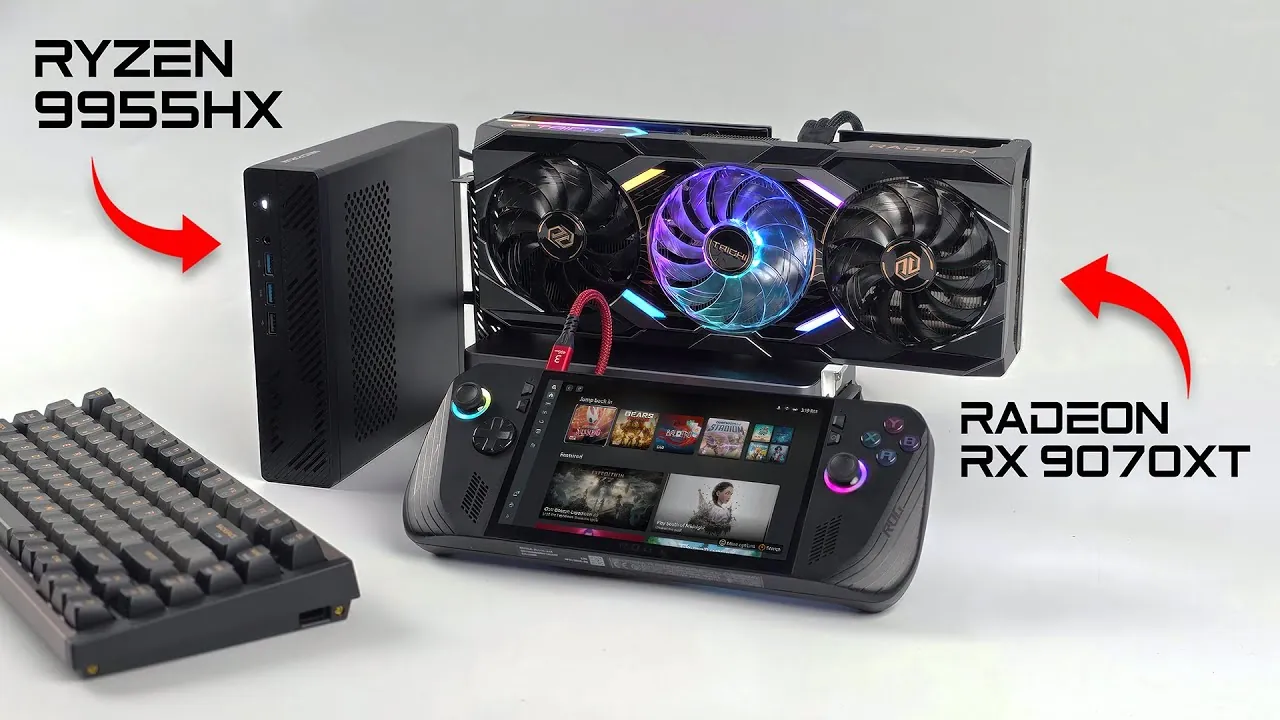
What if you could pack the power of a high-performance gaming rig, a creative workstation, and an AI powerhouse into a device small enough to fit on your desk? It might sound like a pipe dream, but this tiny DIY PC setup turns that vision into reality. Combining innovative hardware like the AMD Ryzen 9 9955HX and the Radeon RX 7900 XT, this build punches far above its weight class, delivering exceptional performance in a compact form factor. Whether you’re a gamer chasing buttery-smooth 1440p gameplay, a creator rendering intricate 3D models, or an AI enthusiast running complex workflows, this setup promises to handle it all without breaking a sweat. But does its portability and versatility come at a cost? Let’s explore what makes this system so unique, and whether it lives up to the hype.
In this deep dive by ETA Prime learn how this compact powerhouse uses innovative connectivity like Oculink to bridge the gap between portability and performance. We’ll break down its core hardware, highlight its strengths in gaming and creative tasks, and examine the trade-offs that come with its design. Is this the ultimate solution for those with limited space or a need for flexibility? Or do its limitations, like slightly reduced GPU performance compared to traditional setups, make it a niche option? By the end, you’ll have a clear picture of whether this DIY PC setup is the right fit for your needs, or if a more traditional build might serve you better. Sometimes, the smallest packages deliver the biggest surprises.
Compact AMD DIY PC Overview
TL;DR Key Takeaways :
- The DIY setup features the Minisforum MSA2 mini PC with an AMD Ryzen 9 9955HX processor (16 cores, 32 threads) and an AMD Radeon RX 7900 XT GPU, delivering high performance for gaming, AI workflows, and creative tasks.
- Key hardware includes 32GB of DDR5 RAM (expandable to 96GB) and an 800W power supply, making sure reliable performance for resource-intensive applications in a compact form factor.
- Oculink connectivity offers faster and more stable GPU performance compared to USB4 or Thunderbolt 4, though it has lower bandwidth than PCIe x16 slots, which may slightly impact GPU-intensive tasks.
- The system excels in gaming (1440p resolution with high frame rates), AI-driven tasks, and creative workflows like video editing and 3D rendering, making it versatile for professionals and enthusiasts.
- While the setup offers portability and flexibility, its cost and slight performance compromises with external GPU docks may make traditional PC builds a better option for budget-conscious users seeking maximum performance.
Core Hardware Configuration
At the heart of this system lies the Minisforum MSA2 mini PC, equipped with the AMD Ryzen 9 9955HX processor. This 16-core, 32-thread CPU is designed to handle demanding workloads, from multitasking and gaming to AI-driven tasks and creative workflows. Complementing the CPU is the AMD Radeon RX 7900 XT GPU, which features 16GB of VRAM and connects via Oculink, a high-speed interface that ensures efficient and stable data transfer. Key hardware components include:
- 32GB of DDR5 RAM, expandable up to 96GB, providing ample memory for resource-intensive applications.
- An 800W power supply, making sure reliable performance even under heavy computational loads.
This configuration delivers high performance in a compact form factor, making it an excellent choice for users with limited space or those seeking a portable yet powerful system.
Performance Highlights
This setup’s performance is backed by impressive benchmark results. The Ryzen 9 9955HX excels in both single-threaded and multi-threaded tasks, achieving high scores in Geekbench 6. Similarly, the Radeon RX 7900 XT demonstrates its capabilities in GPU benchmarks such as 3DMark and Time Spy, making it suitable for gaming and creative workflows alike.
For gamers, this system delivers smooth gameplay at 1440p resolution with high frame rates. Tests with popular titles like Cyberpunk 2077 and Borderlands 4 highlight the benefits of AMD’s FSR4 technology, which enhances visuals and ensures fluid performance. The Oculink connection plays a critical role here, offering better stability and speed compared to traditional interfaces like USB4 or Thunderbolt 4.
Beyond gaming, this setup is equally adept at handling AI-driven tasks and creative workflows, making it a versatile choice for professionals and enthusiasts alike.
This Tiny DIY PC Set Up Can Do It All!

Advance your skills in gaming PC builds by reading more of our detailed content.
- How to Build a Budget 4K Gaming PC for Smooth Gameplay
- MEGAMINI G1 the world’s smallest water-cooled gaming PC from
- Revolt small form factor ITX gaming PC systems
- Mini MSI Vortex Gaming PC Equipped With Dual NVIDIA Graphics
- iBUYPOWER Paladin XLC Gaming PC
- New Corsair Vengeance 5180 RTX 2080 gaming PC from $2,399
- COLORFUL iGame M600 Mirage gaming PC with magnetic power
- Digital Storm Eclipse Mini Gaming PC Systems Unveiled From $699
- Periphio Red Gaming PC, Intel Quad Core i7 3.3GHz, 16GB RAM
- Win Max 2 handheld gaming PC pricing announced
AI and Creative Workflow Capabilities
This system isn’t just a gaming powerhouse, it’s also a robust tool for AI and creative professionals. Applications such as ComfyUI and Amuse run seamlessly, allowing users to generate images, process videos, and work with complex AI models. Whether you’re managing lightweight tasks or tackling resource-heavy projects like language processing or data analysis, the combination of the Ryzen CPU and Radeon GPU ensures reliable and efficient performance.
For creators, this setup excels in video editing, 3D rendering, and graphic design. The expandable RAM is particularly advantageous for managing large datasets and intricate projects, making it a practical choice for professionals who require a balance of power and flexibility. Its compact size further enhances its appeal, allowing it to fit into smaller workspaces without compromising on performance.
Oculink: A Key Connectivity Advantage
One of the standout features of this DIY setup is its use of Oculink for GPU connectivity. This high-speed interface offers several advantages over traditional methods like USB4 and Thunderbolt 4, including:
- Higher data throughput, making sure faster and more stable performance during intensive tasks.
- Improved reliability, particularly under heavy workloads or extended usage.
However, it’s important to note that Oculink’s bandwidth is lower than that of a traditional PCIe x16 slot, which can result in minor performance bottlenecks during GPU-intensive tasks. For users who prioritize maximum performance, an internal GPU setup may be a more suitable option. Despite this limitation, Oculink’s portability and flexibility make it an attractive choice for users who value versatility.
Practical Applications and Considerations
This DIY PC setup is ideal for individuals who need a versatile system capable of handling gaming, AI tasks, and creative workflows. Its compact design makes it well-suited for small spaces, while the external GPU dock allows for easy upgrades and compatibility with multiple devices, including handhelds and laptops.
However, there are some trade-offs to consider:
- Cost: Building a traditional PC with similar or better performance may be more affordable.
- Performance: External GPU docks, while flexible, can introduce slight performance compromises compared to internal GPU setups.
For users who prioritize portability, flexibility, and the ability to test multiple devices, this setup offers a unique and practical solution. On the other hand, those seeking maximum performance at a lower cost may find traditional PC builds more appealing.
Limitations and Alternatives
While this setup delivers impressive performance, it’s not without its limitations. The reduced bandwidth of Oculink compared to PCIe x16 slots can impact GPU performance in certain scenarios, particularly during highly GPU-intensive tasks. Additionally, the overall cost of this build may deter budget-conscious users.
If affordability is a primary concern, consider these alternatives:
- Opt for a lower-end GPU to reduce the overall cost of the build.
- Build a traditional desktop PC for better performance at a similar or lower price point.
For users who value portability and flexibility, however, this setup remains an innovative and practical choice. Its ability to handle a wide range of tasks, from gaming to AI workflows, makes it a compelling option for those with specific needs.
Final Thoughts
This AMD-based DIY PC setup demonstrates the potential of modern hardware and innovative connectivity solutions. It offers strong performance across gaming, AI, and creative tasks, making it a versatile choice for users with diverse requirements. However, its cost and certain limitations, such as the reduced bandwidth of Oculink, mean it may not be the best fit for everyone. By carefully considering its strengths and weaknesses, you can determine whether this compact yet powerful system aligns with your needs and priorities.
Media Credit: ETA PRIME
Disclosure: Some of our articles include affiliate links. If you buy something through one of these links, Geeky Gadgets may earn an affiliate commission. Learn about our Disclosure Policy.
