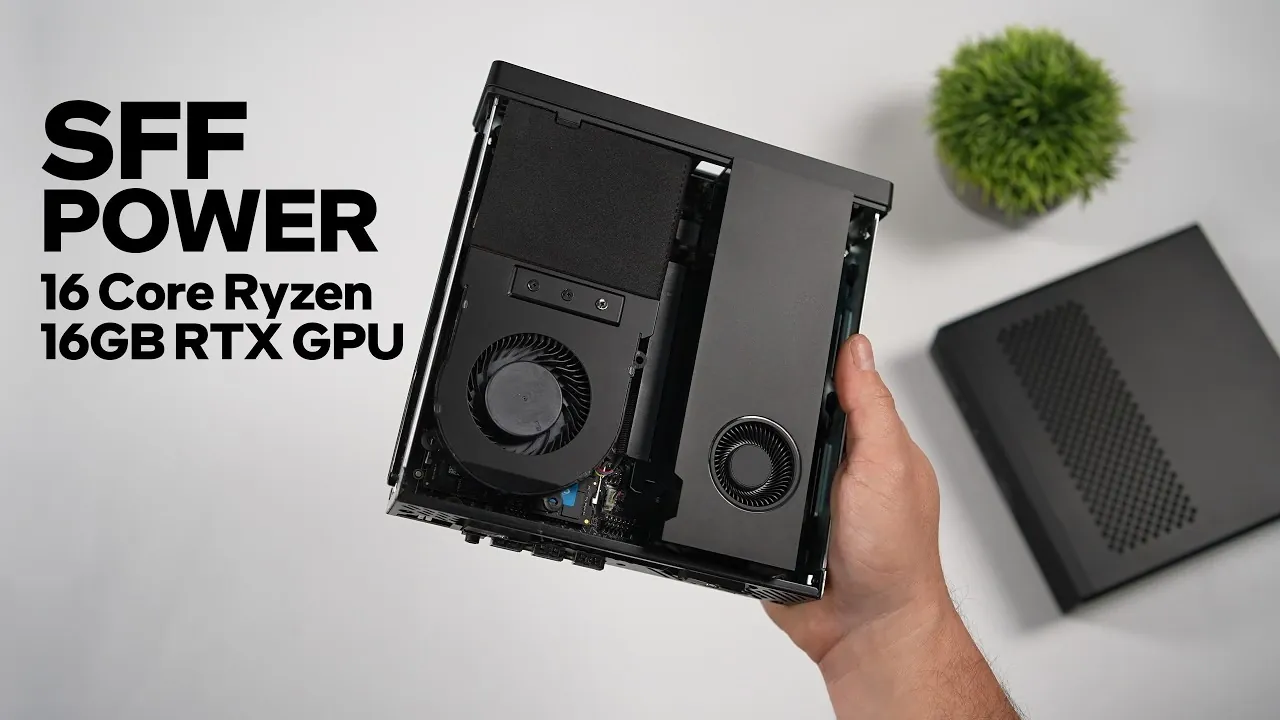
Building a compact gaming PC often involves balancing performance, size, and thermal constraints. This setup pairs the Minisforum MS-A2, a 2.5-liter small form factor PC, with an NVIDIA RTX 2000 GPU featuring 16GB of GDDR6 VRAM. The GPU’s dual-slot bracket was replaced with a custom 3D-printed shell to fit the case, while the AMD Ryzen 9 9955HX CPU provides 16 cores for multitasking and gaming, as demonstrated by ETA Prime.
Explore how this build handles 1440p gaming performance across titles like Cyberpunk 2077 and Spider-Man 2, leveraging DLSS for smoother frame rates. Gain insight into the system’s thermal and power efficiency, including its GPU’s 70-watt power limit and the CPU’s cooling constraints. This explainer also highlights the practical modifications required to accommodate the hardware, offering a clear look at the trade-offs of small form factor gaming PCs.
Compact Gaming PC Packs a Punch with 16GB RTX GPU
TL;DR Key Takeaways :
- The compact gaming PC build using the Minisforum MS-A2 and NVIDIA RTX 2000 GPU delivers strong 1440p gaming performance, with the system’s small 2.5-liter form factor introducing constraints in GPU compatibility and cooling.
- The NVIDIA RTX 2000 GPU, featuring 16GB of GDDR6 VRAM, offers performance close to the RTX 4060 and scored 91,482 in OpenCL benchmarks and 8,452 in 3DMark Time Spy graphics tests, while maintaining a TGP of nearly 70 watts during gameplay.
- Gaming benchmarks at 1440p high settings showed smooth performance in titles like Forza Horizon 6, Spider-Man 2, and Cyberpunk 2077 with DLSS enabled, though Crimson Desert struggled even at 1080p high settings, highlighting its demanding nature.
- Thermal performance remained within acceptable limits, with the GPU averaging 53.1° C and the CPU averaging 76° C, though the CPU’s cooling capacity could lead to thermal throttling under sustained heavy workloads.
- The build required modifications, including a 3D-printed shell to fit the dual-slot RTX 2000 GPU, and while the Minisforum MS A2 is versatile for low-profile GPUs, its 70-watt GPU power limit and cooling constraints make it best suited for compact gaming setups rather than extreme workloads.
A compact gaming PC build demonstrates impressive performance, combining the Minisforum MS-A2 with a 16-core AMD Ryzen CPU and an NVIDIA RTX 2000 GPU. With a form factor of just 2.5 liters, this system delivers solid 1440p gaming capabilities while maintaining controlled thermal performance. However, its small size introduces constraints, particularly in GPU compatibility and cooling.
Hardware Overview: Minisforum MS A2 and NVIDIA RTX 2000
This build centers on the MS-A2, a small form factor PC designed for low-profile, single-slot GPUs. Its PCIe slot provides up to 70 watts of power, sufficient for GPUs without additional power connectors. The NVIDIA RTX 2000 GPU was chosen for this setup. Featuring 16GB of GDDR6 VRAM and based on NVIDIA’s ADA architecture, this workstation-class GPU offers performance close to the RTX 4060, despite fewer cores.
Compared to the NVIDIA A2000, which has a 6GB variant and performance similar to the RTX 3050, the RTX 2000 delivers a significant upgrade in memory and capability.
To fit the RTX 2000 into the Minisforum MS A2, its dual-slot bracket was removed. While single-slot brackets are available commercially, a 3D-printed shell by Jared C1 on Printables was used instead. This custom shell accommodates the GPU and replaces the stock cover, which is incompatible with dual-slot cards. The 3D-printed shell also supports blower-style GPUs like the Intel B50, which shares the RTX 2000’s form factor, and is compatible with the Minisforum MS01, showcasing its adaptability.

Explore further guides and articles from our vast library that you may find relevant to your interests in Minisforum mini PCs.
- Minisforum MS-A2 Review : Ultra Fast 16 Core Ryzen Mini PC with GPU Support
- MINISFORUM MS-01 Intel PC Mini WorkStation
- Minisforum MS-01 a powerful mini workstation with exceptional expansion
- Minisforum MS-S1 MAX Review : The Future of High-Performance Computing?
- Minisforum MS-R1 Review : ARM Home Lab Power or Power-Hungry Detour?
CPU and GPU Performance
The AMD Ryzen 9 9955HX CPU powers this build, offering 16 cores and 32 threads. It achieved a Geekbench 7 single-core score of 2,779 and can boost up to 80 watts, though it typically sustains around 65 watts due to cooling constraints. During gaming, the CPU operated at a TDP of approximately 60 watts, demonstrating efficiency under load.
The NVIDIA RTX 2000 GPU scored 91,482 in OpenCL benchmarks and 8,452 in 3DMark Time Spy graphics tests, highlighting its capability for gaming and other GPU-intensive tasks. Despite its compact size and modest power requirements, the GPU maintained a TGP of nearly 70 watts during gameplay.
In synthetic benchmarks, the system achieved a 3DMark Time Spy CPU score of 12,793 and an overall score of around 8,095, further emphasizing its strong performance. Additionally, the Steel Nomad benchmark score was 1,815, providing another measure of its capabilities.
Gaming Benchmarks at 1440p
The system was tested with several popular games at 1440p settings, delivering strong results with a few exceptions:
- Forza Horizon 6: Smooth gameplay at high settings without DLSS, though ultra settings caused occasional performance dips. The CPU sustained a TDP of around 60 watts, while the GPU reached a TGP of nearly 70 watts.
- Spider-Man 2: At high settings with DLSS set to quality, frame rates occasionally dipped into the mid-60s FPS but averaged in the mid-80s FPS with DLSS frame generation enabled.
- Cyberpunk 2077: Averaged in the low 70s FPS at high settings with DLSS set to quality, improving to the mid-90s FPS with DLSS frame generation.
- Red Dead Redemption 2: Averaged around 62 FPS at high settings with DLSS set to quality, with occasional dips below 60 FPS. Without DLSS, the game still managed an average of around 62 FPS at 1440p high settings.
- Crimson Desert: Struggled even at 1080p high settings, highlighting its demanding nature on lower-end GPUs. At 1440p high with DLSS quality and frame generation enabled, performance remained challenging. Ray tracing was disabled during testing, and the game lacks a built-in sharpness slider for scaling. However, sharpness adjustments can be made using the NVIDIA app.
Overall, the system performs well at 1440p high settings, particularly with DLSS enabled. However, Crimson Desert proved to be a demanding title, even with scaling options.
Thermal and Power Performance
Thermal performance stayed within acceptable limits during testing. The GPU averaged 53.1° C, peaking at 67° C, while the CPU averaged 76° C and reached a maximum of 82° C. The system’s external 280 W power brick provided sufficient power, and overall power draw was moderate.
While the GPU maintained good temperatures, the CPU’s cooling capacity could lead to thermal throttling if all 16 cores were maxed out for extended periods. However, this scenario is unlikely during typical gaming or everyday use.
Modifications and Limitations
The compact size of the Minisforum MS-A2 required modifications to accommodate the dual-slot RTX 2000 GPU. The 3D-printed shell by Jared C1 proved to be a practical solution, fitting perfectly and supporting the blower-style design of the GPU.
Despite these adjustments, the system’s cooling capacity imposes limits on sustained CPU performance, and the small form factor restricts GPU options to low-profile designs unless further modifications are made. While the MS-A2 is versatile for low-profile GPUs, its form factor inherently limits it to single-slot GPUs.
ETA Prime emphasizes that this build demonstrates the potential of small form factor PCs for 1440p gaming, particularly with DLSS and frame generation improving performance in titles like Cyberpunk 2077 and Spider-Man 2. However, the Minisforum MS A2’s 70-watt GPU power limit and cooling constraints mean it is best suited for users who value compactness over hardware flexibility or extreme workloads. While Crimson Desert proved too demanding even at 1080p, the system performed well in most other games, maintaining acceptable temperatures during typical gaming scenarios.
Media Credit: ETA PRIME
Disclosure: Some of our articles include affiliate links. If you buy something through one of these links, Geeky Gadgets may earn an affiliate commission. Learn about our Disclosure Policy.
