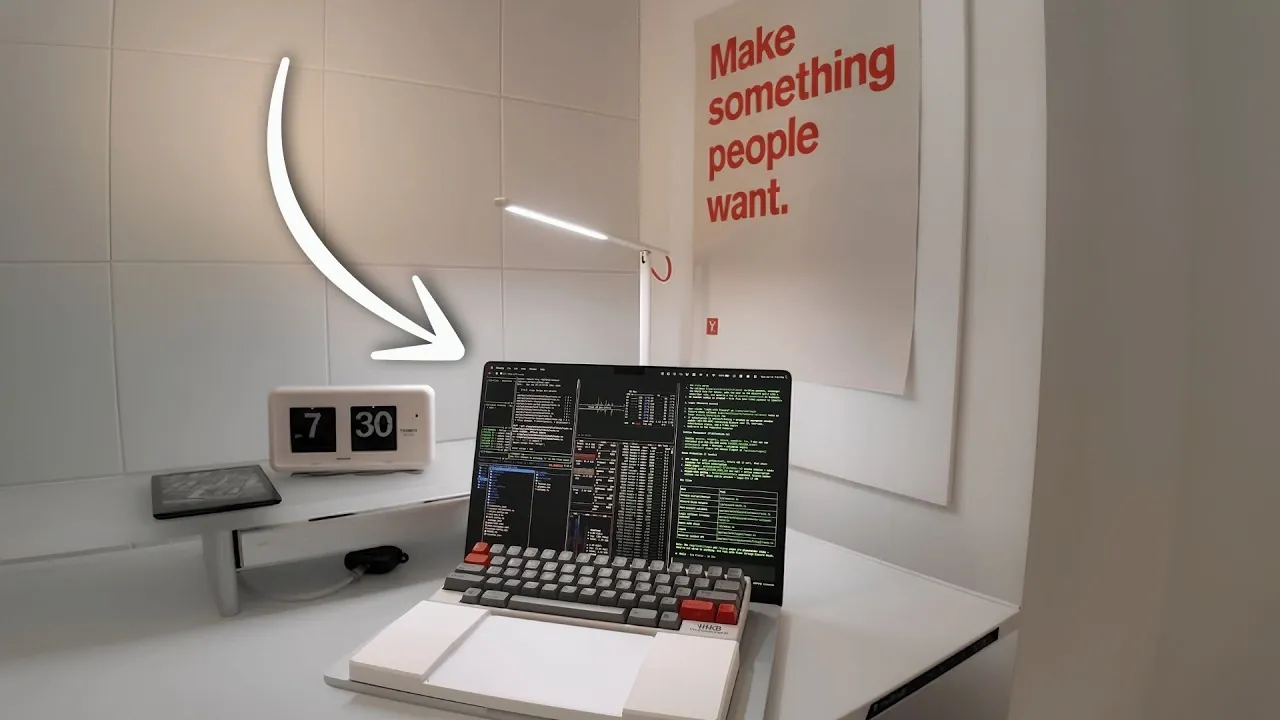
Edmund Yong shares his minimalist MacBook setup, designed to create a focused and efficient coding environment. At the heart of this setup is the MacBook Pro 16-inch M3 Max, chosen for its balance of performance and display size, ideal for demanding tasks like compiling large codebases or managing virtual machines. To complement the hardware, Yong incorporates ergonomic elements such as a height-adjustable desk and the compact HHKB keyboard, which prioritize comfort and productivity during extended work sessions.
Explore how this setup integrates software like Raycast for streamlined navigation and Cursor IDE for debugging workflows. Learn about browser extensions such as Vimium for keyboard-based web navigation and macOS customizations like Yabai for advanced window management. Additionally, gain insight into how these components combine to support a workspace tailored for sustained focus and coding efficiency.
The Foundation of Productivity
TL;DR Key Takeaways :
- A minimalist MacBook setup, featuring the MacBook Pro 16-inch M3 Max, enhances productivity by combining powerful hardware, ergonomic accessories and efficient software tools.
- Key hardware components include the HHKB keyboard for ergonomic typing, a matte anti-glare screen protector to reduce eye strain and an adjustable desk setup for physical comfort.
- Essential software tools like Raycast, Superhuman and Better Display streamline workflows, improve visuals and minimize distractions for a more efficient work environment.
- Browser extensions such as Vimium, Unhook and Freedom help maintain focus by reducing online distractions and improving navigation efficiency.
- Customizations like Yabai & SKHD for window management and animation-disabling commands enhance macOS usability, while coding tools like Cursor IDE and Kitty Terminal optimize development workflows.
Hardware
The hardware you choose forms the backbone of your coding setup, directly influencing your efficiency and comfort. Each component in a minimalist setup should serve a specific purpose to maximize functionality without unnecessary clutter.
- MacBook Pro 16-inch M3 Max: Equipped with the powerful M3 Max chip, this MacBook is designed to handle resource-intensive tasks such as compiling large codebases, running virtual machines and multitasking across demanding applications. Its 16-inch Retina display provides ample screen space for multitasking, while its portability ensures you can work effectively from virtually anywhere.
- Matte Anti-Glare Screen Protector: Prolonged screen exposure can lead to eye strain, especially in brightly lit environments. A matte anti-glare screen protector minimizes reflections and reduces visual fatigue, allowing you to work comfortably for extended periods.
- HHKB Keyboard: The Happy Hacking Keyboard (HHKB) is a compact, tactile keyboard designed for precision and ergonomics. Paired with a custom wrist rest and dampening pad, it reduces typing fatigue and enhances accuracy, making it ideal for long coding sessions.
- Ergonomic Desk Setup: A height-adjustable desk and ergonomic chair can further enhance your physical comfort, promoting better posture and reducing strain during extended work hours.
Software: Elevating Efficiency
The right software can transform your MacBook into a productivity powerhouse, allowing you to work smarter and faster. These tools are tailored to streamline workflows, enhance visuals and minimize distractions.
- Better Display: Unlock your MacBook’s full brightness and color potential, making sure optimal visuals for tasks requiring precise color accuracy, such as UI/UX design or video editing.
- Raycast: A versatile alternative to macOS Spotlight, Raycast offers advanced features like clipboard history, custom snippets and project navigation, helping you access tools and files with speed and efficiency.
- Superhuman: Managing multiple email accounts becomes seamless with Superhuman. Its intuitive interface consolidates inboxes, tracks email activity and streamlines responses, keeping your communication organized and distraction-free.

Discover other guides from our vast content that could be of interest on MacBook Pro.
- Leaked: Apple’s M6 OLED MacBook Pro is the Redesign We’ve Been Waiting For
- M6 MacBook Pro Leaks: Apple’s Massive Redesign is Delayed—And It’s Not Software This Time
- Apple’s 4 Leaked MacBooks: Is It Game Over for Windows Laptops?
- 7 New Leaks Just Revealed the Future of the OLED MacBook Pro M6
- Apple’s Massive 2026 Roadmap: New Devices Coming After the M5 MacBook Pro
- Why Apple Might Release the M6 Macs Much Earlier Than Expected
- Why the M5 Mac Studio and OLED MacBook Pro are Delayed
- Why You Should Hold Off Upgrading Until the OLED MacBook Pro
- Global RAM crisis pushes Apple’s OLED MacBook Pro launch into 2027
- MacBook Ultra: 7 New Features That Will Make You Forget the MacBook Pro
Browser Extensions: Maintaining Focus Online
The internet is a double-edged sword for productivity. While it provides access to essential resources, it can also be a source of endless distractions. These browser extensions help you stay focused and in control of your online activities.
- Vimium: Navigate the web using keyboard shortcuts, reducing reliance on a mouse and speeding up your browsing experience.
- Unhook: Remove distracting elements from YouTube, such as recommendations and comments, allowing you to focus solely on educational or work-related content.
- Freedom: Block distracting websites during focused work sessions, creating a digital environment tailored to productivity.
Coding Tools: Streamlining Development
A well-equipped development environment is essential for efficient coding. These tools and extensions are designed to optimize your workflow and enhance your coding experience.
- Cursor IDE: This advanced coding environment offers features like inline edits and intelligent tab suggestions, allowing you to write and debug code more efficiently.
- Code X: Ideal for planning, brainstorming and research, Code X helps you organize your ideas and maintain control over complex projects.
- To Do Plus & To Do Highlight: These IDE extensions integrate task management directly into your coding environment, making sure you stay on top of your to-do list without switching contexts.
- Kitty Terminal: A fast, customizable terminal that integrates seamlessly with TUI apps like LazyGit (for Git management), Yazi (a file explorer), and Btop (a system monitoring tool), making it a versatile choice for developers.
macOS Customizations: Enhancing Usability
Customizing macOS can significantly improve your workflow by reducing friction and enhancing responsiveness. These tweaks and tools allow you to tailor your MacBook to your specific needs.
- Yabai & SKHD: These tools enable advanced keyboard-based window and space management, eliminating the need for a mouse and speeding up navigation across multiple applications.
- Animation Disabling Commands: Disabling unnecessary UI animations makes your MacBook feel faster and more responsive, allowing you to focus on your work without delays caused by visual effects.
Design Tools: Simplifying Creativity
For developers involved in UI/UX design, having access to the right tools can streamline the creative process and improve the quality of your work.
- Mobbin: This extensive library of UI/UX designs from over 1,400 apps provides inspiration and actionable insights. Whether you’re designing a mobile app or a web platform, Mobbin helps you make informed design decisions efficiently.
Productivity Enhancements: Sustaining Focus and Flow
The ultimate goal of a minimalist MacBook setup is to create an environment that supports sustained focus and flow. By reducing distractions, optimizing tools and making sure physical comfort, this configuration enables you to tackle complex tasks with ease. Whether you’re debugging intricate code, designing user interfaces, or managing a startup, this setup is designed to support your productivity at every step.
Media Credit: Edmund Yong
Disclosure: Some of our articles include affiliate links. If you buy something through one of these links, Geeky Gadgets may earn an affiliate commission. Learn about our Disclosure Policy.
