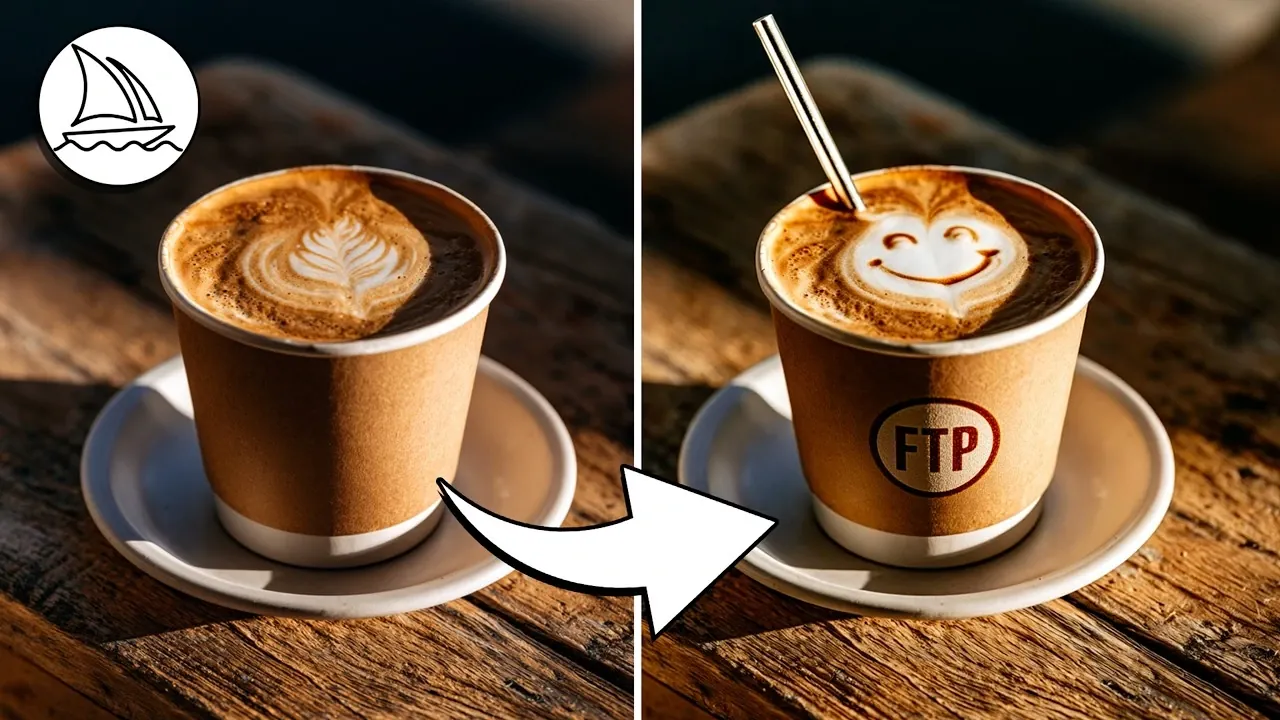
Midjourney’s latest update introduces the highly anticipated Edit Mode, a feature designed to enhance creative workflows through greater precision and interactivity. As highlighted by Future Tech Pilot, this mode brings several notable improvements, including the ability to blend up to four reference images seamlessly and attach visuals directly to prompts for more contextually accurate results. While the update offers exciting opportunities for digital artistry, some challenges remain, such as proportional inconsistencies in complex compositions and occasional unpredictability with intricate prompts.
Explore how this update can reshape your approach to digital art with features like real-time editing for fine-tuning colors and objects, advanced image blending for unique compositions and customizable style transformations to align visuals with your creative goals. You’ll also gain insight into practical strategies for maximizing Edit Mode’s potential, from experimenting with blending techniques to refining prompts for optimal results. This guide provides the clarity you need to navigate the new features effectively and elevate your creative projects.
Midjourney’s New Edit Mode Features
TL;DR Key Takeaways :
- Midjourney’s new Edit Mode introduces advanced tools like real-time editing, image blending and seamless prompt integration, enhancing precision and interactivity in digital artistry.
- Customization features include support for blending up to four reference images, background and style specification and applying artistic transformations like anime or abstract effects.
- Performance improvements focus on fast processing and creative combinations, allowing efficient workflows and innovative outputs.
- Limitations include occasional proportional inaccuracies, inconsistent results with complex prompts and gaps in style transformation effectiveness.
- The alpha.Midjourney.com platform update offers an enhanced interface and streamlined navigation, improving usability for both new and experienced users.
The Edit Mode introduces a variety of tools aimed at improving your editing experience and expanding creative possibilities. Some of the standout features include:
- Attach to Prompt: This tool allows you to integrate images directly into your prompts, using visual references to guide the AI for more accurate and contextually relevant results.
- Quick Edit Tool: Make real-time adjustments to images, such as tweaking colors, modifying objects, or refining styles, giving you greater control over your creative process.
- Image Blending: Combine multiple reference images to create cohesive and unique compositions, allowing you to explore new artistic directions.
These tools are designed to streamline workflows, allowing you to achieve your desired outcomes with greater ease and precision. By combining intuitive functionality with advanced technology, Edit Mode enables you to bring your creative visions to life.
Enhanced Customization Options
Customization lies at the heart of this update, offering tools that allow you to tailor your creations to your specific needs. Key enhancements include:
- Support for Multiple References: Blend up to four reference images seamlessly, allowing you to incorporate diverse elements into a single composition.
- Background and Style Specification: Define backgrounds and artistic styles to create visuals that align with your unique vision.
- Style Transformations: Apply artistic aesthetics, such as anime or other stylized effects, to suit your creative goals, whether they lean toward realism or abstraction.
These features provide a robust framework for experimentation, allowing you to refine your work and explore new possibilities in digital art. Whether you’re creating for personal projects or professional purposes, the enhanced customization options ensure your results are both unique and impactful.

Expand your understanding of Midjourney with additional resources from our extensive library of articles.
- 60 Midjourney AI Video Generation Examples : From Frogs to Cinematic Landscapes
- 200 Midjourney photo realistic word prompts for extra creativity
- 50+ Midjourney art styles to expand your AI creativity further
- New Midjourney Niji 6 anime AI art generator
- 100 artists styles for Midjourney 5.2 experimentation
- Midjourney API Development and Release Date Discussed by Dev Team
- Dall-E 3 vs Stable Diffusion vs Midjourney
- Midjourney 6 vs Midjourney 5 photorealistic and cinematic imagery comparison
- New Midjourney 6 Consistent Characters feature now available
- Make AI trailers and videos combining Midjourney art and Runway AI
Performance and Efficiency
The new Edit Mode prioritizes performance and efficiency, making sure a smoother creative process that keeps pace with your ideas. Key improvements include:
- Fast Processing: Enjoy quick turnaround times for edits and image generation, allowing you to iterate rapidly and maintain creative momentum.
- Creative Combinations: Blend prompts and images to produce unique outputs that push the boundaries of digital art, offering endless opportunities for innovation.
These advancements allow you to focus on the creative aspects of your work without being hindered by technical limitations. The streamlined process ensures that your time is spent on refining your vision rather than navigating cumbersome workflows.
Limitations to Consider
While the new Edit Mode offers significant advancements, it is not without its challenges. Some limitations to be aware of include:
- Proportional Issues: Generated images may occasionally display inaccuracies in proportions or anatomy, particularly in complex compositions.
- Inconsistent Results: Highly specific or intricate prompts can sometimes yield unpredictable outcomes, requiring additional adjustments to achieve the desired effect.
- Style Transformation Gaps: Certain style changes may not produce noticeable differences, limiting their effectiveness in some scenarios.
These challenges highlight areas where further refinement is needed to enhance the platform’s reliability and consistency. Despite these limitations, the tools remain highly effective for a wide range of creative applications.
Updates to the Alpha Website
To complement the new Edit Mode, the alpha.Midjourney.com platform has been updated with several improvements designed to enhance usability. Key updates include:
- Enhanced Interface: A more intuitive interface simplifies workflows, making tasks like adding objects or text to images easier and more accessible.
- Streamlined Navigation: Improved navigation reduces the learning curve, making sure that both new and experienced users can quickly adapt to the platform.
These updates aim to create a more user-friendly experience, allowing you to focus on your creative projects without being distracted by technical hurdles. The improved interface ensures that the tools are accessible and efficient, regardless of your level of expertise.
Tips for Maximizing Edit Mode
To fully use the capabilities of the new Edit Mode, consider the following tips:
- Be Specific: Provide detailed prompts and descriptions to guide the AI effectively, especially when specifying backgrounds, styles, or other key elements.
- Experiment with Blending: Combine different reference images or use various style codes to discover unique combinations and creative possibilities.
- Iterate and Refine: Don’t hesitate to make multiple adjustments to your prompts or edits to achieve the best possible results.
By adopting these strategies, you can unlock the full potential of the platform and create visuals that align with your artistic vision. The flexibility and precision of Edit Mode make it an invaluable tool for both novice and experienced digital artists.
Looking Ahead
Midjourney’s new Edit Mode represents a significant step forward in image editing technology. With its focus on speed, flexibility and innovation, the update provides a powerful toolset for creating dynamic and customized visuals. While some limitations persist, the expanded features and improved interface make it an essential resource for digital artists and creators. As the platform continues to evolve, it promises even greater opportunities for creative exploration and expression, solidifying its role as a leader in the digital art space.
Media Credit: Future Tech Pilot
Disclosure: Some of our articles include affiliate links. If you buy something through one of these links, Geeky Gadgets may earn an affiliate commission. Learn about our Disclosure Policy.
