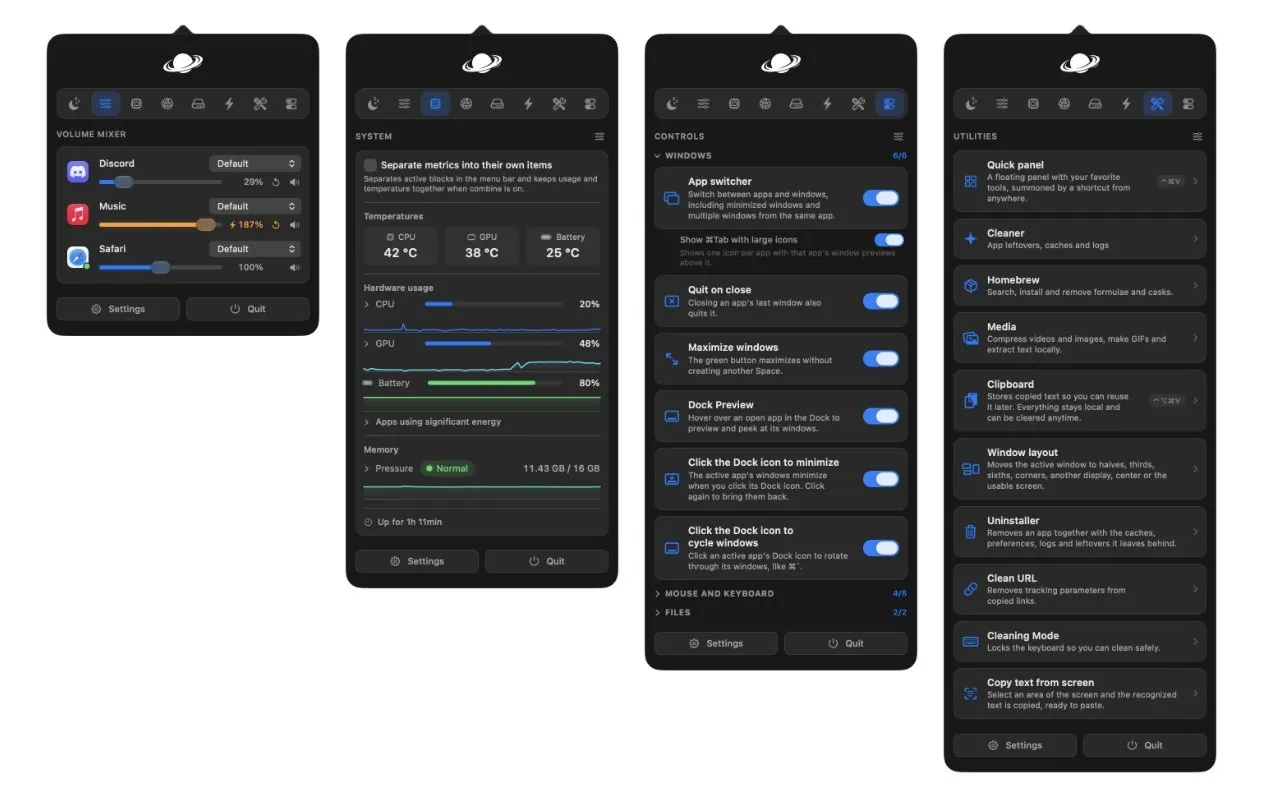
MacOS often leaves users searching for ways to address specific gaps in functionality, particularly when it comes to managing workflows or customizing system behavior. Rogi examines Vorssaint, a modular and free utility app designed to tackle these challenges with precision. One standout feature is its Volume Mixer, which enables users to adjust audio levels for individual applications, a capability missing from macOS’s default settings. By allowing users to install only the modules they need, Vorssaint prioritizes efficiency and avoids unnecessary system clutter.
Dive into this deep dive to uncover how Vorssaint’s features can streamline your macOS usage. Explore Quick Toggles for handling tasks like switching display modes or ejecting drives with ease. Learn how Cleaning Mode temporarily disables inputs to assist safe device cleaning. Additionally, gain insight into Homebrew integration, which offers a user-friendly graphical interface for managing packages without relying on terminal commands.
Why Vorssaint Stands Out
TL;DR Key Takeaways :
- Vorssaint is a free, modular utility app for macOS that enhances functionality by addressing common usability gaps, offering a customizable and efficient alternative to Microsoft PowerToys.
- Key features include tools like a per-app volume mixer, enhanced screenshot capabilities with text extraction, Windows-style file management and customizable external mouse controls.
- It streamlines workflows with practical tools such as Quick Toggles for routine tasks, a Command Bar for faster navigation and Cleaning Mode to disable inputs for device maintenance.
- Advanced utilities like system monitoring, Homebrew integration and a comprehensive app uninstaller cater to both casual users and professionals, improving productivity and system performance.
- Vorssaint’s modular design allows users to install only the features they need, reducing system clutter and creating a tailored macOS experience.
Vorssaint distinguishes itself by offering a suite of tools that directly address macOS usability gaps. Unlike other utility apps that may overwhelm users with unnecessary features, Vorssaint focuses on practicality and customization. Each tool is designed to solve specific challenges, making it a valuable resource for both casual users and professionals. Whether you’re looking to optimize system performance, simplify file management, or enhance navigation, Vorssaint provides solutions that are both intuitive and effective.
Key Features That Enhance macOS
Vorssaint’s features are designed to tackle everyday challenges, making macOS more user-friendly and efficient. Below is a breakdown of its most impactful tools:
- Power Management: Keep Awake
Prevent your Mac from entering sleep mode, even with the lid closed and no charger connected. This feature is particularly useful for long downloads, presentations, or tasks requiring uninterrupted activity. You can customize it to activate only when necessary, making sure energy efficiency. - Audio Control: Volume Mixer
Manage sound levels for individual applications with a per-app volume mixer. Whether you need to mute a browser while listening to music or balance audio across multiple apps, this tool fills a significant gap in macOS’s default audio settings. - Mouse Optimization: External Mouse Controls
Fine-tune scrolling direction and smoothness for external mice. This feature addresses common frustrations with macOS’s default mouse settings, making sure a seamless and customizable experience for users who rely on external peripherals. - Enhanced Screenshot and Text Extraction
Upgrade macOS’s screenshot functionality with tools for region-specific captures, annotations and text extraction. This is particularly useful for working with scanned documents or screenshots, saving time and improving workflow efficiency. - File Management: Cut and Paste
Introduce Windows-style file management to macOS with Command X and Command V shortcuts for cutting and pasting files. This long-requested feature simplifies file handling and enhances productivity. - App Behavior: Quit and Close
Automatically quit apps when their last window is closed, mimicking Windows behavior. This reduces background resource usage and simplifies app management, making your system more efficient. - System Monitoring: Real-Time Stats
Access detailed system information, including network bandwidth, battery health, CPU usage and disk space. This tool is invaluable for diagnosing performance issues and monitoring system health in real time. - Quick Access Shortcuts: Quick Toggles
Streamline routine tasks like switching between light and dark modes, ejecting external drives, or emptying the trash. Quick Toggles reduce the steps required for common actions, saving time and effort. - Input Locking: Cleaning Mode
Temporarily disable keyboard and trackpad inputs to clean your device without triggering accidental actions. This feature is particularly useful for maintaining your hardware without disrupting your workflow. - Search and Navigation: Command Bar and Quick Panel
Replace Spotlight with a faster, more customizable Command Bar. The Quick Panel adds a floating interface for accessing frequently used tools and settings, significantly improving navigation efficiency. - App Removal: Uninstaller and Cleaner
Ensure complete removal of apps and their associated files with Vorssaint’s Uninstaller and Cleaner. This tool helps free up storage space and keeps your system clutter-free, maintaining optimal performance. - Package Management: Homebrew Integration
Simplify Homebrew package management with a graphical interface, eliminating the need for terminal commands. This makes Homebrew more accessible to users who may not be comfortable with command-line tools. - Link Cleaning: Clean URL
Automatically remove tracking parameters from copied links, making sure your URLs are clean and privacy-friendly. This feature is particularly useful for users concerned about online privacy. - Temporary File Storage: Resone
Use Resone as a floating shelf for temporary file storage. This feature is ideal for workflows like video editing, coding, or graphic design, where quick access to files is essential.

Uncover more insights about macOS in previous articles we have written.
- Apple Releases macOS 26.6 Tahoe With Important Security Features
- New iOS 27 Beta 5 Release Arrives with a Big Shift Coming
- Why macOS 27 is Officially Apple’s Biggest Mac Update Yet
- The macOS 27 Beta 5 Release is Out: All the New Features
- Apple Releases MacOS 27 Beta 3 with New Mac Features
- macOS 27 Beta 6 is Now Available: All the Latest Features
- iOS 27 Beta 5 Is Late: What’s Holding Up Apple’s Next Release?
- macOS 27 Beta 3 Unlocks Golden Gate Upgrades for Testers
- Apple Left a Massive MacBook Ultra Clue Hidden Inside macOS 27
- The Biggest Changes Coming to macOS 27 Golden Gate
Why Vorssaint Matters
Vorssaint addresses long-standing macOS limitations by offering practical, user-focused solutions in a single, modular platform. Its tools are designed to simplify and enhance workflows, whether you’re managing files, customizing app behavior, or monitoring system performance. By consolidating essential utilities into one app, Vorssaint eliminates the need for multiple third-party tools, reducing system clutter and improving efficiency. Its modular approach ensures that you only install the features you need, allowing you to tailor the app to your specific requirements.
For professionals, Vorssaint provides advanced tools like system monitoring and Homebrew integration, while casual users benefit from features like Quick Toggles and Cleaning Mode. This versatility makes it a valuable addition to any macOS setup, regardless of your level of expertise.
Media Credit: Rogi
Disclosure: Some of our articles include affiliate links. If you buy something through one of these links, Geeky Gadgets may earn an affiliate commission. Learn about our Disclosure Policy.
