Keychron Thunderbolt 5 Dock (14-in-1) Review: The Keyboard Company Builds a Serious Dock Keychron’s first docking station pairs CNC-machined aluminum with Thunderbolt 5’s 80Gbps pipeline, dual 8K display support, and 140W charging, and it undercuts expectations for a first attempt. Keychron built its name on mechanical keyboards, so a docking station is unexpected territory.
The Keychron Thunderbolt 5 Dock (14-in-1) is the company’s first dock, and rather than easing in with a modest USB-C hub, Keychron has gone straight for the flagship tier: Thunderbolt 5, three TB5 ports, fourteen connections in total, dual 8K display support, and up to 140W of laptop charging, all wrapped in a CNC-machined aluminum tower that sells for $349.99. After a week with the dock parked next to a 16-inch MacBook Pro, the short version is this: Keychron has read the room.
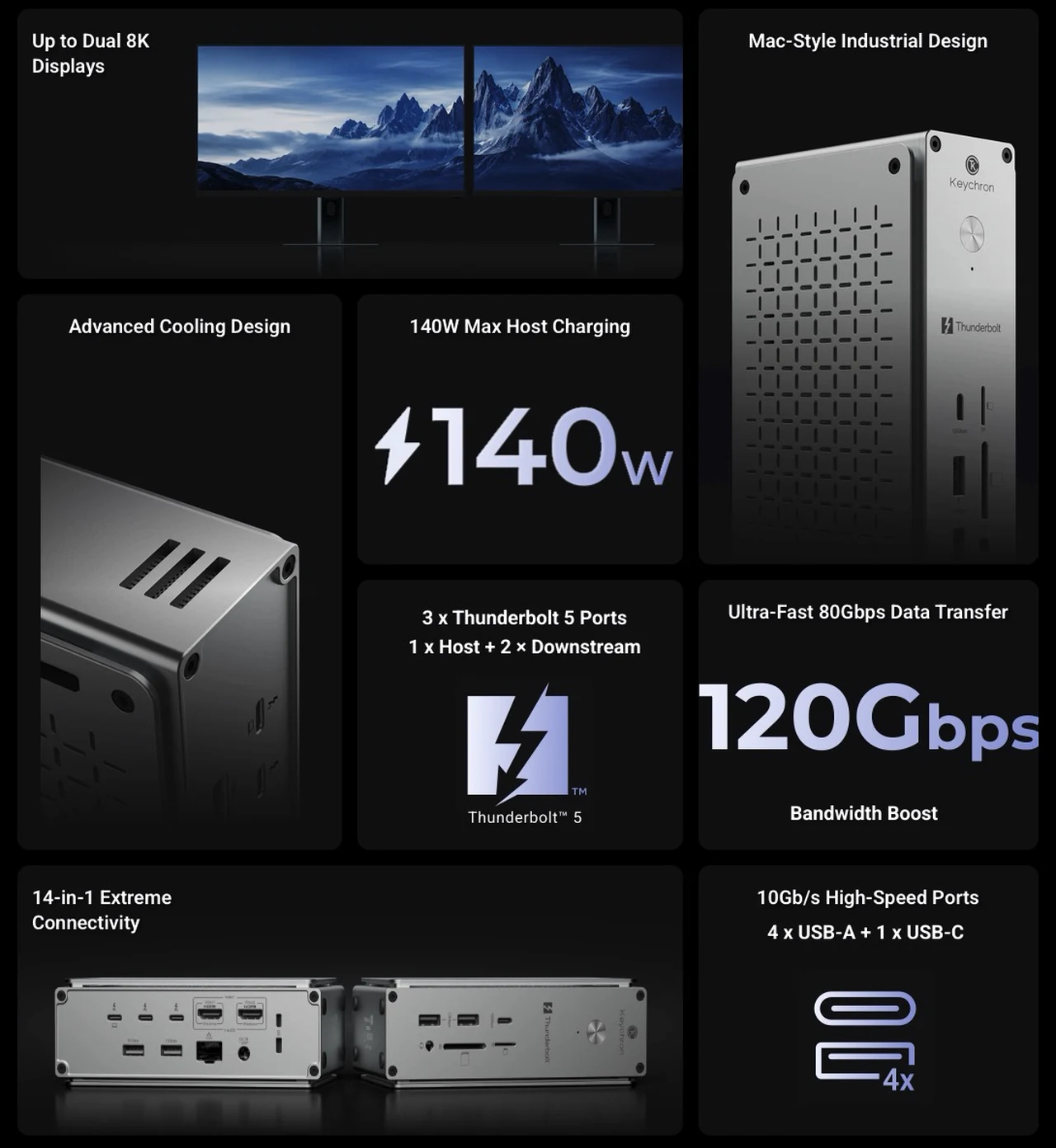
This is a dock built for people who want one cable running to their laptop and everything else, displays, storage, network, and power, hanging off a quiet silver monolith. There are caveats, and I will get to them, but the fundamentals are strong. Keychron Thunderbolt 5 Dock at a glance:
- Price: $349.99
- Bandwidth: 80Gbps bidirectional Thunderbolt 5, Bandwidth Boost up to 120Gbps (upstream only)
- Charging: up to 140W PD 3.1 to the laptop; 30W and 15W downstream
- Displays: up to 4, with dual 8K@60Hz at the top end
- Ports: 14, including 2.5Gb Ethernet and UHS-II card readers
- Build: fanless CNC-machined aluminum, 164.5 x 97.5 x 52.9 mm, 856g
- Compatibility: Thunderbolt 5 hosts for full performance; TB4/USB4 backward compatible; no Thunderbolt 3 Windows support
Design: A Vertical Slab of Aluminum That Earns Its Desk Space
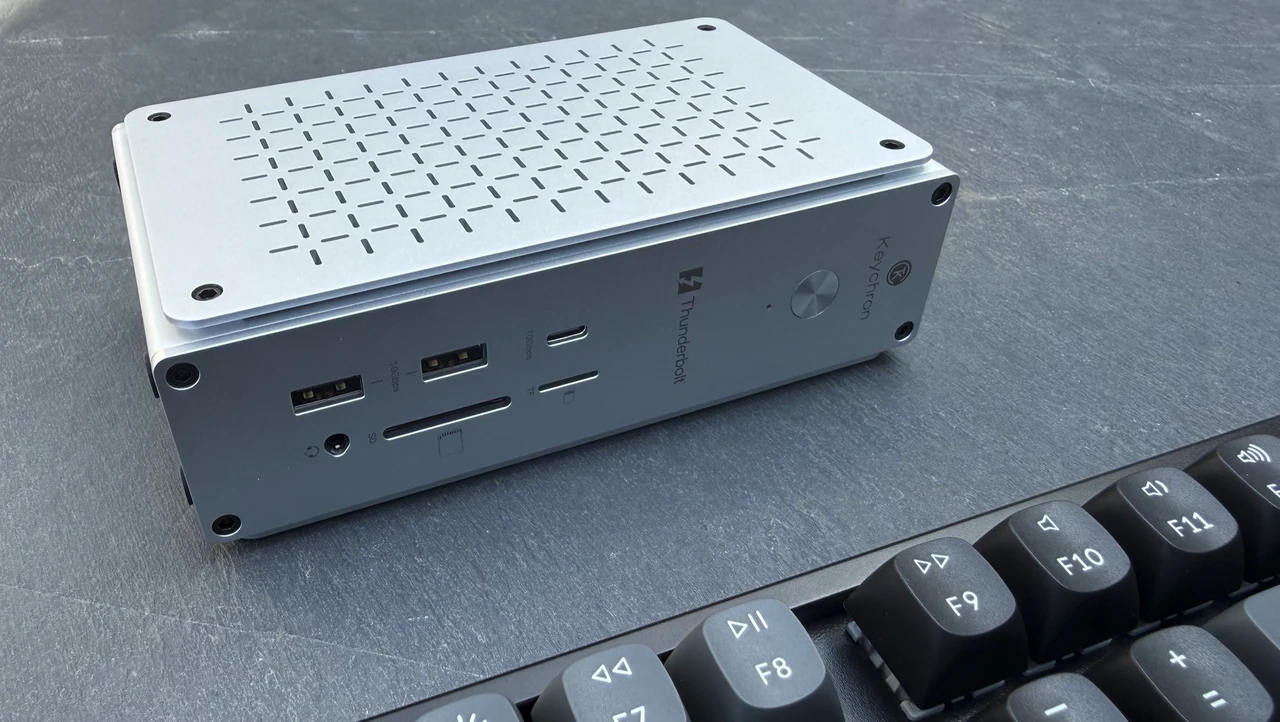
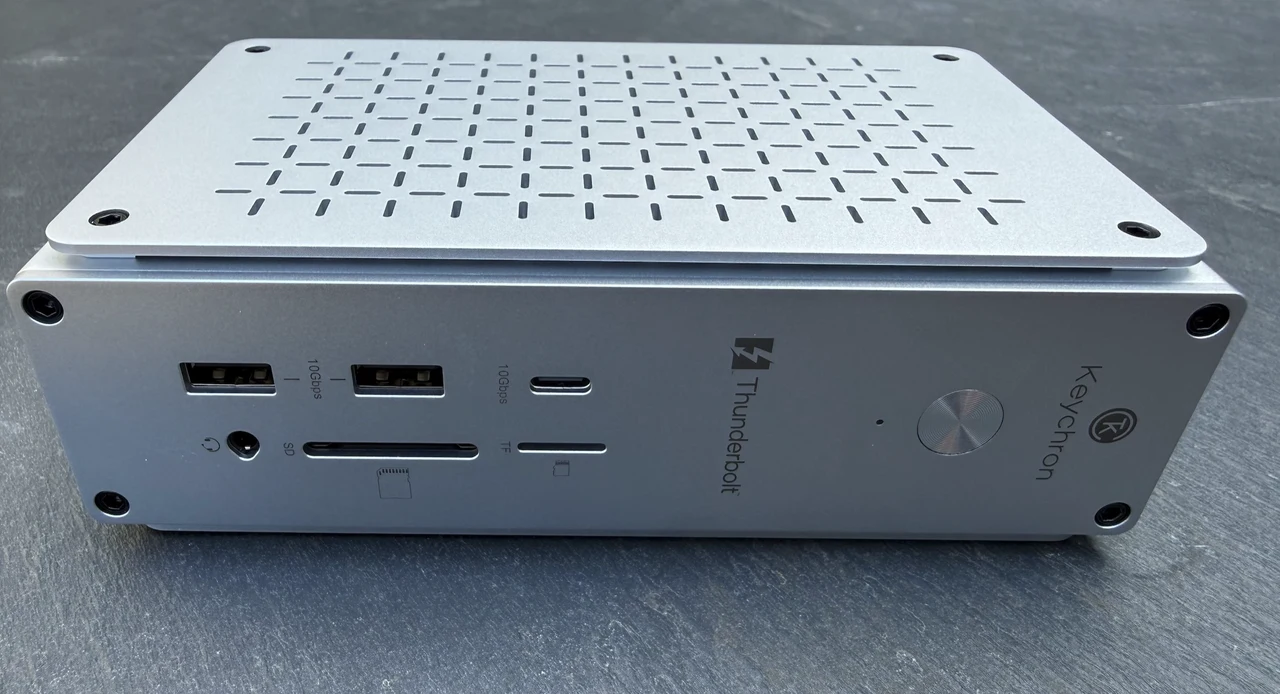
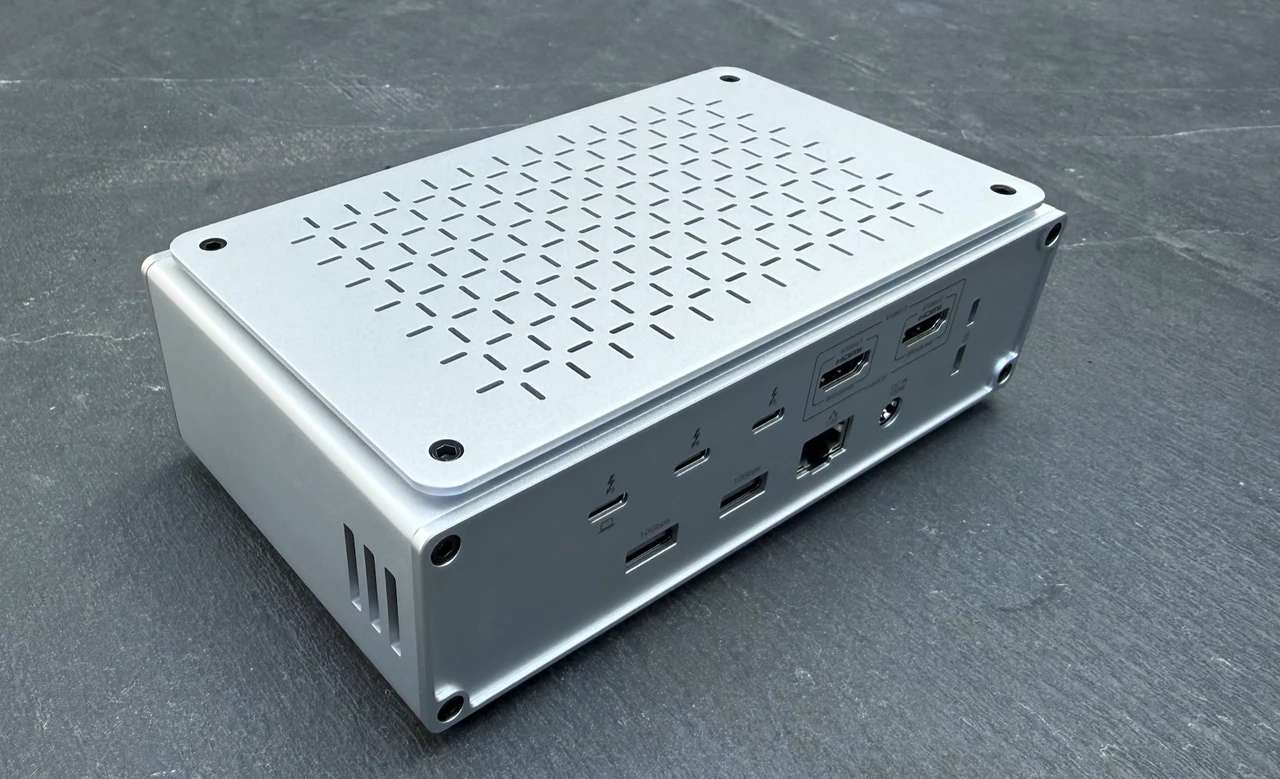
Most docks are horizontal pucks that vanish behind a monitor stand. Keychron went vertical instead. The dock stands 164.5 x 97.5 x 52.9 mm, a slim tower rather than a flat brick, and the footprint it claims on the desk is small. At 856g it has real heft, enough that plugging and unplugging cables does not drag it around, which is a small detail that separates docks designed by people who use them from docks designed to hit a price.
The enclosure is CNC-machined aluminum alloy in a silver finish that Keychron describes, accurately, as Mac-style. Sat beside a MacBook Pro it looks like something Apple could have shipped. There is no RGB lighting anywhere on the unit, and no fan either; more on that later. The aesthetic restraint extends to the whole industrial design: elevated side panels, a through-vent grille, and clean faces. If your desk setup leans minimal, this blends in rather than shouting for attention. Windows workstation users get the same benefit, though the silver-on-silver harmony is clearly aimed at the MacBook crowd.
Fourteen Ports, Counted Honestly
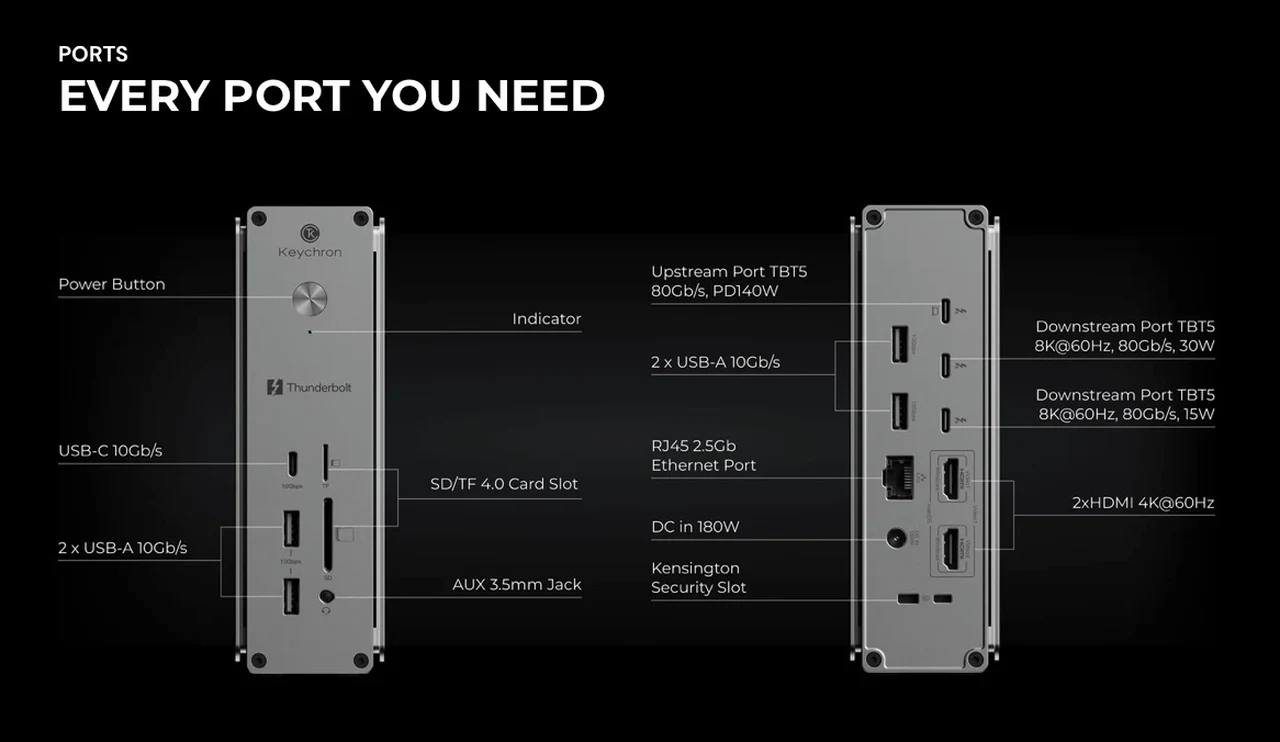
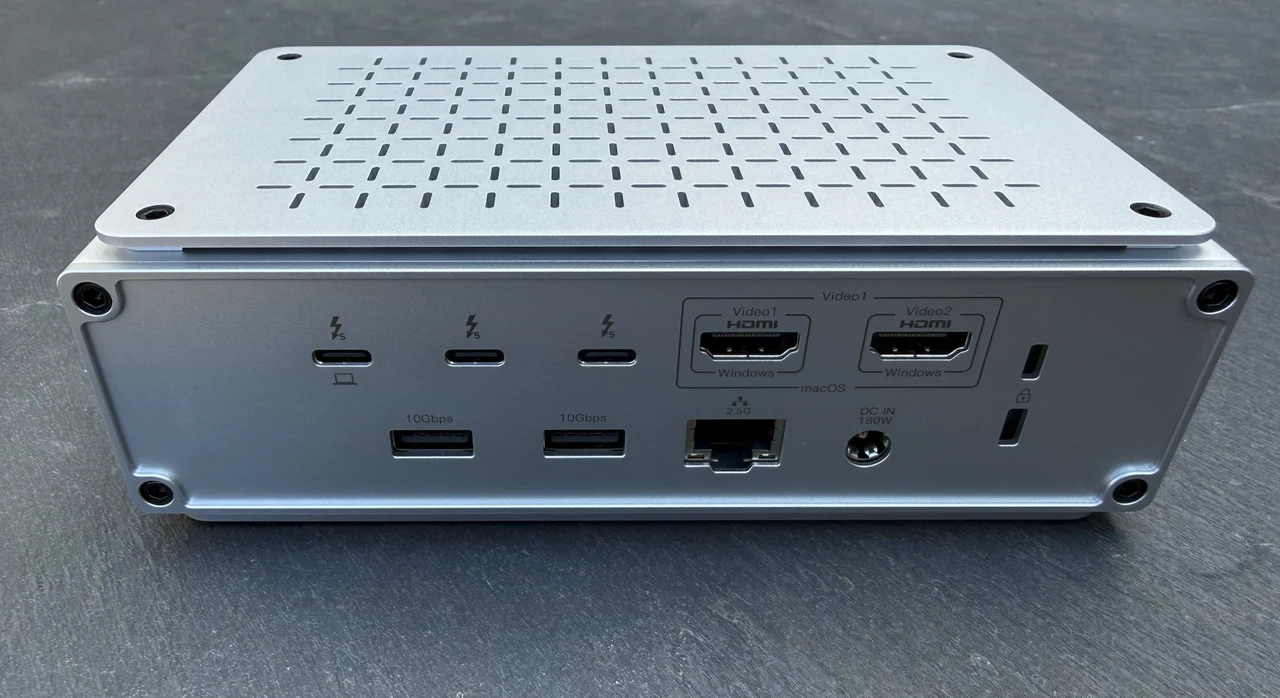
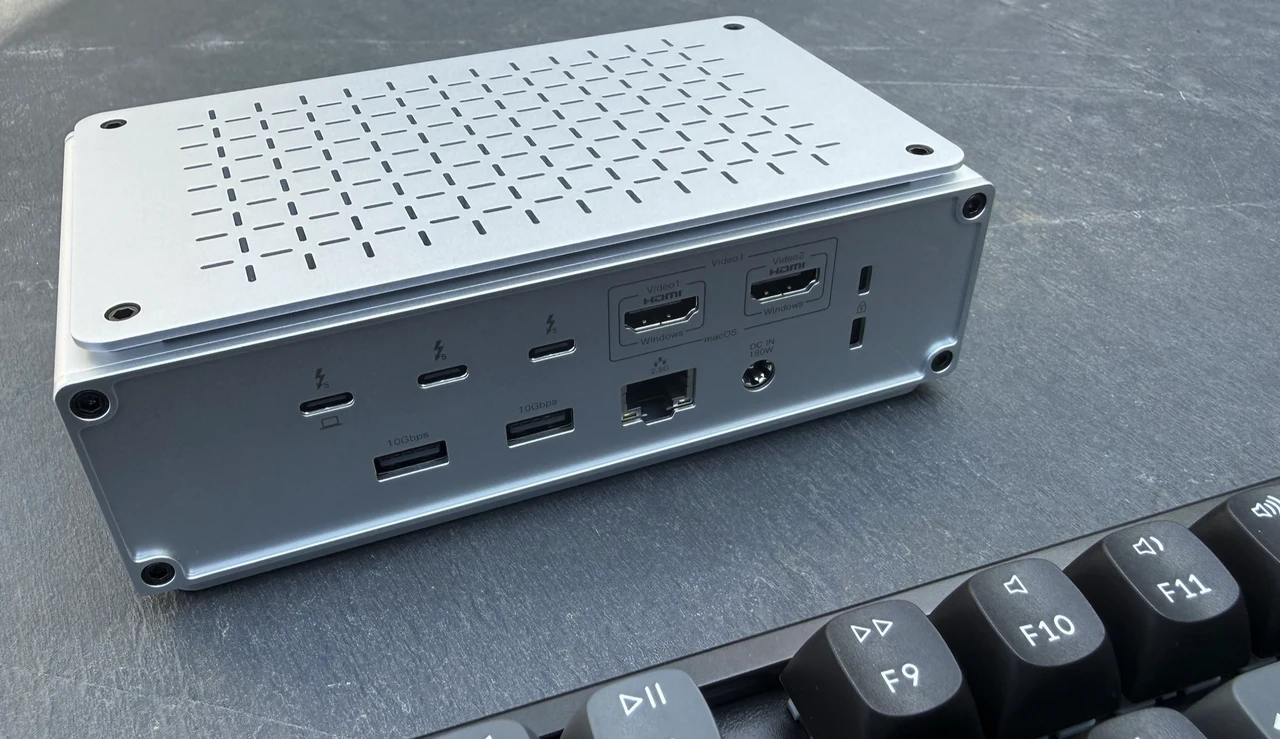
Port-count marketing usually involves creative accounting, so here is the full inventory. You get three Thunderbolt 5 ports: one upstream to the laptop carrying data and 140W of power, and two downstream rated at 30W and 15W output respectively. Five USB ports run at 10Gbps each: four USB-A 3.2 Gen 2 and one USB-C 3.2 Gen 2. Two HDMI 2.1 outputs handle up to 4K at 60Hz apiece. Networking comes from a 2.5Gb Ethernet jack, and the card readers are the good kind: SD and microSD slots at UHS-II speeds, up to 312MB/s. A 3.5mm audio combo jack rounds out the fourteen. All fourteen, itemized:
- 1 x Thunderbolt 5 upstream (80Gbps, 140W PD 3.1 to the host)
- 1 x Thunderbolt 5 downstream (80Gbps, 30W output)
- 1 x Thunderbolt 5 downstream (80Gbps, 15W output)
- 4 x USB-A 3.2 Gen 2 (10Gbps)
- 1 x USB-C 3.2 Gen 2 (10Gbps)
- 2 x HDMI 2.1 (up to 4K@60Hz each)
- 1 x 2.5Gb Ethernet
- SD card reader (UHS-II, up to 312MB/s)
- microSD card reader (UHS-II, up to 312MB/s)
- 3.5mm audio combo jack
That is a well-judged spread. The four USB-A ports acknowledge that keyboards, mice, dongles, and capture cards still live in USB-A land, and at 10Gbps each they are quick enough for external SSDs rather than serving as legacy afterthoughts. The UHS-II card readers will matter to photographers tired of docks that ship UHS-I slots and call it a feature. And 2.5Gb Ethernet is now table stakes at this price, comfortably ahead of the gigabit jacks still found on many Thunderbolt 4 docks; pointed at a NAS, it turns the dock into a respectable ingest station.
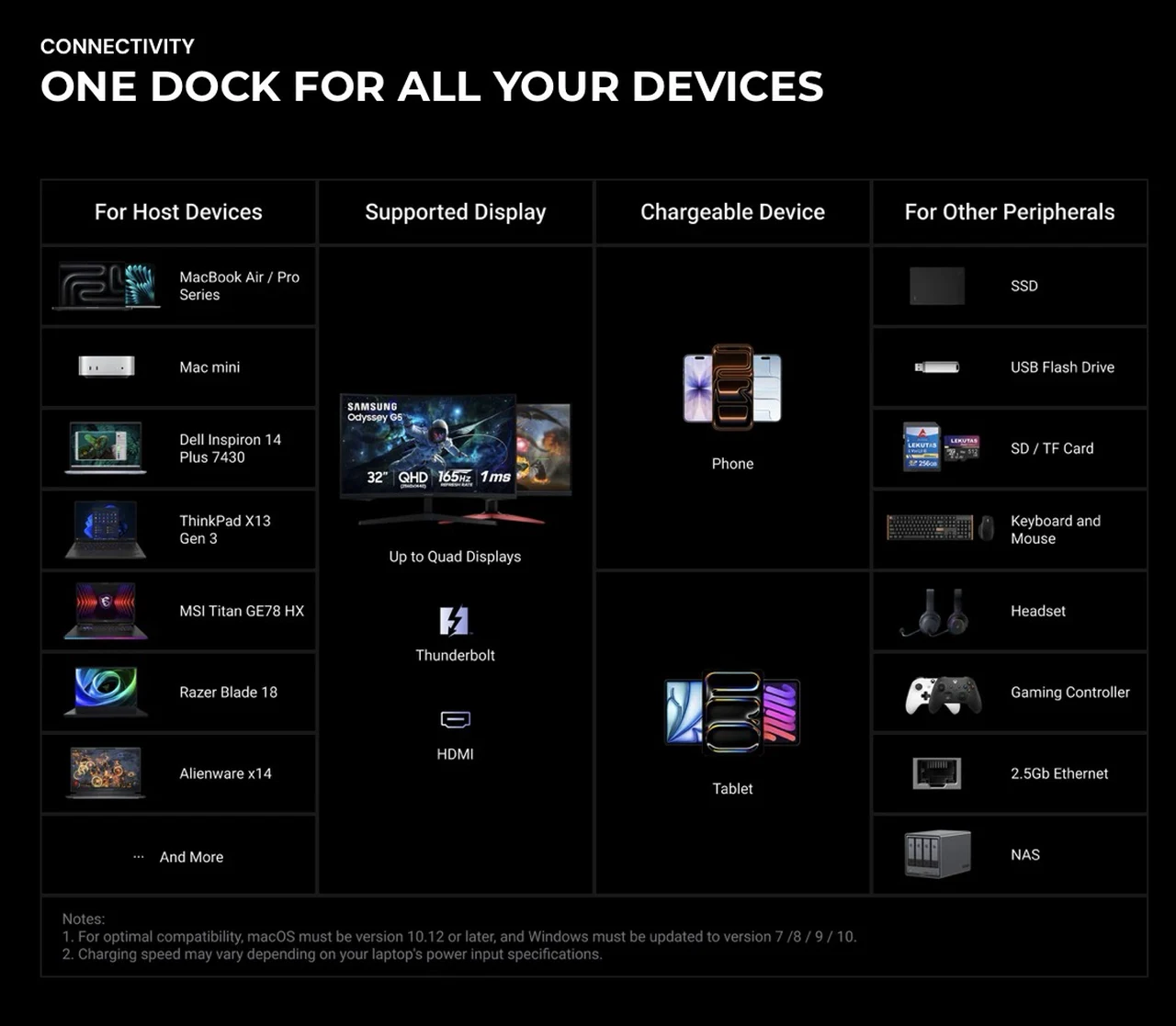
Keychron pitches the dock at creative, office, and gaming workflows alike, and the port mix backs that up: there is room here for a capture card, a game controller, a tablet, and a scratch drive simultaneously, with bandwidth left over. The one spec worth reading twice: the HDMI ports top out at 4K@60Hz. The headline 8K numbers flow exclusively through the Thunderbolt 5 ports. If your monitors are HDMI-only, you are buying bandwidth you cannot fully spend on them.
Thunderbolt 5 is the Whole Point
Thunderbolt 5 doubles Thunderbolt 4’s 40Gbps to 80Gbps of bidirectional bandwidth, and adds a party trick called Bandwidth Boost that reallocates lanes to push up to 120Gbps for video-heavy workloads. On this dock, Bandwidth Boost applies to the Thunderbolt 5 upstream connection only, which is exactly where a multi-display creative setup needs it. In practice, the difference shows up at the edges of a workflow rather than the middle. Browsing and email feel identical on any dock. Where 80Gbps earns its keep is sustained storage traffic: external NVMe drives connected over the downstream TB5 ports no longer queue behind display traffic the way they can on a saturated Thunderbolt 4 dock.
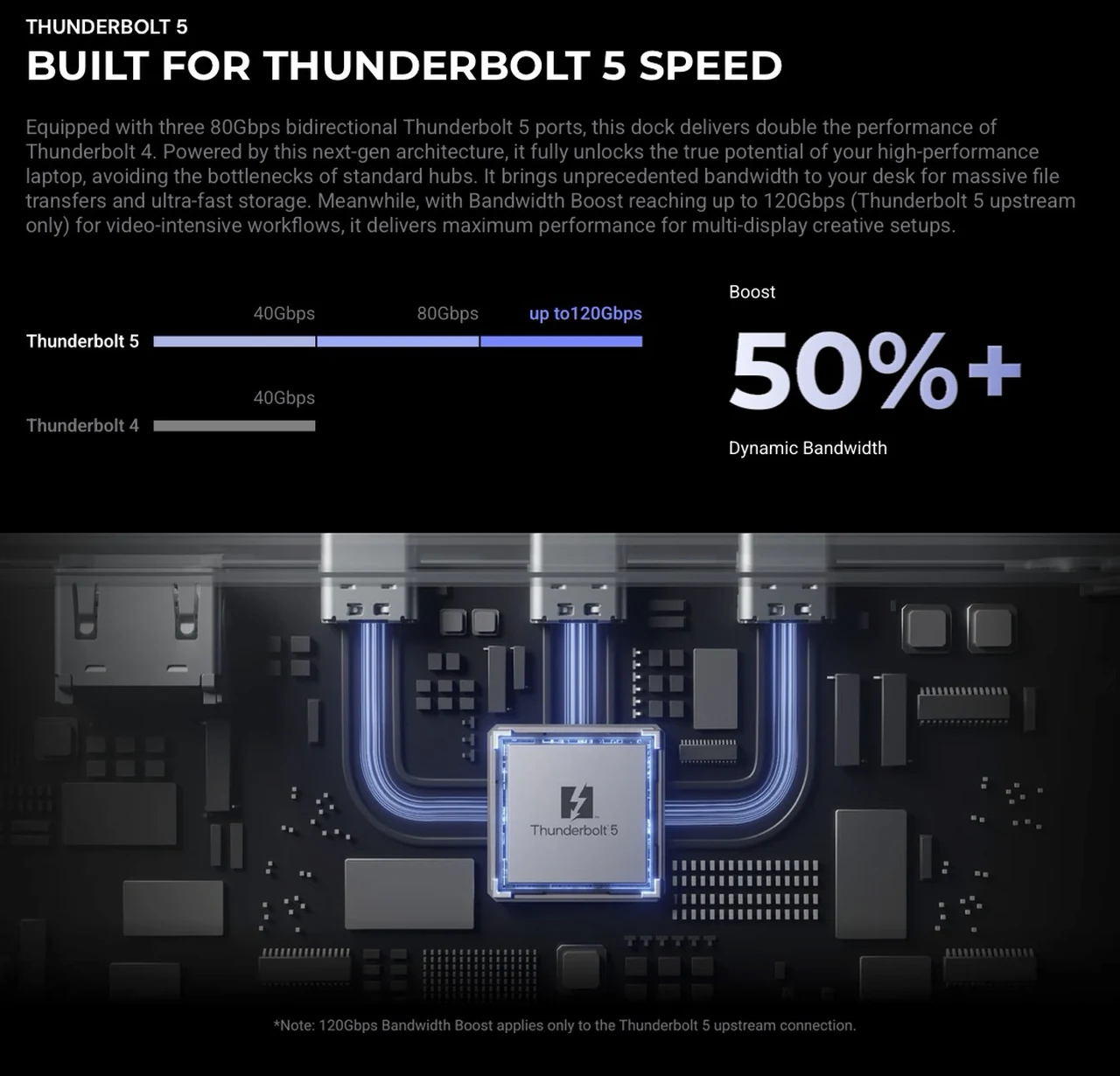
Keychron lists explicit support for Thunderbolt SSD and NVMe drives along with daisy chaining, so a chain of fast storage plus a display off a single downstream port is a supported configuration, not an accident that happens to work. Keychron includes a certified 1-meter Thunderbolt 5 cable in the box, which deserves a nod. Shipping a flagship dock without a certified cable is a cost-cutting move some vendors still make, and a bad cable is the most common cause of mystery dock behavior.
Display Support: Read the Matrix Before You Buy
This is where buyers need to slow down, because the ceiling depends heavily on your host machine, and Keychron publishes detailed tables for both platforms. On the Mac side, the dock scales with Apple’s silicon tiers. An M5 Pro or Max machine hits the maximums: a single 8K@60Hz display over Thunderbolt 5, dual 8K@60Hz over two TB5 connections, a triple arrangement of two 4K@144Hz panels plus a 4K@60Hz screen, or a quad layout combining two 4K@144Hz displays with a mirrored pair of 4K@60Hz HDMI screens. M5 and M4 Pro/Max chips manage a single 8K@60Hz or dual 6K@60Hz.
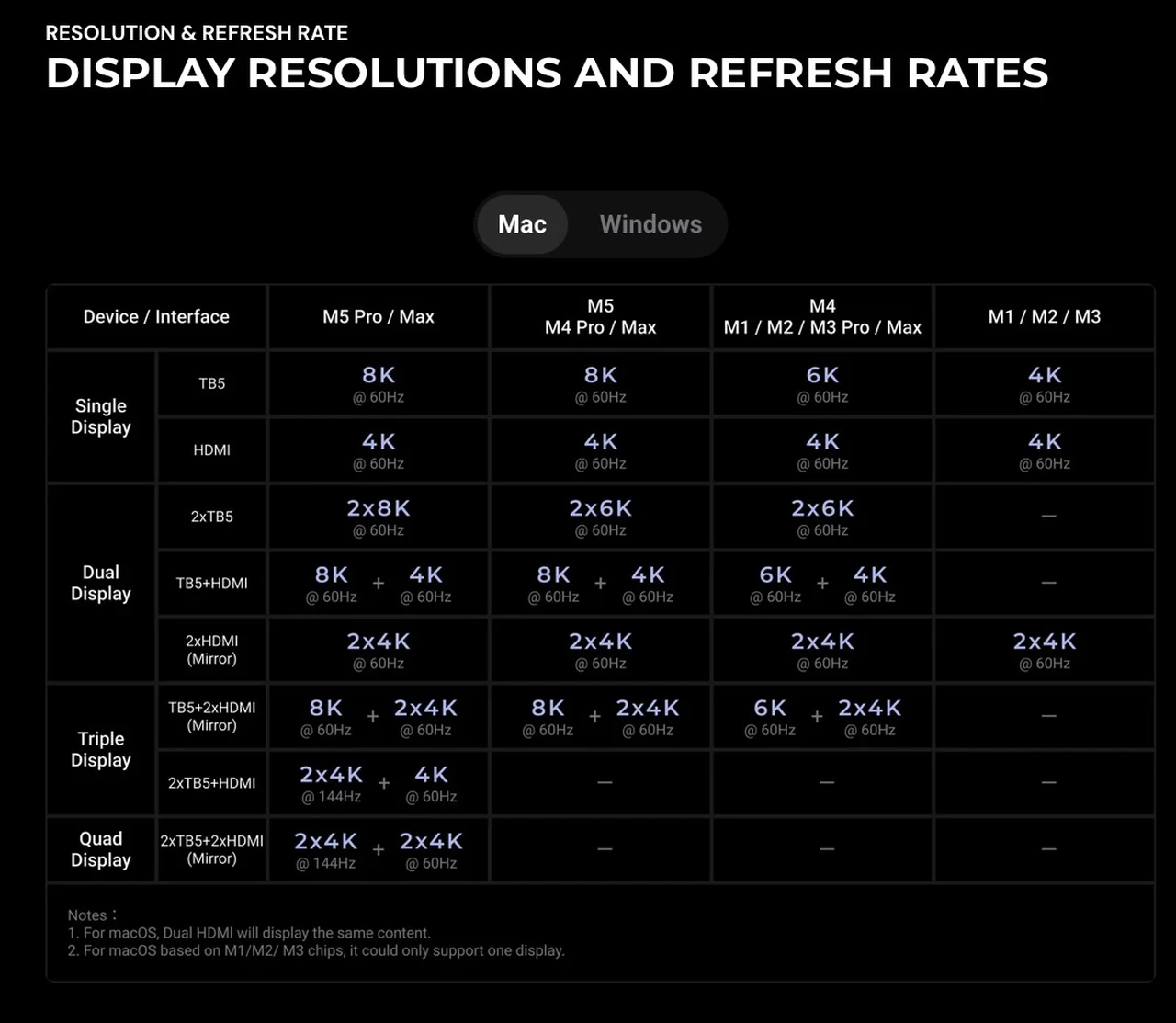
Older or lower tiers step down accordingly, and there are two hard macOS realities baked into the fine print: the two HDMI ports always mirror each other on macOS due to system architecture limits, and base M1, M2, and M3 chips drive only a single external display, full stop. The dock cannot override what the silicon refuses to do. Keychron itself points buyers to Apple’s external display documentation before purchasing, which is candid of them.
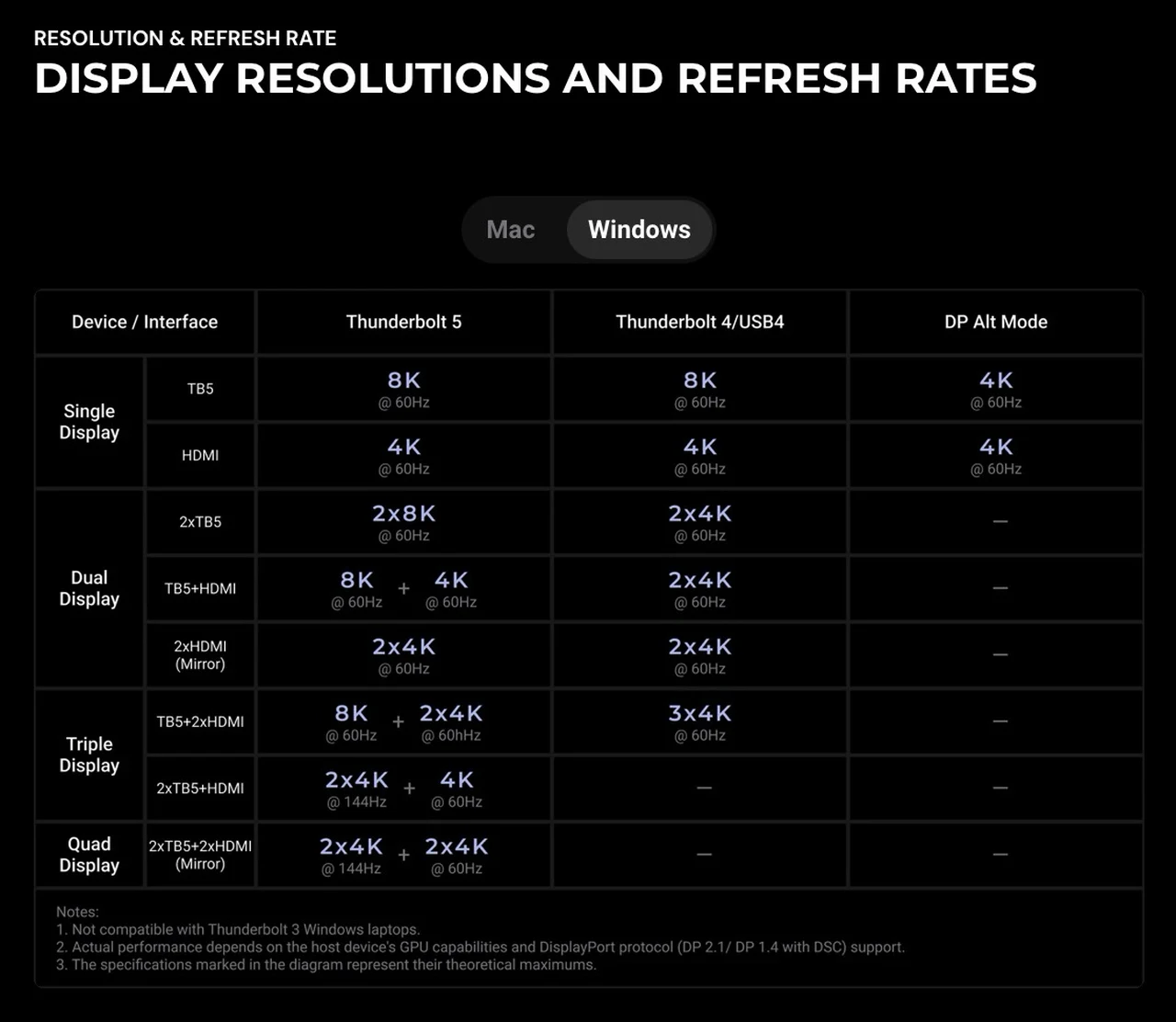
Windows machines with proper Thunderbolt 5 ports get the same top-end numbers, including dual 8K@60Hz and the quad-display layout. Step down to a Thunderbolt 4 or USB4 host and the ceiling drops to dual 4K@60Hz or triple 4K@60Hz, still respectable, but a long way from the box art. Keychron notes that real-world results depend on the host GPU and its DisplayPort protocol support (DP 2.1, or DP 1.4 with Display Stream Compression), and that published figures are theoretical maximums. One hard exclusion deserves bold text: the dock is not compatible with Thunderbolt 3 Windows laptops. Not degraded, not limited: incompatible. Check your spec sheet before ordering. The maximums by host, in brief:
- M5 Pro/Max Macs: dual 8K@60Hz, triple 2x 4K@144Hz + 4K@60Hz, or quad with the mirrored HDMI pair
- M5 and M4 Pro/Max Macs: single 8K@60Hz or dual 6K@60Hz
- M4 and M1/M2/M3 Pro/Max Macs: single 6K@60Hz or dual 6K@60Hz
- Base M1/M2/M3 Macs: one external display, up to 4K@60Hz
- Windows, Thunderbolt 5 host: dual 8K@60Hz up to quad 2x 4K@144Hz + 2x 4K@60Hz
- Windows, Thunderbolt 4/USB4 host: dual or triple 4K@60Hz
- Windows, Thunderbolt 3 host: not supported
Charging: 140W Up, With a Catch on the Desk
The upstream port delivers up to 140W via Power Delivery 3.1, which is the number that matters to owners of big laptops. That is enough to charge a 16-inch MacBook Pro with M3, M4, or M5 Pro/Max silicon at full speed over the same cable carrying your displays and data. The downstream Thunderbolt 5 ports contribute 30W and 15W, sensible allocations for a phone and a pair of earbuds or a small SSD.
The catch is that none of this happens without the wall. The dock requires its included 180W power adapter connected to a DC input; it does not run bus-powered in any capacity, and without mains power there is no display output, no peripheral connectivity, and no charging at all. That is normal for full-fat Thunderbolt docks, but it means this is desk furniture, not travel gear.
To Keychron’s credit, the power side travels well conceptually: the adapter accepts 100 to 240V AC at 50/60Hz, and the mains lead is a standard IEC C7 figure-8 cord you can swap for a region-specific one, so relocating internationally means changing a $5 cable rather than hunting for a proprietary brick. Setup, for what it is worth, is the full anticlimax a good dock should be: brick to DC input, C7 cord to the wall, the bundled cable to the laptop, done.
Silence as a Feature
The dock is fanless. Cooling is entirely passive, handled by the aluminum body working as a heatsink, with elevated side panels, a through-vent grille, and an internal heat spreader moving warmth out of the chassis. Keychron claims stability through continuous Thunderbolt 5 transfers, multi-display output, and sustained storage access, and over a week of leaving it saturated with displays and drives I never heard it, because there is nothing to hear. After years of docks with whiny 40mm fans, zero operational noise is a spec I have come to value as much as any bandwidth figure. The aluminum gets warm under load, which is the heatsink doing its job.
Compatibility and the Small Print
Backward compatibility is broad but graded. Thunderbolt 4 and USB4 hosts work with reduced bandwidth and display ceilings, as covered above. Generic USB-C ports are a lottery that depends on the host’s specification; Keychron recommends a Thunderbolt 5 host for full functionality, which is the polite way of saying buy this for a TB5 machine. On the software side, Keychron lists support for macOS 10.12 or later and Windows from 7 through 11, an unusually generous range, though anyone pairing a $349.99 Thunderbolt 5 dock with a Windows 7 machine has questions to answer that no dock can resolve.
Verdict: A First Dock That Does Not Feel Like One
At $349.99, the Keychron Thunderbolt 5 Dock is priced as a serious tool, and the spec sheet justifies it: three TB5 ports, 140W host charging, dual 8K display support, UHS-II card readers, 2.5Gb Ethernet, and a fanless aluminum chassis that looks the part. Keychron’s own comparison framing is honest about the tiers below it; Thunderbolt 4 docks top out at 40Gbps, 100W, and two displays, and USB-C hubs are not playing the same sport.
Pros:
- Full 80Gbps Thunderbolt 5 bandwidth, with 120Gbps Bandwidth Boost upstream
- 140W PD 3.1 charging covers a 16-inch MacBook Pro over the single cable
- Fourteen well-chosen ports, including UHS-II card readers and 2.5Gb Ethernet
- Fanless CNC aluminum build: silent, premium, and RGB-free
- Certified 1m Thunderbolt 5 cable in the box
- Universal 100 to 240V power with a swappable IEC C7 cord
Cons:
- HDMI outputs capped at 4K@60Hz; the 8K headlines require the TB5 ports
- Mains-only: nothing works without the 180W adapter
- No Thunderbolt 3 Windows compatibility at all
- Base M1/M2/M3 Macs remain limited to a single external display
- macOS mirrors the two HDMI ports rather than extending across them
- $349.99 is a considered purchase, not an impulse buy
The buyers who should hesitate are easy to identify. Owners of base M1, M2, or M3 Macs will hit the single-external-display wall no matter what the dock offers. Thunderbolt 3 Windows laptop owners are excluded outright. And anyone whose monitors are all HDMI will leave most of the bandwidth on the table. For everyone else, particularly MacBook Pro owners with Pro or Max silicon and a pile of fast storage, Keychron’s first dock lands exactly where it aimed: one cable in, an entire desk out, and silence throughout. The keyboard company has built a dock worth taking seriously, and the next generation of Thunderbolt 5 machines will only grow into it.
Source: Keychron
Disclosure: Some of our articles include affiliate links. If you buy something through one of these links, Geeky Gadgets may earn an affiliate commission. Learn about our Disclosure Policy.
