iOS 27 introduces a range of updates aimed at enhancing functionality and user experience. From a redesigned Siri interface to advancements in Apple Intelligence, the update reflects Apple’s ongoing commitment to innovation. However, these changes are accompanied by certain usability challenges and increased storage demands, raising questions about whether the update truly improves daily interactions. In the video below, iDeviceHelp delves into the key features of iOS 27 and their broader implications.

Siri’s Dynamic Island Integration: A Double-Edged Sword
One of the most prominent changes in iOS 27 is Siri’s integration with the Dynamic Island. This redesign enhances visual appeal and provides contextual functionality, making Siri interactions more immersive. However, the update also introduces usability challenges, particularly for users who rely on one-handed operation. Previously, dismissing Siri required a simple swipe up from the bottom of the screen. With iOS 27, this gesture has been removed, leaving users to navigate less intuitive or two-handed methods to close Siri.
For those using larger devices like the iPhone 17 Pro Max, this change can disrupt the seamless experience Apple users have come to expect. The absence of a quick dismissal option feels cumbersome, especially during multitasking or on-the-go usage. A potential solution could involve reinstating the bottom-screen swipe gesture as an optional feature, allowing users to customize their Siri interactions based on personal preferences.
Key Insight: While the Dynamic Island integration adds sophistication, the removal of intuitive gestures may hinder usability for certain users.
Type to Siri and Search: Adjusting to New Interactions
Another significant change in iOS 27 is the removal of the double-tap gesture to activate “Type to Siri” or initiate a search. Instead, users must now swipe down from the top center of the screen to access these features. While this adjustment may seem minor, it often requires two hands to perform, particularly on larger devices. This shift reduces the convenience of quick, one-handed interactions that many users have grown accustomed to.
The issue is even more pronounced on iPads, where the new activation method frequently leads to accidental triggers when accessing notifications or the control center. These unintended activations disrupt workflows and create unnecessary interruptions, particularly for users who rely on their devices for productivity. Reintroducing the double-tap gesture could resolve these issues, restoring a more efficient and user-friendly experience.
Key Insight: The new gesture system prioritizes design uniformity but sacrifices the ease of one-handed use, particularly on larger devices.
Apple Intelligence: Advanced Features with Storage Trade-Offs
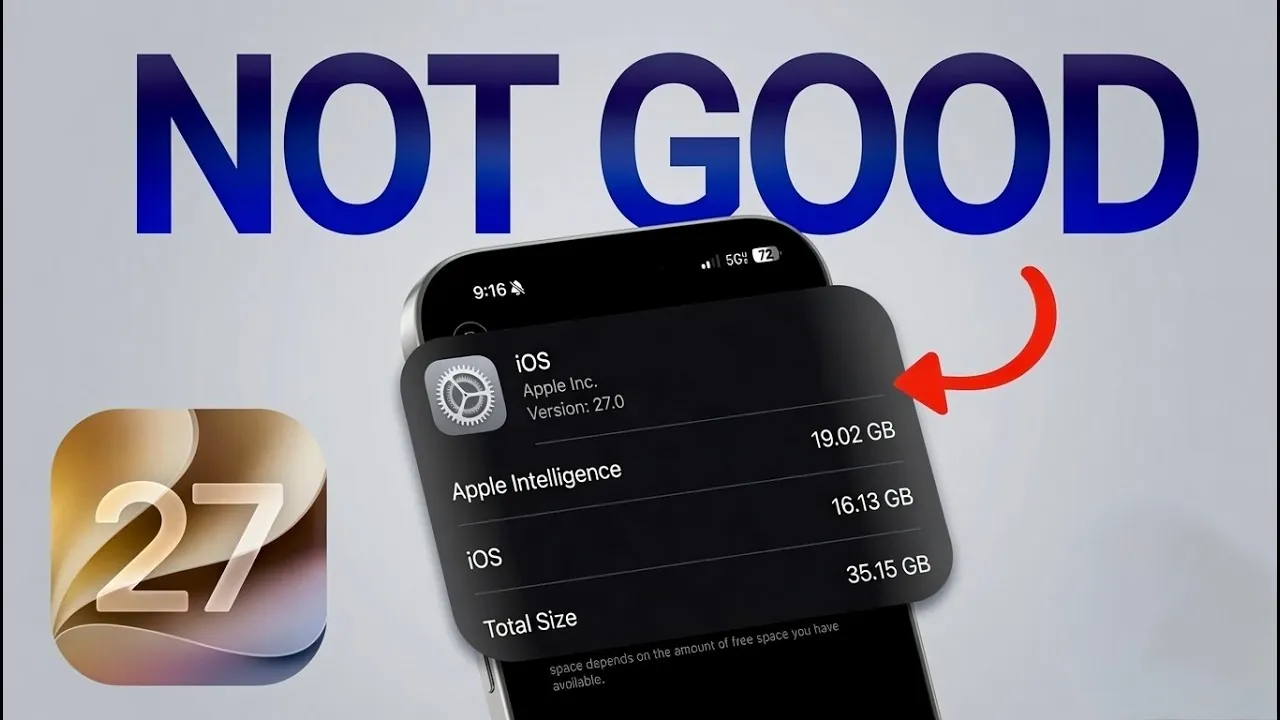
Apple Intelligence, a cornerstone of iOS 27, introduces advanced personalization and performance enhancements. These features use machine learning to deliver tailored recommendations, smarter app interactions, and improved device efficiency. However, these benefits come at a cost: significant storage consumption. On devices like the iPhone 17 Pro, Apple Intelligence can occupy as much as 19 GB of storage, exceeding the operating system’s own requirements of 16 GB.
For users with limited storage capacity, this poses a serious challenge. The reduced space for apps, photos and other personal data may force users to make difficult compromises. While the enhanced functionality of Apple Intelligence is impressive, its storage demands highlight a growing concern for users managing their device capacity. Apple may need to explore optimization strategies to reduce the storage footprint of these features in future updates.
Key Insight: Apple Intelligence offers powerful capabilities but raises concerns about storage efficiency, particularly for users with lower-capacity devices.
Striking a Balance Between Innovation and Usability
iOS 27 exemplifies Apple’s dedication to pushing the boundaries of innovation. The redesigned Siri interface, changes to search functionality and advancements in Apple Intelligence showcase the company’s focus on enhancing user experience. However, these updates also reveal areas where usability and practicality have been compromised.
Adapting to these changes may require users to adjust their habits and expectations. While the update offers clear benefits, addressing its shortcomings will be essential to delivering a truly user-centric experience. Moving forward, Apple’s ability to balance innovation with practicality will play a critical role in maintaining its reputation for seamless and intuitive design.
- Key Takeaway: iOS 27 introduces exciting features but also presents usability and storage challenges that may impact your daily interactions.
- What to Watch: Future updates could address these issues, potentially restoring intuitive gestures and optimizing storage demands.
- Final Thought: While iOS 27 reflects Apple’s commitment to innovation, its ultimate success will depend on how well it aligns with user needs and expectations.
Here are additional guides from our expansive article library that you may find useful on iOS 27.
- Apple’s iOS 27 Beta 3 Is Just Days Away: Here’s When It Drops
- iOS 27 Leaks Reveal the End of an Era: Apple’s New Priorities Confirmed
- iOS 27 Beta 2 Changes: What Apple Is Modifying to Improve Performance
- Should You Install iOS 27 Beta 3 or Wait for the Public Beta?
- iOS 27 Could Be Apple’s ‘Snow Leopard’ Moment, Focusing on One Huge Change
Source & Image Credit: iDeviceHelp
Disclosure: Some of our articles include affiliate links. If you buy something through one of these links, Geeky Gadgets may earn an affiliate commission. Learn about our Disclosure Policy.
