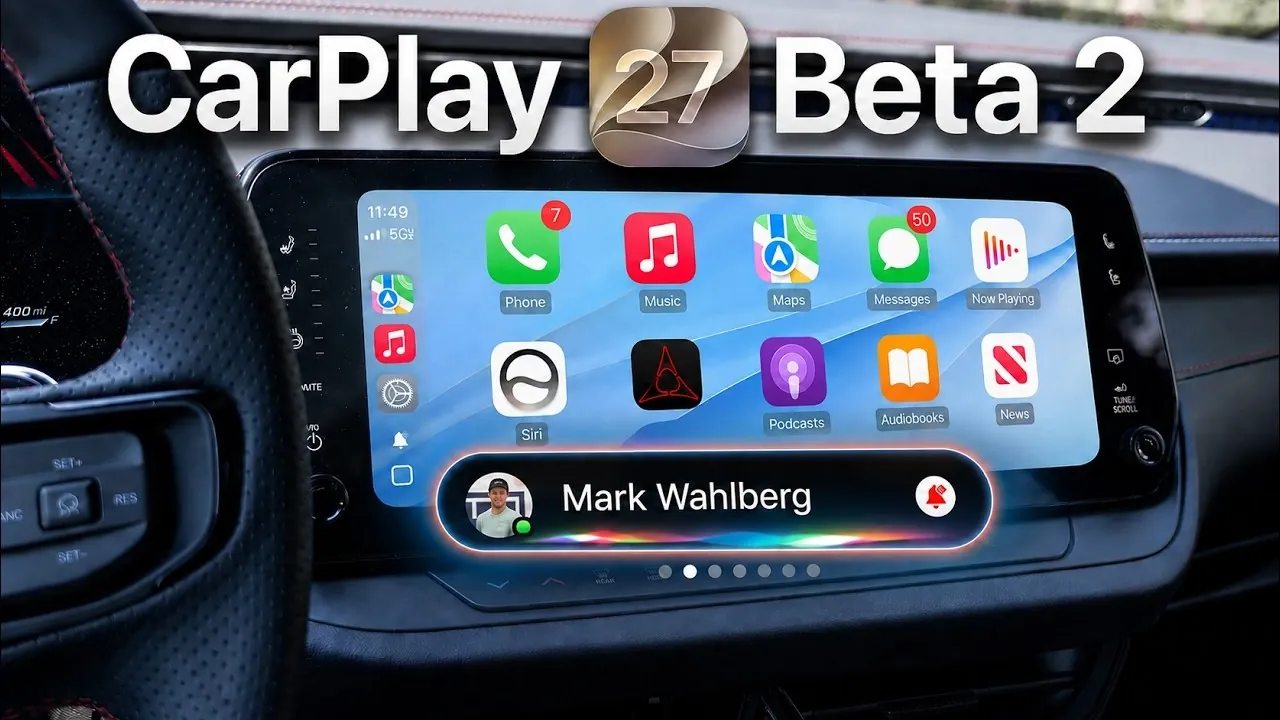
The iOS 27 beta 2 update brings a range of noteworthy enhancements to Apple CarPlay, focusing on improving usability, aesthetics, and functionality. With features such as expanded widget integration, a redesigned interface, and updates to Apple Maps, Siri, and Apple Music, this beta offers a glimpse into the future of in-car technology. While some features remain incomplete, the update underscores Apple’s commitment to refining CarPlay for modern drivers and enhancing the overall driving experience. The video below from HotShotTek gives us more details.

Expanded Widget Integration for Greater Control
The latest beta introduces seamless widget integration from your iPhone and Apple Watch directly into CarPlay, significantly broadening its functionality. This update allows you to incorporate widgets that were previously unavailable in CarPlay, such as smart home controls. For instance, you can now adjust your home’s lighting, monitor security cameras, or even control a smart thermostat, all without leaving your car. By consolidating these essential controls into one interface, this feature enhances convenience and reduces distractions, making it easier to stay focused on the road.
Redesigned User Interface for a Modern Experience
The CarPlay interface has undergone a comprehensive redesign to improve both its visual appeal and usability. Siri now features a glowing rainbow animation when activated, providing a more dynamic and visually engaging cue for users. Additionally, the battery, cellular and time icons have been updated with a rounder, more modern appearance, aligning with Apple’s broader design language. A new microphone activity indicator has also been introduced, making it easier to see when Siri is actively listening. These updates collectively aim to create a cleaner, more intuitive interface that enhances the overall user experience.
Apple Maps Enhancements Streamline Navigation
Navigation in CarPlay has been enhanced with new Apple Maps features designed to make driving more efficient and enjoyable. The “Guides” feature allows you to create customizable lists of locations, such as favorite restaurants, landmarks, or frequently visited destinations, for quick access during trips. Improved route-starting options simplify the process of setting up navigation, making sure a smoother experience whether you’re commuting or exploring unfamiliar areas. These updates are tailored to meet the needs of modern drivers, offering greater flexibility and control over navigation.
Apple Music: Improved Consistency and Reliability
Apple Music in CarPlay has been refined to deliver a more consistent and reliable experience. The “Now Playing” interface now maintains a uniform appearance across browsing and playback modes, reducing confusion when switching between screens. Additionally, issues with wireless CarPlay connectivity have been resolved, making sure a stable and uninterrupted music experience for users who prefer a cable-free setup. These changes aim to make music playback more seamless, allowing you to enjoy your favorite tracks without technical interruptions.
Siri Gets a Dedicated App
A new Siri app for CarPlay centralizes voice command functionality, making it easier to manage tasks while driving. The app includes conversation logs, allowing you to revisit past interactions or start new ones effortlessly. This feature proves particularly useful for setting reminders, sending messages, or managing ongoing tasks without taking your hands off the wheel. By streamlining Siri’s capabilities into a dedicated app, Apple enhances both efficiency and usability, making sure that drivers can stay productive while remaining focused on the road.
Apple Watch Integration Adds Practical Features
CarPlay now integrates more closely with Apple Watch, introducing practical features like vehicle location tracking. This functionality allows you to quickly locate your car in crowded parking lots using your Apple Watch, eliminating the frustration of searching for your vehicle. This addition highlights Apple’s focus on creating a seamless ecosystem across its devices, making sure that everyday tasks are more convenient and accessible for users.
Wallpaper Customization for a Personalized Dashboard
CarPlay introduces new light and dark mode wallpapers, giving users more options to personalize their dashboard. However, older wallpapers from previous iOS versions have been removed to simplify the selection process. These updates provide a fresh, modern look while maintaining a clean and user-friendly interface. The ability to customize your dashboard adds a touch of personalization, allowing you to tailor the in-car experience to your preferences.
Unfinished Features and What’s Next
While the iOS 27 beta 2 update introduces several exciting features, some remain incomplete. For example, video streaming capabilities, such as support for Apple TV, are not yet available. Additionally, the liquid glass appearance settings remain non-adjustable. Apple is expected to address these gaps in future updates, with beta updates typically released every two weeks. The next iteration, beta 3, is anticipated around July 1 or 2, 2026, offering further refinements and potentially introducing new features.
Looking Ahead to the Future of CarPlay
The iOS 27 beta 2 update for Apple CarPlay represents a significant step forward in enhancing both functionality and user experience. From expanded widget integration to a redesigned interface and app updates, these changes reflect Apple’s ongoing efforts to refine its in-car platform. While some features are still in development, this beta lays a strong foundation for future updates, offering a clear vision of the evolving capabilities of CarPlay. As Apple continues to innovate, drivers can look forward to a more connected, intuitive and enjoyable in-car experience.
Below are more guides on Apple CarPlay from our extensive range of articles.
- The Apple CarPlay Widgets Every iOS 26 User Needs to Enable Right Now
- Apple CarPlay 2.0: 5 Massive New Features Including Native ChatGPT Support
- Your iPhone Just Got Smarter: 10 ‘Hidden’ Tricks in the iOS 26.4 Update
- How to Finally Watch Videos on Apple CarPlay in iOS 27
- Why the iOS 27 CarPlay Update Will Change How You Drive
- iOS 26.5 RC is Here: Apple Finally Adds the One Feature Android Users Have Been Waiting For
Source & Image Credit: HotshotTek
Disclosure: Some of our articles include affiliate links. If you buy something through one of these links, Geeky Gadgets may earn an affiliate commission. Learn about our Disclosure Policy.
