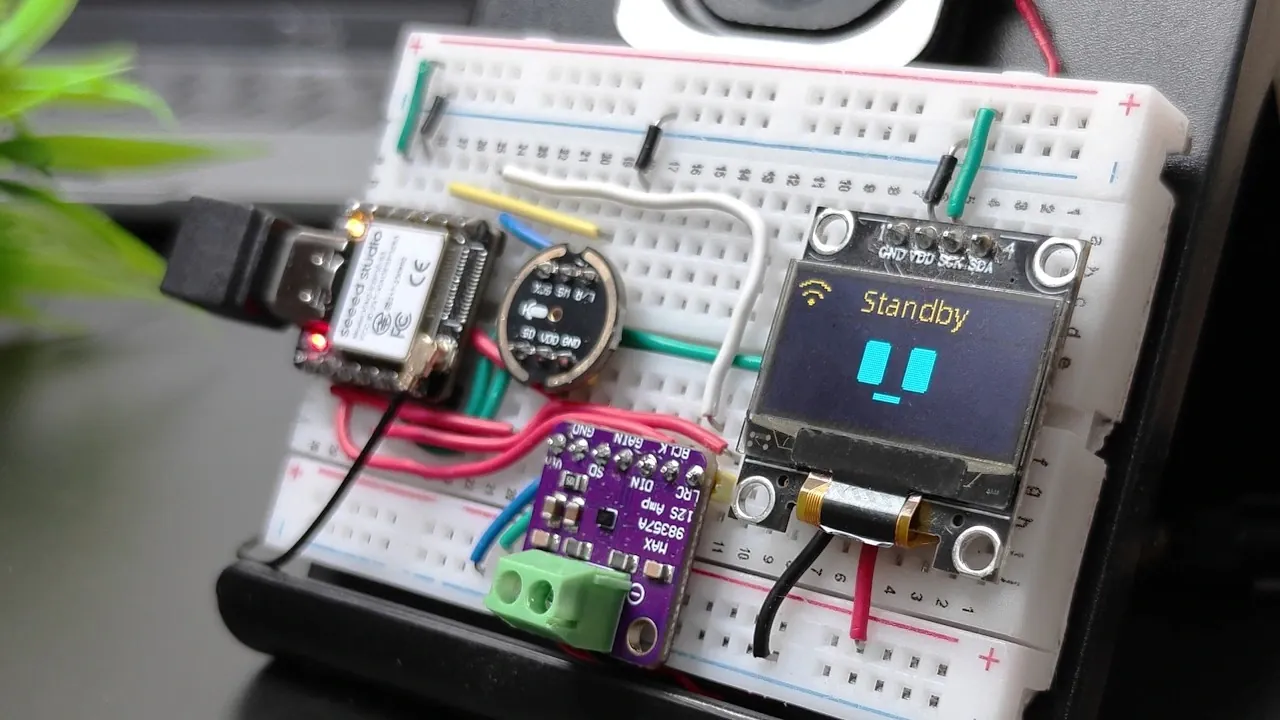
Tech Talkies demonstrates how to create a personalized AI Desk Buddy using the Xiao ESP32-S3 microcontroller and Shia Gi firmware. This project combines hardware assembly and software configuration to build an interactive assistant capable of voice recognition, audio output and visual feedback through a 0.9-inch OLED screen. The guide walks through essential steps, such as wiring components on a breadboard, flashing the firmware with `esptool.py`, and configuring the device to connect to Wi-Fi. With features like customizable facial expressions and real-time responses, this project highlights the potential of embedded systems and IoT technologies.
Explore how to assemble the hardware, install the firmware and personalize your AI Desk Buddy to suit your needs. Gain insight into setting up voice commands, integrating the assistant with other IoT devices and tailoring its behavior through open source customization. By following this guide, you’ll not only create a functional desk companion but also deepen your understanding of microcontroller programming and embedded systems development.
ESP Desktop AI Buddy
TL;DR Key Takeaways :
- Learn to build a customizable AI Desk Buddy using the Xiao ESP32-S3 microcontroller and Shia Gi firmware, combining embedded systems, IoT and voice recognition technologies.
- Assemble essential components like a MEMS microphone, I2S amplifier, OLED screen and speaker to create a functional and interactive assistant.
- Install and configure the open source Shia Gi firmware, allowing features like voice recognition, Wi-Fi connectivity and personalized settings.
- Enjoy versatile features such as voice commands, daily insights, entertainment options and visual feedback via the OLED screen.
- Explore customization and expansion opportunities, including adding new voice commands, integrating with IoT devices and modifying the firmware for enhanced functionality.
What You’ll Need
To begin, you’ll need a selection of essential components. These parts form the foundation of your AI Desk Buddy, making sure seamless functionality and ease of assembly:
- Xiao ESP32-S3 microcontroller: A compact yet powerful board equipped with built-in Wi-Fi and battery management capabilities.
- INMP 441 MEMS microphone: Captures voice commands with high clarity, allowing accurate voice recognition.
- MAX 98357 I2S amplifier: Powers the speaker to deliver clear and crisp audio output.
- Small speaker: Outputs audio responses, music and other sounds.
- 0.9-inch OLED screen: Displays visual feedback such as facial expressions, system status, or notifications.
- Breadboard and jumper wires: Assist easy, solder-free connections between components.
These components are widely available and suitable for both beginners and experienced developers, making this project accessible to a broad audience.
1: Assemble the Hardware
Begin by assembling the components on a breadboard. Follow a detailed wiring diagram to connect the Xiao ESP32-S3 microcontroller to the microphone, amplifier, speaker and OLED screen. Pay close attention to the connections, making sure the jumper wires are securely attached to prevent loose connections during operation. Proper assembly is crucial for the system to function reliably.

Here are more detailed guides and articles that you may find helpful on ESP32.
- $5 ESP32-S3 Super Mini Packs Wi-Fi and Bluetooth
- The $4 ESP32 S3 Super Mini Packs a 240 MHz Dual-Core Chip
- How an $8 ESP32 S3 Microcontroller Runs a 28.9M Parameter Local LLM
- 5 ESP32 Projects Worth Building in 2026: Such as an Apple HomeKit Controller
- $4 ESP32 Module Brings Wi-Fi and Bluetooth to IoT Projects
- Replacing Security Cameras with Three $10 ESP32-S3 Wi-Fi Boards
- ESP32-S3 Super Mini Costs $5 and Packs Wi-Fi and Bluetooth
- ESP32-S3 Super Mini Brings 240 MHz Dual-Core Power For $4
- ESP32 S31 Devkit Hands-on: 320 MHz RISC-V Chip Adds Wi-Fi 6
- Build a DIY Open-Source Flipper Zero Using a ESP32-DIV
2: Install the Firmware
Download the Shia Gi firmware from its GitHub repository. This open source firmware provides the core functionality for your AI Desk Buddy. Use a command-line tool like `esptool.py` to flash the firmware onto the ESP32-S3 microcontroller. After successfully installing the firmware, configure the device to connect to your Wi-Fi network. This step is critical for allowing the AI assistant to access online features and respond to commands effectively.
3: Configure Your AI Desk Buddy
Once the firmware is installed, connect to the Wi-Fi network created by the ESP32-S3. Open a web browser and navigate to the device’s configuration page. Here, you’ll complete the following tasks:
- Enter your home Wi-Fi credentials to link the device to your network.
- Generate a verification code to access the control panel securely.
- Customize settings such as the assistant’s name, preferred language and other parameters.
This configuration process personalizes your AI Desk Buddy, making sure it is tailored to your preferences and ready for use.
Features of Your AI Desk Buddy
Once fully set up, your AI Desk Buddy offers a range of features designed to enhance your daily routine. These include:
- Voice recognition: Responds to commands such as “What’s the weather?” or “Play music.”
- Daily insights: Provides motivational quotes, lucky colors and other uplifting messages to start your day.
- Entertainment: Tells jokes, plays music and adjusts volume based on your instructions.
- Visual feedback: Displays facial expressions, system status and notifications on the OLED screen.
These features make the AI Desk Buddy a versatile and interactive addition to your workspace, combining functionality with a touch of personality.
4: Customize and Expand
One of the most exciting aspects of this project is its open source nature, which allows for extensive customization and expansion. You can modify the firmware’s source code to introduce new features or enhance existing ones. For example:
- Program the AI to recognize additional voice commands tailored to your needs.
- Integrate the assistant with other IoT devices in your home, such as smart lights or thermostats.
- Enhance the visual interface on the OLED screen to display more detailed information or animations.
Even if you’re not familiar with coding, the control panel provides user-friendly options for customization. You can rename your assistant, adjust language settings and tweak its behavior to align with your preferences.
Why Build an AI Desk Buddy?
Building an AI Desk Buddy is more than just a fun DIY project, it’s an opportunity to delve into the capabilities of modern microcontrollers and voice recognition technology. By completing this project, you’ll gain valuable experience in:
- Hardware assembly and troubleshooting, enhancing your understanding of electronic components.
- Software configuration and firmware flashing, providing insight into embedded systems.
- Open source development and customization, allowing you to explore creative possibilities.
Whether you’re a hobbyist looking to expand your skills or a developer seeking hands-on experience, this project offers a practical and rewarding way to explore embedded systems and IoT technologies.
Media Credit: Tech Talkies
Disclosure: Some of our articles include affiliate links. If you buy something through one of these links, Geeky Gadgets may earn an affiliate commission. Learn about our Disclosure Policy.
