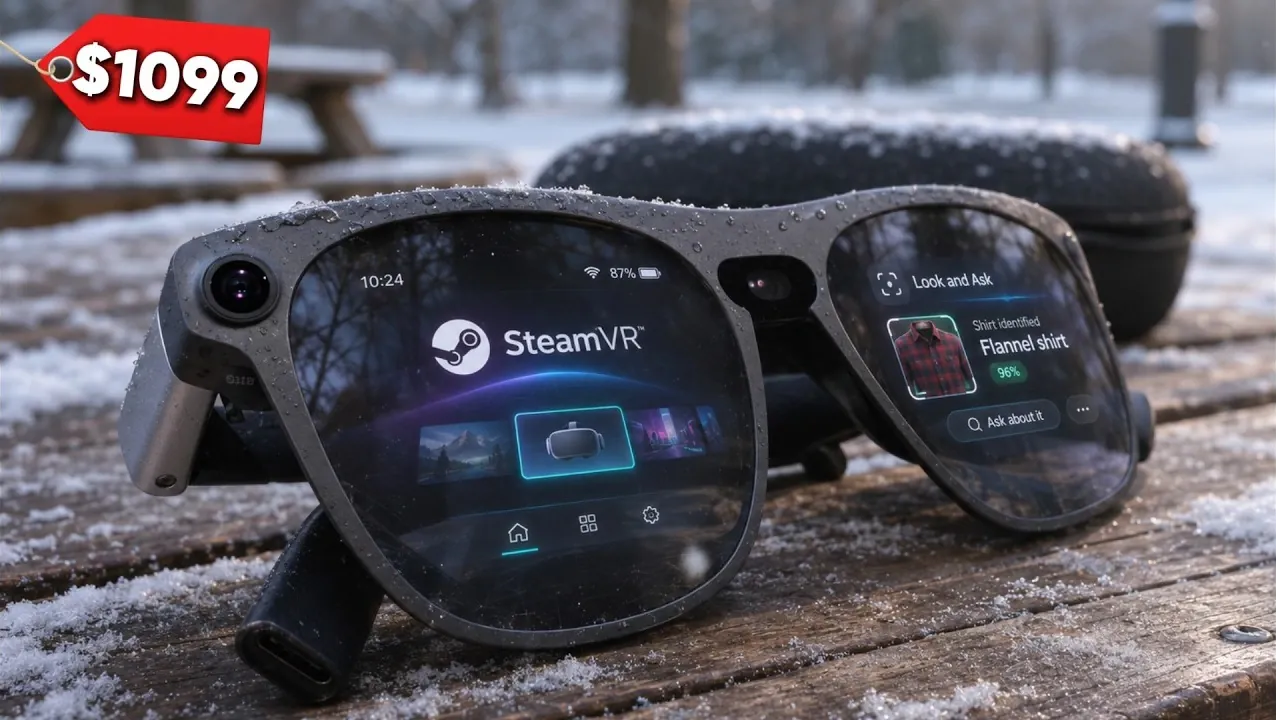
XREAL Aura glasses put digital screens in view while letting wearers see their surroundings through the lenses. They can display Android apps, computer desktops and games, with hand tracking for navigating windows. In his hands-on review, Steven Sullivan explores how the Aura performs across everyday productivity, media consumption and gaming, including its PC VR capabilities.
Explore how wireless virtual desktops can add computer displays and what the connection requires. As well as gaming options, including PC VR and compatible controllers, so you can see which experiences suit your setup. Finally, compare the Aura’s puck overheating and limited VR field of view with its display and gaming capabilities.
TL;DR Key Takeaways :
- The XREAL Aura uses optical see-through lenses with a 70° field of view, 1200p per eye and up to a 120 Hz refresh rate. Prescription support ranges from -10 to +4 diopters.
- Cameras enable fixed-in-place windows and hand tracking, which worked much better in testing than it had in June. Gemini screen sharing can answer questions about an app or computer screen.
- The Aura can show five Android app windows at once. The $24.99 Virtual Desktop app supports up to three wireless Mac or Windows displays; testing found low latency and clear image quality.
- The Aura supports streaming services, Android games and wireless PC VR. Spatial view converts 2D content to 3D, and spatial audio places sound according to window positions. VR controllers are not yet supported, and some apps had glitches in testing.
- The Aura is rated for up to five hours of productivity or closer to three hours of intensive use. In testing, the puck showed an overheating warning after about 15 minutes of intensive VR or AR gaming in a pocket; the 70° view was also too narrow for full VR immersion.
Displays and Controls
The XREAL Aura uses optical see-through lenses, similar to the XREAL Air, so you see your real environment directly behind digital windows. In testing, the Aura’s lenses were light enough for indoor use with transparency turned all the way up. Flat X Prism optics also prevent reflections of your legs or feet on the ground beneath you.
- Field of view: 70°.
- Display resolution: 1200p per eye.
- Refresh rate: Up to 120 Hz.
- Prescription support: -10 to +4 diopters, including astigmatism.
- Prescription lenses: Start at $49.
The Aura glasses include three interchangeable nose-pad sizes, a prescription lens insert, a braided USB-C display cord and a lanyard for the puck. Cameras support six degrees of freedom and hand tracking, so you can walk around screens that stay fixed in place.
You pinch to select, swipe to scroll and look at your hand while pinching to open the main menu. In testing, hand tracking worked much better than it had in June. You can also remove app instances, arrange windows neatly and open Gemini or Circle to Search.
Circle to Search can identify real-world objects. With Gemini screen sharing, the assistant can see an app or computer screen and answer questions about it. For example, Gemini can see Google Docs and give you instructions for creating a table.
Computer Screens and Android Apps
A wired PC or Mac connection to the XREAL Aura puck gives you one large computer display alongside four Android apps. For more computer displays, Virtual Desktop connects the glasses wirelessly to a computer. The app must be installed on both devices, and both must be on the same Wi-Fi network.
Virtual Desktop costs $24.99 on the Google Play Store and is free on the computer. The wireless connection also leaves the puck’s connection slot available for charging.
On the Aura, Virtual Desktop supports Mac and Windows and can show up to three different computer displays wirelessly. You can resize and position a display, orient one or more vertically, and use the computer’s keyboard and trackpad or mouse. A large vertical display can hold two horizontal windows stacked on top of each other.
In testing, the wireless desktop had low latency and clear image quality. Virtual environments include outdoor settings, a modern apartment at different times of day, and personal or commercial cinema rooms. A Bluetooth keyboard also works with the Aura itself; you can place the puck beside it and use the puck as a trackpad.
The Aura can show five Android app windows in the foreground at once, while more apps remain in the background tray. Opening a sixth foreground window closes one of the visible ones. Voice search worked in testing, and an Apple Magic Keyboard provided a faster way to type than hand tracking or selecting keys with a controller.

Here are additional guides from our expansive article library that you may find useful on XREAL Aura.
- $20 Price Gap Pits XREAL Aura Against Meta VR Glasses
- XREAL Aura Beats Meta VR Headset with 5 Virtual AR Screens
- Best $1300 Smart Glasses: XREAL Aura vs Meta VR Headset
- XREAL Aura Brings Android XR to $1,099 Smart Glasses
Streaming and Spatial Audio
The Aura can play streaming services through Chrome, including Netflix, and has individual apps for Paramount Plus, HBO Max and Prime Video. YouTube’s theater mode places comments and related videos beside the main window. In testing, copyright restrictions blocked screen recording from the three named streaming apps, producing a black screen in the recording.
Spatial view converts app content from 2D to 3D. You can turn it on for an individual app using the cube-shaped control above its window or apply it broadly through quick settings. It also works with Android games.
The Aura has Bose sound and spatial audio, which places audio sources according to their window positions. In testing, a video and music could be heard as separate sources rather than blending together. Placing a music window above a game made the music appear to come from the game’s direction.
Games and VR Experiences
The Aura runs Android games including Minecraft, Knights of the Old Republic II and Star Wars Castles. For controller-compatible Android games, you can connect an Xbox or PlayStation controller over Bluetooth.
Chrome can open Xbox Game Pass for streaming, while Steam Link can stream games wirelessly from a PC. Xbox-streamed games run on Xbox servers; Steam Link games use the PC’s hardware. In testing with a gaming handheld wired to the puck, a heavily modded Fallout 4 kept running while a YouTube music window and a separate game-tips window were selected. No audio stutters were heard.
Virtual Desktop can also connect the Aura wirelessly to a PC for full VR games. The glasses do not yet support VR controllers, but Xbox and PlayStation controllers work. Subnautica ran with gamepad navigation while allowing you to look around at human scale; it launched better through Virtual Desktop on the Aura than it had on the Steam Frame.
Other experiences include the Cosmos app’s black-hole content and Galapagos VR. In Galapagos VR, you can change time to see how the islands formed, move tectonic plates in a 3D model and speak to a Charles Darwin AI. A piano overlay places notes over a real piano and uses the microphone to check what you play.
Some apps had problems in testing: a boxing game failed to register punches, a drumming game was inconsistent, and Spotify sometimes continued playback without sound until it was reopened. YouTube music did not have the same audio problem. The review does not consider the glitches an Aura issue, though the cause is unknown and app compatibility with Android XR is one possibility.
Battery Life and Wear
The Aura is rated for up to five hours of productivity with the puck, or closer to three hours for gaming, VR, media and other intensive use. You can charge it while using it, and the glasses did not come close to running out during testing.
The review’s biggest concern was overheating. During intensive VR or AR gaming, the puck showed a warning after about 15 minutes in a pocket, although it did not overheat all the time during intensive use. Keeping the puck outside a pocket during demanding tasks may help reduce the risk of overheating.
The included lanyard lets you wear the puck around your neck. Placing it on a table instead leaves a cable that you could trip over or pull out. A software update is a possible fix for the pocket overheating.
The 70° view was sufficient for flat-screen games and productivity windows, but too narrow for full immersion in VR games because the real surroundings remained visible. Comfortable light blockers could address that limitation. The XREAL Aura glasses were comfortable enough for extended wear in testing, but the puck’s overheating and limited VR field of view are important conditions to weigh against their productivity and gaming capabilities.
Media Credit: Steven Sullivan
Disclosure: Some of our articles include affiliate links. If you buy something through one of these links, Geeky Gadgets may earn an affiliate commission. Learn about our Disclosure Policy.
